Vanta, Drata & Secureframe AI Features (2026): What Each Automates in Questionnaires, Policies, and Evidence
We read each vendor's help center, pricing page, and release notes to answer three questions per AI feature: what it actually automates, where a human still has to sign off, and which plan you need to get it.
TL;DR
Questionnaires: All three draft answers from a knowledge base plus your policies, and all three require a human to approve answers before the questionnaire is completed. Vanta adds the most routing and approval workflow. Drata's SafeBase-based assistant draws on the widest set of sources, including controls synced from Drata. Secureframe is the most explicit about leaving answers blank instead of guessing.
Policies: Only Vanta lists "agentic policy generation" on every plan. Drata's documented policy AI compares versions and suggests control mappings. Secureframe's is an AI text editor on top of auditor-vetted templates. In all three, a policy owner or approver still publishes.
Evidence: Integrations and scheduled tests do the bulk of evidence collection, and that layer is rule-based, not AI. Each vendor documents a different AI layer on top. Vanta checks evidence against audit requirements and captures screenshots for your review. Secureframe validates uploaded documents in an advisory check. Drata summarizes custom-test failures, and its documentation does not describe an AI review of evidence.
None of the three lets AI decide whether a control passes. Every vendor's own documentation describes the AI output as something to review.
How we evaluated each AI feature
Every GRC vendor puts "AI" and "agentic" on its homepage now, which makes the marketing pages close to useless for comparing them. We ignored them where possible and worked from three kinds of official sources: the help-center articles that describe how a feature behaves, the plan tables on each pricing page, and dated release posts. For every AI feature we asked the same three questions:
- What does it automate? What goes in, what comes out, and which data it reads.
- Where is a human still required? The approval step the product enforces or the documentation calls for.
- Which plan includes it? As shown on the vendor's own plan table on October 23, 2026.
If a feature appears in a press release or a third-party review but we could not find it described in the vendor's own docs or plan table, we left it out. Some features from the earlier version of this article were removed for that reason (see Methodology).
1. Security questionnaire auto-answering
For most B2B SaaS teams, this is the AI feature that pays for itself, because questionnaires arrive on a sales deadline. The three implementations look similar on the surface: each matches incoming questions against a library of approved answers and generates a draft when no exact match exists. The differences are in the sources each one reads, what it does when it isn't confident, and how much workflow surrounds the draft.
| Questionnaire AI | Vanta | Drata | Secureframe |
|---|---|---|---|
| What it automates | Reuses exact matches from the knowledge base and generates cited drafts for the rest | Generates answers that subject-matter experts then approve, edit, or reject | Reuses exact knowledge-base matches word for word and generates cited answers for the rest |
| Sources it reads | Knowledge base (past questionnaires, uploaded documents and policies) and synced Vanta policies | SafeBase documents, knowledge base, Trust Center content and updates, external websites, and policies and controls synced from Drata | Knowledge base and published policies (the help center is inconsistent on whether controls and tests are also used) |
| Formats | .csv/.xlsx, .pdf/.docx, and portals via a Chrome extension | Word, PDF, TXT, and spreadsheets (.xlsx), with portals and Google Sheets via a Chrome extension | Excel, Word, and PDF, with portals via a Chrome extension |
| When it isn't confident | Not documented | Returns no answer when it finds no relevant supporting material (no confidence score is shown) | Leaves the answer blank instead of guessing, and sorts answers into Draft and Complete |
| Human checkpoint | All answers must be approved before the questionnaire is marked complete. Approved answers go back into the library. | Run, review, approve, complete, then add to the knowledge base. Question owners approve, edit, or reject each answer. | Each answer is marked Complete individually, then "Complete review" unlocks the export. Reviewers can be assigned. |
| Workflow around the draft | Assigns questions to experts, sends email and Slack notifications, and offers approval workflows (an add-on on all plans) | Assigns subject-matter experts and question owners. Enterprise adds API upload, Salesforce upload, and status webhooks. | Assigns reviewers. Complete adds "Advanced Questionnaire Automation." |
| Plan availability | Essentials: add-on (144/yr). Plus: 25/yr included, upgradable to 144. Professional: 144/yr. Enterprise: add-on. | Foundation: up to 100 questionnaires. Advanced: Standard, unlimited. Enterprise: Pro, unlimited. More questionnaires available as an add-on on every tier. | Fundamentals: 100 AI-answered questions/yr. Complete: 15,000 questions/yr. |
Sources: Vanta pricing page and help center (Questionnaire Automation articles); drata.com/plans and the SafeBase AIQA guide and FAQ; secureframe.com/pricing and the Secureframe security-questionnaire help articles. Checked October 23, 2026. The allowance units differ: Secureframe counts AI-answered questions, while Vanta and Drata list questionnaires.
Vanta: the most workflow around the draft
Vanta's product page says AI-generated answers are "accepted up to 95% of the time," with a footnote that results "may vary based on the information available in the knowledge base." The same page says it "answers an average of 80% or more of your security questions." Treat both as vendor figures that depend on how well your library is populated. On a fresh account the knowledge base is close to empty.
Vanta adds the most process around the AI draft. You can assign individual questions or whole questionnaires to subject-matter experts, notify them by email or Slack, and let them answer inside Slack. The help center states that "all answers must be marked as approved" before a questionnaire can be completed, and only approved answers are written back into the answer library. With Vanta AI turned off, the feature falls back to similar-question matching from the library. Vanta's help center also notes that Vanta AI features are "powered by third-parties" and can be switched off account-wide by an Admin or Editor.
Drata: the widest source set, through SafeBase
Drata's questionnaire AI comes from SafeBase, the Trust Center company Drata acquired, and it reads the widest set of inputs of the three: SafeBase documents, the knowledge base, Trust Center content, external websites, and the policies and controls synced from Drata. The FAQ is candid that there is "not a confidence score associated with AI generated answers." When the assistant can't find supporting material, it is designed to return no answer rather than invent one. Drata previewed a more autonomous "Agentic Questionnaire Response" in March 2026, describing it as upcoming, and we could not confirm that it has shipped.
Secureframe: blank beats wrong
Secureframe sorts every AI answer into Unanswered, Draft (which "requires human review"), or Complete, and it "will intentionally leave the answer blank rather than guess." Only published and approved policies are used as context. Two caveats come from Secureframe's own documentation. First, its help center contradicts itself on sources: one passage says answers also draw on tests, controls, and company metadata, while the FAQ on the same page says it uses only the knowledge base and policies. Second, the feature requires a "Large language model authorization" setting that sends data to OpenAI. Secureframe says it does not train or fine-tune its own models.
Drowning in security questionnaires?
Vanta's Questionnaire Automation drafts cited answers from your knowledge base and routes the rest to subject-matter experts, with approval before anything is completed.
2. AI policy generation and policy maintenance
Here the marketing and the documentation diverge the most. "AI policy generation" can mean writing a policy from scratch, tailoring a template, or summarizing what changed between versions. What each vendor actually documents:
| Policy AI | Vanta | Drata | Secureframe |
|---|---|---|---|
| Generating policy text | "Agentic policy generation" is listed on all four plans. Drafting policy content through MCP is limited to Admins. | Not documented. The plans list "Policy Templates." | AI editor that can summarize, improve, simplify, expand, trim, change tone, or translate (5 languages) on top of auditor-vetted templates |
| Change summaries | AI Change Summaries are generated when a policy is submitted for approval, and the editor can edit them | AI Policy Version Comparison produces an executive summary, a detailed change log, and risk/compliance notes | "Summarize" is available as an editor action |
| Other policy AI | Policy agent search with "AI Insights" that flags contradictions such as inconsistent SLAs. Bulk policy importing on Plus and above. | AI suggests which controls a policy should map to (English policies of 450+ words that are approved or published) | None documented beyond the editor |
| Human checkpoint | The approver approves or requests changes. The help center warns that "Vanta AI can make mistakes. Please verify responses." | The approval-stage summary "is for your review only." Inserting it for employees is optional. Control suggestions are mapped, ignored, or regenerated by a user. | "Only policy owners can publish the policy" |
| Plan availability | Generation and change summaries on all plans. Bulk importing on Plus and above. | No plan restriction stated. Requires the AI settings toggle and an eligible role. | Comply AI for Policies on both Fundamentals and Complete |
In practice, the AI here saves editing time, not judgment. Vanta is the only vendor whose plan table puts AI policy generation on every plan, but we found no help-center article explaining how that generation works. Its documented Policy Builder is a template-plus-questionnaire flow that ends with "submit the policy for approval." Drata's documented strength is the review side: a structured diff for approvers, plus control-mapping suggestions that keep your policy library tied to the controls an auditor will test. Secureframe keeps generation rule-based (templates whose sections switch on or off depending on the integrations you've connected) and puts the AI in the editor.
3. Evidence collection automation: where AI is and isn't involved
It is worth separating two layers that marketing pages tend to blur. The bulk of evidence collection on all three platforms is rule-based automation: integrations pull configuration and HR data, and scheduled tests compare it to a control's requirements. None of that requires an LLM, and it existed before the current AI wave. The AI layer sits on top. It checks documents a human uploaded, captures evidence that has no API, or explains why a test failed.
| Evidence automation | Vanta | Drata | Secureframe |
|---|---|---|---|
| Rule-based layer (official counts) | 400+ integrations and 1,400+ automated, hourly tests. Continuous monitoring on all plans. Custom tests on Professional and above. | 300+ integrations, with control statuses updated daily. Automated evidence collection on all plans. Custom tests on Advanced and above. | 300+ native integrations. Automated evidence collection and continuous monitoring on both plans. 1 custom test on Fundamentals, unlimited on Complete. |
| AI check of evidence | "Agentic evidence checks" of policies, IRLs, and documents against audit requirements, with reasons when evidence doesn't match | Not documented | AI Evidence Validation for Upload Tests looks for missing items, file problems, and dates within 12 months (PDFs/images, under 10 MB, up to 100 pages) |
| AI collection of evidence without an API | Screenshot agent that navigates the app read-only, captures audit-ready screenshots, and checks them against the requirement | Not documented | Not documented |
| AI on failing tests | AI-generated code for failing tests, plus AI suggestions to map tests and documents to custom controls | AI failure summaries, for custom tests only, on select plans | Comply AI for Remediation: infrastructure-as-code fixes for AWS, Google Cloud, and Azure, plus a follow-up chat |
| Human checkpoint | You review and approve screenshots before they are uploaded | The summaries are described as "assistive, not authoritative" | The validation is advisory: "The test result is what counts for compliance status" |
| Plan availability | Agentic evidence checks, agentic evidence collection, and AI code for failing tests on all plans | Failure summaries on "select plans" (custom tests require Advanced and above) | Evidence Validation for all customers using Upload Tests. Remediation on both plans. |
Integration and test counts are the vendors' own figures from their pricing and product pages, checked October 23, 2026. Counts on older pages and marketplace listings are lower and outdated.
Drata's most notable use of AI at this layer happened before you ever log in. In February 2026 it said it had used AI-assisted tooling to generate new infrastructure tests, which brought its library to more than 1,000 tests across AWS, Azure, and GCP covering 165 unique controls, and that external auditors reviewed every test. The same post states plainly that "AI does not make compliance decisions."
That sentence sums up the whole category. Across the three vendors' documentation, the AI checks, captures, explains, and drafts. It does not set a control's status. Secureframe says this outright for its evidence validation, Drata says it for its test summaries, and Vanta has you approve screenshots before they become evidence.
Want AI-drafted fixes for failing cloud controls?
Secureframe's Comply AI for Remediation generates infrastructure-as-code fixes for AWS, Google Cloud, and Azure, and AI Evidence Validation checks uploaded documents before your auditor does.
Adjacent AI features: risk scoring, MCP, and AI governance
These features sit outside the three core workflows, but they come up in most evaluations, so here is their status as of October 2026:
- AI risk scoring. Secureframe's Comply AI for Risk fills in categories, CIA ratings, treatment, and impact and likelihood scores with justifications, as "a starting point you can review and edit before saving" (both plans). Vanta's Agent for Risk was announced on June 2, 2026, as generally available to all customers. Drata's AI risk work is in third-party risk: Agentic TPRM launched in March 2026, the agentic TPRM assessment is an Enterprise add-on, and you configure when the agent "must pause for your approval."
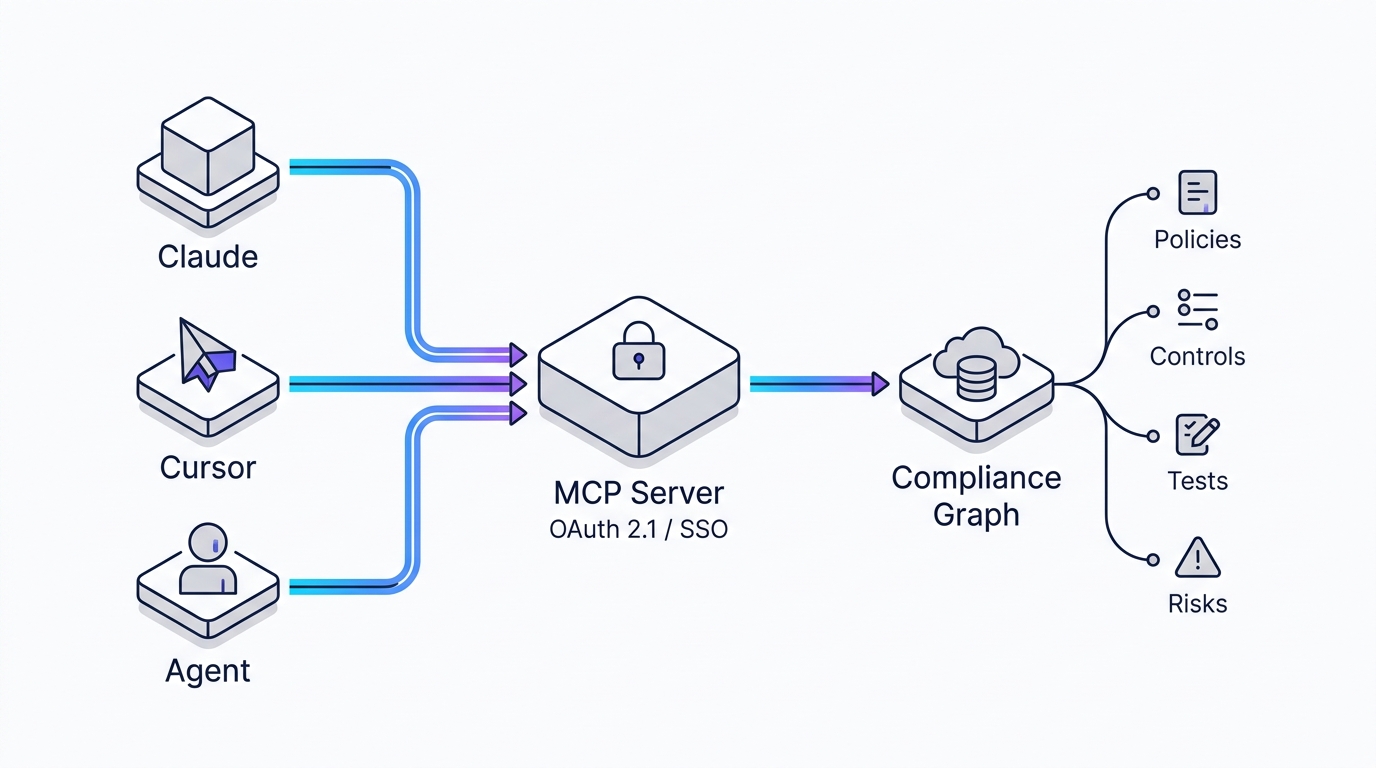
- MCP servers. All three now offer one. Vanta's remote MCP server has been in public preview since April 15, 2026, on Essentials and above. Drata hosts its server at mcp.drata.com (with EU and APAC endpoints): an admin configures OAuth first, and each user can do only what both the configured scopes and their role allow. Some scopes allow writes and deletes. Secureframe announced a hosted MCP server "available today for all Secureframe users."
- Governing your own AI agents. Drata's AI Agent Governance has been in Limited Availability since August 4, 2026, for qualified enterprises running agents on Anthropic. Neither Vanta nor Secureframe documents an equivalent.
- AI frameworks. All three have ISO 42001 pages. Secureframe added ISO 42001 and NIST AI RMF in May 2024 and lists the EU AI Act among its AI frameworks. For what the EU AI Act timeline means for buyers, see our EU AI Act compliance checklist for B2B SaaS buyers.
Want Claude to read your compliance state directly?
Drata's hosted MCP server connects AI assistants to live compliance data, with access limited to the OAuth scopes an admin configures and each user's role.
Where the AI stops: the sign-off map
If you are writing the business case, this is the part to copy. Every AI feature above ends at a human step, and that step is where your team's time still goes:
- Questionnaires: a person approves each answer before the questionnaire is completed or exported, and approved answers feed the library. The time saving grows as the library fills, so it is smallest on day one.
- Policies: a policy owner or approver publishes. The AI drafts, edits, or summarizes, but none of the three vendors documents AI publishing a policy on its own.
- Evidence: the rule-based tests set control status. AI checks are advisory, screenshots wait for your approval, and remediation code is for an engineer to review and apply.
- Audit: the auditor makes the final call on whether evidence satisfies a control. None of these tools changes that.
Which AI layer matches your bottleneck
Your bottleneck is security questionnaires
- Choose Vanta if you need routing, Slack-based answering, and approval workflows around the draft. Check which questionnaire allowance your plan includes, because Essentials gets it only as an add-on.
- Choose Drata if your answers live across a Trust Center, public web pages, and your control set, not just a Q&A library.
- Choose Secureframe if you want the AI to leave questions blank rather than guess. Note that Fundamentals includes only 100 AI-answered questions a year.
Your bottleneck is policy upkeep
- Vanta is the only one that lists AI policy generation on every plan.
- Drata gives approvers the most structured view of what changed, and its AI keeps policies mapped to controls.
- Secureframe fits if you want vetted templates with AI help limited to editing.
Your bottleneck is evidence and failing tests
- Vanta documents the broadest AI layer here: evidence checks, a screenshot agent, and code for failing tests.
- Secureframe combines advisory validation of uploaded documents with IaC remediation for AWS, Google Cloud, and Azure.
- Drata's documented AI here is narrower (failure summaries for custom tests). Its strengths are the test library and the MCP and agent-governance layer.
Price and contract terms often decide more than any AI feature. Those are covered in our full Secureframe vs Vanta vs Drata comparison. For adjacent decisions, see our Vanta vs Drata (2026): Honest Compliance Automation Comparison and our Zapier vs Make comparison for the automation layer that often sits alongside these platforms.
Frequently asked questions
Does any of these platforms use AI to decide whether a control passes?
No. As of October 2026, control status still comes from rule-based tests and human review. Secureframe calls its AI evidence validation advisory ("The test result is what counts for compliance status"), Drata states that "AI does not make compliance decisions," and Vanta's screenshot agent returns screenshots for you to approve.
Can the questionnaire AI submit answers without a human?
Not according to any of the three vendors' documentation. Vanta requires all answers to be approved before the questionnaire is marked complete. Drata's process is run, review, approve, complete. Secureframe requires each answer to be marked Complete and then "Complete review" before export.
Is Vanta's 95% acceptance rate realistic?
It is Vanta's own figure, worded as "accepted up to 95% of the time," with a footnote that results vary with what is in your knowledge base. Expect a lower rate until your library is built from approved past answers and policies.
Which plan do I need for questionnaire AI?
Vanta: an add-on on Essentials and Enterprise, 25 per year included on Plus, and 144 per year on Professional. Drata: up to 100 questionnaires on Foundation and unlimited on Advanced and Enterprise. Secureframe: 100 AI-answered questions a year on Fundamentals and 15,000 on Complete.
Is my data used to train the vendors' models?
Drata says it does not currently train or fine-tune AI models on customer data, and AI can be turned off in settings. Secureframe says it does not train, fine-tune, or host its own models, and its questionnaire AI sends data to OpenAI once you enable the LLM authorization setting. Vanta's AI features are powered by third-party services, and an Admin or Editor can disable them, which immediately stops that processing. Check each vendor's subprocessor list before you enable these features.
Can I switch platforms later if I pick wrong?
Yes, but policies, evidence, and control mappings rarely transfer cleanly between vendors, and your questionnaire answer library has to be rebuilt or exported. Our guide to migrating from Vanta to Drata walks through the timing.
Methodology
This article was first published on June 19, 2026, refreshed on August 7, 2026, and restructured on October 23, 2026, into an AI-feature evaluation. For this version we read each vendor's help-center articles (help.vanta.com, help.drata.com and help.safebase.io, support.secureframe.com), pricing and plan tables (vanta.com/pricing, drata.com/plans, secureframe.com/pricing), and dated release posts, all checked on October 23, 2026. Plan availability reflects those tables. Where a table entry was ambiguous or a feature appeared only in marketing copy, we left it out. Removed from the earlier version because we could not confirm them in official documentation: the name "AI Agent 2.0," acceptance-rate ramps by month, ROI percentages, and all pricing and renewal estimates (now covered in our full comparison). We do not hold paid accounts at all three vendors at the same time, so this is a documentation-based evaluation, not a hands-on test.

Technology consultant with 10+ years in the Japanese tech industry. Specializing in SaaS evaluation, workflow automation, and B2B tool integration.