Vendor Comparison · Agent Identity
Auth0 vs WorkOS vs Okta for MCP Authorization (2026): The Billing Unit and the Audit Trail Decide This
Every comparison of MCP authorization providers we found runs the same play: a feature checklist of RFC numbers, a paragraph per vendor, and a conclusion that the vendor who published the article wins. That is not the decision a VP Engineering actually faces. The RFC checklist converged months ago — all three of these platforms now implement the mandatory parts of the spec. What still differs, and what will still differ in eighteen months, is how each one bills your agents, how deep its audit trail goes, and whether it sits inside or outside the identity system your company already runs.
TL;DR — the verdict
The MCP specification makes your MCP server an OAuth 2.1 resource server, not an authorization server. So you are not shopping for "MCP auth." You are choosing which authorization server issues tokens for a resource you already own — and the right answer depends almost entirely on who the MCP server is for.
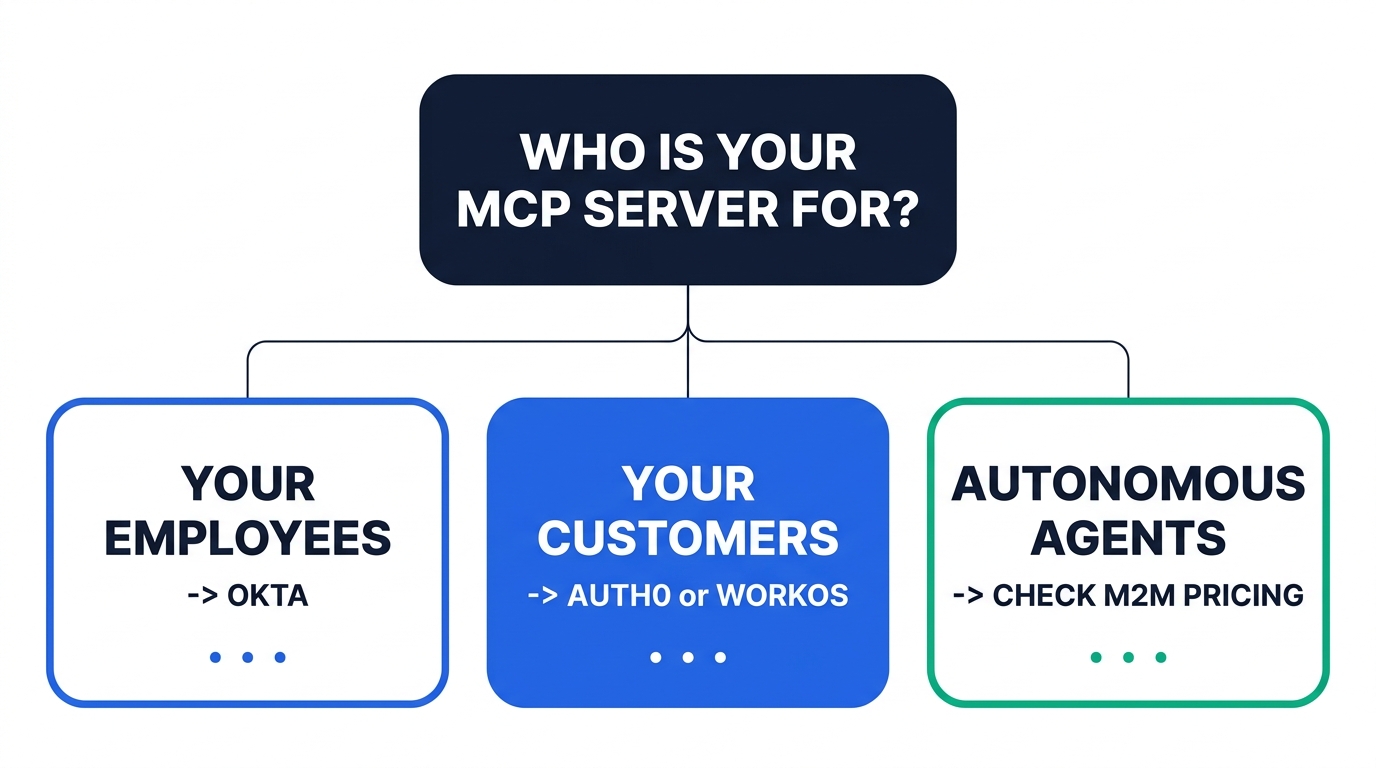
OKTA — Your MCP servers are internal, your employees are the users, and Okta or Entra is already your IdP. Do not buy a second identity vendor. Turn on Cross App Access. Budget for the Enterprise suite, because machine-to-machine tokens and API Access Management live there. WORKOS — You ship an MCP server to business customers and need enterprise SSO, SCIM, per-tool permissions, and an audit log you can resell. Most predictable pricing of the three at agent scale, because the meter is not tokens. AUTH0 — You need the widest surface area — Token Vault for downstream third-party APIs, CIBA for human-in-the-loop approvals, the deepest SDK coverage. Model your machine-to-machine token volume before you sign, because that meter can move your bill by four figures a month.The single most expensive mistake is assuming your agents will be billed as users. Some will. The autonomous ones will not.
01First, the question that actually decides this
Read the MCP authorization specification and one line reframes the entire buying process:
"A protected MCP server acts as an OAuth 2.1 resource server, capable of accepting and responding to protected resource requests using access tokens… The authorization server is responsible for interacting with the user (if necessary) and issuing access tokens for use at the MCP server. The implementation details of the authorization server are beyond the scope of this specification."
Your MCP server validates tokens. It does not mint them. That separation is the whole ball game, and it means the vendor comparison collapses into a much narrower question: which authorization server should issue tokens whose audience is your MCP server?
Once you frame it that way, three genuinely different situations fall out, and they map onto three different vendors — not because of feature gaps, but because of where the users already live.
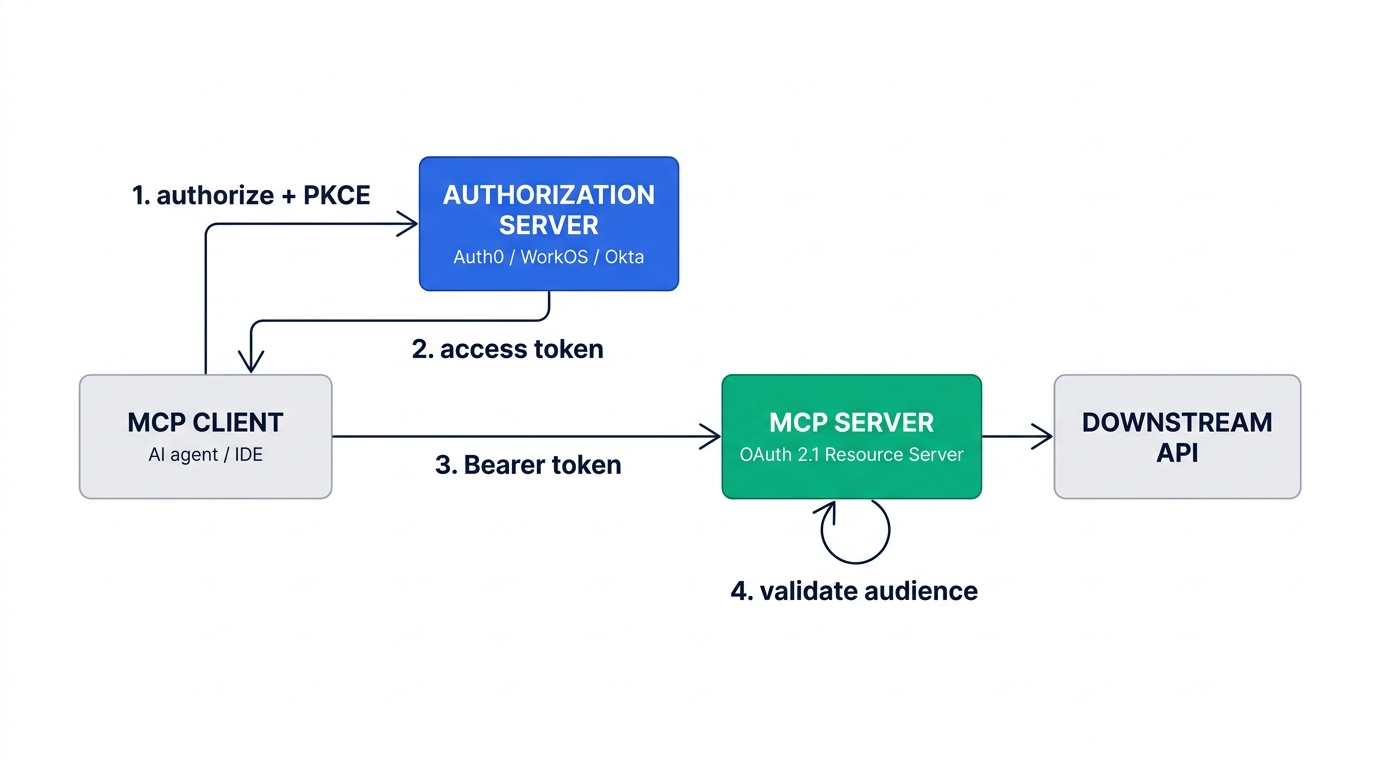
Situation A — internal MCP servers, employee users
You are exposing internal systems (a data warehouse, a ticketing system, an internal API) to Claude, Copilot, or an in-house agent, and the humans behind those agents are your own staff. Your users are already in Okta or Entra. Introducing a second identity vendor here creates a second source of truth for "who works here," which is the exact problem your IdP exists to prevent. This is an Okta configuration project, not a procurement project.
Situation B — MCP servers you ship as product
Your SaaS product now exposes an MCP endpoint so your customers' agents can reach their data in your system. The users are your customers, not your employees. This is customer identity, and it is where Auth0 and WorkOS actually compete. Your buyers will ask for SAML, SCIM, and an exportable audit log, and the vendor that hands you those without a build is worth real money.
Situation C — autonomous agents with no human in the loop
A scheduled agent, a background pipeline, an agent-to-agent call. There is no browser, no consent screen, and no user. This is client_credentials, and it is billed on a completely different meter than everything above. Most teams discover this after the invoice.
Most organizations have all three situations, and they buy for Situation B while the cost lands in Situation C. Price all three before you commit, because moving an authorization server after your agents are in production means re-issuing every credential in the fleet.
02Quick comparison
| Auth0 (by Okta) | WorkOS | Okta Workforce | |
|---|---|---|---|
| Best fit | MCP servers you ship to customers; agents calling third-party APIs | B2B SaaS shipping MCP to enterprise buyers | Internal MCP servers for your own employees |
| Free tier | 25,000 MAU | 1,000,000 MAUAuthKit; staging free | None$1,500 annual minimum |
| Entry price | B2B Essentials from $150/mo (500 MAU)Professional from $800/mo | $0 until 1M MAUthen $2,500/mo per additional 1M | Starter $6/user/moEssentials $17/user/mo |
| Enterprise SSO connections | 3 incl. (Essentials) / 5 incl. (Pro)$100/mo each additional, 30 max | $125/connection (1–15)down to $50 at 101–200 | Included in all suites |
| M2M / agent tokens | 5,000 incl. on Professionaladd-ons ≈ $4 per 1,000 | Not metered as a separate SKU | Enterprise suite only |
| Log retention (default) | 5 days (Essentials)10 days Pro / 30 days Enterprise | 30 days365 via API; $99/mo per 1M events | Okta System Logretention varies by suite |
| SIEM streaming | Log Streams (plan-dependent) | $125/mo per connection | Included / add-on |
| Fine-grained authz | Auth0 FGAdocument-level for RAG | WorkOS FGA10M ops free; ~$250/mo at 10k warrants | Policy in IdP + API AM |
| Cross App Access (ID-JAG) | Early AccessEnterprise, B2B Pro, B2B Essentials | Supported | First supported IdP |
| Self-hostable | No | No | No |
Note the row that does not vary: none of the three can be self-hosted. If air-gapped deployment is a hard requirement, this comparison is the wrong one and you should be looking at Keycloak or Ory instead.
03What "MCP support" actually means in the 2026-07-28 revision
Vendor pages have said "MCP-ready" since early 2025, but the spec moved underneath them twice. The current revision is dated 2026-07-28, and it changed two things that matter when you evaluate a provider.
- RFC 9728 Protected Resource Metadata — MUST. Your MCP server publishes /.well-known/oauth-protected-resource pointing at its authorization server. This is on you, not the vendor, though all three document the pattern.
- RFC 8707 Resource Indicators — MUST. Clients send a resource parameter in both the authorization and token requests, and must send it "regardless of whether authorization servers support it." Your authorization server has to honor it and bind the token audience accordingly.
- CIMD Client ID Metadata Documents — SHOULD. The client uses an HTTPS URL as its client_id and the authorization server fetches metadata from it. This is the new default registration path.
- RFC 7591 Dynamic Client Registration — MAY, and explicitly deprecated. The spec keeps it only "for backwards compatibility with authorization servers that do not support Client ID Metadata Documents."
- RFC 9207 Issuer identification. Clients must record the expected issuer and compare the returned iss before sending the authorization code anywhere — a direct mitigation for mix-up attacks.
- Audience Token audience validation — MUST. "MCP servers MUST validate that access tokens were issued specifically for them," and "MUST NOT accept or transit any other tokens."
That DCR deprecation is the live evaluation criterion right now. A provider whose MCP story is built on Dynamic Client Registration is implementing a deprecated path. WorkOS positions DCR as a dashboard toggle you enable specifically "for backwards compatibility with MCP clients that don't yet support Client ID Metadata Document" — which is the correct posture. Auth0 supports both and has publicly moved toward CIMD. Check the date on whatever tutorial you are following: anything written before mid-2026 will walk you into DCR as the default.
Token passthrough. The tempting shortcut is to have your MCP server forward the client's token to the downstream API. The spec forbids it, and the reason is the confused deputy problem: a malicious client can present a token minted for a different application and ride someone else's authorization. If your MCP server needs downstream access, use token exchange — which is exactly the gap Auth0's Token Vault and Okta's Cross App Access are built to fill.
04The billing unit: MAU vs. M2M tokens
This is the part no comparison publishes, and it is the part that shows up on the invoice.
Which meter your agents land on is determined by one thing — the OAuth grant type, which in turn is determined by whether a human is behind the request:
- Human-delegated agent → authorization_code + PKCE → the human is a monthly active user. Ten agents acting for one person still cost one MAU.
- Autonomous agent → client_credentials → no user exists, so you are billed per machine-to-machine token issued.
On the MAU meter, WorkOS is dramatically cheaper: the first 1,000,000 monthly active users are free, versus 25,000 on Auth0's free tier. For most B2B products that difference is the entire authentication line item.
On the M2M meter, the picture inverts into something stranger. Auth0 includes 5,000 M2M tokens on its B2B Professional plan and sells add-ons on a ladder that works out to roughly $4 per 1,000 tokens — $20 for 5,000, $40 for 10,000, $80 for 20,000, up to $1,200 for 300,000. That is fine for a handful of service accounts. It behaves very differently for an agent fleet, because the number of tokens issued is a function of token lifetime, not of how much work the agents do.
Your token TTL is a line item
Model a fleet of 100 autonomous agents, each holding one client_credentials token, running continuously, re-issuing on expiry:
| Access token TTL | Tokens / agent / month | Fleet total / month | Est. add-on cost |
|---|---|---|---|
| 24 hours (Auth0 default) | 30 | 3,000 | $0 — within included |
| 8 hours | 90 | 9,000 | ≈ $16 / mo |
| 1 hour | 720 | 72,000 | ≈ $268 / mo |
| 15 minutes | 2,880 | 288,000 | ≈ $1,132 / mo |
Read that table again with a security hat on. Shortening token lifetime is the single most standard hardening measure for non-human identities — it is what every threat model tells you to do when a credential might leak. On this pricing model, going from a 24-hour to a 15-minute TTL across 100 agents costs roughly $1,100 per month, and it buys you nothing your auditor will ever see as a feature. You are being charged for reducing your blast radius.
WorkOS does not carry an equivalent per-token SKU, which is why it is the more predictable choice when Situation C dominates. Okta's position is different again and easy to miss: Machine-to-Machine Tokens and API Access Management appear only in the Enterprise suite. If you are on Okta Essentials at $17 per user per month and you plan to run autonomous agents against an internal MCP server, that is a suite upgrade, not an add-on — and the price is a conversation with a sales rep.
These are models, not quotes. Real token counts depend on your SDK's caching behavior, container restart frequency, and whether you use refresh tokens. Run a two-week pilot with production-like restart patterns and count actual issuances before you size a plan. The point is not the exact number — it is that token lifetime is a pricing decision at one vendor and not at the others, and nobody tells you that during the demo.
If you have priced automation platforms before, this will feel familiar. It is the same failure mode we documented in our comparison of Make, Zapier, and n8n, where the billing unit — task vs. operation vs. execution — mattered far more than the feature matrix. Agent identity has now developed the same problem.
Modeling M2M token cost before you commit
Both Auth0 and WorkOS let you run a full MCP authorization flow on the free tier. Stand up one agent, set your intended production TTL, and read the actual issuance count off the dashboard after a week. That number, multiplied by your fleet size, is your real price.
05Scope design: your MCP tools are not OAuth scopes
The second thing implementers get wrong is mapping one OAuth scope to one MCP tool. It looks tidy for the first twelve tools. At sixty tools it produces a consent screen no human will read, and it makes every new tool a change to your authorization server configuration.
The 2026-07-28 revision pushes toward a different model. Servers are told to return the required scopes in a WWW-Authenticate challenge, and clients are expected to step up:
HTTP/1.1 403 Forbidden
WWW-Authenticate: Bearer error="insufficient_scope",
scope="files:write",
resource_metadata="https://mcp.example.com/.well-known/oauth-protected-resource"
The client then re-authorizes with the union of previously granted and newly challenged scopes. The spec is explicit that "scope accumulation across operations is a client-side responsibility," and that servers should emit all scopes needed for an operation in a single challenge rather than one at a time.
The practical design that survives contact with production is two layers:
- Coarse OAuth scopes at the transport boundary. Perhaps five to fifteen, grouped by capability and blast radius — files:read, files:write, billing:read. These are what the user consents to, so they must be things a human can reason about.
- Fine-grained authorization for the row-level decision. "Can this agent, acting for Alice, read this specific document?" is not an OAuth question. It is a relationship question, and it belongs in an FGA engine evaluated inside your tool handler.
This is where the FGA pricing in the comparison table stops being trivia. WorkOS FGA includes 10 million operations free, with paid tiers starting around $250/month at 10,000 warrants. Auth0 FGA is positioned heavily around document-level filtering for RAG pipelines, which is the same primitive pointed at a different problem. Either way, budget for an authorization check on every tool call, not every login — and agents make far more tool calls than humans make logins.
The spec says scopes_supported should represent "the minimal set of scopes necessary for basic functionality," with everything else requested incrementally. In practice most teams ship one broad scope because step-up flows are annoying to implement in the client. If you do that, say so in your threat model rather than pretending the scope boundary is doing work it is not.
Per-tool permissions without building a policy engine
If your enterprise buyers are asking who can invoke which tool on which record, that is a relationship-based authorization problem. WorkOS pairs a spec-compatible MCP authorization server with FGA and a resellable audit log in one contract, which is a materially shorter path than assembling three vendors.
06Audit log granularity: five questions your logs must answer
Agent activity breaks audit logging in a specific way. A human logs in once and does ten things. An agent authenticates once and does ten thousand things, several of which were suggested by a model reading untrusted content. OAuth issuance logs record the first event and none of the rest.
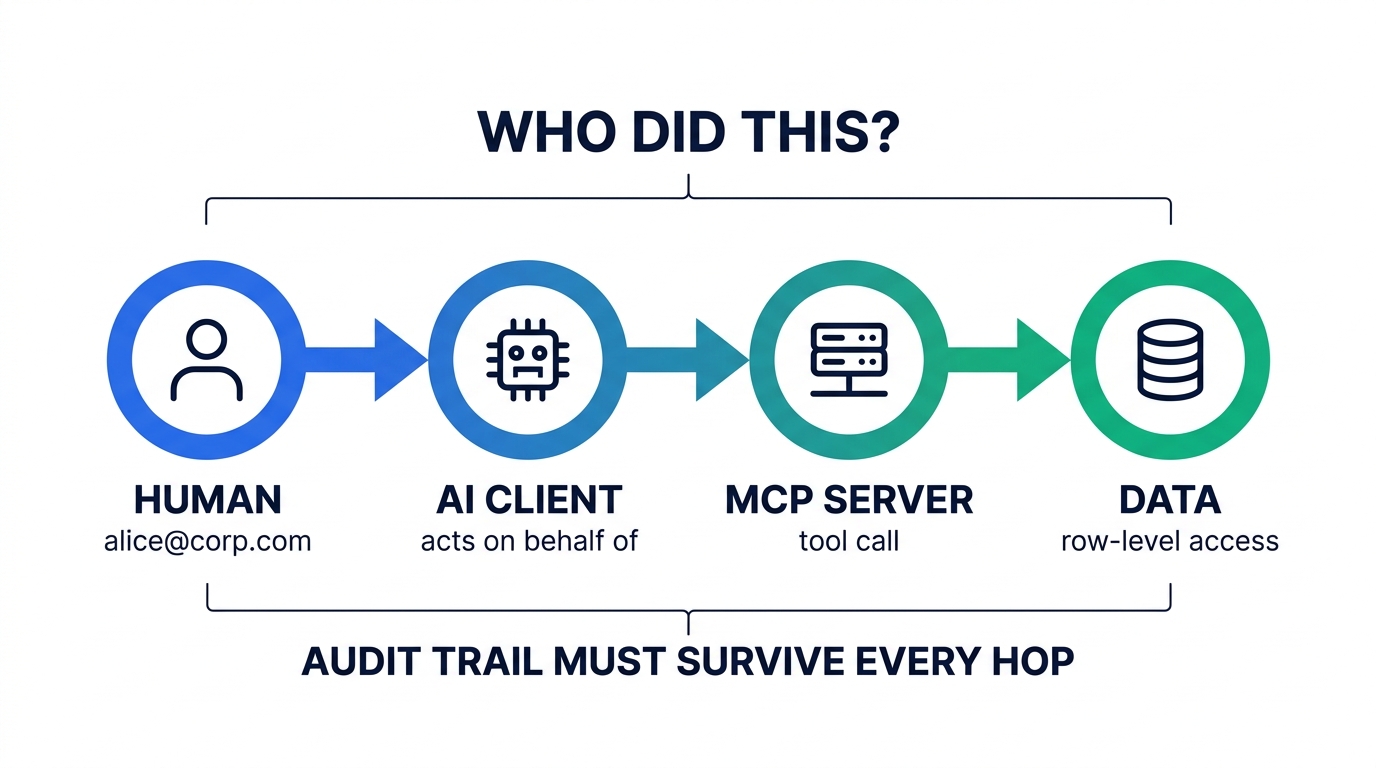
Take these five questions into every vendor call. They separate the platforms far more cleanly than the RFC checklist does.
| Question | Answered by the IdP? | Where it actually lives |
|---|---|---|
| Which agent got a token, and when? | Yes | Token issuance log — all three |
| Which human was it acting for? | Only if delegated | Token sub / act claim; lost entirely under client_credentials |
| Which MCP tool did it invoke? | No | Your MCP server. You must emit this. |
| Which records did it touch? | No | Your FGA check log or app layer |
| Can I still see it in 90 days? | Depends on plan | Retention setting — see below |
Rows three and four are the uncomfortable part: no identity vendor logs your tool calls. Independent analyses of MCP audit logging have flagged exactly this — tool-call logging is optional and inconsistent across implementations, which is a compliance liability if you are relying on it for SOC 2 or an internal control. Whichever vendor you pick, you are writing tool-call audit events yourself, and you should design that schema before you write the first tool.
Row five is where the plans diverge sharply, and it is the finding we would most want a buyer to check:
- Auth0 retains logs for 5 days on Essentials, 10 days on Professional, and 30 days on Enterprise. Five days is shorter than the average time-to-detection for almost any class of incident. If you stay on Essentials, you need log streaming to your own store from day one — treat it as mandatory, not optional.
- WorkOS defaults to 30 days and can be raised to 365 through the retention API. Retention is metered at $99/month per million events retained, and SIEM streaming is $125/month per connection. Expensive is fine; predictable and configurable is what matters.
- Okta writes to the Okta System Log, which is the same place the rest of your workforce access events already land. For Situation A that consolidation is the whole argument — one query answers "what did this employee's agent do" alongside "what did this employee do."
If your MCP servers touch regulated data, this row interacts directly with your control evidence. We covered the underlying evidence-collection problem in our breakdown of SOC 2 automation tooling; the short version is that a control you cannot produce 90 days of logs for is a control you do not have.
07Cross App Access: the enterprise feature that changes the math
The most consequential development in MCP authorization this year is not from any of these three vendors' marketing pages. It is Identity Assertion JWT Authorization Grant (ID-JAG), an OAuth extension being standardized at the IETF and shipped by Okta under the product name Cross App Access (XAA). MCP's enterprise authorization extension reached stable status in June 2026, with Okta as the first supported IdP.
The problem it solves is specific. Under plain OAuth, when an AI client wants to reach an MCP server, the user approves that relationship through a consent screen. The IdP authenticated the user into both applications but was never asked whether those two applications should talk to each other. Multiply by every agent and every MCP server in the company and you get consent fatigue, zero central visibility, and no way to revoke an app-to-app relationship without hunting down individual grants.
XAA inverts it. After the user signs in via SSO, the client asks the IdP for a short-lived, audience-bound identity assertion targeting a specific MCP server. The IdP evaluates admin policy — app-to-app allowlists, group membership, scope restrictions, MFA requirements — and if it approves, issues the assertion, which the MCP server validates and exchanges for a scoped access token. No consent popup. One place to see every AI-to-tool relationship. One place to kill it.
For Situation A this is close to decisive. It is the only model in which a security team can answer "which AI applications can reach which internal systems" with a query rather than a survey. Availability as of August 2026: Okta ships it as the reference implementation, WorkOS supports it, and Auth0 has it in Early Access for Enterprise, B2B Professional, and B2B Essentials customers as part of Enterprise Connections. If XAA is central to your architecture, confirm the current GA status before you build on it.
08Auth0 by Okta
Auth for MCP went generally available in May 2026 after roughly six months in Early Access. Auth0 remains the broadest platform of the three for agent scenarios specifically, and the breadth is real rather than marketing.
Three capabilities are genuinely hard to replicate. Token Vault stores and refreshes third-party API tokens — Google, Slack, GitHub — so your agent can act against external services without your application ever handling those credentials. This is the correct answer to the token passthrough anti-pattern, and it is a substantial build if you do it yourself. Asynchronous authorization via CIBA lets an agent pause and request human approval out of band, through push, SMS, or email, which is the only clean pattern for an autonomous agent that hits a privileged operation at 3 a.m. Auth0 FGA enforces document-level access inside RAG pipelines. SDK coverage spans LangChain, LlamaIndex, Vercel AI, Cloudflare, and Genkit.
Pros
- Token Vault solves downstream third-party access properly
- CIBA gives you real human-in-the-loop approval, not a hack
- Deepest agent-framework SDK coverage of the three
- 25,000 MAU free tier; documentation density is unmatched
- Supports both CIMD and DCR during the transition
Cons
- M2M tokens are a metered SKU — cost scales with token TTL, not value
- 5-day log retention on Essentials is unworkable for agent forensics
- Enterprise connections capped at 30, $100/mo each beyond the included
- Cross App Access still Early Access as of August 2026
- MAU pricing steepens well before WorkOS's does
When Token Vault and CIBA are the requirement
If your agents need to act against Google, Slack, or GitHub on a user's behalf, or need to pause for human approval before a privileged operation, Auth0 is the shortest path — those two features are the ones teams most often underestimate the cost of building. Start on the free tier and instrument M2M issuance before you scale.
09WorkOS
AuthKit is a spec-compatible OAuth authorization server that exposes the endpoints MCP clients expect: /.well-known/oauth-protected-resource for discovery, configurable Resource Indicator URLs with a default when a client omits the resource parameter, Client ID Metadata Documents as the primary registration path, and DCR available as an explicit backwards-compatibility toggle. Your side of the work reduces to verifying access tokens and serving metadata endpoints.
The commercial shape is the differentiator. A million free MAU is not a trial tier — it is most B2B SaaS companies' entire user base. Costs shift instead onto enterprise connections ($125 each, falling to $50 at volume), audit log retention ($99/month per million events), and FGA warrants (10 million operations free, roughly $250/month at 10,000 warrants). Those are all quantities you can forecast from your customer count. Token issuance is not, which is precisely why this pricing shape suits agent workloads.
The caveat is scope. WorkOS is built for B2B SaaS selling to enterprises. If you need consumer login flows, exotic MFA, or a large catalog of social providers, you are outside its design center.
Pros
- 1M MAU free — the most generous starting point by a wide margin
- No per-token meter, so agent cost stays predictable
- FGA and audit logs in the same contract as authentication
- CIMD-first with DCR as an explicit legacy toggle
- Configurable log retention up to 365 days via API
Cons
- Narrow by design — weak fit for consumer identity
- Per-connection SSO pricing adds up fast at high customer counts
- Retention and SIEM streaming are separately metered line items
- Smaller vendor than Okta; matters in some procurement reviews
- No Token Vault equivalent for third-party API delegation
10Okta (Workforce Identity)
Okta is on this list for a reason most comparisons get backwards. For internal MCP servers, Okta is usually not a purchase — it is already deployed, already the source of truth for employment status, already wired into offboarding. The question is not whether to buy it but which suite you need.
Suites are per-user, per-month, billed annually, with a $1,500 annual minimum: Starter at $6 (SSO, MFA, Universal Directory, 5 Workflows), Core Essentials at $14, Essentials at $17 (adaptive MFA, Privileged Access, Lifecycle Management, Access Governance, 50 Workflows), then Professional and Enterprise by quote.
API Access Management and Machine-to-Machine Tokens are Enterprise-suite features. If your MCP plan involves autonomous agents or issuing scoped tokens for internal APIs, you are looking at the top suite. Teams routinely scope an internal MCP project against their current Essentials contract and discover the gap during implementation.
What you get in exchange is consolidation that no standalone product can match: agent access governed by the same lifecycle rules as employee access, so revoking someone in the HR system revokes their agents; audit events in the same System Log as everything else; and Cross App Access as the reference implementation, letting security answer app-to-app access questions centrally. If you are already running an AI governance program, that single pane is worth more than any feature on the other two platforms' pages.
Pros
- One identity source of truth for employees and their agents
- Cross App Access reference implementation — central app-to-app policy
- Offboarding automatically revokes agent access
- System Log consolidates agent and human events
- Governance and Privileged Access already in mid-tier suites
Cons
- M2M tokens and API Access Management gated to Enterprise suite
- Per-seat pricing is a poor fit for customer-facing MCP servers
- $1,500 annual minimum and annual billing — no meaningful free tier
- Heavier configuration burden than developer-first alternatives
- Professional and Enterprise pricing is quote-only
11Who should choose which
| If this is you | Choose | Because |
|---|---|---|
| Internal MCP servers, Okta or Entra already deployed | Okta | A second identity vendor creates a second source of truth. Budget the Enterprise suite for M2M. |
| B2B SaaS shipping MCP to enterprise buyers | WorkOS | 1M free MAU, SSO/SCIM/FGA/audit logs in one contract, no per-token meter. |
| Agents acting against third-party APIs | Auth0 | Token Vault is the correct pattern and expensive to build yourself. |
| Agents needing human approval mid-run | Auth0 | CIBA is production-grade async authorization out of the box. |
| Large fleet of autonomous agents, short token TTLs | WorkOS | The M2M meter is the dominant cost driver elsewhere. |
| Regulated data, 90+ day log retention required | WorkOS or Okta | Auth0's 5–10 day retention on lower plans forces immediate log streaming. |
| Air-gapped or self-hosted mandate | None of these | Evaluate Keycloak or Ory instead — all three here are SaaS-only. |
One decision that is not on this table: whether to expose an MCP server at all. If you are still choosing which capabilities to expose, start with our survey of the best MCP servers for B2B workflows, and note that agent traffic will also hit your model routing layer — a separate cost surface we broke down in our LLM gateway comparison.
12Frequently asked questions
Do I need a dedicated identity vendor for MCP at all?
Not necessarily. The MCP specification makes your server an OAuth 2.1 resource server, so if you already run an authorization server that supports PKCE, RFC 8707 resource indicators, and audience-bound tokens, you can point your MCP server at it. What you cannot skip is the resource-server side: publishing RFC 9728 protected resource metadata and validating that every token was issued specifically for your server. Buying a vendor mostly saves you the authorization server, not the resource server.
Is Dynamic Client Registration still required for MCP?
No. In the 2026-07-28 revision, DCR (RFC 7591) is MAY and carries an explicit deprecation note — it is "retained for backwards compatibility with authorization servers that do not support Client ID Metadata Documents." CIMD, where the client uses an HTTPS URL as its client_id and the authorization server fetches metadata from it, is the recommended path. Support DCR only for older clients, and prefer a provider that treats it as a toggle rather than the default.
How are AI agents billed — as users or as machines?
It depends entirely on the grant type. An agent acting on behalf of a signed-in human uses authorization_code with PKCE, and that human counts as one monthly active user no matter how many agents act for them. An autonomous agent with no human in the loop uses client_credentials and is billed per machine-to-machine token issued. Auth0 meters M2M tokens at roughly $4 per 1,000 after the 5,000 included on Professional; WorkOS does not carry an equivalent SKU; Okta gates M2M tokens to its Enterprise suite. Audit which of your agents fall into which bucket before you sign anything.
Can I map one OAuth scope to each MCP tool?
You can, and it stops working somewhere around thirty tools. Consent screens become unreadable and every new tool becomes an authorization server change. The pattern that holds up is coarse scopes at the transport boundary — grouped by capability and blast radius, few enough that a human can reason about them — plus a fine-grained authorization check inside each tool handler for the row-level decision. The spec's step-up flow, where a 403 with insufficient_scope drives incremental re-authorization, is designed for exactly this split.
Will any of these log which MCP tool an agent invoked?
No. All three log token issuance and authentication events. None of them see your tool calls, because your MCP server handles those and never reports them upstream. Tool-call audit logging is your responsibility, and independent reviews have flagged its inconsistency across MCP implementations as a genuine compliance liability. Design that event schema — agent identity, acting-on-behalf-of, tool name, arguments hash, decision, timestamp — before you write your first tool, and check the vendor's log retention window separately.
What is Cross App Access and do I need it?
Cross App Access is Okta's product name for the Identity Assertion JWT Authorization Grant (ID-JAG), an OAuth extension being standardized at the IETF. It replaces the per-user consent screen between an AI client and an MCP server with an IdP-evaluated policy decision, so admins control which AI applications may reach which tools and can revoke that centrally. You need it if you are governing internal AI access at any scale. As of August 2026, Okta is the reference implementation, WorkOS supports it, and Auth0 offers it in Early Access.
13Methodology
We evaluated these platforms against the MCP authorization specification revision 2026-07-28 rather than against vendor feature lists, reading the normative MUST and SHOULD requirements directly and checking each provider's documentation for the corresponding behavior. Pricing was taken from each vendor's public pricing page on August 18, 2026, and is stated with the plan it applies to; quote-only tiers are marked as such. The M2M token cost table is a model, not a quotation — it assumes one token issued per agent per TTL window with no cross-restart caching, priced at the published marginal add-on rate, and is included to demonstrate the sensitivity of cost to token lifetime rather than to predict any specific invoice. We hold no commercial relationship that determined the ranking, and we did not test these platforms in a production deployment; claims about behavior are sourced to vendor documentation and to the specification, not to first-hand operation.
Sources and further reading
- Model Context Protocol — Authorization specification, revision 2026-07-28 (roles, RFC 9728/8707 requirements, CIMD, DCR deprecation, step-up authorization)
- Model Context Protocol — Security best practices (token passthrough anti-pattern, confused deputy)
- Auth0 — Pricing (B2B plan tiers, M2M token add-ons, enterprise connections, log retention), checked August 18, 2026
- WorkOS — Pricing (AuthKit MAU tiers, SSO and Directory Sync connections, Audit Logs retention and streaming), checked August 18, 2026
- Okta — Plans and pricing (Workforce Identity suites, API Access Management and M2M token tiering), checked August 18, 2026
- WorkOS Docs — AuthKit for MCP (protected resource metadata, resource indicators, CIMD and DCR toggle)
- Auth0 Docs — Cross App Access (Early Access availability and plan eligibility)
- Okta Developer — Cross App Access (XAA) (ID-JAG flow and IdP policy evaluation)
- IETF — Cross-App Access / Identity Assertion Authorization Grant (standardization status)
- Auth0 Blog — Auth for MCP is now generally available (May 2026 GA)
- WorkOS Changelog — Audit Logs retention period API (30-day default, 365-day maximum)

Technology consultant with 10+ years in the Japanese tech industry. Specializing in SaaS evaluation, workflow automation, and B2B tool integration.