QuickBooks vs Xero for Growing B2B Teams (2026): The Seat-Cost Math That Decides It
Both platforms handle standard B2B bookkeeping fine — the split shows up when your headcount moves. QuickBooks Online prices by seat count (Plus tops out at 5 users for $140/month, then forces a $340/month jump to Advanced), while Xero bills per organization with unlimited users on every plan ($55–$90/month regardless of team size). For a 5-to-10-person finance/ops team, that alone can mean paying $3,000+ more per year on QuickBooks. QuickBooks pulls back the advantage where volume matters: a 500-call-per-minute API versus Xero's 60, plus deeper US CPA-tool integration. If your growth is mostly more people touching the books, Xero is the cheaper, simpler call. If your growth is mostly more transactions and integrations, QuickBooks' throughput and accountant ecosystem are worth the premium.
Quick Comparison: QuickBooks Online vs Xero (August 2026)
Pricing below reflects Intuit's August 1, 2026 renewal price changes and Xero's current US rates ahead of its own announced October 1, 2026 increase — checked directly against both vendors' pricing pages this month.
| Factor | QuickBooks Online | Xero |
|---|---|---|
| Realistic B2B-team tier | Plus — $140/mo | Growing — $55/mo |
| Users included | 5 (hard cap) | Unlimited |
| Next tier up | Advanced — $340/mo, 25 users | Established — $90/mo, unlimited |
| Cost for an 8-person team | $340/mo (forced upgrade) | $55–$90/mo |
| API rate limit | 500 calls/min per app | 60 calls/min per tenant |
| Multi-currency | Per-vendor only, not per-transaction | Native, per-transaction |
| Multi-entity consolidation | Weak; needs a third-party tool | Weak, but cheaper to run in parallel |
| US CPA / bookkeeper availability | Very high — default choice for US accountants | Growing, but still a minority preference in the US |
| Native payroll | QuickBooks Payroll — Core from $44/mo + $6–$10/employee | Xero Payroll, powered by Gusto (launched Aug 12, 2026) — from ~$49/mo + $6/employee |
| Upcoming price move | Just raised (Aug 1, 2026): Essentials, Plus, Advanced up 41–70% | Raising Oct 1, 2026: +$2 to +$7/mo per tier |
One caveat on Xero: its entry-level Early plan ($25/month) caps you at 20 invoices and 5 bills per month, even though it also includes unlimited users. That cap makes Early a non-starter for most active B2B teams — Growing is the plan you'll actually be comparing against QuickBooks Plus.
The Seat-Cost Cliff: What Adding Headcount Actually Costs
This is the part most generic "QuickBooks vs Xero" roundups skip, because it only matters once a team is actually growing — which is exactly the situation this article is written for.
QuickBooks Online prices by user seat. Plus, the tier most B2B teams land on, includes exactly 5 users — no more, no partial add-ons. The moment a sixth person needs login access (a new AP clerk, a sales ops hire who needs to check invoice status, an outsourced bookkeeper), there's no add-a-seat option. You move the entire company file to Advanced at $340/month, a jump of $200/month for capacity you may use a fraction of.
Xero doesn't have this cliff. Every plan — Early, Growing, Established — includes unlimited users at a flat organization price. A 5-person team and a 15-person team pay the same $55/month on Growing, assuming neither needs Established-tier features like project tracking or expense claims.
Worked example: a growing 8-person finance/ops team
QuickBooks: Plus doesn't cover 8 users, so you're on Advanced — $340/month, or $4,080/year.
Xero: Growing covers 8 users at $55/month, or $660/year. Established, if you need its extra reporting and multi-currency depth, is $90/month, or $1,080/year.
Gap: $3,000–$3,420/year for the same headcount, before add-ons like payroll or payments.
To be fair to QuickBooks, Advanced isn't just "more seats" — the August 2026 price update bundled in Workforce Elite payroll and Bill Pay Elite, so part of that premium buys features Xero charges for separately or doesn't offer at all. If your 8-person team was already going to pay for a premium payroll add-on, the effective gap shrinks. But if you just need more people to see the books, you're paying enterprise pricing for a seat-count problem.
Teams that outgrow either platform's accounting layer entirely — multiple subsidiaries, complex revenue recognition, board-ready consolidated statements — usually end up evaluating NetSuite or Sage Intacct for multi-entity consolidation rather than pushing QuickBooks Advanced or Xero Established further than they're built for. That's a separate decision from the one this article covers.
Integration Throughput: Where QuickBooks Pulls Ahead
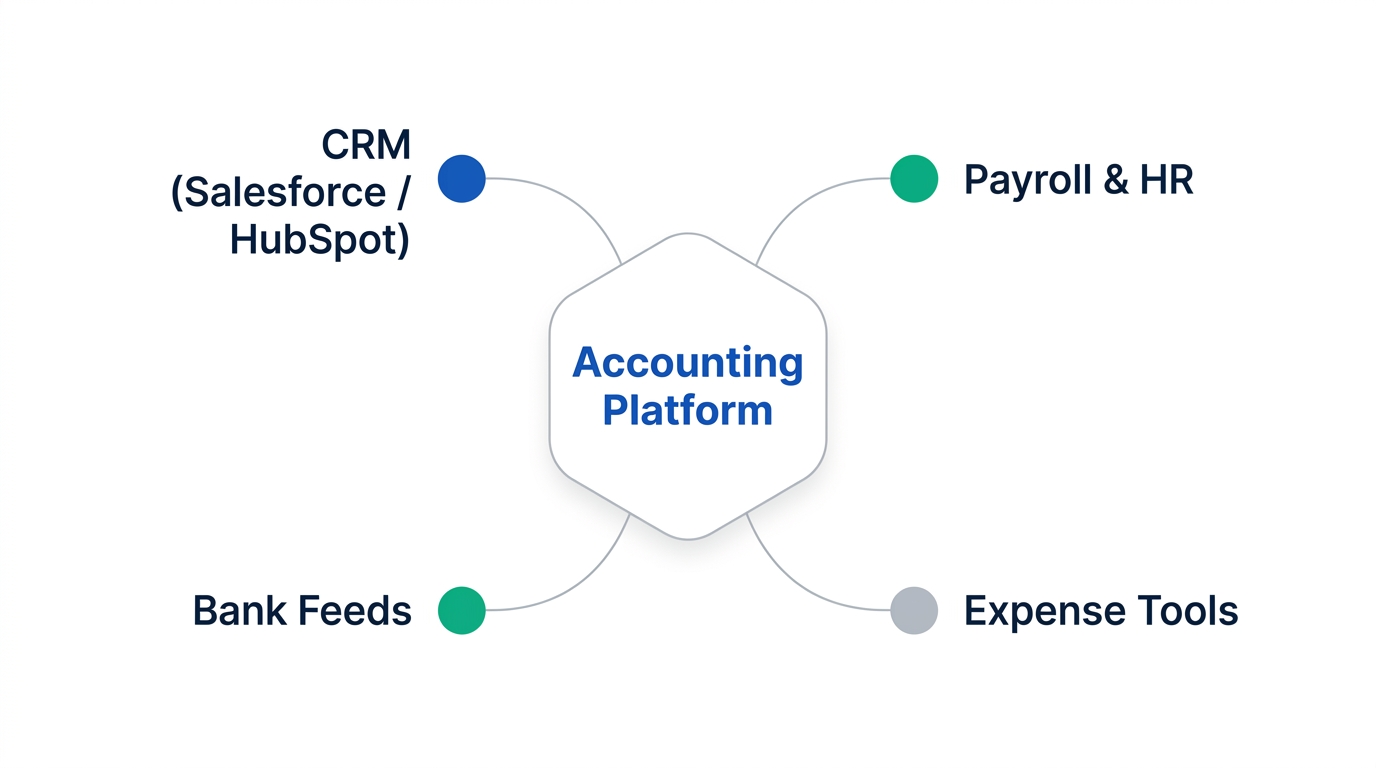
Growing B2B teams rarely run their accounting platform in isolation. By the time you have a dedicated ops or finance hire, the accounting system is usually wired into a CRM (Salesforce or HubSpot), a bill-pay or AP automation tool, expense software, and sometimes a data warehouse or BI layer for board reporting.
This is where the API story matters more than most comparison articles acknowledge. QuickBooks' API allows roughly 500 calls per minute per app, while Xero's default limit is 60 calls per minute per tenant. For a single nightly sync, that difference is invisible. For a stack running several concurrent integrations — CRM sync, bill-pay sync, expense-tool sync, a reporting pipeline — Xero's lower ceiling means more batching, more delta-sync logic (pulling only records changed since the last run), and more careful scheduling to avoid hitting rate limits during business hours.
In practice, most mid-market integration platforms already account for this — tools like Bill.com, which connects to both platforms and syncs with Salesforce and HubSpot, handle the throttling for you. But if your team is building custom API connections in-house, or running several high-frequency syncs at once, QuickBooks' higher ceiling is a real operational advantage, not just a spec-sheet number.
If your stack already leans on an automation layer to move data between your CRM and accounting system — Zapier, Make, or n8n — the platform choice matters less, since the automation tool absorbs most of the rate-limit friction either way. Our Make vs Zapier vs n8n comparison covers how those platforms price and throttle high-volume workflows if that's part of your stack.
Multi-Currency and Multi-Entity: Where Xero Pulls Ahead
Growing B2B teams increasingly means international vendors, contractors, or customers — even before you open a foreign entity. This is where the two platforms diverge architecturally, not just in pricing.
QuickBooks Online has a structural limitation here: each vendor or customer is assigned a single currency, and that assignment can't be changed per transaction. If you invoice the same customer in both USD and EUR depending on the deal, or pay a contractor in a currency that fluctuates by engagement, QuickBooks makes you work around this rather than handle it natively.
Xero treats multi-currency as a first-class feature on its Growing and Established plans: transactions can be recorded in their original currency, and Xero converts and reports in your base currency automatically. For a B2B team billing across borders — a common pattern once you're selling into the EU or UK, or hiring contractors abroad — this removes a category of manual reconciliation work entirely.
Neither platform is a real multi-entity solution, to be clear. If your growth path includes multiple legal entities needing consolidated, intercompany-eliminated reporting, both QuickBooks and Xero rely on either manual work or a third-party consolidation tool — Xero is simply cheaper to run in parallel across entities because of its flat per-organization pricing, while QuickBooks' per-seat cost compounds with every entity you add.
Teams scaling internationally on the people side as much as the currency side — hiring engineers or ops staff in other countries — usually run into this alongside employer-of-record and global payroll decisions. If that's part of your 2026 roadmap, our comparison of Deel vs Rippling for global engineering teams covers the adjacent hiring-infrastructure side of that expansion.
The Accountant Ecosystem — and What the 2026 Price Hikes Changed
QuickBooks' biggest structural advantage in the US has never been the software itself — it's the accountant. The majority of US-based CPAs and bookkeepers are trained on QuickBooks, expect QuickBooks-formatted exports for tax prep, and offer QuickBooks-specific services (cleanup, year-end adjusting entries, accountant-access workflows) as a default. If your growing team already works with a US CPA firm, moving off QuickBooks means either finding a Xero-fluent firm or asking your existing accountant to adapt — both are increasingly possible, but neither is guaranteed to be frictionless.
To be precise about a common misconception: when accountants complain about QuickBooks, the complaint is rarely about the software's accounting logic. It's usually about how clients set it up — default chart of accounts left unedited, personal and business transactions mixed, expenses vaguely categorized. Firms report spending hours rebuilding a client's books before they can do actual accounting work, which is a process problem more than a product one.
What changed in 2026 is the price side of that trade-off. Intuit raised QuickBooks Online's paid tiers by 17–70% depending on plan, with Advanced taking the steepest hike (from $200 to $340/month) as part of a bundle that folds in premium payroll and bill-pay features. For a team that was already paying for those add-ons separately, the math is less painful. For a team on Plus that simply needs a few more seats, the accountant-ecosystem advantage now has to justify a meaningfully larger price gap than it did in early 2026 — which is exactly why the seat-math comparison above has gotten more relevant this year, not less.
Payroll: Xero Just Changed the Calculus (August 2026)
This is worth flagging specifically because it's recent enough that most existing comparison content hasn't caught up: Xero launched embedded payroll for US customers, powered by Gusto, on August 12, 2026 — completing what Xero has called its "3x3" strategy of accounting, payments, and payroll under one login. Before this, running payroll alongside Xero meant a separate Gusto subscription that only loosely synced with your books. Now it's positioned as part of the platform itself.
The pricing shape still looks like Gusto's own: a base fee around $49/month plus roughly $6 per employee for the entry tier, layered on top of whatever Xero plan you're already paying for. QuickBooks Payroll, by comparison, starts at $44/month (Core) plus $6–$10 per employee, scaling up to a Premium & Plus bundle around $101.50/month for teams that want same-day direct deposit and HR support built in — and as of the August 2026 update, Workforce Elite payroll is now bundled directly into the Advanced tier rather than priced as a pure add-on.
Net effect for a growing B2B team: neither platform makes payroll free, and per-employee fees mean the payroll line item scales with headcount on both sides regardless of which accounting plan you're on. What's changed is that Xero no longer has a clear payroll-integration gap to point to — a criticism that was fair to raise as recently as mid-2026 is no longer accurate. If you were holding off on Xero specifically because payroll felt bolted-on, that objection is now largely closed.
Pros & Cons
QuickBooks Online Plus / Advanced
Pros
- Highest API throughput (500 calls/min) for teams running several concurrent integrations
- Deepest bench of US CPAs and bookkeepers familiar with the platform
- Advanced tier now bundles premium payroll and bill-pay, reducing add-on sprawl
- Stronger built-in inventory and industry-specific reporting on higher tiers
Cons
- Hard per-seat caps (5 users on Plus) force an expensive jump to Advanced
- Per-vendor currency assignment makes true multi-currency billing awkward
- August 2026 price hikes raised Plus and Advanced by 41% and 70% respectively
- Weak native multi-entity consolidation
Xero Growing / Established
Pros
- Unlimited users on every plan — no seat-count price cliff as the team grows
- Native per-transaction multi-currency on Growing and Established
- 40–50%+ cheaper than QuickBooks for teams of 5 or more once seat limits are hit
- Flat per-organization pricing makes running several entities in parallel more affordable
- As of August 2026, embedded payroll (powered by Gusto) closes its longtime payroll-integration gap
Cons
- Lower API rate limit (60 calls/min) can bottleneck teams with several concurrent syncs
- Smaller pool of US-based CPAs who default to Xero over QuickBooks
- Early plan's 20-invoice/5-bill cap makes it unusable for most active teams — Growing is the real starting point
- Also raising US prices October 1, 2026, though by a smaller percentage than QuickBooks
Who Should Choose Which
Choose QuickBooks Online if…
- You're US-anchored and already work with a QuickBooks-fluent CPA firm
- Your integration stack runs several high-frequency syncs at once
- You bill mostly in USD, with currency handling as a secondary concern
- You're already paying for premium payroll/bill-pay and can absorb Advanced into that spend
Choose Xero if…
- Your growth is mainly more people needing book access, not more transaction volume
- You invoice or pay vendors in multiple currencies regularly
- You're cost-sensitive at the 6–20 user range and don't need QuickBooks-specific CPA support
- You expect to run more than one entity and want pricing that doesn't compound per seat
Teams straddling both — say, a US entity that still needs a QuickBooks-fluent accountant, plus an international subsidiary billing in euros — sometimes end up running QuickBooks for the US book and Xero for the international one rather than forcing a single platform to do both jobs well. It's not an elegant answer, but for teams past a certain size, "your accounting stack matches your entity structure" beats "everything lives in one tool."

If either platform's core ledger stops being the constraint — you've outgrown basic invoicing and need better AR automation across a growing client roster — that's a separate tooling decision. Our look at the best invoicing tools for agencies covers what to layer on top once volume outpaces what either QuickBooks or Xero handles natively. And if neither platform's core feature set fits at all — some teams need project accounting or job costing that both product lines handle only partially — it's worth working through our broader roundup of QuickBooks alternatives for startups before committing either way.
よくある質問
Is Xero or QuickBooks better for small business?
For a solo operator or a 1–2 person team, QuickBooks Simple Start is usually the simpler default in the US because of how many bookkeepers and tax preparers already expect it. Once the team grows past 3–5 people who need login access, Xero's unlimited-user pricing typically becomes the cheaper and simpler option, since QuickBooks starts forcing tier upgrades based on seat count alone.
Why don't accountants like QuickBooks?
Most accountant frustration with QuickBooks isn't about the software's accounting logic — it's about setup. Businesses that accept the default chart of accounts, mix personal and business transactions, or use vague expense categories create cleanup work that can take hours to unwind before real accounting can start. The platform itself is the industry standard for US bookkeeping; the complaints are almost always about how it was configured, not what it can do.
Is Xero a good alternative to QuickBooks?
Yes, particularly for teams that bill internationally, need more than a handful of users with book access, or are cost-sensitive as headcount grows. The trade-off is a smaller pool of US CPAs who default to Xero, and a lower API rate limit that can matter if you're running several concurrent integrations. For US-only, single-currency teams tightly tied to a QuickBooks-fluent accountant, the switching case is weaker.
Is QuickBooks being phased out?
No — that confusion usually comes from QuickBooks Desktop, the older locally-installed product line, which Intuit has been winding down in stages (new sales of several Desktop versions stopped in September 2024, and support for Desktop 2023 ends May 31, 2026). QuickBooks Online, the cloud product this article covers, is not being discontinued — Intuit raised its prices and added features in August 2026, which points the opposite direction.
How much more does QuickBooks cost than Xero for a growing team?
At 5 users, QuickBooks Plus ($140/month) costs roughly $1,020 more per year than Xero Growing ($55/month) for the same headcount. Once a team crosses 5 users, QuickBooks forces an upgrade to Advanced ($340/month), widening the annual gap to $3,000–$3,420 versus staying on Xero Growing or Established — before either platform's payroll or payment-processing add-ons are factored in.
Methodology
Pricing, user limits, and plan features were checked directly against Intuit's and Xero's official pricing pages in August 2026, cross-referenced against independent pricing-tracking coverage of both vendors' 2026 rate changes. API rate limits and multi-currency behavior were verified against each platform's developer documentation and third-party integration guides. This comparison focuses specifically on B2B teams evaluating both platforms as their headcount grows — it does not cover solo-operator or enterprise-scale (50+ user, multi-entity ERP) use cases, which have different decision criteria entirely.
参考・出典
- Intuit — QuickBooks Online August pricing changes and product updates
- Xero US — Pricing Plans (Early / Growing / Established)
- Xero US — Pricing Update (October 1, 2026 changes)
- Xero Developer — API pricing and rate limits
- Xero US — Xero Introduces Integrated Payroll, Powered by Gusto (August 2026)
- Method — QuickBooks Desktop discontinued: next steps for Desktop users (2026)

Technology consultant with 10+ years in the Japanese tech industry. Specializing in SaaS evaluation, workflow automation, and B2B tool integration.