Best Workflow Automation Tools for HR Onboarding (2026): The Three-Layer Stack, and the Sync Gap That Breaks Day One
Most "best HR automation tools" lists compare an HRIS against an iPaaS as if they were substitutes. They are not. Here is the stack that actually issues a new hire's accounts before 9 a.m. — with verified 2026 pricing and the scheduling detail every vendor page buries.
The short version
There is no single best workflow automation tool for HR onboarding, because onboarding is not one workflow — it is three, running in different systems, on different clocks, billed on different meters. Pick one tool per layer:
- Layer 1 — the hire event. Rippling if you want HR and IT provisioning in one vendor and can live with quote-only module pricing. BambooHR at a published $10–$25 per employee per month if you would rather keep identity in a dedicated tool. Deel if a meaningful share of your hires are outside your entity footprint.
- Layer 2 — account issuance. Okta Lifecycle Management (Essentials Suite, $17/user/month) if your app estate is heterogeneous. Microsoft Entra ID Governance ($7/user/month on top of Entra ID P1 or P2) if you are already a Microsoft 365 shop — it is the cheapest credible option by a wide margin. JumpCloud if devices and directory need to be the same bill.
- Layer 3 — everything else. Make from $9/month for small teams, n8n self-hosted when the workflow touches employee data you would rather not send to a US SaaS vendor, Workato only when you have an integration team and a five-figure budget.
The single most consequential decision is not which tool. It is how often Layer 1 talks to Layer 2 — because that interval, not the feature list, is what determines whether a new hire can log in on their first morning.
1 The framing mistake in every roundup
Search this keyword and you get nine lists. We read the top-ranking ones — Console, bika.ai, Moveworks, Apty, Breeze, Native Teams, Tango, LupaHire, WalkMe — and they share a structural problem. They rank BambooHR next to Workato next to a digital adoption platform, score each out of five, and leave the reader to infer that these are alternatives.
They are not alternatives. They occupy different layers of the same pipeline, and a working onboarding automation almost always uses one from each.
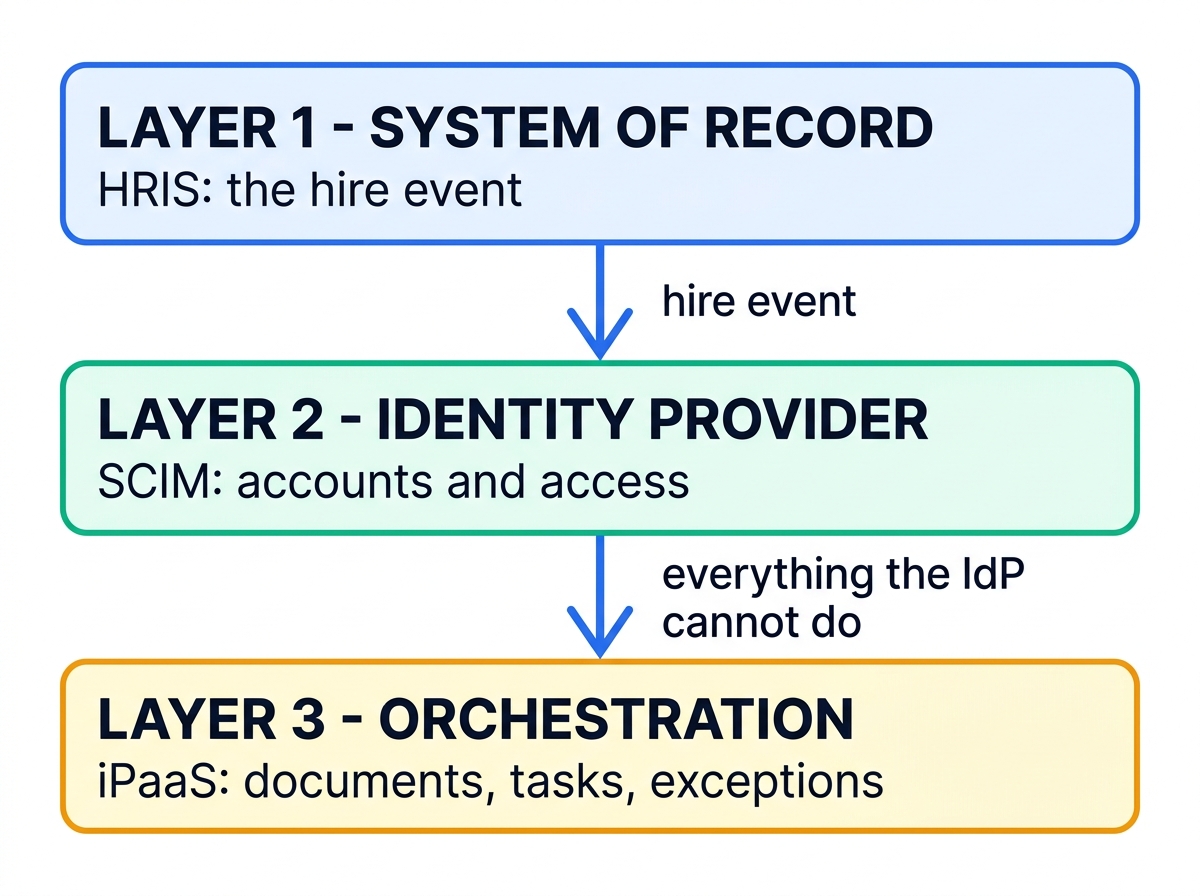
The three layers:
Layer 1 System of record. The HRIS holds the authoritative fact that a person was hired, when they start, who they report to, and what their job title is. Its job in the automation is to emit a clean, correctly dated hire event. Nothing downstream can be more accurate than this record.
Layer 2 Identity provider. The IdP consumes that event and creates the human's accounts — directory entry, email, group memberships, licenses, and SCIM-provisioned seats in every downstream SaaS app. This is where "account issuance" actually happens, and it is the layer generic roundups skip entirely.
Layer 3 Orchestration. The iPaaS handles everything the IdP has no opinion about: sending the handbook, collecting the signed NDA, opening a laptop-shipping ticket, posting an introduction to the right Slack channel, scheduling the week-one check-in, and nudging a manager who has not completed their part.
Competitors write about Layer 1 and Layer 3 and almost never about Layer 2. That omission matters, because Layer 2 is where the day-one failures come from — and Layer 2 is the only layer with a hard scheduling constraint you cannot design around.
2 All 11 tools, side by side
Prices below were checked against vendor pricing pages in August 2026. Where a vendor does not publish, we say so rather than repeating an aggregator's estimate as fact.
| Tool | Layer | Billing unit | Entry price (Aug 2026) | Best for |
|---|---|---|---|---|
| Rippling | 1 + 2 | Per employee/month + platform fee | From $8 PEPM + base fee | One vendor for HR and IT provisioning |
| BambooHR | 1 | Per employee/month | $10 / $17 / $25 PEPM | SMB with published, predictable pricing |
| HiBob | 1 | Per employee/month (quote) | Not published | Mid-market culture-forward HR ops |
| Deel | 1 | Per employee/month, per product | Core HR free <200 staff | Hires outside your legal entities |
| Okta Lifecycle Mgmt | 2 | Per user/month | $17/user/mo (Essentials) | Heterogeneous SaaS estates |
| Entra ID Governance | 2 | Per user/month add-on | $7/user/mo + P1 or P2 | Microsoft 365 shops |
| JumpCloud | 2 | Per user/month, à la carte | $3/user/mo (lifecycle module) | Device + directory on one bill |
| Workato | 3 | Annual contract + task pool | Not published | Enterprises with an integration team |
| Zapier | 3 | Per task | $19.99/mo, 750 tasks | Low volume, wide app coverage |
| Make | 3 | Per credit (action) | $9/mo, 10,000 credits | Best price-per-action at SMB scale |
| n8n | 3 | Per workflow execution | Free self-hosted / €20/mo cloud | Data residency and step-heavy flows |
PEPM = per employee per month. Okta and Entra prices are annual-commitment rates. Make and n8n entry prices are the lowest published paid tier.
Two columns in that table do more work than the rest. Layer tells you what a tool can possibly be responsible for. Billing unit tells you how the bill will behave when you hire twenty people in a month instead of two — and those three meters (per employee, per user, per action) scale on completely different curves. We come back to that in the cost section.
3 Layer 1: the tools that own the hire event
Everything downstream inherits this layer's data quality. If the HRIS record has a start date in the wrong timezone, or a blank manager field, the identity layer will faithfully provision a broken account on the wrong day.
Rippling
Rippling is the only vendor on this list that credibly occupies Layer 1 and Layer 2 at once. Its pitch is that the employee record and the identity record are the same record, so there is no sync to configure, no interval to tune, and no reconciliation job to debug. For a company under a few hundred people with a mostly-SaaS app estate, that is a real architectural simplification, not just marketing.
The catch is pricing opacity. Rippling's small-business page starts the platform at roughly $8 per user per month plus a flat monthly base fee in the $35–$40 range, but every module — payroll, benefits, IT and device management, recruiting — is quoted separately and none of those module rates are published. Third-party buyers report landing in the $20–$35 PEPM range once the modules they actually needed were added, with IT management alone commonly quoted around $8–$10 PEPM. Treat any single number for "what Rippling costs" with suspicion, including that one; the honest answer is that you cannot model it without a quote.
Pros
- Hire event and provisioning in one system — no HRIS-to-IdP sync interval to manage
- Device shipping, app provisioning, and payroll triggered from the same record
- Deprovisioning is genuinely one action, which is where most stacks leak
Cons
- Module-level pricing is not published; budgeting requires sales cycles
- Base fee makes it disproportionately expensive under about 25 employees
- Consolidating HR and identity in one vendor concentrates switching cost
If you are weighing Rippling primarily against a global-employment platform rather than against a classic HRIS, we worked through that specific trade-off in our Deel vs. Rippling comparison for global engineering teams.
BambooHR
BambooHR is the SMB default, and unusually for this market, it publishes its prices. As of August 2026: Core at $10 per employee per month, Pro at $17, and Elite at $25, with a flat $250/month floor for organizations of 25 employees or fewer. Workflows and approvals, plus the onboarding checklist tooling, are in the Core tier — you do not need to buy up to automate onboarding.
Its role in a serious stack is narrow and useful: be the clean source of truth, and hand off. BambooHR is a first-class HR-as-master source for both Okta and Entra, which means it slots into Layer 2 without custom work.
$10 · Pro $17 · Elite $25 per employee/monthPros
- Published pricing — you can model the bill without talking to sales
- Onboarding workflows in the entry tier, not gated behind an upgrade
- Clean, well-documented connectors into both major identity providers
Cons
- No identity or device management — Layer 2 is a separate purchase
- The $250 floor is poor value for teams well under 25 people
- Workflow builder is checklist-shaped; complex branching belongs in Layer 3
HiBob
HiBob targets the 100–1,000-employee band, where the HRIS is expected to carry culture and engagement features alongside records management. Its automation model is closer to BambooHR's than to Rippling's: it is a strong Layer 1 that expects you to own Layer 2 elsewhere.
HiBob does not publish per-seat pricing. Buyer-side aggregators put it broadly in the $8–$25 PEPM range depending on headcount and module mix, with an implementation fee frequently quoted at 10–20% of the first-year contract. We flag those as third-party estimates, not vendor figures. The implementation fee is the number to press on in negotiation — it is the one most often treated as non-negotiable and most often is not.
Deel
Deel earns its place here for a specific reason: if your new hires are in countries where you have no legal entity, Layers 2 and 3 are the easy part and Layer 1 is the hard part. Deel's Core HR product is free under 200 employees and $5 per employee per month above that, which makes it an unusually cheap system of record — but the money is in the surrounding products: US payroll at $19 PEPM, contractor management at $49 per contractor per month, and Employer of Record starting around $599 per employee per month.
That EOR figure is the one that dominates any real total. Before you evaluate Deel as an onboarding automation tool at all, it is worth settling whether you need an EOR in the first place — we covered the decision boundary in EOR vs. PEO: what's the difference and which does your B2B team need.
Layer 1 verdictChoose Rippling if you want to collapse Layers 1 and 2 and can absorb quote-only pricing. Choose BambooHR if you want a predictable bill and a clean handoff to a dedicated identity provider — for most companies under 500 people, this is the better-behaved architecture. Choose Deel when the constraint is jurisdictional rather than technical.
4 Layer 2: the layer the other roundups skip
This is where a new hire actually gets a login. The mechanism is SCIM — an open, REST-based standard that lets an identity provider create, update, suspend, and delete user records in downstream SaaS applications. The HRIS is the source of authority; the IdP is the enforcement point; SCIM is the wire protocol between the IdP and the eighty apps your company has accumulated.
Get this layer right and a new hire's Slack, Google Workspace, Salesforce, and Jira accounts exist before they open their laptop. Get it wrong and you are back to a shared spreadsheet and an IT ticket queue — which, per Vlerick and Talmundo's onboarding research, is roughly where a lot of companies still are: 43% of new hires reported waiting more than a week for their workstation tools, and 18% still lacked necessary equipment two months in.
Okta Lifecycle Management
Okta is the reference implementation of HR-driven provisioning. It treats your HR system — Workday, BambooHR, or SuccessFactors — as the source of truth, watches it for joiner, mover, and leaver events, and drives the corresponding account actions across every connected application. Okta Workflows sits alongside it as a no-code builder for the cases the standard lifecycle rules do not cover.
Pricing is published, which is welcome in this category. Starter Suite is $6 per user per month and includes SSO, MFA, Universal Directory, and five Workflows. Essentials Suite is $17 per user per month and is the tier that actually includes Lifecycle Management, Access Governance, Privileged Access, and fifty Workflows. All suites bill annually, with a $1,500 annual contract minimum on Okta Workforce Identity.
That minimum is the practical gate. At $17/user/month, the floor binds below roughly eight users — so Okta is not a sensible choice for a ten-person company, but it is close to a default above a hundred.
Pros
- Broadest catalog of pre-built SCIM provisioning connectors in the market
- Published per-seat pricing at both tiers
- Workflows covers the long tail without needing a separate iPaaS for identity tasks
Cons
- Lifecycle Management is Essentials-tier only — the $6 Starter tier will not do this job
- $1,500 annual minimum rules out small teams
- Scheduled-import behavior needs deliberate tuning (see below)
If your interest in Okta extends past HR provisioning into machine and agent identity, we compared it against the developer-first alternatives in Auth0 vs. WorkOS vs. Okta for MCP authorization.
Microsoft Entra ID Governance
If your company runs on Microsoft 365, this is almost certainly the correct answer, and it is not close on price. Entra ID Governance is $7 per user per month, paid yearly, as an add-on to Entra ID P1 ($7/user/month) or P2 ($10/user/month). For an organization already paying for P1, the incremental cost of full joiner-mover-leaver automation is $7 per seat — against Okta's $17 all-in.
What that buys is Lifecycle Workflows, and Microsoft's own documentation is refreshingly specific about what it can do. The built-in templates map directly onto onboarding: Onboard prehire employee generates a Temporary Access Pass and emails it to the new hire's manager; Onboard new hire employee enables the account, sends the welcome email, and adds the user to their groups. Execution conditions are attribute-scoped, so you can run a different workflow for the sales department than for engineering.
The constraints are equally well documented, and worth knowing before you commit:
offsetInDays between −180 and +180 days from the hire or leave dateemployeeHireDate and employeeLeaveDateTime must be populated on the accountThat last row is the one that sinks deployments. Lifecycle Workflows cannot fire on a date it does not have, and those two attributes are not populated by default — they arrive only if your inbound provisioning from Workday, SuccessFactors, Entra Connect, or the API-driven path is explicitly mapped to fill them. Microsoft's own deployment plan lists an HR representative as a required stakeholder for exactly this reason: someone has to confirm the source attributes exist and have values.
JumpCloud
JumpCloud's proposition is that directory, SSO, and device management come from one vendor on one bill, which suits companies where IT is one or two people rather than a department. Its pricing is à la carte and published: Device Management at $9 per user per month annually ($11 monthly), SSO at $11 annually ($13 monthly), and Device Identity Management at $13 annually ($15 monthly). The piece that matters for onboarding — HRIS integration and user lifecycle management — is $3 per user per month annually ($4 monthly), but it is a module, not a standalone product; it has to be combined with other JumpCloud products to be useful.
The bundled packages (Platform Essentials, capped at 300 users, plus Platform and Platform Prime) are quote-only, which undercuts the transparency of the à la carte list somewhat.
Layer 2 verdictMicrosoft 365 shop: Entra ID Governance at $7/user/month, and it is not a close call. Mixed or Google-centric app estate: Okta Essentials at $17/user/month. Small IT team that also owns laptops: JumpCloud, priced module by module. Already on Rippling: you may not need this layer as a separate purchase at all.
5 The sync gap: why "real-time provisioning" usually isn't
This is the section the other nine articles do not have, and it is the one that decides whether your automation works.
Every vendor in Layer 2 describes its HR integration as real-time. Read the implementation documentation instead of the marketing page and a more careful picture emerges: HR-to-identity synchronization is predominantly a scheduled reconciliation, with a real-time channel layered on top that covers most — but not all — event types.
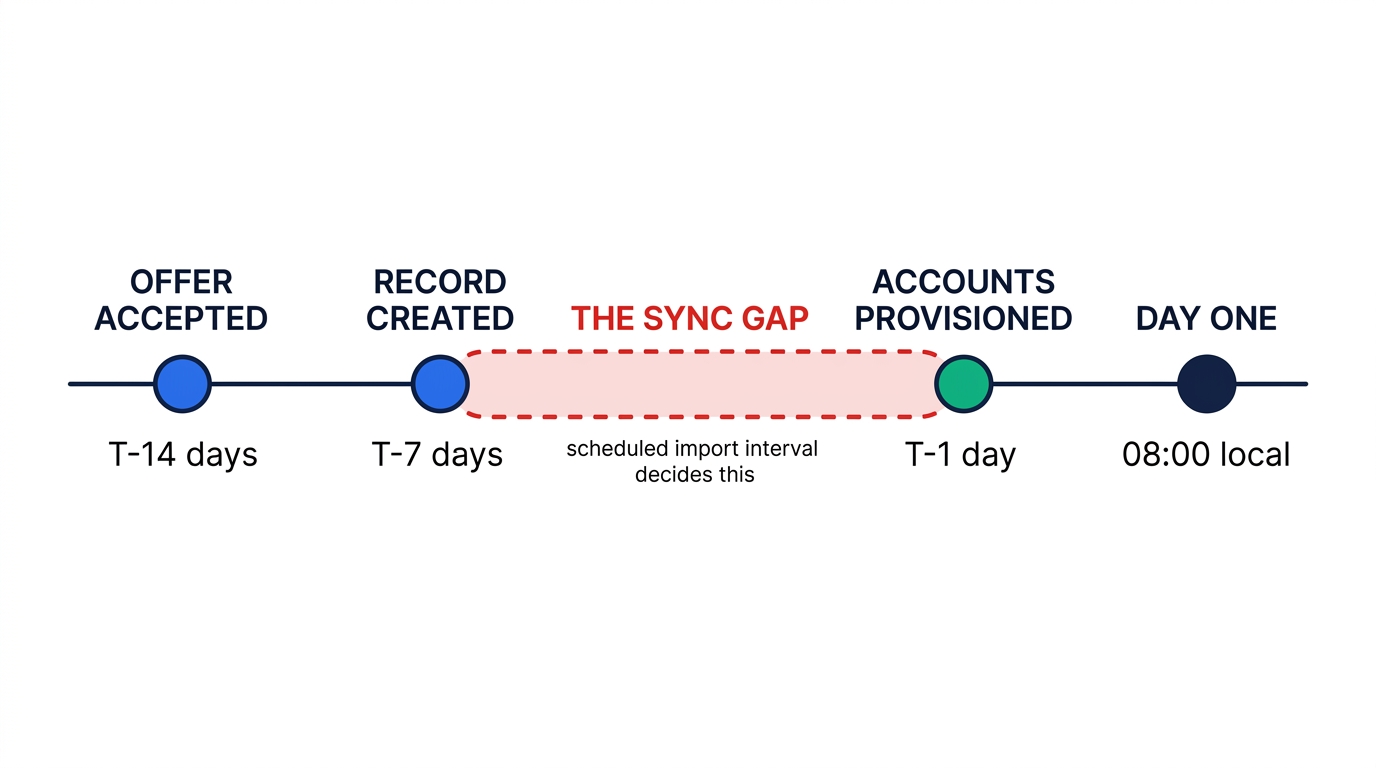
Three concrete examples from vendor documentation:
What the docs actually say
- Okta + Workday. Workday Real-Time Sync does push user creation, update, and termination events immediately. But Okta's own documentation notes that some actions do not trigger RTS — updates to the
Second EmailandManager Usernameattributes among them — and recommends pairing RTS with scheduled imports on a one-to-two day interval to reconcile what real-time misses. A manager reassignment that lands in that window will not propagate until the next scheduled import. - Okta + BambooHR. The integration exposes a
Pre-Start Intervalsetting measured in days. Set it to 7 and only users whose hire date falls within the next week are considered active and imported into Okta. Leave it at a value shorter than your provisioning lead time and the account simply will not exist early enough to be useful. - Microsoft Entra Lifecycle Workflows. The workflow execution schedule defaults to every 3 hours and can be configured anywhere from 1 to 24 hours. Microsoft states plainly that a workflow will not run earlier than the time specified in the attribute, but the tenant schedule can delay it. A "run at 5 a.m. on the hire date" workflow on a default 3-hour tenant schedule can therefore actually fire at 7 a.m.
None of this is a defect. It is a reasonable engineering trade-off between API load and freshness. But it has a direct operational consequence: if you schedule provisioning to happen on the start date, you have designed a race condition. The fix is not a better tool. It is to move the trigger earlier.
How to close the gap
- Provision on the offer-accepted event, not the start date. Both Okta and Entra support pre-hire flows — Entra's
offsetInDaysaccepts negative values down to −180 days, and its Onboard prehire employee template exists specifically for this. Target T−2 days, not T−0. - Set the pre-start window wider than your provisioning lead time. If Okta's BambooHR
Pre-Start Intervalis 7 days and your laptop shipping takes 10, the account arrives after the hardware. Set the interval from the longest downstream dependency, not from a default. - Tighten the tenant schedule where it is cheap to do so. Entra's execution schedule goes down to 1 hour. On a normal hiring volume the extra API traffic is immaterial and the tail latency drops from three hours to one.
- Hardcode the time component and mind the timezone. Workday and SAP SuccessFactors always send timestamps in UTC. Microsoft's guidance for single-timezone organizations is to hardcode the time portion — 5 a.m. for joiners, 10 p.m. for last-day-of-work workflows — rather than inheriting whatever the HRIS emitted.
- Give the Temporary Access Pass a realistic lifetime. Microsoft recommends a maximum TAP lifetime of 24 hours precisely because a new hire in a different timezone may receive their credential well before they can use it. A one-hour TAP issued at 5 a.m. UTC is useless to someone starting at 9 a.m. Pacific.
- Verify the date attributes are actually populated. Before building anything, query a handful of real pre-hire accounts and confirm
employeeHireDateis non-null. This is the single most common reason a correctly-built lifecycle workflow silently never fires.
6 Layer 3: orchestration for everything the IdP won't do
The identity provider creates accounts. It does not email a handbook, chase an unsigned NDA, open a hardware ticket, book a buddy lunch, or escalate to a manager who has ignored three reminders. That is the iPaaS layer, and here the choice is genuinely about the billing meter.
Make
Make prices in credits, where most individual actions consume one credit — reading data, searching, creating, updating, deleting, transforming, iterating. Router modules and error handlers are free. Published tiers at 10,000 credits per month: Core at $9, Pro at $16, Teams at $29, with a free tier at 1,000 credits.
For onboarding specifically this is a strong fit, because onboarding workflows are long — a realistic sequence has fifteen to thirty steps — but low-volume, running once per hire rather than continuously. Make's per-action meter at $9/month for 10,000 credits gives a 20-employee company enormous headroom.
Zapier
Zapier's meter is the task, counted whenever a Zap successfully completes a unit of work. Usefully, triggers, polling, and the built-in Filter and Formatter steps do not consume tasks — which softens the per-step cost more than the headline suggests. Published pricing runs from a free tier at 100 tasks through Professional starting at $19.99/month for 750 tasks and Team from $69/month for 2,000, on annual billing. Overages bill at 1.25× the base rate on annual plans and 2.5× on monthly.
Zapier's advantage is catalog breadth: if your onboarding touches an obscure regional benefits portal, Zapier is the most likely to have a connector. Its disadvantage is that a 25-step onboarding sequence consumes 25 tasks per hire, and the tiers are priced for higher-frequency, lower-step-count automation.
n8n
n8n meters the execution — one full workflow run, regardless of how many steps it contains or how much data it moves. For long onboarding sequences this is structurally the cheapest model available: a 40-step onboarding flow costs exactly the same as a 4-step one. Cloud pricing is Starter at €20/month for 2,500 executions, Pro at €50/month for 10,000, and Business at €667/month for 40,000, billed annually. The self-hosted Community Edition is free under n8n's fair-code license.
The self-hosting option carries real weight in an HR context, because onboarding workflows handle salary, national ID numbers, home addresses, and emergency contacts. Keeping that payload inside your own infrastructure is a materially easier conversation with a privacy officer than routing it through a third-party US automation vendor. If you are already on Zapier and this argument lands, we wrote the cutover in detail: how to migrate from Zapier to n8n.
Workato
Workato is genuinely the strongest tool in this layer for large, governed environments — recipe versioning, environments, approvals, and a deep HR connector library. It is also the only Layer 3 option here with no published pricing at all. Buyer-side aggregators report annual contracts in the region of $10,000–$25,000 for small companies, $50,000–$130,000 for mid-market, and $120,000–$300,000+ for enterprise, with monthly task pools and overage charges. We report those as third-party estimates because Workato does not publish rates.
The honest test: if your onboarding automation is the reason you would buy Workato, you are overbuying. Workato earns its cost when it is running forty integrations across finance, sales, and HR — not when it is sending welcome emails.
Layer 3 verdictUnder 200 hires a year, Make at $9/month is the best value in the category. n8n self-hosted wins when data residency or long step counts dominate. Zapier wins on connector coverage for unusual apps. Workato only makes sense as an existing enterprise platform you are extending — never as an onboarding purchase.
We compared these three head-to-head on billing behavior rather than feature lists in Make vs. Zapier vs. n8n, which is the deeper read if Layer 3 is the only decision you are actually making.
7 The cost math, and where the money actually is
Three billing units, three curves. Layer 1 and Layer 2 bill per person on payroll — they scale with headcount whether or not you are hiring. Layer 3 bills per unit of work — it scales with hiring volume. That distinction produces a result most roundups get backwards.
Take a realistic mid-market case: 120 employees, 40 hires a year, a 25-step onboarding workflow.
| Stack | Layer 1 | Layer 2 | Layer 3 | Monthly | Annual |
|---|---|---|---|---|---|
| Microsoft-native Entra P1 already owned via M365 E3 |
BambooHR Core $1,200 |
Entra ID Gov. $840 |
Make Pro $16 |
$2,056 | $24,672 |
| Best-of-breed mixed or Google-centric estate |
BambooHR Core $1,200 |
Okta Essentials $2,040 |
Make Pro $16 |
$3,256 | $39,072 |
| Consolidated Rippling at a blended $25 PEPM |
Rippling (Layers 1 + 2) ~$3,040 |
Make Pro $16 |
~$3,056 | ~$36,672 | |
Layer 1 and 2 figures use published rates at 120 seats. The Rippling row uses a third-party blended estimate because module pricing is not published; treat it as a planning placeholder, not a quote.
Two things fall out of that table.
First: the Microsoft-versus-Okta decision is worth about $14,400 a year at this headcount — more than the entire HRIS line. If you are already paying for Entra ID P1 inside a Microsoft 365 E3 subscription, the marginal cost of full lifecycle automation is $7 per seat. Nothing else in this evaluation moves the number that much, which is why "which IdP are we already committed to" should be the first question asked, not the last.
Second: Layer 3 is a rounding error. At 40 hires a year with a 25-step workflow, the arithmetic is unforgiving:
1,000 credits/year — inside the free tier's monthly allowance twelve times over1,000 tasks/year, roughly 83/month — the $19.99 Professional tier is ampleThe orchestration layer accounts for well under 1% of the stack cost at typical hiring volume. Yet it is the layer most "best HR automation tools" articles spend the most words on, because iPaaS vendors run affiliate programs and HRIS vendors mostly do not. If you are optimizing your onboarding automation budget, you are optimizing Layer 2.
A note on the ROI numbers you will be shown
Every vendor deck justifying this spend cites the same figure: an average cost-per-hire of roughly $4,700, attributed to SHRM. It is worth knowing where that number comes from. SHRM's widely-circulated benchmarking figure is $4,129, from its fiscal-year 2015 report, with data collected in early 2016. The commonly quoted "$4,700" is a rounded, inflation-adjusted derivative of it; SHRM's more recent update puts non-executive cost-per-hire at $5,475.
Similarly, the frequently cited productivity and retention gains — 50% greater new-hire productivity and 69% three-year retention from SHRM, 82% retention improvement from the Brandon Hall Group and Glassdoor study — measure the effect of structured onboarding programs, not of automation software. Automating a bad onboarding process reproduces it faster. Build the checklist that works manually first; then automate the version you have validated.
8 Which stack to pick
| If you are… | Layer 1 | Layer 2 | Layer 3 |
|---|---|---|---|
| Under 25 people, one country | BambooHR ($250 flat) or Deel Core HR (free) | Google Workspace or Entra native provisioning — skip a dedicated IdP | Make free tier |
| 25–150, Microsoft 365 | BambooHR Core | Entra ID Governance ($7/user/mo) | Make Core or Pro |
| 25–150, Google Workspace | BambooHR Core or HiBob | Okta Essentials or JumpCloud | Make Pro |
| Small IT team that also owns laptops | BambooHR Core | JumpCloud (device + lifecycle modules) | Make or n8n |
| Hiring across borders without entities | Deel (EOR) or Rippling | Entra or Okta, per app estate | n8n self-hosted (data residency) |
| Consolidation-minded, 50–500 | Rippling — Layers 1 and 2 in one vendor | Make | |
| 1,000+ with an integration team | Workday or HiBob | Okta or Entra, governed | Workato, if already licensed |
One pattern to notice: in six of seven profiles, Layer 3 is the cheapest tier of the cheapest tool. The decision that carries the cost and the risk sits in Layer 2.
9 What this stack still will not do
Three honest limits, since none of the top-ranking articles state them.
Offboarding is the half that actually carries risk, and it is harder. Provisioning failures are visible — a new hire complains within an hour. Deprovisioning failures are silent, and they are what auditors find. Entra's Lifecycle Workflows include offboarding templates (disable account, remove from all groups and Teams, strip licenses, delete after a delay), and Microsoft explicitly notes that the schedule cannot be enabled for the real-time Leaver and Mover scenarios by design. Build the leaver workflow in the same sprint as the joiner workflow, or you will not build it at all.
SCIM coverage is narrower than the connector count implies. An IdP catalog entry may mean SSO only, not provisioning. Before you assume an app will be auto-provisioned, verify it supports SCIM user creation — not just SAML sign-in. The apps that most often fall short are exactly the departmental tools HR cares about: benefits portals, learning platforms, regional payroll add-ons.
Nothing here fixes the manager. The most common cause of a bad first week is not a missing account; it is a hiring manager who has not prepared anything. Automation can send reminders and escalate, and Entra's templates do exactly that. It cannot make someone care. Structured onboarding is a management practice with software support, not a software category.
How we evaluated. We began from the nine articles currently ranking for this query, catalogued which tools they cover and which criteria they use, and identified the gaps — pricing transparency, identity provisioning depth, and offboarding — that none of them addressed. We then verified every price against the vendor's own published pricing page during August 2026, and where a vendor publishes nothing (Rippling module rates, HiBob, Workato), we label the figure as a third-party estimate rather than presenting it as fact. Technical behavior claims — sync intervals, scheduling limits, attribute prerequisites, template contents — come from vendor implementation documentation (Okta Help Center, Microsoft Learn), not from marketing pages. This is a desk-based evaluation of published documentation and pricing; we did not deploy each stack in a production tenant. Based on our research, no evaluation of this kind should be treated as a substitute for a proof of concept against your own app estate.
10 Frequently asked questions
What are the best automation tools for HR?
Which is the best workflow automation tool?
What is the best tool for employee onboarding?
What are the top 5 HR software platforms in 2026?
Why do new hires still lack accounts on day one even with automation configured?
employeeHireDate populated, and that attribute is not filled in by default. Check the trigger offset, the import window, and the source attributes in that order.11 Sources and further reading
- BambooHR — Plans and Pricing. Core, Pro, and Elite per-employee rates and the 25-employee flat-rate floor. Checked August 2026.
- Okta — Workforce Identity Pricing. Starter and Essentials Suite rates, included Workflows counts, and the $1,500 annual contract minimum. Checked August 2026.
- Microsoft — Entra Pricing. Entra ID P1, P2, and ID Governance per-user rates. Checked August 2026.
- Microsoft Learn — Plan a Lifecycle Workflow deployment. Workflow limits, the 3-hour default execution schedule,
offsetInDaysrange, attribute prerequisites, template contents, and Temporary Access Pass guidance. - Okta Help Center — Workday Real-Time Sync. Which events RTS does not trigger on, and the recommendation to pair it with scheduled imports on a one-to-two day interval.
- Okta Help Center — Integrate BambooHR with Okta. The Pre-Start Interval setting and its effect on which users are imported.
- Zapier — Pricing. Task definition, tier allowances, and overage multipliers. Checked August 2026.
- Make — Pricing. Credit model, per-action consumption, and tier rates at 10,000 credits. Checked August 2026.
- n8n — Pricing. Execution-based billing definition, cloud tier rates, and the self-hosted Community Edition. Checked August 2026.
- JumpCloud — Pricing. À la carte module rates including HRIS integration and user lifecycle management. Checked August 2026.
- SHRM — Benchmarking Report: $4,129 Average Cost-per-Hire. The origin and vintage of the cost-per-hire figure widely recirculated as "$4,700".

Technology consultant with 10+ years in the Japanese tech industry. Specializing in SaaS evaluation, workflow automation, and B2B tool integration.