How to Migrate from Zapier to n8n (2026): The Cutover Playbook and the Execution-Count Trap
TL;DR
There is no import button. Migrating from Zapier to n8n is a rebuild, and the part that goes wrong is almost never the rebuilding — it is the billing math and the cutover.
Two facts kill most migration business cases. First, Zapier does not bill you for Filters, Paths, Formatter, Delay, Looping, Storage, or Digest steps, so the popular "10-step Zap costs 10 tasks, n8n costs 1 execution" comparison overstates your savings — often by 2–3x. Second, n8n's Schedule Trigger burns one execution every time it fires, whether or not there is work to do, while Zapier never bills for triggers at all. Rebuild a 15-minute polling Zap as a Schedule Trigger and you will consume 2,880 executions a month for a workflow that cost you almost nothing on Zapier.
Run the numbers on billable steps, not total steps. In practice self-hosting is a false economy below roughly 10,000 executions per month; the real trigger to move is n8n's Pro → Business price cliff (€50 to €667/month) or a data-residency requirement — not a generic promise of "90% savings."
Every guide to this migration tells you the same six things: audit your Zaps, spin up n8n, rebuild the important ones, run both in parallel for a week, cut over, celebrate the savings. That advice is not wrong. It is just the easy half, and it quietly skips the two places where migrations actually fail: a cost model built on the wrong unit, and a "parallel run" that writes every record twice.
This playbook covers the whole thing in seven phases, with the arithmetic done properly. If you have not yet settled on n8n as the destination, start with our comparison of Make vs Zapier vs n8n, which works through how each platform's billing unit shapes the decision. This article assumes the decision is made and you now have to execute it without breaking production.
Before you commit
Audit what you are actually paying for
The first move is not opening n8n. It is finding out what your Zapier bill is really made of, because the number you need is not "how many steps do I have" — it is how many billable tasks do I consume, and which Zaps consume them.
Zapier's own documentation is explicit about which steps count. A task is charged when Zapier successfully completes a unit of work, which in practice means action steps. Everything else in the following table is free:
| Step type | Cost | Notes |
|---|---|---|
| Trigger (incl. polling) | Free | Polling every 1–15 min costs nothing |
| Action step | 1 task | Per successful run |
| Filter | Free | Unlimited |
| Paths | Free | Unlimited |
| Formatter | Free | Date, text and number utilities are free |
| Delay | Free | Unlimited |
| Looping | Free | The loop step itself; actions inside it still bill |
| Storage, Digest, Tables, Forms | Free | Built-in data tools are free |
| Code by Zapier | 1+ task | 1 at standard runtime, more with extended runtime |
| Sub-Zaps | Multiple | Call, Return, and each action inside all bill separately |
| Errored / halted steps | Free | Failures are not charged |
| Replayed steps | 1 task | A full replay re-bills previously successful steps |
A "12-step Zap" that is a trigger, three Formatter steps, two Filters, a Path split, and four actions bills four tasks, not twelve. If your migration business case assumed twelve, you have overstated the savings by 3x before you have written a single node.
Pull the three exports you need
Zapier gives you everything required to build a real inventory, and almost nobody uses it:
- Analytics dashboard reports. Download CSV reports of top task usage by Zap, by app, and by member — plus the Zaps with the highest error rates. Capped at 5,000 rows per report. This single export tells you which 10% of your Zaps are 80% of your bill, which is the only list that matters for sequencing the migration.
- Zap history export. Export up to 5,000 Zap runs at a time as CSV or JSON, filtered to specific Zaps. Use this to get real run volumes and real payload shapes — you will need both to size n8n and to validate the rebuild later.
- Member task usage. On Team and Enterprise accounts, "Download member data" produces a CSV of task consumption per member for the current billing cycle. This is how you find the shadow automations built by someone who left the company.
By the end of Phase 0 you should have a spreadsheet with one row per Zap: trigger type, billable action count, monthly runs, monthly tasks, error rate, and the apps involved. Everything downstream keys off this sheet.
Sort before you build
Classify every Zap into one of four buckets
Treating the migration as "rebuild all 40 Zaps" is how a two-week project becomes a two-month one. Zaps do not port uniformly. Sort them first.
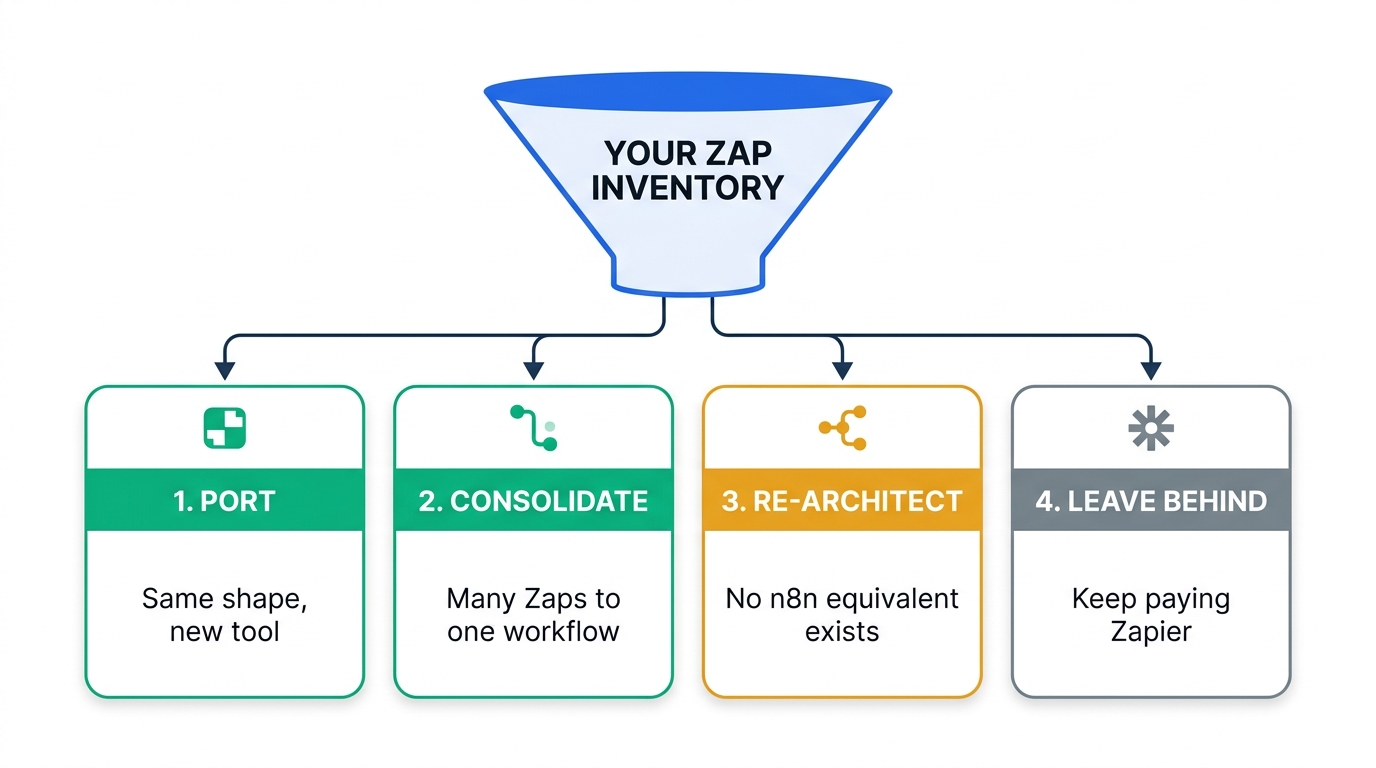
Port — same shape, new tool
Webhook or app-triggered, linear, using connectors n8n ships natively. Zapier's Filter becomes an IF node, Paths become a Switch node, Code by Zapier becomes the Code node (JavaScript or Python). These are mechanical and fast — budget 20–45 minutes each including testing.
Consolidate — many Zaps into one workflow
Any set of Zaps firing on the same trigger event, or chained together with Sub-Zaps, collapses into a single n8n workflow with branches. This is where n8n's per-execution billing genuinely pays: four Zaps on one "new deal created" event become one execution instead of four separate Zap runs.
Re-architect — no equivalent exists
Zaps leaning on Zapier's free built-ins with different semantics in n8n: Digest, Storage, Tables, Forms, Interfaces, Chatbots, and Agents. These are not node swaps; they are redesigns, and some of them get more expensive after the move. Budget 2–6 hours each.
Leave behind — keep paying Zapier
Low-volume Zaps on niche connectors where n8n has no node and the vendor API is not worth wrapping. n8n ships roughly 400–500 native integrations against Zapier's 8,000+; the gap is real at the long tail even though the HTTP Request node closes most of it.
The Class 3 example worth understanding
Digest by Zapier is the cleanest illustration of why "n8n is cheaper per run" is not a universal truth. Digest collects entries across many Zap runs and releases them on a schedule — daily, weekly, or once a threshold is hit — and it costs zero tasks.
n8n has no equivalent built-in. You rebuild it as two workflows: a collector that appends each event to a Data Table (native persistent storage, available on Cloud and on self-hosted from v1.113.1), and a scheduled sender that reads the table, aggregates, sends, and clears it. Functionally identical, and architecturally cleaner. But the collector now costs one execution per event where Zapier charged nothing, and the sender costs one execution per fire.
The Zaps that benefit most from n8n are action-heavy: many billable writes per run. The Zaps that get worse are utility-heavy: lots of free Zapier formatting, filtering, and batching wrapped around one or two actions. Sort your inventory by billable-actions-per-run and migrate from the top down.
The number that decides everything
Run the break-even math on the right unit
Here is the part that no amount of rebuilding skill can rescue if you get it wrong.
How n8n counts an execution
Per n8n's documentation, production executions count like this:
| Event | Execution cost | Detail |
|---|---|---|
| Schedule Trigger fires | Counts — every fire | One execution per fire, regardless of outcome |
| Polling trigger finds data | Counts | Only when new data is found |
| Polling trigger finds nothing | Free | Empty polls do not count |
| Webhook receives a request | Counts | One per inbound request that activates the trigger |
| Malformed request | Free | Fails before the workflow starts |
| Manual / editor test run | Free | Building and testing costs nothing |
| Sub-workflow call | Free | Only the parent top-level execution counts |
| Error workflow | Free | Dedicated error handlers do not count |
Read the first and third rows together and the trap becomes obvious. On Zapier, a polling trigger checking a folder every 15 minutes is free forever; you only pay when an action runs. The instinctive n8n rebuild is a Schedule Trigger every 15 minutes that fetches, filters, and acts. That Schedule Trigger fires 2,880 times a month and bills every one of them.
triggers .......... 2,880 polls → 0 tasks
actions ........... 20 events × 2 actions → 40 tasks
monthly cost ... 40 tasks
// n8n rebuild #1: Schedule Trigger every 15 min (the instinctive port)
schedule fires .... 4/hr × 24 × 30 → 2,880 executions
monthly cost ... 2,880 executions — blows the entire Starter plan
// n8n rebuild #2: native polling trigger (the correct port)
empty polls ....... 2,860 → 0 executions
polls with data ... 20 → 20 executions
monthly cost ... 20 executions — 144x cheaper than rebuild #1
Same business logic. Two orders of magnitude apart in cost. The rule: use a native app polling trigger or a webhook wherever one exists, and reserve the Schedule Trigger for work that genuinely must run on a clock — nightly reconciliations, report generation, cleanup jobs.
The tier cliff, not the tool, is the real decision point
n8n Cloud's published pricing (August 2026) is €20/month annually for Starter (2,500 executions), €50/month for Pro (10,000 executions), and €667/month for Business (40,000 executions, plus the self-hosted license, SSO/SAML/LDAP, and Git version control). Enterprise is custom. All paid tiers include unlimited users, unlimited workflows, unlimited steps per workflow, and every integration — executions are the only meter.
Plot that and the shape of the decision changes. Pro to Business is a 13x price increase for 4x the executions. That cliff, not any comparison against Zapier, is what determines whether you should self-host.
| Monthly executions | Cheapest sane option | Why |
|---|---|---|
| Under 2,500 | n8n Cloud Starter — €20/mo | A €8/month server plus any ops time at all costs more than €20. Self-hosting here is a hobby, not a saving. |
| 2,500–10,000 | n8n Cloud Pro — €50/mo | Still under the cost of two engineer-hours a month. Self-host only if compliance requires it. |
| 10,000–40,000 | Self-hosted Community Edition | The cliff. Business is €667/mo. A 4 vCPU/8 GB box runs roughly €8.50/mo on Hetzner against $24–36 for comparable specs elsewhere. Even at 4 ops-hours a month you are far under €667. |
| Over 40,000 | Self-hosted with queue mode | Horizontal workers on your own infrastructure. Compare against a custom Enterprise quote. |
| Any volume, regulated data | Self-hosted | n8n Cloud holds SOC 2 Type II with EU hosting, but if data may not leave your environment at all, self-hosting is the only answer. |
One more line item worth knowing: n8n runs a startup program offering 50% off self-hosted Business — €333/month billed annually — for companies with fewer than 20 employees and under €5M in total funding. If you are in that band and want Business features without running Community Edition, ask before you architect around the full price.
Community Edition is free but not open source in the OSI sense. The Sustainable Use License permits use "only for your own internal business purposes or for non-commercial or personal use." Consulting and support services around n8n are explicitly allowed, but hosting n8n and charging customers for access, or embedding it so your customers use it inside your product, requires a commercial license. Files marked .ee. require an Enterprise License regardless. Agencies running client workflows on their own Community instance should read the license before, not after, the migration.
Infrastructure
Stand up n8n the way it will run in October
If you are deploying in the second half of 2026, one date should shape your setup: n8n 3.0 lands in October 2026 and drops npm/npx installs entirely. Self-hosted deployments will require Docker. It also removes the legacy Function node, the legacy Function Item node, the Item Lists node, and the $getPairedItem expression helper; changes Execute Workflow node behavior; retires Chat hub; and discontinues workflow URL imports in the editor.
Deploy with Docker Compose from day one, and build every workflow with the Code node (never legacy Function nodes) and with Split Out / Aggregate / Sort / Limit / Remove Duplicates / Summarize (never Item Lists). Migrating into deprecated nodes and then migrating off them two months later is entirely avoidable work.
Sizing and the queue-mode threshold
n8n runs on SQLite out of the box, which is fine for a single-process evaluation instance and unsuitable for anything else — SQLite does not support concurrent writes from multiple processes and will corrupt data if you try. Production means PostgreSQL.
The moment you need more than one worker, you need queue mode: set EXECUTIONS_MODE=queue on the main instance and every worker, back it with PostgreSQL (13+ is the documented queue-mode minimum) and Redis (6+ if you set a Redis username). The main process receives webhooks and pushes jobs to Redis; workers pull and execute them. We cover the full production topology in our n8n self-hosting and queue mode production setup guide.
On sizing, RAM is the bottleneck, not CPU. Each in-flight execution holds its payload in memory, and a single webhook workflow processing a large JSON body can consume 150–300 MB by itself. A 2 GB/1 vCPU box will technically boot n8n; production workloads generally want 4 cores and 8 GB or more, and a team running 50+ workflows with steady webhook traffic should plan for 4–8 cores, 16 GB, and NVMe storage.
n8n encrypts every stored credential with N8N_ENCRYPTION_KEY. If you lose that key, every API key, OAuth token, and database password in your instance is permanently unrecoverable. There is no reset and no support path. The classic failure is running n8n in a container without a persistent volume for ~/.n8n: on restart n8n generates a fresh key, the workflows survive, and every credential inside them dies. Set the key explicitly, store it in your secrets manager, and back it up separately from the database.
Budget the OAuth work honestly
Zapier ships pre-approved OAuth apps for its connectors; you click "connect" and you are done. On n8n you will register your own OAuth applications with Google, Microsoft, Salesforce and similar vendors for several integrations — which can mean consent screens, verification, and in some cases a review process measured in days. For mainstream tools it is 5–10 minutes each. For anything requiring vendor approval, start it in Phase 3, not the night before cutover.
The rebuild
Translate concepts, not screens
The architectural difference matters more than any node-to-node mapping. Zapier is sequential: a trigger, then actions in a fixed order, with data passed implicitly from step to step. n8n is a node graph where each node emits a full JSON object to whatever is connected downstream, and you reference fields explicitly from the node that produced them. Trying to reproduce a Zap step-for-step fights the tool. Reproduce the outcome.
| Zapier | n8n | Watch out for |
|---|---|---|
| Zap | Workflow | Several Zaps often collapse into one workflow |
| Action step | Node | Nodes are free; executions are the meter |
| Filter | IF node | Free on Zapier; part of your billed execution on n8n |
| Paths | Switch node | n8n branches run in the same execution |
| Formatter | Set node, or Code node | A chain of Formatter steps usually becomes one Code node |
| Code by Zapier | Code node | Full JavaScript or Python, no per-run task charge |
| Looping | Loop Over Items (Split in Batches) | Batch size matters for memory |
| Webhooks by Zapier | Webhook node | New URL. See Phase 6. |
| Storage / Tables | Data Tables (v1.113.1+) | Native persistent storage; different query model |
| Digest | Data Table + Schedule Trigger | Two workflows, and it now costs executions |
| Sub-Zaps | Execute Sub-workflow node | Cheaper: only the parent execution is billed. Note 3.0 changes this node's behavior. |
| Autoreplay / error handling | Error Workflow + Retry On Fail | Error workflows do not count toward your quota |
Rebuild in the order your Phase 0 spreadsheet dictates: highest billable-task consumers first, then highest error rates, then the long tail. Test each node individually and inspect its output as you go — n8n's per-node execution view is the fastest debugging loop you will get, and it costs nothing because editor runs are not billed.
Where you are rebuilding data-sync patterns specifically, our walkthrough of syncing Google Sheets with a CRM covers the native, iPaaS, and direct-API approaches to the same problem, and the dedupe logic there transfers directly.
The part everyone gets wrong
Shadow-run. Do not parallel-run.
Standard advice says to run Zapier and n8n side by side for a few days and compare. Taken literally, this is a data-integrity incident waiting to happen. If both platforms are live on the same trigger and both write to the same destination, you get two CRM records, two invoices, two Slack messages, two emails to the customer for every single event.
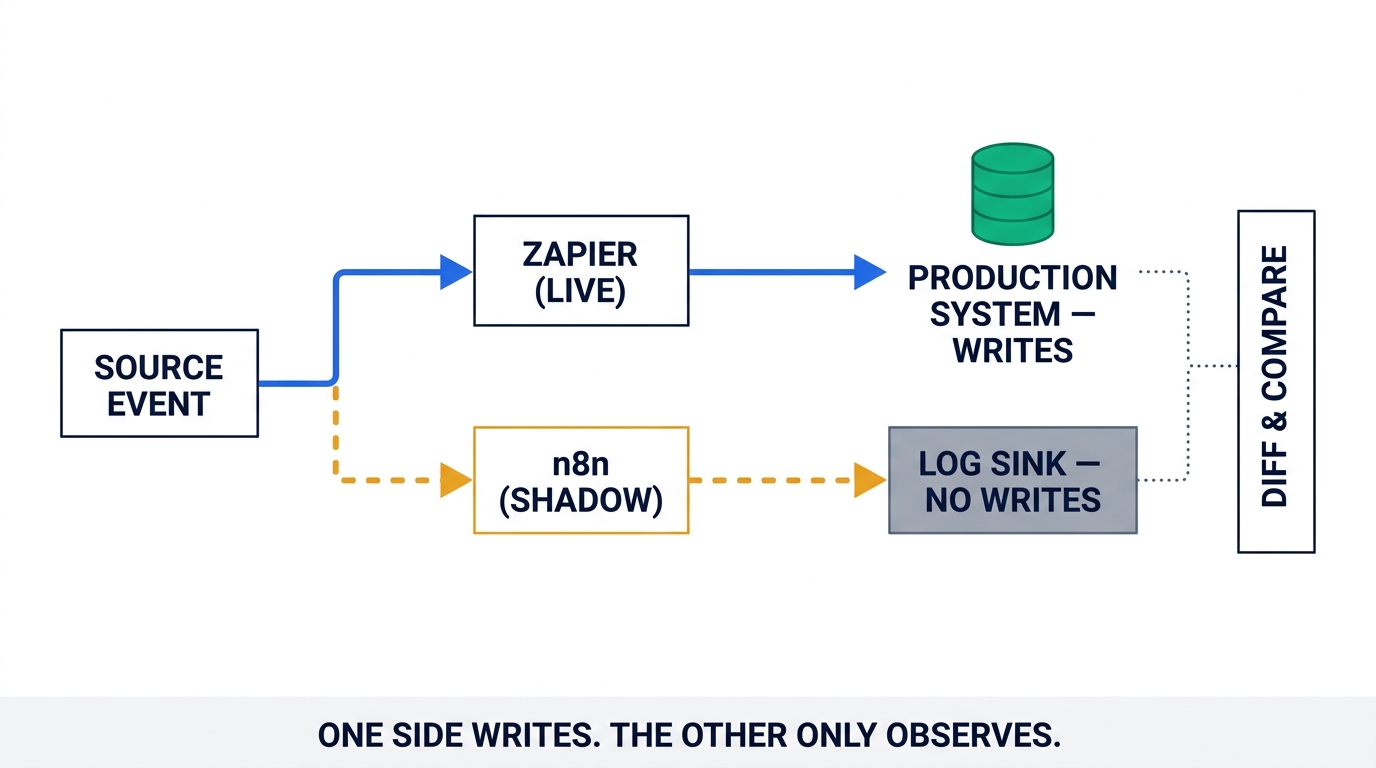
Do it in three stages instead.
Stage A — Shadow (3–7 days per batch)
Activate the n8n workflow on the real trigger, but replace every terminal write node with a log sink: a Data Table, a Postgres table, or a Google Sheet. n8n processes 100% of real production traffic and writes nothing anywhere that matters. Then diff what n8n would have written against what Zapier actually did. This catches the failure class that kills cutovers — date format drift, timezone handling, field mapping that looks right and is subtly wrong, and duplicate-detection logic that behaves differently.
Stage B — Canary with a free traffic split
Once the diffs are clean, let n8n write for real — but only for a slice, and make sure exactly one system handles each record. The elegant way to do this: add a Filter step to the Zap that excludes the slice n8n now owns (region = EU, or record type = renewal, or account ID modulo 10 = 0), and add the inverse condition in n8n.
Zapier Filter steps do not consume tasks. Gating a Zap down to a subset costs you nothing on the Zapier side and reduces your task consumption as the n8n share grows. You get a reversible, incrementally de-risked cutover with no cost penalty — flip the filter back and you are instantly rolled back.
Stage C — Make writes idempotent where you cannot split cleanly
Some flows do not partition neatly. For those, make the write itself safe to run twice: upsert on a stable external ID rather than create, use n8n's Remove Duplicates node, or keep a dedupe ledger in a Data Table keyed by source event ID. Then a duplicate execution is a no-op rather than a duplicate record. This is worth doing permanently, not just during the migration — it is also what makes replays and retries safe afterwards.
Cutover
Inventory every webhook before you turn anything off
This is the single most common cause of silent post-cutover failure, and it is structural: Zaps triggered by "Webhooks by Zapier" have a hooks.zapier.com URL that lives in someone else's system.
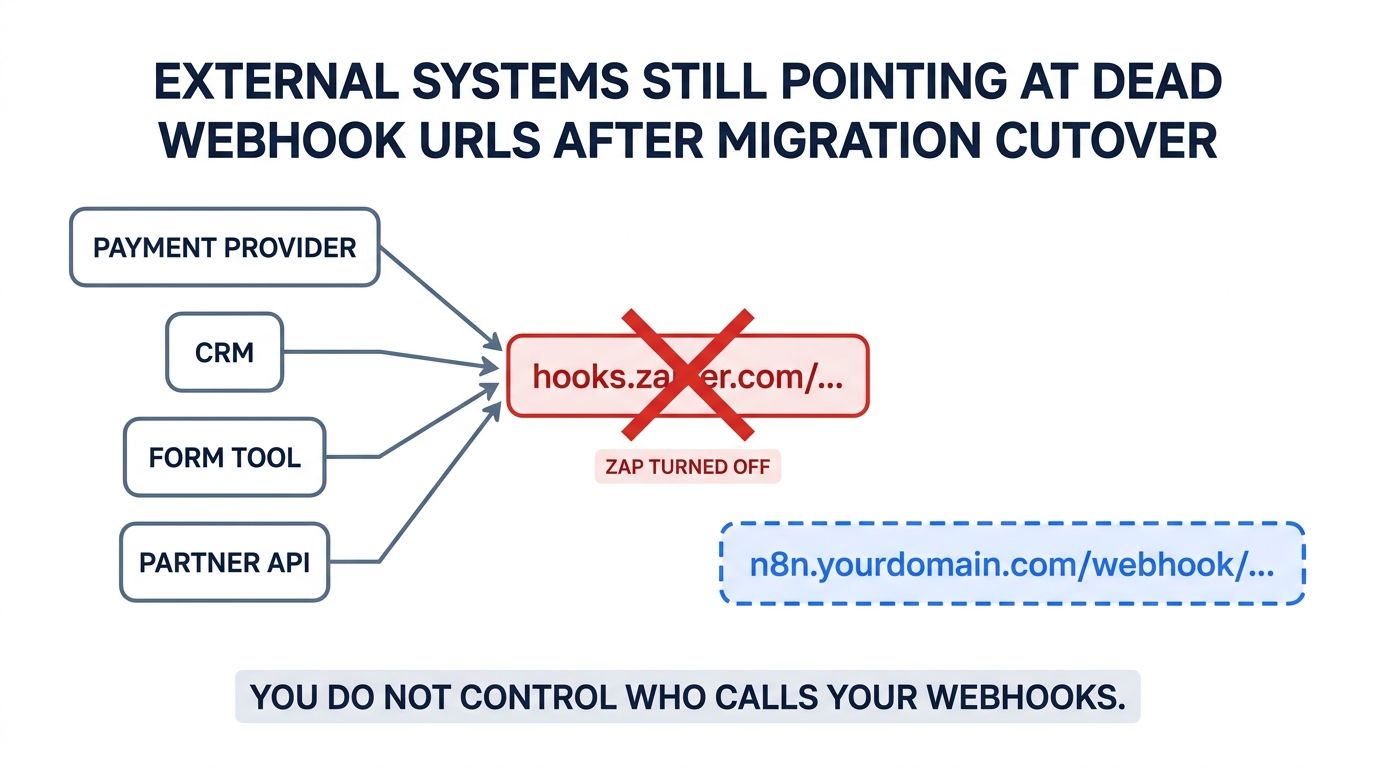
Your payment provider, your form tool, a partner's integration, a script someone wrote three years ago — each holds that URL in a config screen you may not have access to. Turn the Zap off and those events do not error loudly. They vanish.
The mitigation is a forwarder Zap. Before cutover, strip the old Zap down to a single action: POST the incoming payload to your new n8n webhook URL. Keep the same hooks.zapier.com endpoint alive so nothing external breaks, and let it relay into n8n. It costs one task per event, which is a rounding error against the confidence it buys. Retire each forwarder only once you have confirmed with the owning system that the URL has been updated — and if you never find the owner, the forwarder can simply stay.
- List every Zap with a Webhooks by Zapier trigger and its exact URL
- For each, identify the calling system and the human who owns it
- Stand up the n8n Webhook node and confirm it accepts the real payload shape
- Convert the old Zap into a forwarder rather than deleting it
- Update the caller's configuration; confirm traffic arrives at n8n directly
- Only then retire the forwarder
- Leave Zapier's plan active for one full billing cycle after the last cutover
That last point is not caution for its own sake. Zapier's Zap history is your audit trail for the migration period, and downgrading early can cost you access to it exactly when a discrepancy surfaces.
Day two
Build the operational layer Zapier gave you for free
Zapier handles failures, retries, alerting, uptime, and upgrades on your behalf. Self-hosted n8n hands all of that back to you, and the honest version of the cost comparison includes it.
Error handling is opt-in
Configure an Error Workflow for every production workflow — no exceptions. Because dedicated error workflows do not count toward your execution quota, there is no cost argument against instrumenting all of them. Route failures to a durable store (Postgres, a Data Table, or S3) plus a real alerting channel, so you have a dead-letter queue rather than a notification someone missed.
At the node level, enable Retry On Fail with a sensible attempt count and wait interval for anything hitting an external API — that covers the transient timeouts and rate limits that otherwise show up as mysterious data gaps. Use error output branches for non-critical steps (an optional enrichment lookup should not abort a workflow) and let critical steps fail loudly.
Backups, upgrades, and the ongoing tax
- Backups: PostgreSQL dumps on a schedule, plus
N8N_ENCRYPTION_KEYstored separately in a secrets vault. A database backup without the key restores workflows with dead credentials. - Upgrades: n8n releases frequently, and major versions can bring breaking changes to node configuration, credential format, or database schema. Pin your image tag, test upgrades in a staging instance, and keep a rollback path. Version 3.0 in October 2026 is the near-term one to plan for.
- Steady-state effort: for a small team on a stable instance, roughly an hour a month once past initial setup. Price that at your loaded engineering rate and put it in the comparison table. It is what turns "€8 a month versus €667" into an honest number rather than a marketing one.
If you are building out broader automation infrastructure alongside this, our survey of no-code automation tools sorted into the three categories that actually matter covers where n8n sits relative to the rest of the field.
Realistic timeline and effort
Published estimates cluster around two to four weeks for 20–40 workflows. That matches our reading of practitioner accounts, with one consistent caveat: the estimate holds when Class 3 work is small. A portfolio heavy on Digest, Storage, Interfaces, or Sub-Zap patterns will run longer, because those are redesigns rather than rebuilds.
| Phase | Elapsed | Notes |
|---|---|---|
| 0. Audit and export | 1–2 days | Mostly spreadsheet work; do not skip it |
| 1. Classification | 0.5–1 day | Determines everything downstream |
| 2. Break-even math and hosting decision | 0.5 day | Cloud vs self-hosted, decided on data |
| 3. Infrastructure | 1–3 days | Longer if OAuth apps need vendor approval |
| 4. Rebuild | 1–2 weeks | Class 1 & 2 fast; Class 3 dominates the tail |
| 5. Shadow and canary | 1–2 weeks | Overlaps rebuild; run in batches |
| 6. Cutover | 2–5 days | Gated by external webhook owners |
| 7. Day-2 hardening | 2–3 days | Error workflows, backups, alerting |
Do not migrate in alphabetical order or by "easiest first." Migrate in descending order of monthly billable tasks. The top handful of Zaps typically carry most of your bill, which means you capture most of the savings in the first week and can then take the long tail at a relaxed pace — or leave it on Zapier permanently.
When not to migrate
Three situations where the answer is to stay put, at least for now:
- Your bill is under roughly $100/month and utility-heavy. If most of your steps are Filters and Formatters, you are already getting them free, and the migration will cost more in engineering time than it saves in a year.
- Your critical path runs on long-tail connectors. With ~400–500 native n8n nodes against 8,000+ Zapier apps, the HTTP Request node can reach any documented API — but "can" means someone maintains that integration forever. Count the ones you would be hand-rolling and decide whether you want to own them.
- Nobody owns the instance. Self-hosted n8n needs a named owner for upgrades, backups, and 3 a.m. failures. If that person does not exist, use n8n Cloud or stay on Zapier. An unmaintained automation platform is worse than an expensive one.
A hybrid is entirely legitimate and rarely mentioned: move the action-heavy volume to n8n, keep a small Zapier plan for the long tail of niche connectors, and stop treating this as an all-or-nothing decision. If you are still weighing destinations, our roundup of the best Zapier alternatives for small business compares the options on real monthly cost.
Frequently asked questions
Can Zapier replace n8n?
Is n8n more powerful than Zapier?
Can I export my Zaps and import them into n8n?
Will I really save 90% by switching?
Is n8n Community Edition free for commercial use?
.ee. need an Enterprise License in any case. Agencies operating workflows on behalf of clients should get legal review of their specific arrangement.Should I self-host or use n8n Cloud?
Methodology
All pricing, billing rules, and platform limits in this article were verified against Zapier's and n8n's own published pricing and documentation in August 2026, and are cited below. Execution- and task-counting rules are drawn from each vendor's official usage documentation rather than third-party summaries, because that is precisely where the widely repeated comparisons go wrong. Migration timelines, effort estimates, and failure patterns are synthesized from published practitioner accounts and vendor community threads; where a figure is an estimate rather than a published number, we have said so. Based on our research, not on a first-party migration we performed. Vendor pricing changes frequently — reconfirm the tier prices against the linked sources before you build a business case on them.
Sources and further reading
- Zapier — How is task usage measured in Zapier? (which steps bill and which do not)
- Zapier — Pricing (plan tiers and task allowances)
- n8n — Plans and Pricing (Starter, Pro, Business, Enterprise)
- n8n Docs — Understand executions (Schedule Trigger vs polling vs webhook counting)
- n8n Docs — v3.0 breaking changes (Docker requirement, removed nodes, October 2026)
- n8n — Sustainable Use License (internal business purposes clause)
- n8n Docs — Data tables (native persistent storage)
- Zapier — Export your Zap history (CSV/JSON export limits)
- Zapier — Account usage analytics dashboard (top usage by Zap, error rates)
- Zapier — Compile data in a digest (the Class 3 pattern)
- n8n Community — Has anybody migrated workflows from Zapier to n8n? (practitioner accounts)

Technology consultant with 10+ years in the Japanese tech industry. Specializing in SaaS evaluation, workflow automation, and B2B tool integration.