Best Accounting Software for SaaS Companies (2026): 9 Options Compared on ASC 606 and Deferred Revenue
Most "best accounting software" lists are written for small businesses that invoice once and get paid. A SaaS company has a different problem: cash arrives up front, revenue has to be earned month by month, and the gap between the two is a liability on your balance sheet. Auditors and investors will check that gap. Whatever you pick has to produce a deferred revenue schedule you can defend.
This guide is for finance leads, founders, and controllers at subscription software companies. It compares nine setups on the one capability that separates SaaS accounting from ordinary bookkeeping: ASC 606 revenue recognition and deferred revenue tracking. It also shows, with a worked contract example, where each tier of tool stops being enough.
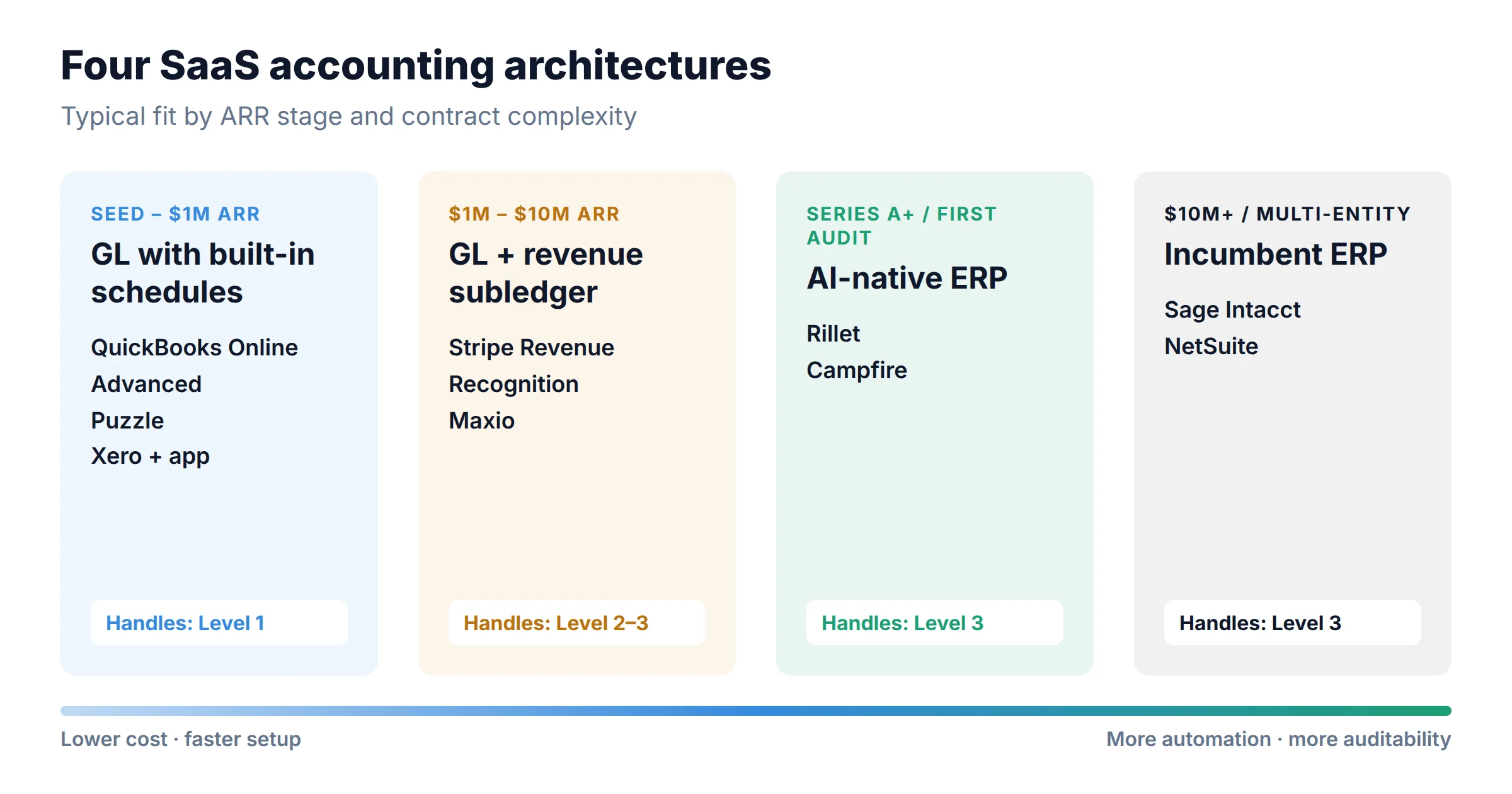
Below roughly $1M ARR with simple monthly or annual plans, QuickBooks Online Advanced ($340/month list) has built-in straight-line revenue schedules and is usually enough. Puzzle ($120/month Complete plan) is a cheaper Stripe-native option. When contracts start to include upgrades mid-term, bundled services, or usage fees, keep your general ledger and add a revenue recognition subledger such as Stripe Revenue Recognition (from $25/month) or Maxio ($599/month, billing included). When you need multi-entity consolidation and an audit-grade close, move to an ERP. Choose Rillet or Campfire if you want an AI-native system built around SaaS revenue. Choose Sage Intacct or NetSuite if your auditors, investors, or future acquirer expect the incumbents.
$1M
QuickBooks Online Advanced or Puzzle
Built-in revenue schedules for straight-line subscriptions. QBO has the bigger accountant ecosystem; Puzzle is cheaper and maps Stripe subscriptions to deferred revenue automatically.
$10M
Your GL + Stripe Revenue Recognition or Maxio
Keep QuickBooks or Xero as the ledger and push revenue logic into a subledger that handles proration, modifications, and summarized journal entries.
multi-entity
Rillet / Campfire, or Sage Intacct / NetSuite
A full ERP with native ASC 606, consolidation, and close management. The newer platforms are SaaS-first; the incumbents carry more auditor familiarity.
Section 1
Why SaaS accounting is a different problem
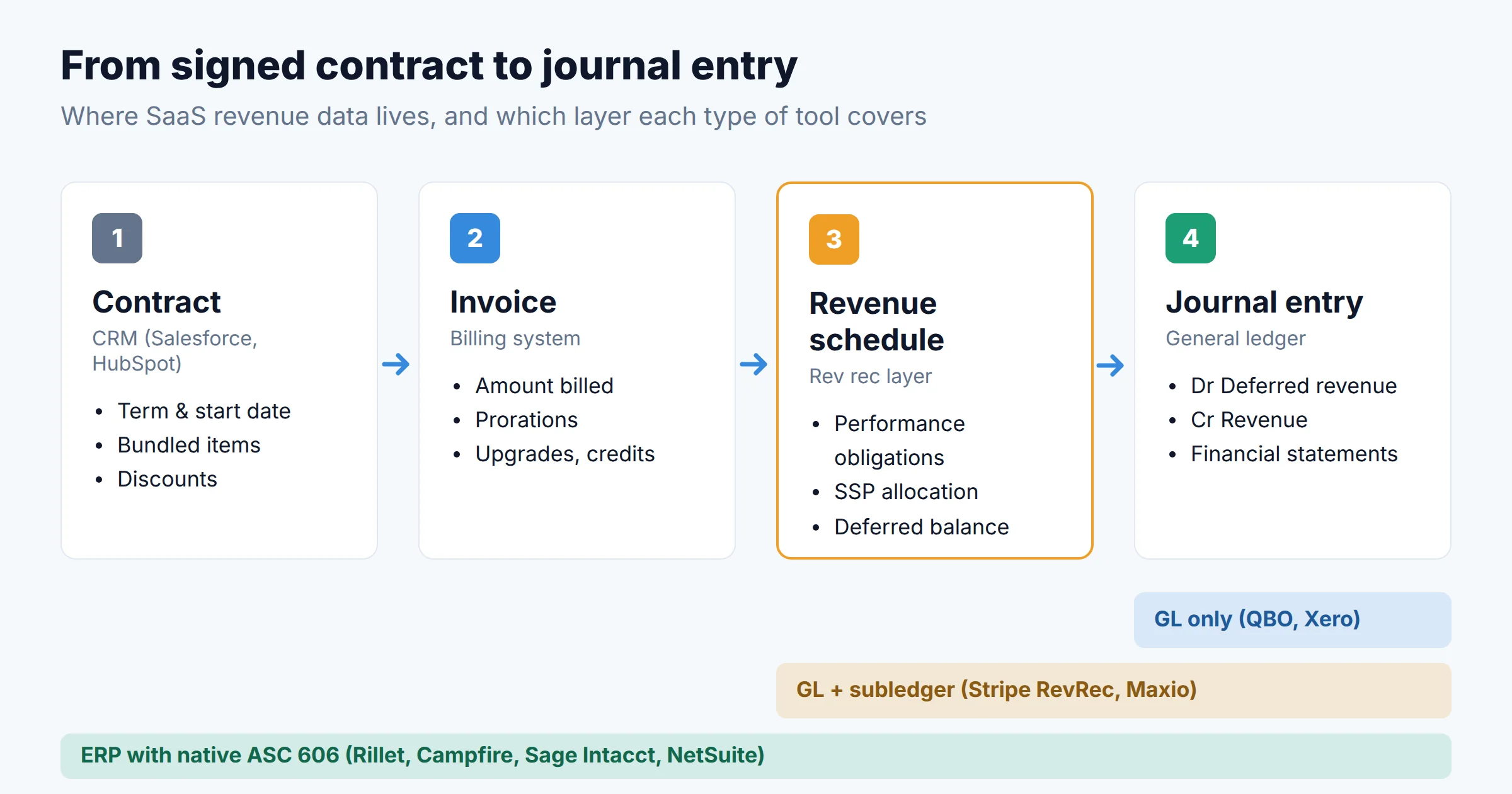
ASC 606, the US GAAP revenue standard, uses a five-step model. You identify the contract, identify the performance obligations in it, determine the transaction price, allocate that price to the obligations, and recognize revenue as each obligation is satisfied. For a plain monthly subscription, all five steps collapse into "book the invoice as revenue this month." That is why generic bookkeeping software works fine at the start.
Each of the following changes makes the five steps harder:
- Annual or multi-year prepayment. You collect $24,000 today, but only one-twelfth of it is revenue this month. The rest sits in deferred revenue and has to be released on a schedule.
- Mid-period start dates. A contract starting March 15 needs a partial first month. Monthly and daily proration give different numbers, and you have to pick one method and apply it consistently.
- Upgrades, downgrades, and early renewals. These are contract modifications. The remaining deferred balance has to be re-spread, and sometimes a cumulative catch-up is required.
- Bundles. Implementation fees, training, premium support, and usage overages may be separate performance obligations. Their share of the price is allocated by standalone selling price (SSP), which is not necessarily the price on the invoice.
- Usage-based pricing. Revenue follows consumption rather than the calendar, so the schedule depends on metering data that usually lives outside the ledger.
Your billing system creates the invoices. Your accounting software has to turn those invoices into a revenue schedule that holds up to these cases. That is the gap this comparison measures. If you are still choosing how to bill, start with our comparison of subscription billing software for SaaS. This article covers what happens after the invoice exists.
Section 2
One contract, three levels of difficulty
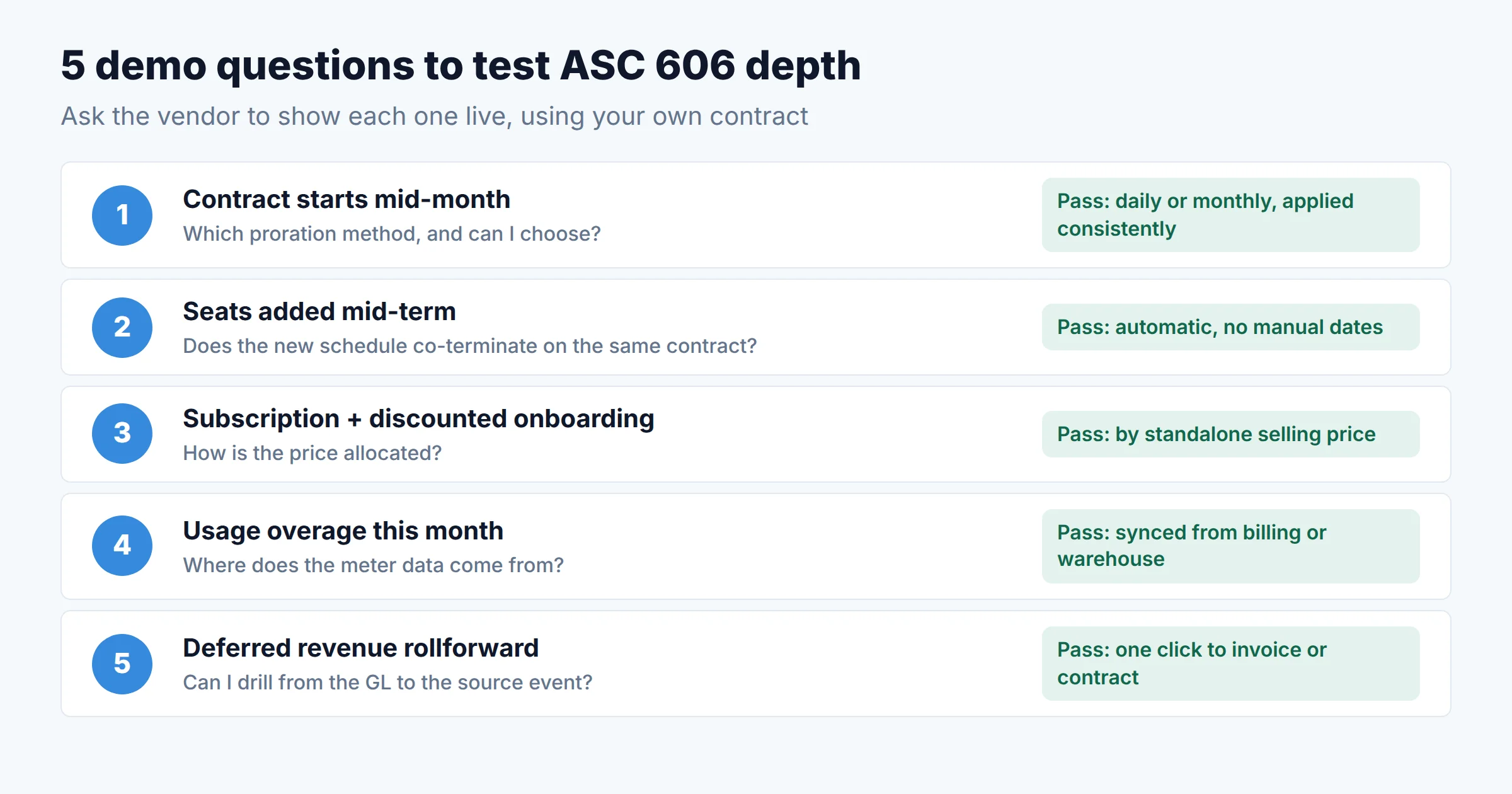
Vendor pages all claim "ASC 606 support," so a concrete contract is a better test. Here is one deal that gets harder in three stages. The figures are illustrative, chosen to make the arithmetic easy to check.
A customer signs a 12-month subscription for $24,000, invoiced and paid up front. Service starts March 15.
| Month | Monthly straight-line | Daily proration (365 days) | Deferred balance after month (daily) |
|---|---|---|---|
| Mar (17 days) | $2,000.00 | $1,117.81 | $22,882.19 |
| Apr (30 days) | $2,000.00 | $1,972.60 | $20,909.59 |
| May (31 days) | $2,000.00 | $2,038.36 | $18,871.23 |
| … | … | … | … |
| Next Mar (14 days) | $0.00 | $920.55 | $0.00 |
Both methods total $24,000. With monthly straight-line, March gets a full month for 17 days of service. Daily proration matches revenue to days of service. Either can be acceptable if you apply it consistently, but your auditors will ask which one you use. Every tool in this guide can handle Level 1.
On September 1, the customer adds seats worth another $6,000 for the remaining term, co-terminating next March 14.
The original schedule has to keep running. A second schedule for the $6,000 starts September 1 and ends on the same date. Your deferred revenue report must show both schedules under the same customer and contract. In a template-based tool, you manually create a second invoice line with its own service dates and check that it ends on the right day. That works for ten customers and gets error-prone at two hundred. Subledgers and ERPs handle Level 2 automatically. Basic GL tools need a person to do it.
The renewal includes the $24,000 subscription and a $5,000 onboarding package discounted to $2,000. The contract total is $26,000.
If onboarding is a distinct performance obligation, ASC 606 requires allocating the $26,000 across the two items by relative standalone selling price, not by invoice line. At SSPs of $24,000 and $5,000, the subscription is allocated about $21,517 (24/29 × $26,000) and onboarding about $4,483. Onboarding revenue is recognized when it is delivered, and the subscription over 12 months. Invoice-driven schedules will recognize $2,000 and $24,000 instead. Only the tools marked "full" in the table below do SSP allocation natively. Everywhere else, it ends up in a spreadsheet.
Most early-stage SaaS companies are at Level 1, reach Level 2 around the time they hire their first sales team, and hit Level 3 with their first enterprise deal. The right tool depends on how close you are to the next level, not on headcount.
Section 3
Comparison table: all 9 options
Prices below are US list prices checked on each vendor's official pricing page in early October 2026, except where marked as a third-party estimate. Quote-only vendors do not publish prices. For those, we give ranges reported by buyer-data sites and label them as estimates.
| Tool | What it is | Price (Oct 2026) | Rev rec depth | Handles up to | Best fit |
|---|---|---|---|---|---|
| QuickBooks Online Advanced | General ledger | $340/mo list (25 users) | Basic | Level 1 | Seed to ~$1M ARR, simple plans |
| Xero + rev rec app | GL + marketplace add-on | $90/mo (Established) + app fee | Basic–Mid | Level 1–2 | Multi-currency startups outside the US |
| Puzzle | AI-first GL for startups | $120/mo (Complete) | Mid | Level 1–2 | Stripe-billed startups |
| Stripe Revenue Recognition | Rev rec subledger | From $25/mo; $190–$1,650/mo annual tiers | Mid | Level 2 | Stripe-first companies on QBO/Xero |
| Maxio | Billing + rev rec | $599/mo (Grow, ≤$100K monthly billings) | Full | Level 3 | B2B SaaS, $1M–$20M ARR, finance-owned billing |
| Rillet | AI-native ERP | Quote; ~$20K–$35K/yr (third-party est.) | Full | Level 3 | Series A+ SaaS replacing QBO |
| Campfire | AI-native ERP | Quote only | Full | Level 3 | Usage/hybrid pricing, multi-entity |
| Sage Intacct | Mid-market ERP | Quote; ~$15K–$60K/yr typical (third-party est.) | Full | Level 3 | Audit/IPO track, CPA-firm ecosystem |
| NetSuite | ERP + ARM module | Quote; base ~$999/mo + users + modules (third-party est.) | Full | Level 3 | $20M+ ARR, complex ops, many entities |
"Rev rec depth": Basic = invoice-line schedules (straight-line, percentage, milestone). Mid = automated schedules from billing events, including proration and modifications. Full = contract-level ASC 606 with performance obligations and SSP allocation. Xero's depth depends on which app you add.
Section 4
Individual reviews
1. QuickBooks Online Advanced: the default ledger, with real (but basic) revenue schedules
As of October 2026, QuickBooks Online lists Simple Start at $38, Essentials at $85, Plus at $140, and Advanced at $340 per month. All plans show a 50%-off promotion for the first three months. Revenue recognition is only available on Advanced and Intuit Enterprise Suite. Plus does not include it, so a SaaS company on Plus has to track deferred revenue in a spreadsheet.
On Advanced, you attach a revenue recognition template to a product or service. Intuit's documentation lists four methods: straight-line (spread evenly over a set number of months), percentage (you set the share per period), milestone, and one-time future event. The invoice's service date starts the schedule. Editing the schedule or an item's price re-calculates it. That covers Level 1 well. Level 2 is possible if you are careful with service dates, but nothing ties two invoice lines into one contract. Level 3 allocation is not done for you.
Its real advantage is the ecosystem. Almost every outsourced accounting firm, fractional CFO, and tax preparer knows it, and almost every SaaS tool syncs to it. Our QuickBooks vs Xero comparison for growing B2B teams covers the seat-cost math in detail.
- Native revenue schedules with no add-on
- Largest accountant and integration ecosystem
- Easy to pair with a subledger later
- Rev rec requires the $340 Advanced tier
- Schedules are per invoice line, not per contract
- No SSP allocation or performance-obligation tracking
2. Xero + a revenue recognition app: flexible, but you're assembling it yourself
Xero's US plans are Early ($25), Growing ($55), and Established ($90) per month. A SaaS company with foreign customers needs Established, because multi-currency is only on that plan. Xero has no native revenue recognition engine. Deferred income is usually tracked manually through a liability account and journals, so most SaaS teams on Xero add an app from the Xero marketplace. ScaleXP and Flowrev are two examples that market IFRS 15 / ASC 606 schedules built from Xero invoices.
This works well for companies with UK, Australian, or New Zealand operations, where Xero has a strong accountant network. The cost is that you are now running two vendors, and how well the setup holds up at Level 2 depends on the app. Check how the app handles credit notes and mid-term changes before committing.
- Low base cost; unlimited users on all plans
- Strong outside the US
- Choose the rev rec app that fits your model
- No built-in revenue recognition
- Two vendors to reconcile and audit
- Multi-currency only on the $90 tier
3. Puzzle: the cheapest accrual-ready ledger for Stripe-billed startups
Puzzle is a general ledger built for venture-backed startups. Its pricing page lists Starter ($30), Core ($72), Complete ($120), and Scale ($360) per month. Revenue recognition is included from Complete upward. Puzzle says its Stripe sync maps subscriptions, refunds, and disputes directly to deferred revenue schedules, and that each schedule stays linked to the Stripe event, BILL invoice, or bank payout that created it. Auditors will want to see that link.
It keeps cash-basis and accrual books at the same time. Founders get burn and runway from the cash view, and investors get GAAP-style statements from the accrual view. For a Stripe-billed company at Level 1 or early Level 2, $120 a month is the cheapest way we found to get automated deferred revenue. The trade-off is a smaller ecosystem: fewer outside accountants know it, and invoices from non-Stripe sources need CSV or manual entry.
- Rev rec at $120/mo, well below QBO Advanced
- Stripe events map directly to deferred revenue
- Dual cash/accrual view suits founder-led finance
- Smaller accountant ecosystem
- Weaker for invoice-heavy, sales-led billing
- Not a fit for multi-entity groups
4. Stripe Revenue Recognition: a subledger that bolts onto any GL
Stripe Revenue Recognition sits between Stripe Billing and your ledger. It builds revenue schedules from Stripe invoices and subscription changes, including prorations and upgrades. It produces month-end summarized journal entries, a deferred revenue waterfall, and AR aging. It also supports monthly or 4-4-5 accounting periods.
The monthly plan is $25 a month, which covers $10,000 in monthly payment volume, plus 0.25% above that. Annual plans, billed monthly, are $190, $450, $860, and $1,650 per month for up to $100K, $250K, $500K, and $1M in monthly volume, with 0.2% charged above each tier. Transactions imported from outside Stripe count toward volume. So at about $3M ARR billed monthly (~$250K/month), you would pay $450 a month on the annual plan.
For a company already on Stripe Billing, this is the simplest way to reach Level 2 without changing ledgers. It is weaker at Level 3. Sales-negotiated bundles that never pass through Stripe as structured data still need manual adjustment.
- Low entry price; scales with volume
- Handles prorations and upgrades from Stripe data
- Summarized journal entries keep the GL clean
- Only as good as your Stripe data
- Off-Stripe contracts need CSV imports
- Not a ledger; you still need QBO, Xero, etc.
5. Maxio: billing and ASC 606 in one system, owned by finance
Maxio, formed from the merger of Chargify and SaaSOptics, combines subscription billing with ASC 606 / IFRS 15 revenue recognition. The Grow plan costs $599/month for up to $100K in monthly billings, with revenue recognition included. Above that, Scale is quote-only and adds advanced revenue management as an option. Both tiers include QuickBooks, Xero, and NetSuite integrations and unlimited seats.
Maxio is the right choice when billing and revenue recognition should sit in the same place, which is usually a sales-led B2B company with negotiated contracts, multi-year deals, and a controller who owns the order-to-cash process. It also produces SaaS metrics (MRR, churn, cohort retention) from the same data the revenue schedules use, so board reporting and the GL agree. If you are only adding revenue recognition, $599 is high. If you are also replacing a billing tool, it is reasonable.
- Contract-level rev rec plus billing in one system
- SaaS metrics from the same source as the GL
- Keeps your existing ledger
- $599/mo floor is steep for rev rec alone
- Means migrating billing too
- Scale tier is quote-only
6. Rillet: an AI-native ERP built around SaaS revenue
Rillet is a general ledger with revenue recognition, multi-entity consolidation, AR/AP, and close management built in. It integrates natively with Stripe, Salesforce, HubSpot, Rippling, Ramp, and Avalara. Revenue schedules are driven from CRM and billing data rather than re-keyed invoices. Its plain advantage over the "GL + subledger" setup is that there is no subledger to reconcile.
Rillet does not publish pricing. Buyer-data site ERP Research reports a median of about $28,300 a year, with a typical range of $20K–$35K and a first-year cost of $35K–$60K including implementation. Treat these as estimates. In 2026, the company announced a $100M Series C at a $1B valuation, led by ICONIQ, and said it has more than 600 customers. That matters if you are worried about a younger vendor surviving through your audit cycles.
- Rev rec, GL, and close in one system
- CRM-driven contracts suit sales-led SaaS
- Priced by complexity, not per seat
- No public pricing
- Younger vendor; fewer implementation partners
- More than a seed-stage company needs
7. Campfire: the AI-native option for usage and hybrid pricing
Campfire is also an AI-native ERP, but its revenue module is built for complicated pricing. Campfire says it automates ASC 606 recognition across subscription, usage, milestone, and transaction billing, including allocations and performance obligations. It tracks deferred revenue by customer, contract, and product, and reports GAAP and non-GAAP revenue from the same records. It connects to Stripe for payments, to Metronome for metering, and to Snowflake and Looker for usage data. For a company with usage-based or hybrid pricing, that is the main reason to choose it.
Campfire does not publish prices, and third-party reviews describe annual contracts quoted by entity count and modules. Reported funding is about $103M, including a Series B in October 2025. Choose Campfire over Rillet if usage revenue is a large share of your total; otherwise compare both in demos.
- Strongest fit for usage and hybrid revenue
- Data-warehouse connectors for metering
- Multi-entity consolidation built in
- No public pricing or free trial
- More than a simple subscription business needs
- Still a young ecosystem
8. Sage Intacct: the incumbent auditors know best
Sage Intacct is the established mid-market choice for SaaS companies heading toward institutional rounds or an IPO. Its contract and revenue management module handles ASC 606 and IFRS 15 recognition, and its dimensional general ledger allows reporting by entity, department, product, and customer without a chart of accounts with thousands of accounts.
Pricing is quote-only and depends on modules, users, and entities. ERP Research reports $15K–$60K a year as common for small and mid-market deployments, with large multi-entity setups exceeding $100K. The contract revenue module is quoted separately. The main reason to choose Intacct over the AI-native options is familiarity: your audit firm, your next controller hire, and a future acquirer's diligence team have likely all worked with it.
- Proven ASC 606 at audit/IPO scale
- Dimensional GL for SaaS reporting
- Large partner and talent pool
- Module-by-module pricing adds up
- Implementation through a partner, typically months
- Less automation out of the box than AI-native ERPs
9. NetSuite: when the company has outgrown "SaaS accounting"
NetSuite's Advanced Revenue Management module handles performance obligations, SSP calculation, contract modifications, and cumulative catch-up entries. This is the full Level 3 toolkit, at enterprise scale. Oracle does not publish prices. BrokenRubik, a NetSuite partner, reports a base platform of about $999 a month plus $129–$199 per full user, with the advanced financials needed for SaaS revenue sold as add-ons. It puts implementation at $25K–$50K for small deployments and $50K–$150K for mid-market ones.
Choose NetSuite when the business has needs well beyond revenue: several legal entities in different countries, inventory or hardware, complex procurement, or a board that wants the system larger companies use. For a single-entity SaaS company under $10M ARR, it is usually more system than you need.
- Full ASC 606 incl. SSP and catch-ups
- Scales to many entities and currencies
- Very large partner ecosystem
- Highest total cost of ownership here
- Implementation measured in months
- Licensing per user and per module
If you're deciding between the two incumbents specifically, our NetSuite vs Sage Intacct for multi-entity consolidation breakdown is in progress.
Section 5
7 signs you've outgrown your setup
Switching ledgers mid-year is painful, so it helps to see the signs early. If three or more of these apply, start evaluating the next tier now:
- Your deferred revenue balance lives in a spreadsheet and is reconciled to the GL with one manual journal entry each month.
- Month-end close takes more than ten business days, and most of that time is spent on revenue.
- Sales is signing bundles (implementation + subscription, multi-year with ramp pricing), and nobody is allocating by SSP.
- Your board deck's ARR does not reconcile to GAAP revenue, and you cannot explain the difference line by line.
- You opened a second legal entity (often a foreign subsidiary for hiring) and now consolidate in Excel.
- Your first financial statement audit is coming, often because of a priced round, a debt facility, or an enterprise customer's vendor review.
- Usage revenue is growing, and the meter data lives in a warehouse your ledger cannot read.
Sign 5 often arrives together with international hiring. If you are adding headcount abroad without an entity, our guide to EOR providers for startups covers that side. Sign 6 often coincides with a customer asking for a security attestation. Our SOC 2 guide for B2B SaaS founders explains how that process differs from a financial audit.
Migration caveat: moving from a GL-only setup to an ERP mid-contract means rebuilding open deferred revenue schedules in the new system. Plan the cutover for a fiscal year-end if you can, and export a full deferred revenue rollforward from the old system first. Our guide to QuickBooks alternatives for startups covers which history migrates cleanly and which does not.
Section 6
Who should choose which
| Your situation | Choose | Why |
|---|---|---|
| Pre-revenue to ~$1M ARR, Stripe self-serve, monthly/annual plans | Puzzle (Complete) | Automated deferred revenue from Stripe at $120/mo |
| Same stage, but working with an outsourced accountant who uses QBO | QuickBooks Online Advanced | Native schedules; your accountant already knows it |
| UK/ANZ entity or multi-currency from day one | Xero Established + rev rec app | Multi-currency and local accountant network |
| $1M–$10M ARR on Stripe Billing, upgrades and prorations piling up | Existing GL + Stripe Revenue Recognition | Handles Level 2 without changing ledgers |
| Sales-led B2B, negotiated contracts, replacing billing anyway | Maxio | Billing, ASC 606, and SaaS metrics from one source |
| Series A–C, first audit coming, want one modern system | Rillet | GL + rev rec + close, driven from CRM/billing |
| Usage-based or hybrid pricing, multiple entities | Campfire | Usage-aware ASC 606 and warehouse connectors |
| IPO or PE-diligence track, auditor familiarity matters most | Sage Intacct | Proven at audit scale; large talent pool |
| $20M+ ARR, many entities, operations beyond software | NetSuite | Broadest ERP scope, ARM for full ASC 606 |
If your company is not a SaaS business, or not yet, a general list will fit better. See our best accounting software for small business roundup and the 7-criteria framework for choosing accounting software.
Section 7
FAQ
What is SaaS accounting software?
Can QuickBooks handle ASC 606 for a SaaS company?
Is QuickBooks itself a SaaS company?
When do I need a separate revenue recognition tool?
What is the Rule of 40, and does my accounting software affect it?
Section 8
How we chose
Based on our research, we started from the search results for SaaS accounting and revenue recognition software, plus the tools that keep appearing in finance-team discussions. We excluded tools with no revenue recognition path, such as Wave and FreshBooks, and billing-only platforms already covered in our billing comparison. We scored each remaining option on four criteria: (1) how far it gets through the three-level contract example without spreadsheets, (2) whether it keeps an audit trail from source event to journal entry, (3) verifiable pricing, and (4) whether it fits a single-entity startup, a multi-entity group, or both. We took prices from official pricing pages in early October 2026. Where vendors are quote-only, we report third-party buyer-data ranges and label them as estimates. We did not run hands-on trials, and no vendor paid for placement.
Sources
- Intuit, QuickBooks Online pricing — quickbooks.intuit.com/pricing
- Intuit, "Set up a product or service's revenue recognition schedule" — QuickBooks Help
- Xero, US pricing plans — xero.com/us/pricing-plans
- Puzzle, pricing and revenue recognition — puzzle.io/pricing and puzzle.io/revenue-recognition
- Stripe, Revenue Recognition pricing — stripe.com/us/revenue-recognition/pricing
- Maxio, pricing — maxio.com/pricing
- Rillet, "$100M Series C" announcement — rillet.com/blog/100m-series-c
- ERP Research, Rillet and Sage Intacct pricing estimates — erpresearch.com/pricing/rillet, erpresearch.com/pricing/sage-intacct
- Campfire, revenue automation — campfire.ai/revenue-automation
- BrokenRubik, NetSuite pricing guide (Sept 2026) — brokenrubik.com
- FASB, ASU 2014-09, Revenue from Contracts with Customers (Topic 606) — storage.fasb.org (PDF)

Technology consultant with 10+ years in the Japanese tech industry. Specializing in SaaS evaluation, workflow automation, and B2B tool integration.