QuickBooks Online Pricing 2026: Every Plan, the User Caps, and What Growing B2B Teams Actually Pay
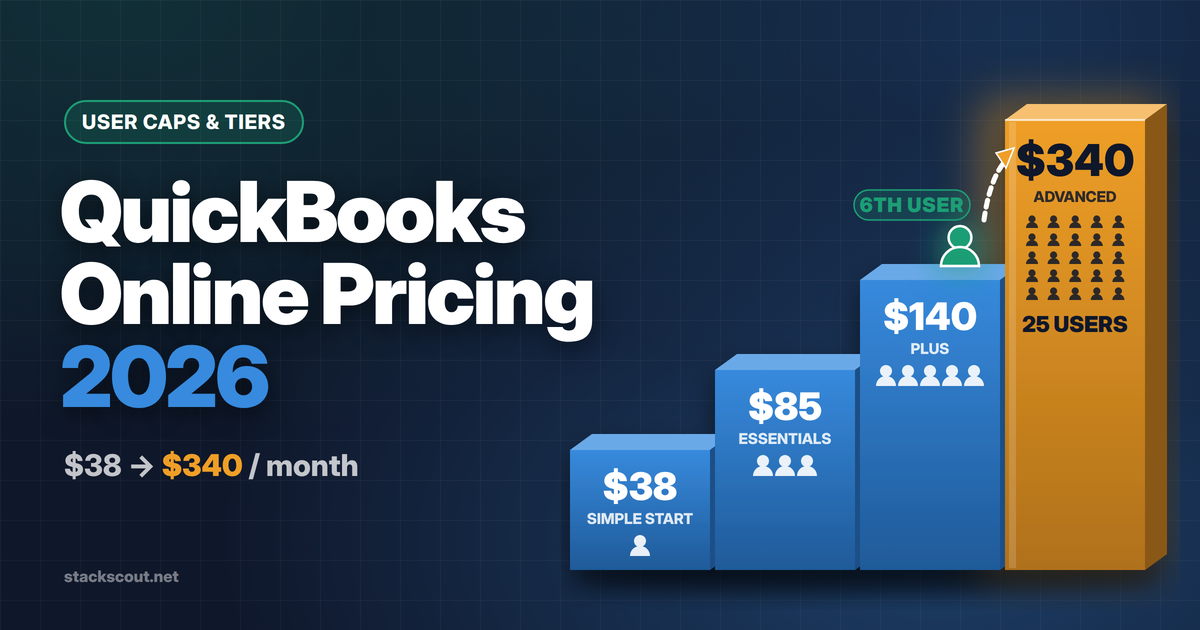
As of October 8, 2026, QuickBooks Online lists at $38 (Simple Start), $85 (Essentials), $140 (Plus), and $340 (Advanced) per month, with hard caps of 1, 3, 5, and 25 billable users. Intuit raised Essentials, Plus, and Advanced for renewals on or after August 1, 2026. Advanced has now gone from $235 to $340 in about two years.
For a growing B2B company, the list price is rarely what decides your bill. Three things push you up a tier: a 6th user, the need for built-in revenue recognition (Advanced only), and more than 40 classes/locations. Payroll is billed separately, starting at $50 + $7 per employee. If you need ASC 606-style deferrals but have five or fewer users, price out Plus plus a revenue recognition subledger before paying the $200/month jump to Advanced.
01
QuickBooks Online plans and prices (October 2026)
These are Intuit's US list prices for monthly billing, taken from the official pricing page on October 8, 2026. New customers are offered either 50% off for three months or a 30-day free trial. More on how to choose between them below.
Below Simple Start, Intuit also sells QuickBooks Free ($0: one bank connection, two invoices per month, no mobile app or integrations) and QuickBooks Lite ($20/month) for solo operators. Neither is relevant to a team with more than one person in finance, so this article skips them.
The headline prices hide most of what matters to a CFO. The next table shows where each plan stops. It's built from the per-plan feature data on Intuit's pricing page, not from marketing copy.
| What you get | Simple Start | Essentials | Plus | Advanced |
|---|---|---|---|---|
| Monthly list price | $38 | $85 | $140 | $340 |
| Billable users | 1 | 3 | 5 | 25 |
| Accountant seats (free) | 2 | 2 | 2 | 3 |
| Cost per user at the cap | $38.00 | $28.33 | $28.00 | $13.60 |
| Multiple currencies | — | ✓ | ✓ | ✓ |
| Budgeting | — | — | ✓ | ✓ |
| Inventory, purchase orders | — | — | ✓ | ✓ |
| Class and location tracking | — | — | Up to 40 | Unlimited |
| Custom fields | 1 | 4 | 4 | 12 |
| User permissions | Basic | Basic | Basic | Custom roles |
| Revenue recognition | — | — | — | ✓ |
| Workflow automation, batch invoices/expenses | — | — | — | ✓ |
| Custom report builder, management reports, Excel sync | — | — | — | ✓ |
| Backup and restore | — | — | — | ✓ |
| Bill Pay Elite (approvals, 1099 e-file) | $45/mo add-on | $45/mo add-on | $45/mo add-on | Included |
| Priority Circle support | — | — | — | ✓ |
Source: quickbooks.intuit.com/pricing (feature comparison data) and Intuit's August 2026 product update, both checked October 8, 2026. The Bill Pay Elite add-on price comes from the product update. "Cost per user" is our arithmetic.
Look at the per-user column. On paper, Advanced is the cheapest plan per seat. That only holds if you actually fill the seats. A team of eight people on Advanced pays $42.50 per user. That's more than Plus, and the reason is the cap, not the features.
02
What changed in 2026, and how fast prices are rising
On its product update page, Intuit says monthly prices for Essentials, Plus, and Advanced "will change for renewals on or after August 1, 2026." It also says pricing for Free, Lite, Ledger, and Simple Start "remains unchanged." The stated reasons are new AI features under the Intuit Intelligence brand and an expanded Advanced tier. Advanced now includes Bill Pay Elite, which Intuit values at $540/year, and construction and professional-services tools, which it values at $900/year.
This was the second big summer increase in a row. In July 2025, Intuit raised Simple Start from $35 to $38, Essentials from $65 to $75, Plus from $99 to $115, and Advanced from $235 to $275. That round was widely covered by accounting trade press and is consistent with the "previous price" figures resellers quote for 2026.
Over two increases, Simple Start rose 8.6%, Essentials 30.8%, Plus 41.4%, and Advanced 44.7%. The pattern is consistent: the higher the tier, the bigger the increase. That matters for budgeting. If you're on Plus today and expect to move to Advanced within 18 months, you're exposed to the steepest part of Intuit's price curve twice: once when you upgrade, and again at the next summer increase.
When the new price hits your account
The increase doesn't land on the same day for everyone. Intuit's notice includes three timing rules worth knowing:
- It applies at renewal. The exact date depends on your subscription. If you prepaid an annual term through a reseller or sales rep, you generally keep your rate until that term ends.
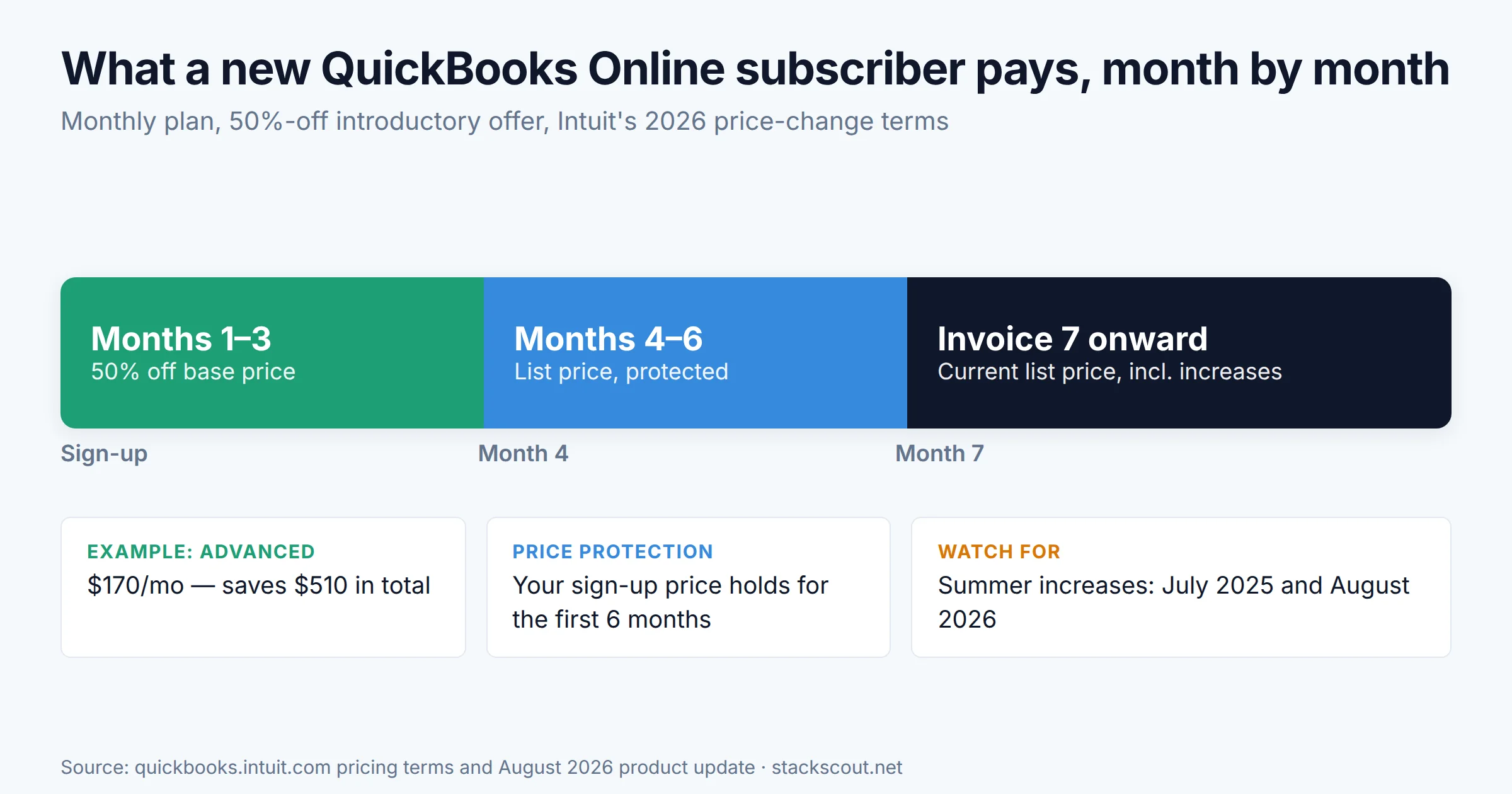
- New customers get six months of price protection. Intuit says recent subscribers keep their price for the first six months, and the updated price starts with the seventh invoice.
- Promotions run out first. Intuit honors promotional pricing for the full promotion, then applies the increase from the next applicable subscription date.
03
The five triggers that push a growing company up a tier
Few B2B companies move from Plus to Advanced because they want the AI features. They move because they hit a limit that makes Plus unworkable. Here are the limits we see most often, in roughly the order a scaling company hits them:
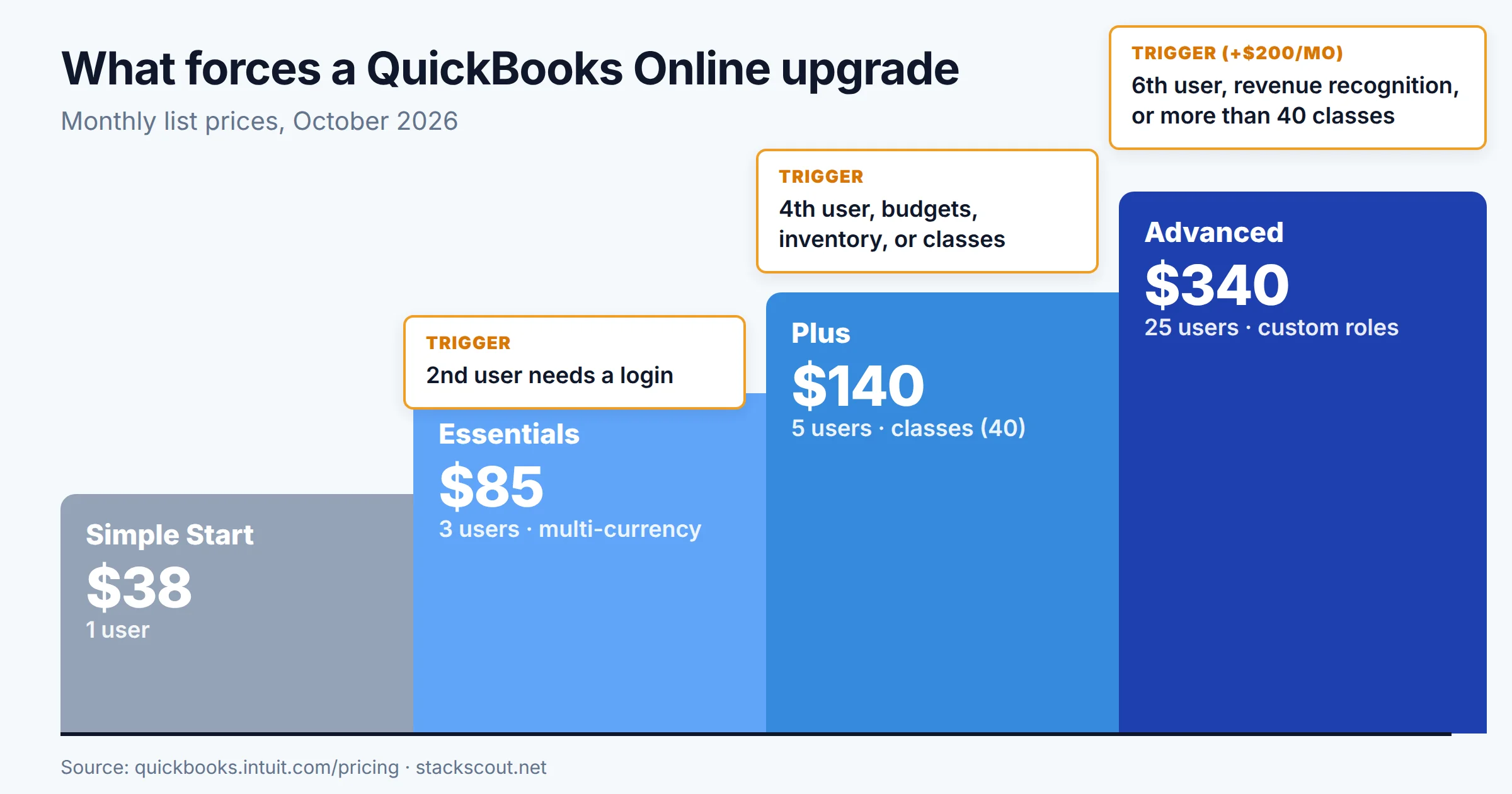
- A second person needs a login → Essentials ($38 → $85)Simple Start has one billable user. Your outside accountant doesn't count, because every plan includes at least two free accountant seats. Your first in-house finance or ops hire does count.
- A fourth user, or the need for budgets, inventory, or classes → Plus ($85 → $140)Essentials stops at three users and has no budgeting, inventory, or class/location tracking. For B2B companies, the usual reason is class tracking. Without it, you can't produce a P&L by department or product line.
- A sixth user → Advanced ($140 → $340)This is the most expensive step. Plus is capped at five users, and Intuit doesn't sell extra seats on any QuickBooks Online plan. The pricing page lists a fixed user count per tier and no per-seat add-on. Going from five users to six costs $200/month, or $2,400/year, for one login.
- Deferred revenue needs to be automated → AdvancedRevenue recognition appears only in the Advanced column of Intuit's comparison data. Intuit's help documentation describes the feature as available in "QuickBooks Online Advanced and Intuit Enterprise Suite." If you invoice annual contracts upfront, this is the trigger that matters most. Section 05 covers it in detail.
- More than 40 classes/locations, or custom roles → AdvancedPlus allows up to 40 classes and locations combined. Advanced removes the limit and adds custom user permissions. Without custom permissions, you can't limit a sales manager to invoices, or an AP clerk to bills, in a precise way.
Intuit's support team has said that "reports only" and "time tracking only" users are non-billable and don't count toward your user limit. Before you upgrade only to add seats, check whether the new people need to edit the books, or only need to see reports or enter time. Confirm in Settings → Manage users, because user types can differ by plan.
If the sixth-user trigger is your only reason to upgrade, it's worth comparing other platforms first. Xero bills per organization rather than per seat, so headcount growth doesn't change the price. We worked through the seat-cost math in QuickBooks vs Xero for growing B2B teams.
04
Add-ons: payroll, bill pay, inventory, and payment fees
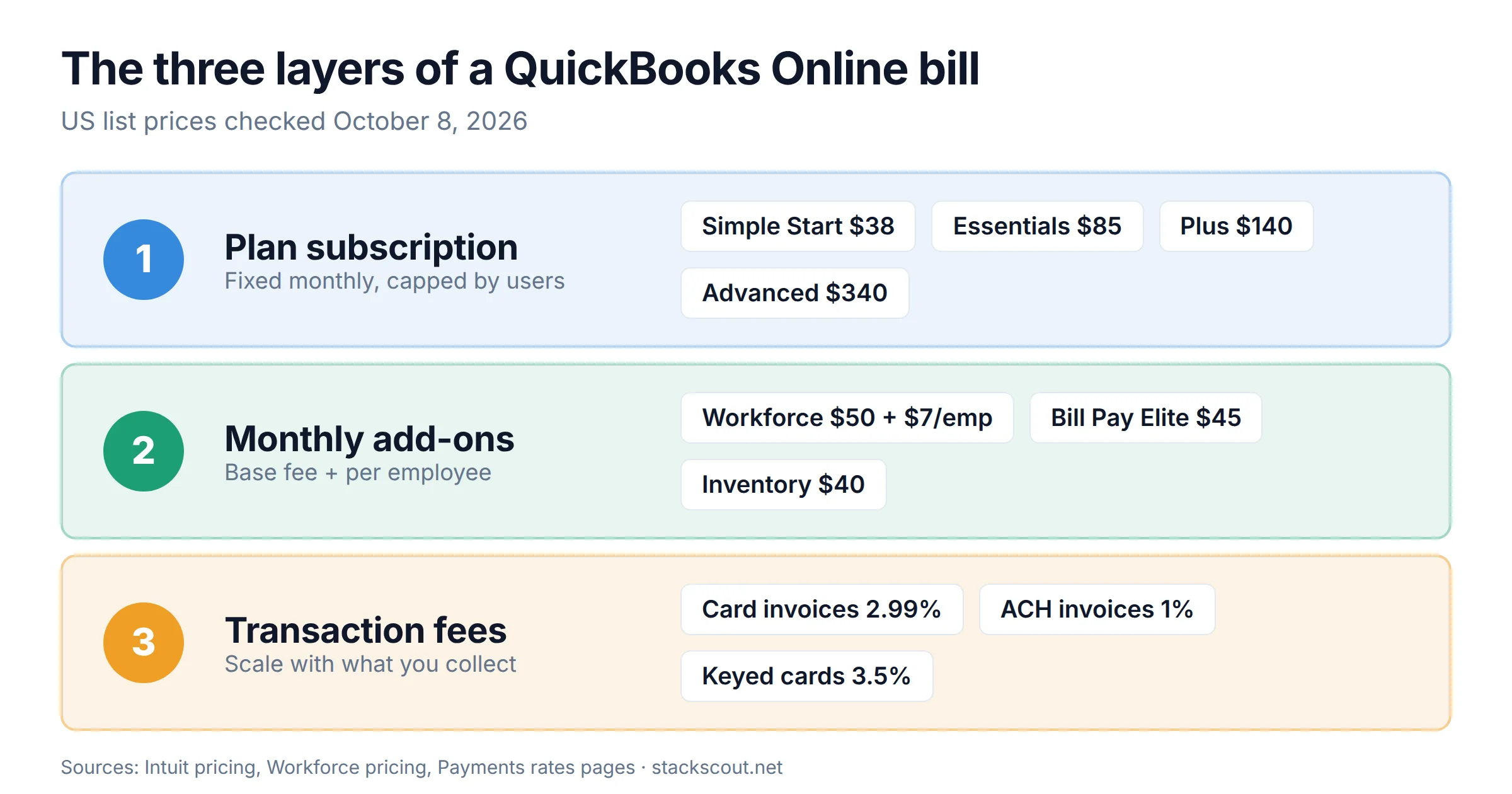
The subscription is the first cost layer. Most growing companies pay for two more: add-ons billed monthly, and fees charged on each transaction.
Payroll is now "QuickBooks Workforce"
Intuit has renamed QuickBooks Payroll to QuickBooks Workforce. When added to an existing QuickBooks Online plan, these are the list prices from the Workforce pricing page on October 8, 2026:
| Workforce plan | Base / month | Per employee / month | Cost for 15 employees | Cost for 40 employees |
|---|---|---|---|---|
| Workforce Payroll Full-service payroll, next-day direct deposit, auto payroll | $50 | $7 | $155 | $330 |
| Workforce Premium Same-day deposit, time tracking, HR tools, expert setup review | $88 | $13 | $283 | $608 |
| Workforce Elite Expert setup, tax penalty protection, personal HR advisor | $134 | $17 | $389 | $814 |
The 15- and 40-employee columns are our arithmetic from Intuit's base + per-employee list prices. Intuit's FAQ says time tracking is included only with Workforce Premium and Elite.
At 40 employees, Workforce Premium costs almost twice as much as QuickBooks Online Advanced itself. That's why the accounting plan is often not the biggest Intuit line item for a company with a team. If you're comparing QuickBooks payroll with an HR-first platform, see our Rippling pricing breakdown for that per-employee math.
Other add-ons that show up on growing-company invoices
- Bill Pay Elite: $45/month on Simple Start, Essentials, and Plus, and included in Advanced. It adds custom approval workflows, an audit trail, and 1099 e-filing. Intuit cut the standalone price from $90 to $45 in June 2026, according to reseller Fourlane's summary of the change.
- Enhanced inventory: $40/month as an add-on to Simple Start or Essentials. It's included in Plus and Advanced.
- Standard ACH for bills: free within monthly allotments that "may vary," then $0.50 per standard ACH payment, per the pricing page.
QuickBooks Payments processing fees
If customers pay your invoices through QuickBooks, Intuit's payment rates page (rates stated as accurate as of September 18, 2026) lists:
| Payment type | QuickBooks rate | On a $20,000/month volume |
|---|---|---|
| Invoices paid by card or digital wallet | 2.99% | $598 |
| ACH bank payments on invoices | 1% | Up to $200 (see note) |
| In-person (card reader / Tap to Pay) | 2.5% | $500 |
| Keyed-in cards | 3.5% | $700 |
| Instant deposit | 1.75% | Per deposit |
Note: QuickBooks Online ACH fees have historically been capped at $10 per transaction. Intuit's current rate page shows 1% without a cap, so check the terms in your merchant account. Intuit also says merchants processing over $2,500/month may qualify for up to 25% off transaction costs.
For a B2B company with large invoices, card fees can easily cost more than the software. A company collecting $20,000/month by card pays about $7,200/year in processing alone. That's more than Advanced costs. Nudging customers toward ACH is often the biggest single saving available.
05
Revenue recognition: the Advanced-only feature SaaS finance teams pay for
For subscription and services businesses, this section probably matters more than any other. Revenue recognition is the only accounting-core feature in QuickBooks Online that exists on just one plan.
Here's how it works, per Intuit's help article. You turn on revenue recognition in settings and create or pick a template. Then you assign the template to a service item along with a liability (deferred revenue) account. Any invoice that uses that item gets a schedule that recognizes the amount over time, and a Revenue Recognition report shows billed vs. recognized amounts.
That's enough for a straightforward case, such as a $24,000 annual contract invoiced upfront and recognized at $2,000/month. It isn't a full ASC 606 engine. Schedules are set by item and invoice, and the setup is driven by templates. If you sell bundles with several performance obligations, usage-based pricing, or frequent mid-term changes, you'll likely outgrow it whichever QuickBooks plan you're on. Our guide to accounting software for SaaS companies walks through those complexity levels.
The Plus + subledger alternative
If revenue recognition is your only reason to upgrade and you have five or fewer users, compare these two setups:
| Setup | Monthly | Annual | Best when |
|---|---|---|---|
| QuickBooks Online Advanced | $340 | $4,080 | You also need the 6+ users, custom roles, or the reporting suite |
| QuickBooks Online Plus + Stripe Revenue Recognition (≤$10K monthly volume) | $165 | $1,980 | You bill through Stripe and only need deferral schedules |
Stripe Revenue Recognition's $25/month price applies up to $10,000 in monthly volume, plus 0.25% above that, per Stripe's US pricing as we checked it in early October 2026. At $50K/month in Stripe volume, add about $100/month, which brings the gap down to roughly $75/month. See our subscription billing software comparison for other subledgers.
Above a certain volume, the subledger setup costs about the same as Advanced. At that point Advanced's other features (more users, workflow approvals, Bill Pay Elite, reporting) make it the simpler option. Below that volume, Plus with a subledger is both cheaper and usually the stronger revenue engine.
06
What growing B2B companies actually pay: three scenarios
The scenarios use October 2026 list prices with monthly billing, no promotions, and no payment-processing fees. They show the total of the accounting plan and the add-ons each company would realistically need.
07
How to pay less for QuickBooks Online
1. Choose between the promo and the trial deliberately
At sign-up, Intuit offers either 50% off for three months or a 30-day free trial. According to the offer terms on the pricing page, the discount applies only to the base price of a new monthly subscription. It doesn't apply to per-employee payroll fees or other add-ons, and offers for the same product can't be combined. On Advanced, the promo saves $510. On Plus, it saves $210. If you've already evaluated the product and are sure about the tier, the promo is worth more than the trial.
2. Go through a ProAdvisor if you have an outside accountant
Intuit's ProAdvisor Preferred Pricing page describes it as "our only ongoing discount option" for QuickBooks Online. If your accounting firm adds you as a client, you can get 30% off ongoing when Intuit bills the firm, or 30% off for 12 months when Intuit bills you directly. Workforce payroll gets 30% off the base price plus 15% off per-employee fees. On Advanced, the ongoing discount brings the price to $238/month, which saves $1,224 a year. The discount is for new subscriptions, so set it up before you sign up directly with Intuit.
3. Use non-billable users before you buy a tier
As mentioned above, reports-only and time-tracking-only users don't use up billable seats. Department heads who only need to read P&Ls shouldn't be the reason you move from Plus to Advanced.
4. Time your upgrades around the renewal cycle
Intuit's pricing changes so far have landed in summer (July 2025, August 2026). If you know you'll need Advanced in Q3, it may be worth moving early so the next increase arrives at your planned renewal rather than as a surprise. Some resellers also offer annual prepay terms, which Fourlane notes generally lock your rate until the term ends. Ask for those terms in writing.
08
When QuickBooks Online stops being the right price
QuickBooks Online is still the default ledger for US small businesses. Almost every CPA knows it, and its integration ecosystem is very large. For example, the HubSpot–QuickBooks sync is one of the most widely used CRM-to-accounting links. Those strengths are real. The price increases change the comparison in three situations, though:
QuickBooks Online is still good value when…
- You have up to 5 people editing the books and need classes (Plus)
- You fill most of Advanced's 25 seats, so cost per user drops below $15
- Your CPA works in QuickBooks and offers ProAdvisor pricing
- You want payroll, bill pay, and the ledger from one vendor
Look elsewhere when…
- You have 6–10 users and need nothing else from Advanced
- You need multi-entity consolidation (not in QBO; Intuit sells Intuit Enterprise Suite for that)
- Your revenue model needs real ASC 606 handling for usage-based pricing or modifications
- Card processing fees are higher than your subscription
For companies outgrowing Advanced, Intuit points to Intuit Enterprise Suite, its multi-entity, AI-native ERP. Intuit doesn't publish a list price for it. Third-party estimates, such as ERP Research's, start around $650/month for a single entity, but treat any figure as a quote to negotiate, not a list price. For non-Intuit options at each funding stage, see our roundup of QuickBooks alternatives for startups.
Frequently asked questions
How much does QuickBooks Online cost in 2026?
How much does QuickBooks Online cost per year?
What is the cheapest way to get QuickBooks Online?
Why is QuickBooks Online so expensive?
Which QuickBooks Online plan includes revenue recognition?
Methodology
All QuickBooks Online and Workforce prices, user caps, and plan features come from Intuit's US pages, read on October 8, 2026. Feature availability by plan was taken from the per-plan comparison data in the pricing page's source rather than from marketing summaries. Historical prices come from Intuit's August 2026 product update and from accounting-industry coverage of the July 2025 change. Where a figure comes from a third party (reseller notes, ERP Research's Intuit Enterprise Suite estimate, older Intuit community answers), we say so in the text. The scenarios are our own arithmetic on list prices and leave out taxes, promotions, and payment-processing fees unless noted. We have no commercial relationship with Intuit. Prices change often, so check the live pricing page before you commit.
Sources
- Intuit — QuickBooks Online plans & pricing: quickbooks.intuit.com/pricing/
- Intuit — Pricing changes (August 2026 product update): quickbooks.intuit.com/r/product-update/quickbooks-price-changes/
- Intuit — QuickBooks Workforce pricing: quickbooks.intuit.com/payroll/pricing/bundle/
- Intuit — QuickBooks Payments rates: quickbooks.intuit.com/payments/payment-rates/
- Intuit — Set up a product or service's revenue recognition schedule: quickbooks.intuit.com/learn-support/…/L0edAQ1Eg_US_en_US
- Intuit — ProAdvisor Preferred Pricing: quickbooks.intuit.com/accountants/proadvisor/pricing/
- Intuit — QuickBooks Lite and Free plans: quickbooks.intuit.com/solopreneur/
- Fourlane — QuickBooks Online pricing changes 2026 (previous prices, Bill Pay Elite change): fourlane.com
- Insightful Accountant — QuickBooks price hikes (July 2025 round): blog.insightfulaccountant.com/quickbooks-price-hikes
- Intuit Community — Time tracking only users and the user limit: quickbooks.intuit.com/learn-support/…/604797
- ERP Research — Intuit Enterprise Suite pricing estimates: erpresearch.com

Technology consultant with 10+ years in the Japanese tech industry. Specializing in SaaS evaluation, workflow automation, and B2B tool integration.