Best Accounts Payable Automation Software (2026): 8 Tools Compared for Startups Paying Hundreds of Invoices a Month
BILL, Ramp, Tipalti, Stampli, Melio, Brex, Mercury, and Paylocity for Finance compared on invoice OCR, approval routing, international payments, and accounting sync, with per-payment fees checked against each vendor's own pricing page.
Most "best AP automation" lists rank tools by G2 stars and stop there. That's not much help when you're the one finance person at a Series A startup, a few hundred vendor invoices arrive every month, and you need to know three things: will the tool read the invoices for you, can it route approvals without a spreadsheet, and what will 300 payments cost once the per-ACH and per-check fees are added up?
This guide is written for that reader. We compared eight tools on the four axes that matter at a few hundred invoices a month (invoice capture, approval workflow, international payments, and accounting sync) and then ran every published fee through the same monthly scenario. All prices were checked on the vendors' official pricing pages and help centers in October 2026.
Ramp: the strongest free tier for a QuickBooks Online or Xero startup. AI OCR with line items and AP fraud checks are on the $0 plan. Ramp Plus adds 3-way matching against NetSuite or QBO purchase orders. Since June 1, 2026, ACH ($0.59) and check ($1.99) fees apply unless you pay from Ramp's own checking account.
Tipalti: the pick if a meaningful share of your payees are overseas vendors or contractors. It covers 200+ countries and 120+ currencies and collects W-9/W-8 forms automatically. AP automation starts at $99/month, with transaction fees quoted separately.
Mercury: the lowest published cost if your vendors are mostly US-based and you're willing to bank there. Bill pay is free on every plan, and ACH, checks, and domestic wires cost $0. There's no PO matching and you can't pay bills by card.
Stampli: the pick when invoice volume reaches roughly 300+ a month and the pain is coding and chasing approvers rather than paying. It works on top of 70+ ERPs. Pricing is quote-only.
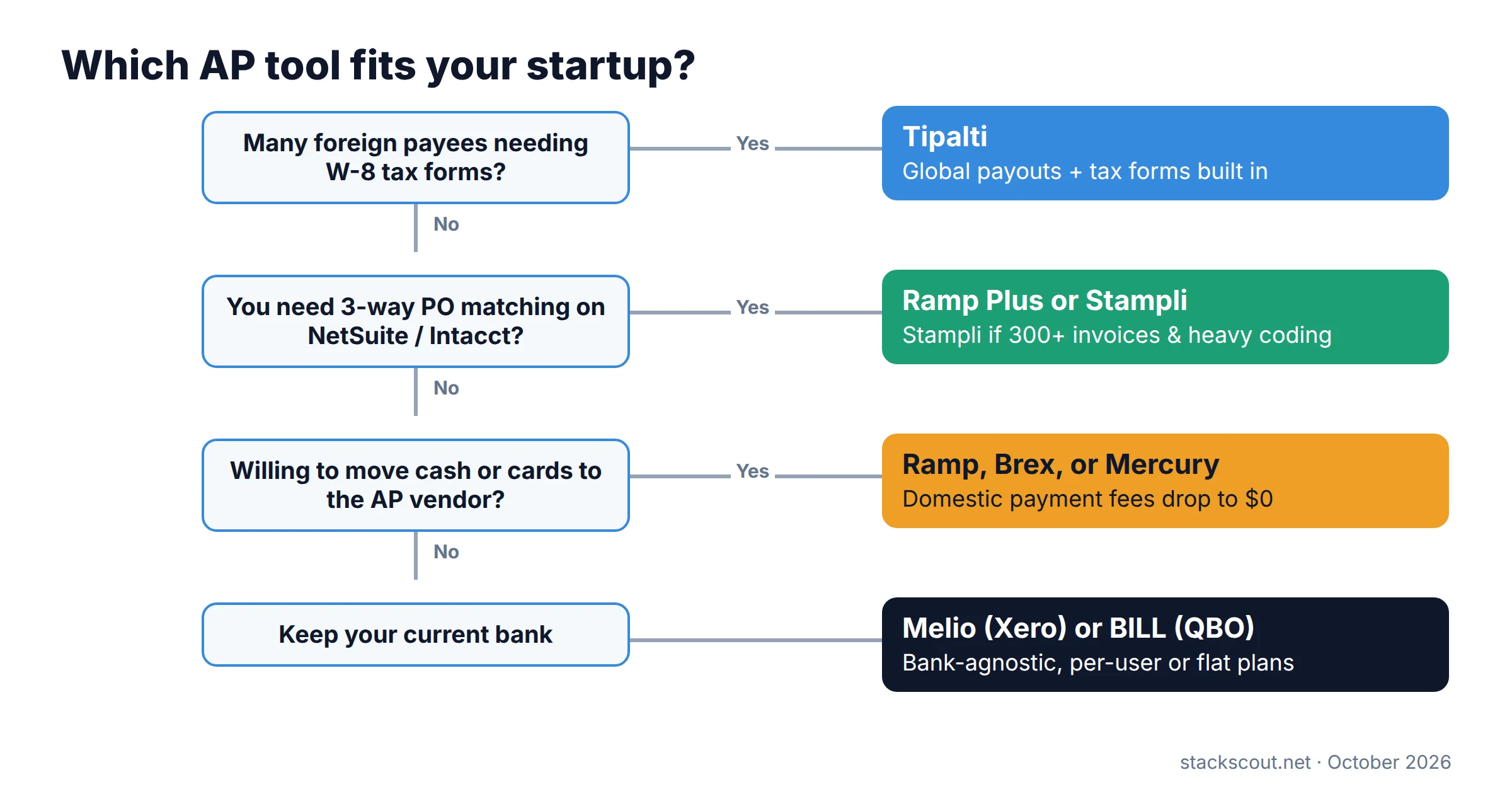
Not sure which side of the line you're on? The flowchart below covers most startup situations in four questions.
01
Comparison table: the 8 tools side by side
Prices are per month as published in October 2026. "Domestic fees" means paying from a regular external bank account unless noted. Each vendor sets FX rates itself, and only Mercury publishes its markup.
| Tool | Software price | ACH / check fee | Invoice capture | Approvals | PO matching | Global payments | Accounting sync |
|---|---|---|---|---|---|---|---|
| BILL | $49 / $65 / $89 per user; Enterprise custom | $0.59 / $1.99 | Inbox + OCR all plans; AI line coding Team+ | Custom policies on Corporate+ | 2-way on Corporate+ (add-on below) | 130+ countries | QBO/Xero auto-sync Team+; NetSuite/Intacct Enterprise |
| Ramp | Free; Plus $15/user + platform fee | $0.59 / $1.99 ($0 from Ramp Checking) | AI OCR with line items, all plans | Basic on Free; advanced routing on Plus | 3-way on Plus (NetSuite/QBO POs) | SWIFT USD to 180+ countries; local currency to ~60 | QBO/Xero on Free; NetSuite/Intacct on Plus |
| Tipalti | AP from $99; payouts from $249 | Quoted per payment | AI scan, Peppol e-invoicing, auto GL coding | Multi-step + AI approval agent | 2- and 3-way, line level | 200+ countries, 120+ currencies | NetSuite, Intacct, QBO, Xero, Dynamics |
| Stampli | Quote only | Not published | Unlimited capture; Billy AI coding | Custom by amount/currency | 2–3 way (semi-auto; full via Billy) | 100+ countries | 70+ ERPs incl. QBO, NetSuite, Intacct; no Xero |
| Melio | $0 / $25 / $55 / $80 (monthly) | $0.50 after free quota / $1.50 | AI capture; line items Core+ | Core+ (amount, vendor, scheduler) | None | 80+ countries, 15 currencies | QBO/Xero Core+; NetSuite on Unlimited |
| Brex | Essentials $0; Premium $12/user | $0 from Brex account | AI draft with line items, all plans | Multi-level all plans; dynamic chains Premium | 2-way on Premium+ | Wires to 120+ countries | QBO, Xero, NetSuite, Intacct |
| Mercury | Free; Plus $35; Pro $350 | $0 / $0 | Bills inbox + OCR, all plans | Amount-based, multi-level, all plans | None | 40+ currencies; 1% FX fee | QBO, Xero, NetSuite |
| Paylocity for Finance | Quote only | Not published | AI/OCR via email, upload, portal | Org-chart routing from HR data | 2- and 3-way | 200+ countries, 145+ currencies | QBO, NetSuite, Intacct, Dynamics 365; no Xero |
Sources: vendor pricing pages and help centers listed under "Sources and references", checked October 2026. Brex's country count is our tally of its supported-countries table, and Ramp's local-currency figure is our tally of its support list.
02
What 300 invoices a month actually costs
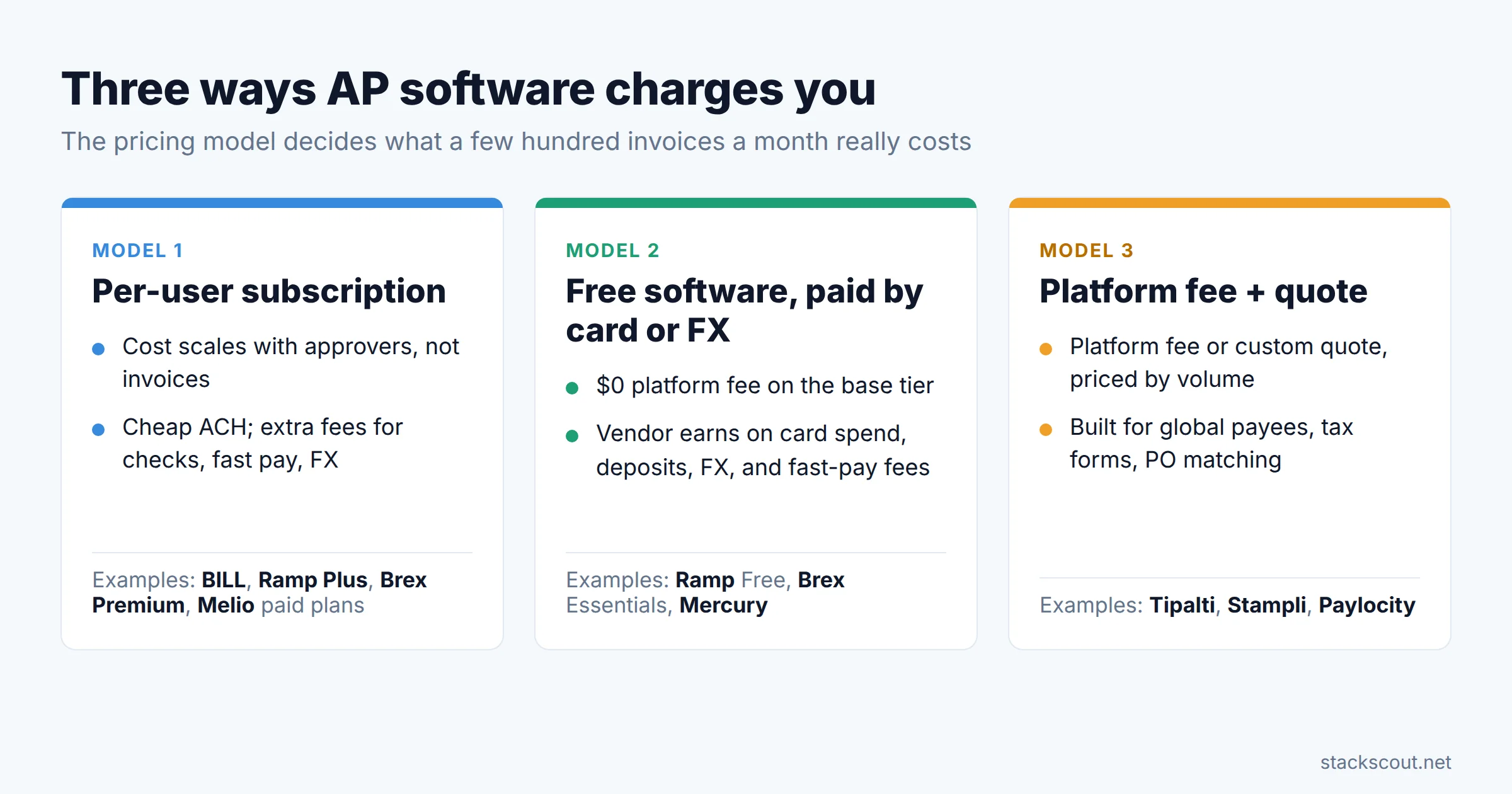
Feature tables hide the real difference between these tools, which is how each one charges. A per-user subscription, a free platform that earns money elsewhere, and a platform fee plus custom quote produce very different bills at the same volume.
To make this concrete, we modeled a typical Series A month. These are our assumptions, not vendor figures:
- 300 invoices, paid as 250 payments (some vendors' invoices batched)
- 200 domestic ACH payments, 25 mailed checks, 25 foreign-currency payments
- 5 users: one AP specialist, one controller, three budget-owner approvers
- Paying from an existing external bank account, with standard (not same-day) delivery
| Tool / plan | Software (5 users) | 200 ACH | 25 checks | Monthly total | Foreign-currency payments |
|---|---|---|---|---|---|
| BILL Team | 5 × $65 = $325 | $118.00 | $49.75 | $492.75 | No fee; BILL's exchange rate applies |
| BILL Corporate | 5 × $89 = $445 | $118.00 | $49.75 | $612.75 | Same; approver-only seats discounted (amount unpublished) |
| Ramp Free | $0 | $118.00 | $49.75 | $167.75 | "May include a margin on FX" |
| Ramp Plus | 5 × $15 = $75 + platform fee | $118.00 | $49.75 | $242.75 + platform fee | Same as Free |
| Melio Boost | $55 + 4 × $10 = $95 | 150 over quota × $0.50 = $75 | $37.50 | $207.50 | "Conversion rates apply"; 15 currencies |
| Melio Unlimited | $80 (unlimited users) | $0 (unlimited) | $37.50 | $117.50 | Same as Boost |
| Brex Essentials | $0 | $0* | $0* | $0 | Brex sets the rate; no markup published |
| Mercury | $0 | $0 | $0 | $0 | 1% exchange fee (e.g., $500 on $50,000 converted) |
| Tipalti / Stampli / Paylocity | From $99/month (Tipalti) plus quoted per-payment fees; Stampli and Paylocity are quote-only | Quoted | |||
*Brex fees are $0 when paying from a Brex business account; Brex doesn't publish a fee for bills paid from an external bank. Ramp's ACH and check fees are $0 when paid from a Ramp Checking Account, and Ramp counts a batched payment as one fee.
What the model tells you. At this volume the per-user subscription is usually the biggest line item, not the payment fees. BILL's Team plan costs about three times Ramp Free in this scenario, mainly because of the five paid seats. The per-ACH fee still adds up: $0.59 × 200 is $118 a month, or $1,416 a year. Ramp, Brex, and Mercury all waive domestic fees if you move operating cash into their accounts, and that's the trade-off they're offering you.
For a sense of what the software is replacing, Ardent Partners' State of ePayables 2025 puts the average all-in cost to process one invoice at $12.42, against $2.65 for the best-in-class top 20%. At 300 invoices, that's the difference between roughly $3,700 and $800 a month in fully loaded processing cost. Any tool in this list costs far less than that gap. The real question is which one closes it without creating a second migration in 18 months.
03
Individual reviews
Each review covers what the tool is best at, where the plan gates fall for a startup at a few hundred invoices a month, and the fees that matter at that volume.
1. BILL Best for accountant-led QBO shops
BILL is the default AP tool in much of the US accounting-firm world, and the reason is the network. Many vendors already receive payments through BILL, and outsourced bookkeepers know the approval screens. Every plan includes a centralized invoice inbox (vendors email bills to it, or you upload or photograph them) and the W-9 Agent for vendor onboarding. BILL claims 99% accuracy on key invoice fields.
The plan gates are where startups get caught. Essentials only syncs to QuickBooks Online or Xero by manual CSV import/export, so automatic two-way sync effectively starts at Team ($65/user). The AI Invoice Coding Agent is also Team and above. Custom approval policies that route by vendor, department, location, or GL account need Corporate ($89/user). That's the plan most teams with three or more budget owners end up on. NetSuite and Sage Intacct sync are Enterprise only.
On fees, BILL is mid-pack: $0.59 per ACH, $1.99 per mailed check, free virtual card payments, and free international wires sent in foreign currency (at BILL's exchange rate). Paying a USD wire abroad costs $19.99. Speed costs extra: $11.99 for Pay Faster ACH and 1% (min $9.99, max $100) for Instant Payment. BILL's site is inconsistent on PO matching. The product page says 2- and 3-way, but the pricing table lists 2-way matching on Corporate and Enterprise and as a paid add-on on Essentials and Team.
Pros
- Large existing vendor network; familiar to outside accountants
- Bank-agnostic: no need to move cash or cards
- Full fee schedule published, including speed tiers and 1099 e-file ($2.99)
Cons
- Every approver is a paid seat on Essentials and Team
- Custom approval rules require Corporate
- NetSuite/Intacct only on Enterprise (custom pricing)
2. Ramp Bill Pay Best free tier
Ramp puts more automation on its free plan than anyone else here. AI-powered OCR that extracts line items, AP Agent fraud checks, basic approval routing, mobile approvals, and QuickBooks Online or Xero sync all come at $0. Bills arrive by email forwarding, drag-and-drop, CSV, or import from your ERP. For a startup on QBO with a handful of approvers, the free tier covers capture, approve, pay, and sync.
The 2026 change to know about: Ramp started charging for standard bill payments on June 1, 2026. Standard ACH is $0.59 and standard check $1.99, matching BILL. Same-day ACH costs $10, domestic wires $15, and SWIFT USD wires $20. All of these are waived if you pay from a Ramp Checking Account. Ramp bills these fees on a monthly statement, and they don't sync to your accounting system, so your bookkeeper needs a monthly journal entry. If you're comparing against a 2025 review that says "free ACH," that review is out of date.
Ramp Plus adds the features a scaling finance team actually notices: approval routing by vendor, department, accounting field, and payment type, AI approval recommendations, payment-release approvals, auto-coded line items, and 3-way matching against purchase orders imported from NetSuite or QuickBooks Online. Plus is $15 per user per month plus a platform fee based on team size, which Ramp doesn't publish. International coverage is broad for SWIFT USD (180+ countries on our count of Ramp's support list) and narrower for local-currency payments (about 60 countries). Paying from non-USD bank accounts is Enterprise only.
Pros
- Line-item OCR and fraud checks on the free plan
- 3-way PO matching on Plus without a separate procurement tool
- Domestic fees go to $0 if you use Ramp Checking
Cons
- ACH/check fees since June 2026 when paying from an external bank
- Plus platform fee is unpublished, so true cost needs a quote
- Payment fees don't sync to the ledger automatically
If you're also evaluating Ramp's corporate card side, our comparison of expense management software for small businesses covers the card-swap trade-off in detail.
3. Tipalti Best for global payees
Tipalti is the tool built for the problem the other seven treat as an edge case: paying a large share of vendors and contractors outside the US. It covers 200+ countries and territories in 120+ currencies across 50+ payment methods (local bank transfer, global ACH, wire, card, PayPal, and more). Just as important for a US startup, it handles the paperwork. It collects W-9, W-8BEN, W-8BEN-E, and other W-8 variants based on each payee's country and classification, runs IRS TIN matching, calculates withholding, and prepares 1099 and 1042-S reports. E-filing goes through a Tax1099.com integration rather than natively.
The AP side is complete. AI invoice scanning handles PDFs, e-invoices, and spreadsheets. Peppol e-invoicing is supported, along with automatic GL coding, line-level 2- and 3-way PO matching with tolerance thresholds, and AI agents for PO matching and bill approval. Native integrations cover NetSuite, Sage Intacct, QuickBooks Online, Xero, Microsoft Dynamics, and SAP Business One.
Tipalti dropped its old Starter/Premium/Elite tier names. The pricing page now shows two products with starting prices: AP automation from $99/month and global payouts from $249/month. Both come with unlimited users and no per-approver fees. On top of that you pay "transaction pricing per invoice and payments," which varies by method and destination and isn't published. Expect a sales conversation, and model costs on your actual payment mix.
Pros
- Broadest country and currency coverage on this list
- W-8/W-9 collection, TIN matching, and 1042-S built in
- Unlimited users; approvers never cost a seat
Cons
- Per-payment fees and FX rates are quote-only
- No free tier; overkill if 95% of vendors are domestic
- 1099/1042-S e-filing relies on a third-party integration
4. Stampli Best for invoice-heavy teams on an ERP
Stampli takes a different approach: it centers everything on the invoice itself. Approvers, AP, and requesters comment and resolve questions on the invoice image, so the "who approved this and why" trail lives in one place instead of across email threads. Its AI assistant, Billy the Bot, captures and codes invoices, checks vendor details, matches invoices to POs and receipts at line level, routes approvals, and flags duplicates. People still approve, post, and release payment.
Stampli's own pricing page says it's "typically a strong fit for teams at 300+ monthly invoice volume," which lines up with the reader of this guide. The base price includes unlimited invoice capture, entities, and vendors, semi-automated 2–3-way PO matching (full automation through Billy), and a dedicated customer success manager. Pricing is quote-only, so there's no number to compare against the table above.
Integration depth is the main reason to choose Stampli. It connects to 70+ ERPs, including QuickBooks Online and Desktop, NetSuite, Sage Intacct, and the Microsoft Dynamics family, and it works inside your existing ERP setup rather than asking you to change it. Xero isn't on the list, which rules it out for many early startups. Payments (Direct Pay) cover domestic ACH and check, virtual cards, and international payments to 100+ countries, but fees aren't published.
Pros
- Invoice-centric collaboration cuts approver back-and-forth
- Strong ERP coverage including Intacct and NetSuite
- Unlimited invoices, entities, and vendors in the base price
Cons
- No published pricing or payment fees
- No Xero integration
- More than a sub-100-invoice startup needs
5. Melio Best flat price for Xero users
Melio is the simplest bill pay tool here, and its pricing makes it unusually predictable at volume. Each plan includes a monthly allowance of free ACH payments (5, 20, 50, or unlimited). The Unlimited plan at $80/month ($64 billed annually) includes unlimited users and unlimited free ACH, which is why it came out at $117.50 in our 300-invoice model, mostly check fees. Vendors can also be paid by card at 2.9%, which lets you stretch payables on a credit card while the vendor still receives ACH or a check.
The trade-offs are features, not price. AI bill capture and a bills inbox are on every plan, but line-item capture starts at Core. Approval workflows (by amount, scheduler, or vendor) aren't available on the free Go plan. There's no PO matching on any plan, NetSuite sync is Unlimited only, and Sage Intacct isn't supported. International payments reach 80+ countries in 15 currencies: $20 flat for USD from a bank account, conversion rates for local currency.
Xero completed its $2.5 billion acquisition of Melio on October 15, 2025, and every Melio plan now includes a six-month free Xero subscription. If your books are in Xero, expect the integration to get deeper. If you're on QuickBooks, Melio still syncs, but you're betting on a tool owned by your accounting vendor's competitor. Our QuickBooks vs Xero comparison for growing B2B teams covers that decision.
Pros
- Flat $80 Unlimited plan: unlimited users and free ACH
- Pay vendors by card even if they don't accept cards
- Bank-agnostic; nothing to move
Cons
- No PO matching at all
- No Sage Intacct; NetSuite only on Unlimited
- Only 15 currencies for local-currency payments
6. Brex Best if you already use Brex cards
Brex bundles bill pay into every plan, including the free Essentials tier: automatic invoice entry, multi-level approvals, paying from a Brex business account or an external bank, and sync to QuickBooks Online, NetSuite, Sage Intacct, and Xero. You can email invoices to a dedicated address or upload them, and Brex's AI drafts the bill with line items. Paid from a Brex business account, domestic ACH, checks, domestic wires, and international wires all cost $0.
Premium ($12/user/month) adds dynamic approval chains, multiple expense policies, multi-entity support, and a PO field for 2-way matching. We found no 3-way matching. International wires reach about 120 countries in 65 currencies on our count of Brex's supported-countries table. Local-currency wires must be funded from a Brex business account. One quirk: Brex's help center says emailed invoices must be in English and in USD, though you can upload foreign-currency invoices manually.
The ownership change matters for vendor-risk reviews. Capital One completed its acquisition of Brex on April 7, 2026, and Brex now operates as a wholly owned subsidiary. Product pricing hadn't changed as of October 2026, but if you pick Brex for AP, plan for the roadmap being set inside a large bank.
Pros
- Bill pay with AI capture free on Essentials
- $0 domestic and international wire fees from a Brex account
- Syncs to all four major ledgers, including Xero and Intacct
Cons
- Best economics require holding cash at Brex
- 2-way matching only, on Premium
- FX rate set at Brex's discretion; markup not published
7. Mercury Lowest published cost
Mercury is a banking platform first, and bill pay is a free feature of the account, unlimited on every plan including the $0 tier. Each account gets a dedicated bills inbox with approved senders. Bills are read with OCR and auto-filled, duplicates are flagged, and a bill can be split across GL codes. Approval rules are amount-based. You can stack rules for multi-level review, name specific approvers, set daily per-user limits, and approve in Slack or the mobile app.
On cost, nothing in this list beats it for a domestic-heavy vendor base. ACH (including same-day), mailed checks, real-time payments, domestic wires, and USD international wires are all $0. Mercury is also the only vendor here that publishes its FX markup: 1% on non-USD wires. That makes it easy to model, even if 1% on large foreign payments isn't small.
The limits are clear. Bills can only be paid by ACH, wire, or check, not by card. There's no PO matching, and approval routing by department or vendor isn't documented. Accounting sync covers QuickBooks Online, Xero, and NetSuite, and bills sync only once they have a GL code. Sage Intacct isn't supported. Mercury works well for a startup that already banks there, has few POs, and wants zero marginal cost per payment.
Pros
- $0 software and $0 domestic payment fees on every plan
- Published 1% FX fee, so costs are predictable
- Approvals in Slack and mobile
Cons
- Requires Mercury as your operating bank
- No PO matching; no card payments for bills
- No Sage Intacct sync
8. Paylocity for Finance (formerly Airbase) Best if you run payroll on Paylocity
Airbase is gone as a standalone brand. Paylocity completed the acquisition on October 1, 2024, and relaunched the product as Paylocity for Finance on July 22, 2025, built into Paylocity's HR and payroll platform. airbase.com is now a holding page, and its pricing link redirects to Paylocity's quote form.
The AP feature set is still solid: AI/OCR invoice capture by email, bulk upload, or vendor portal, and automated 2- and 3-way PO matching. Approvals follow the org chart pulled from the employee record, so when someone changes managers in HR, their approval chain updates automatically. Payments cover ACH, check, virtual card, and international wire to 200+ countries in 145+ currencies. Accounting integrations listed are QuickBooks Online, NetSuite, Sage Intacct, and Microsoft Dynamics 365.
The catch for most startups is packaging. Paylocity positions the finance suite as part of its HCM platform, and we couldn't confirm it's sold standalone. If you already run payroll on Paylocity, it's worth a quote. If you don't, the other seven are easier to adopt.
Pros
- Approval chains sync automatically with the org chart
- 2- and 3-way matching included
- Wide international payment coverage
Cons
- Quote-only; standalone purchase unconfirmed
- No Xero integration
- Roadmap now tied to an HCM vendor
What about QuickBooks' built-in Bill Pay? If you're on QuickBooks Online, the native option is worth pricing first. Bill Pay Elite, which adds approvals and 1099 e-filing, is a $45/month add-on on Simple Start, Essentials, and Plus, and is included in Advanced. It doesn't offer the OCR depth or global payments of the tools above, but for under ~100 domestic invoices a month it may be enough. See our QuickBooks Online pricing breakdown for the full plan math.
04
Where the cheap tier stops: the plan gates that matter
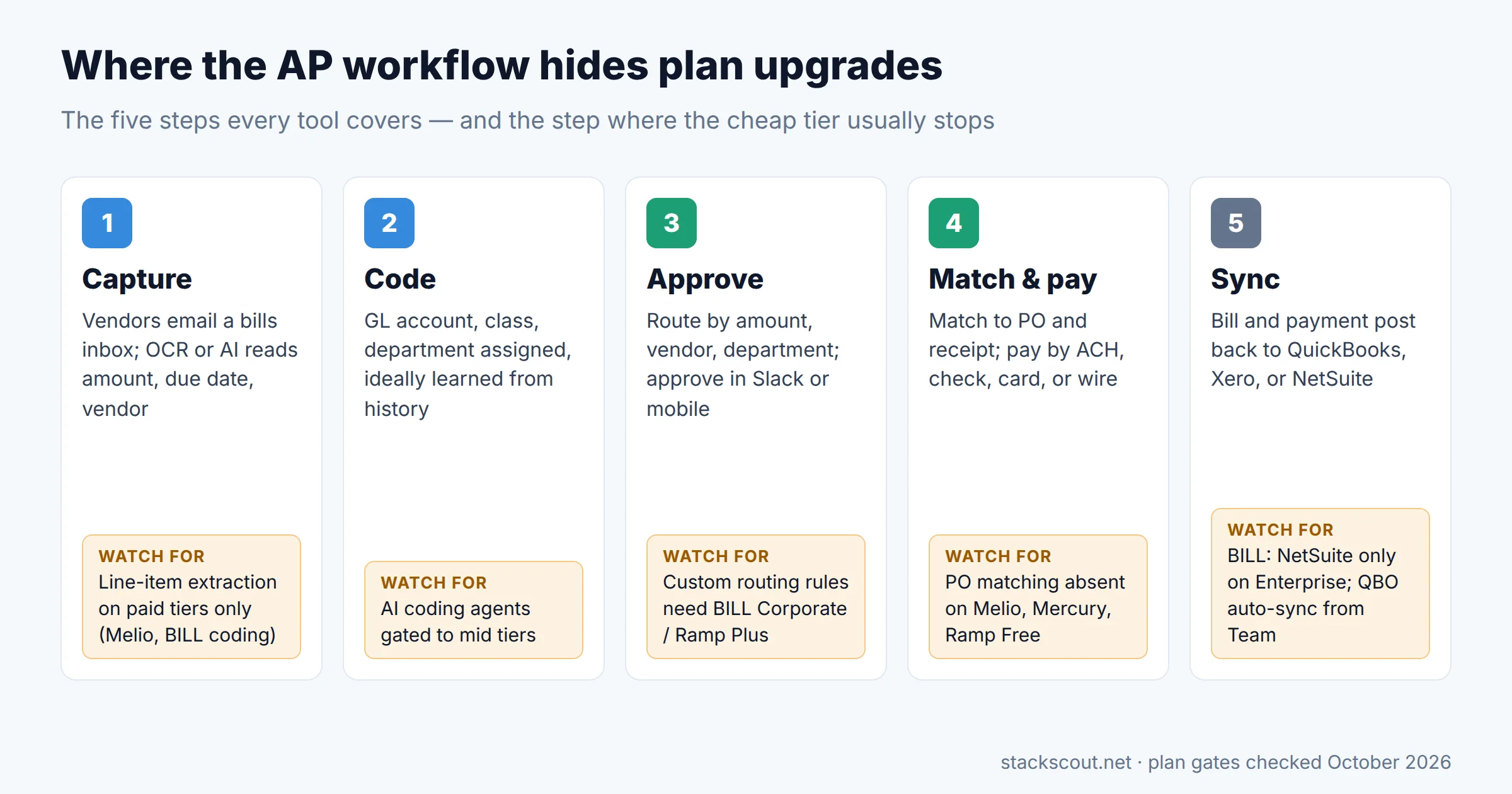
Every tool on this list covers the same five steps. The differences show up in which step forces an upgrade. For a startup moving from 100 to 400 invoices a month, these are the gates that usually trigger the next plan:
1. Approval rules by department or GL account
With one approver, any tool works. Once three or four budget owners each approve their own vendors, you need routing by department, vendor, or GL account. At BILL that's Corporate. At Ramp it's Plus, and at Brex, dynamic chains are on Premium. Melio routes by amount, vendor, and scheduler from Core. Mercury documents amount-based rules only.
2. Automatic sync with your ledger
This is the gate that catches people on BILL Essentials (CSV only) and Melio Go (limited syncs). If you're on NetSuite or Sage Intacct, the shortlist narrows fast. BILL needs Enterprise, Ramp needs Plus, Melio has NetSuite on Unlimited but no Intacct, and Mercury has NetSuite but no Intacct. Tipalti, Stampli, Brex, and Paylocity support both. For revenue-side considerations when choosing a ledger, see our guide to accounting software for SaaS companies.
3. PO matching
Most startups under 300 invoices don't issue purchase orders, so this gate may never matter. If your auditors or board want POs for hardware or large contracts, three tools are out entirely (Melio, Mercury, and Ramp Free). Brex offers 2-way on Premium. Ramp Plus, Tipalti, Stampli, and Paylocity offer 3-way.
4. International payments that don't need a separate tool
Count your foreign vendors before you buy. If it's a handful of SaaS subscriptions billed in USD, every tool here can send a USD wire. If you pay contractors in a dozen local currencies and need W-8 forms on file, Tipalti is the one designed for it. Ramp, Brex, and BILL work in between.
05
Who should choose which
If your next step after AP is connecting more of the finance stack, such as Stripe revenue into the ledger, our guide to connecting Stripe to QuickBooks Online covers the fee entries that tend to break reconciliation.
06
How we chose
We started with the AP automation tools most often recommended to US startups and small mid-market companies. We kept tools that publish enough of their product details to evaluate without a sales call, plus two quote-only tools (Stampli and Paylocity for Finance) because they're common finalists. Each tool was scored on four criteria weighted for a finance team processing roughly 100–500 invoices a month:
- Invoice capture: email inbox, OCR or AI extraction, line items, and which plan includes them.
- Approval workflow: multi-step and conditional routing, and the plan where custom rules start.
- International payments: country and currency coverage, fees, and FX transparency.
- Accounting sync: QuickBooks Online, Xero, NetSuite, and Sage Intacct support, sync type, and plan gating.
Total cost was modeled from published prices only, using the scenario described in the cost section. Where a vendor doesn't publish a number, we say so rather than estimate it. Ratings from review sites weren't used to rank tools.
07
Frequently asked questions
Which AP automation software is the best?
What is the best software for automating accounts payable processes at a startup?
What is the best AI software for accounts payable?
Is Ramp Bill Pay still free in 2026?
Do I need PO matching at 300 invoices a month?

Technology consultant with 10+ years in the Japanese tech industry. Specializing in SaaS evaluation, workflow automation, and B2B tool integration.