Power Automate Pricing 2026 for Microsoft 365 Teams: What's Included, and When You Pay $15, $150, or $0.60
If your company already pays for Microsoft 365, most of your flows may cost nothing extra. The bill depends on three things for each flow: the connectors it uses, who triggers it, and how often it runs. Here's the math, using Microsoft's October 2026 licensing guide.
TL;DR
- Most Microsoft 365 plans already include Power Automate for flows that use only standard connectors (SharePoint, Outlook, Teams, Excel Online, Approvals). That covers a lot of approval and notification work at $0 extra.
- You pay the moment a flow touches a premium connector (HTTP, SQL Server, Dataverse, Salesforce and most non-Microsoft SaaS), a custom connector, or a desktop flow triggered from the cloud. For licensing, it doesn't matter how small the flow is.
- The trigger type decides who pays. An automated or scheduled flow needs Premium ($15/user/month) for the owner only. An instant (button) flow needs Premium for every person who runs it. Once 11 or more people run one, a single Process license ($150/month) on that flow costs less.
- Pay-as-you-go ($0.60 per premium cloud run) beats a Process license below 250 runs a month. Unattended RPA at $3.00 per run beats Process below 50 runs.
- Mark November 1, 2026 on your calendar. The 5,000 AI Builder credits included with each Premium and Process license are removed on that date. Flows with AI steps will need Copilot Credits after that.
01Power Automate prices at a glance (October 2026)
Microsoft's public pricing page loads its prices with JavaScript, so most crawlers and many comparison sites show them stale or blank. We took the numbers below from the Power Platform Licensing Guide dated October 2026. The pay-as-you-go meters were checked against Microsoft Learn and the Azure Retail Prices API. All prices are US list, per month, billed annually.
| License | Unit | Price | What it's for |
|---|---|---|---|
| Microsoft 365 seeded rights"Power Automate Basic" | per M365 user | $0 extra | Cloud flows using standard connectors only |
| Power Automate Premium | per user | $15 | Unlimited cloud flows with premium and custom connectors, plus 1 attended RPA bot and process mining |
| Power Automate Process | per bot or flow, per environment | $150 | Licenses a flow on its own, regardless of who runs it, or one unattended RPA bot |
| Power Automate Hosted Process | per bot, per environment | $215 | Same as Process, plus a Microsoft-hosted machine for RPA |
| Process Mining add-on | per 100 GB stored | $5,000 | Large-scale process mining (requires Premium) |
| Pay-as-you-go: cloud / attended run | per premium flow run | $0.60 | Billed to an Azure subscription; standard-connector runs free |
| Pay-as-you-go: unattended run | per desktop flow run | $3.00 | Unattended and hosted RPA runs |
| Per user (legacy) | per user | $15 | Older plan, still listed for existing customers |
| Per flow (legacy) | per flow, min. 5 | $100 | Replaced by Process; Microsoft advises replacing instead of renewing |
Source: Microsoft Power Platform Licensing Guide (October 2026), Microsoft Learn "Pay-as-you-go meters", Azure Retail Prices API. Partner and enterprise agreement pricing can differ.
Note that the Process license is priced per environment. If you deploy the same flow or bot to dev, test, and production environments, each environment where it runs needs its own license. Premium works differently: it's assigned per user and works across every environment in the tenant.
02What your Microsoft 365 license already includes
This is the part most "Power Automate pricing" pages skip, and it matters most to a team that already has Microsoft 365. Microsoft calls these seeded rights. Every Office 365 and Microsoft 365 business and enterprise suite in the licensing guide's Appendix B includes cloud flows: Business Basic, Standard, and Premium; Office 365 E1/E3/E5; and Microsoft 365 E3/E5/F3. Microsoft 365 F1 is the exception.
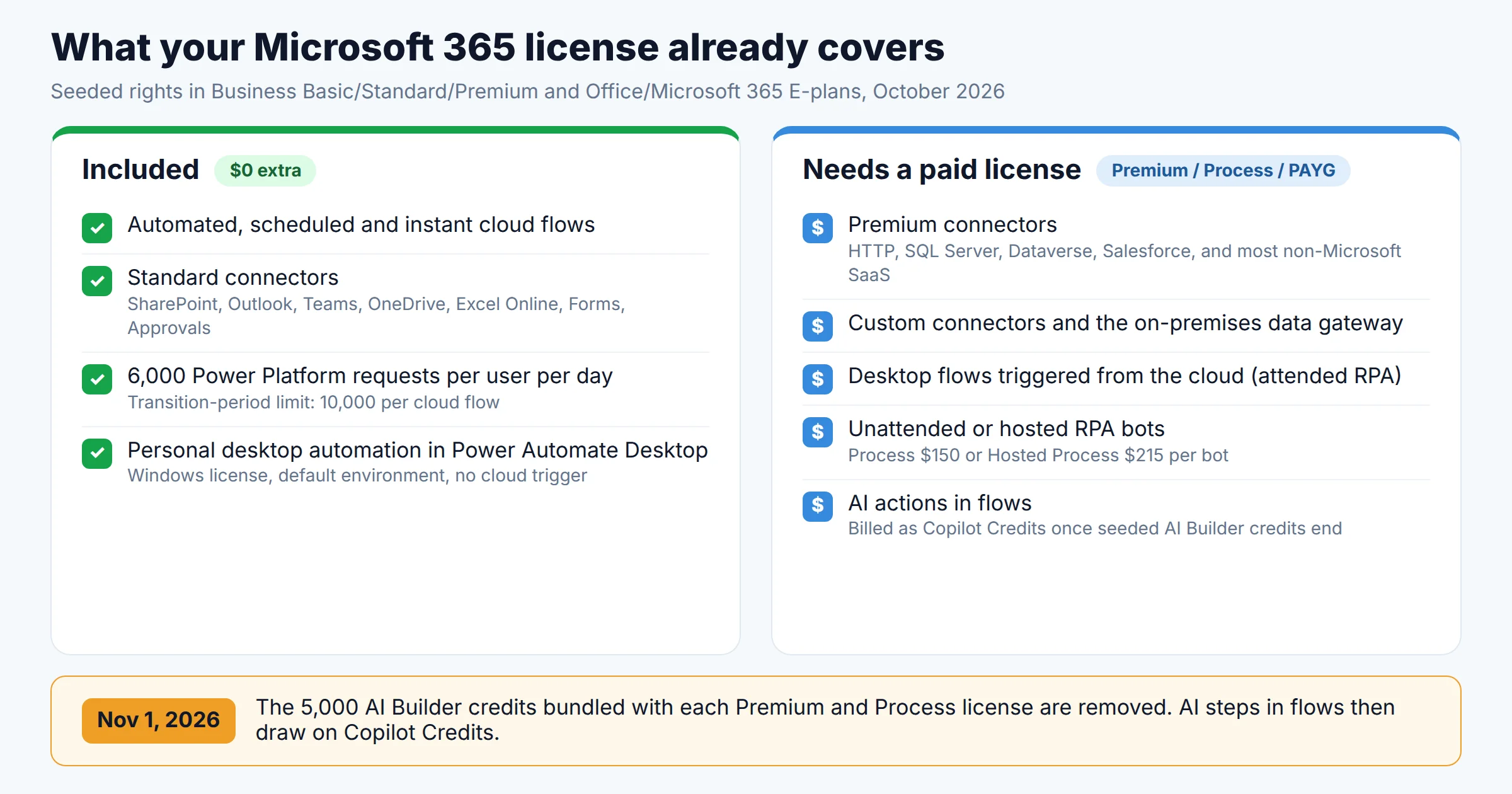
Here's what those seeded rights include, according to Microsoft's licensing FAQ:
- Automated, scheduled, and instant cloud flows using standard connectors. That covers SharePoint, Outlook, Teams, OneDrive, Excel Online, Forms, Planner, and Approvals, which are the building blocks of most internal approval and notification flows.
- 6,000 Power Platform requests per user per 24 hours. Premium gets 40,000. A request is roughly one action: a connector call, a "compose", or a variable initialization. Failed actions and retries count too.
- No premium connectors, with one narrow exception: inside Dataverse for Teams environments.
- No business process flows, custom connectors, on-premises data gateway, or AI Builder capacity.
Desktop automation works differently. Windows Pro and Enterprise licenses include Power Automate for desktop for personal, attended automation. The licensing guide's footnotes describe it as a free app "not for business-critical functions, with no SLA or Microsoft support." You can't trigger it from a cloud flow, schedule it, or share it. To get any of those, you need Premium.
The Microsoft 365 suite you're on doesn't change the Power Automate bill
For reference, here are the M365 suite prices after the July 1, 2026 increase, from Microsoft's own plan pages: Business Basic $7, Business Standard $14, Business Premium $22, Microsoft 365 E3 $39, and E5 $60 per user per month (annual, with Teams). Upgrading from Business Standard to E5 does not unlock premium connectors. Every M365 tier gets the same Power Automate seeded rights for cloud flows, so the decision about Power Automate licensing is separate from the decision about which suite to buy.
Flows owned by a user with only an M365 license can be turned off after 90 days without a trigger. Owners get a warning 30 days before it happens. Flows owned by Premium users or licensed with Process are exempt. If a quarterly or annual flow keeps disappearing, this is usually the reason.
03Per user vs per flow: the trigger decides who pays
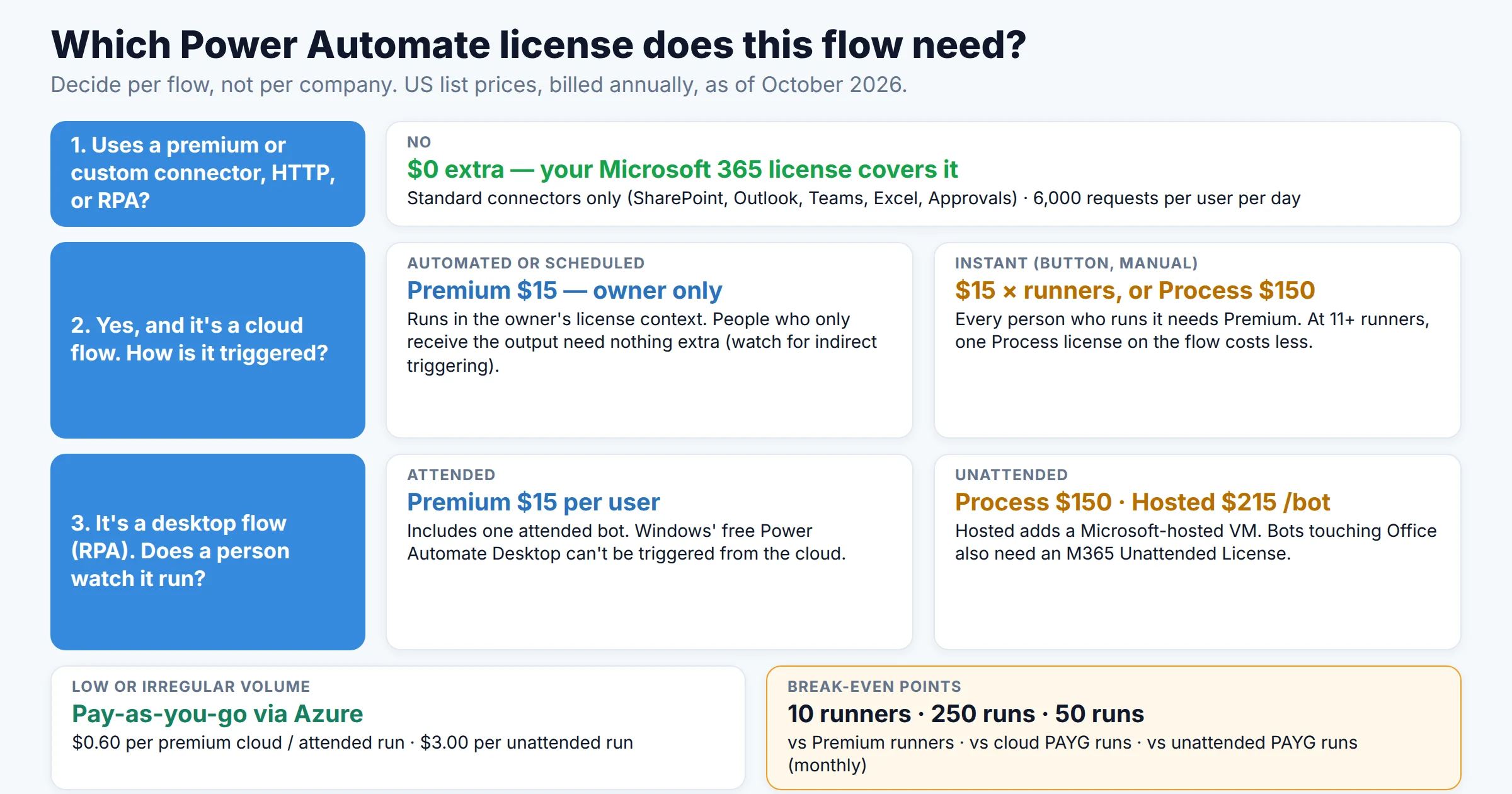
A flow is "premium" if it uses any premium or custom connector. When that's the case, Microsoft's licensing FAQ decides who needs a license based on how the flow is triggered, not on who built it or whose account the connections use:
- Automated and scheduled flows always run under the owner's license. If a SharePoint upload triggers a flow that writes to SQL Server, only the owner needs Premium.
- Instant flows (buttons, manual triggers, Teams message actions) run under the license of the person who starts them. If 80 employees click a button that hits a premium connector, all 80 need Premium, or the flow needs a Process license.
- A Process license assigned to the flow overrides both rules. The flow gets premium connectors and its own 250,000 daily requests, no matter who runs it. The flow must be in a solution.
The multiplexing rule that breaks the "one service account" shortcut
A common idea is to buy one Premium license for a service account and let everyone run flows through it. Microsoft calls this multiplexing, and its FAQ says it directly: "Assigning a single Power Automate Premium license to a service account that many users share is multiplexing, and the flow isn't compliant."
Indirect triggering counts as well. Microsoft gives this example: a premium flow is triggered when a user uploads a file to SharePoint, and it emails that same user a result. Both the owner and the uploader need Premium. If the flow only moves data or notifies colleagues who didn't trigger it, it isn't multiplexing. When many users trigger a premium flow, Microsoft's own answer is a Process license on the flow, which also keeps the flow compliant as new users are added.
Break-even math: Premium seats vs Process vs pay-as-you-go
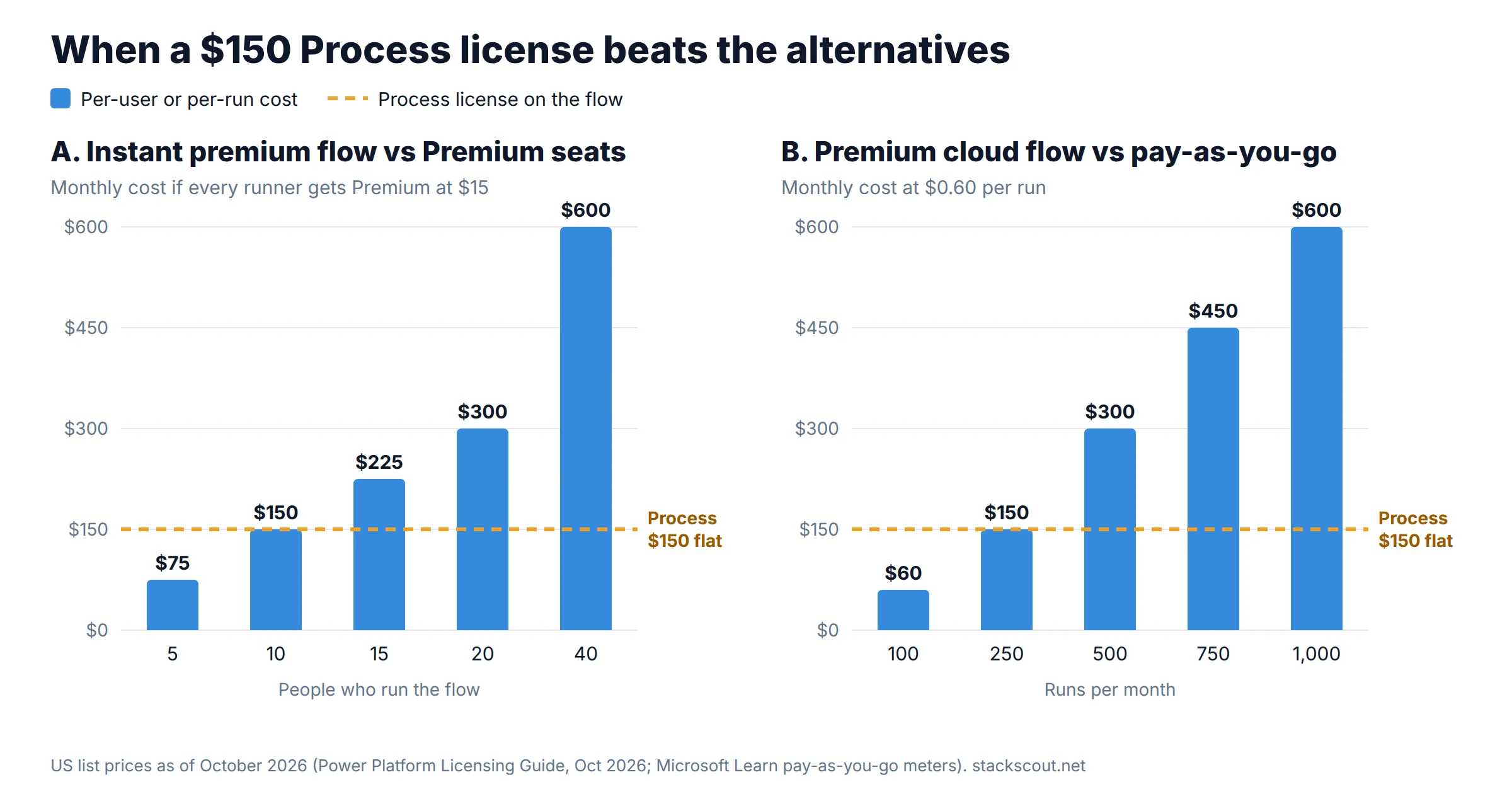
With a $15 seat, a $150 flow license, and a $0.60 run, the break-even points are easy to calculate:
| Comparison | Break-even | Rule of thumb |
|---|---|---|
| Premium for every runner ($15) vs Process on the flow ($150) | 10 runners | 11+ people running one instant premium flow → Process |
| Cloud pay-as-you-go ($0.60/run) vs Process ($150) | 250 runs/mo | Under ~8 runs a day → PAYG; above → Process |
| Cloud pay-as-you-go ($0.60/run) vs one Premium seat ($15) | 25 runs/mo | A single builder running a premium flow daily → Premium |
| Unattended pay-as-you-go ($3.00/run) vs Process bot ($150) | 50 runs/mo | A nightly batch job (~22 runs) → PAYG; per-document bots → Process |
| Hosted Process ($215) vs Process ($150) | $65/mo gap | Hosted wins if your own VM, patching, and Windows licensing cost more than $65 a month |
Two details change the math. First, a Premium seat covers every flow that person runs, not just one. If the same 15 people use five different premium flows, 15 Premium seats ($225) cost less than five Process licenses ($750). Second, a "run" on pay-as-you-go is one flow run. A cloud flow that runs once per invoice is billed per invoice. Child flows of cloud and attended flows aren't charged separately, but unattended child flows are.
Microsoft Learn says Process licenses and unattended RPA add-ons are ignored in an environment linked to pay-as-you-go. Every unattended run there is billed at $3.00, even if you've assigned capacity. Keep flows that rely on Process licenses in a separate environment that isn't linked to Azure.
04Desktop flows and RPA: where the costs grow
Desktop flows (Microsoft's RPA, which clicks through legacy apps the way a person would) are licensed separately from cloud flows. For more on how RPA differs from API-based workflows, see our explainer on workflow automation vs RPA vs AI agents.
- Attended RPA (a person is logged in and watching): included with Premium, with one attended bot per user. That bot runs one desktop flow at a time, so several processes have to run one after another.
- Unattended RPA (runs on a machine with nobody logged in): needs a Process license ($150) for each bot. Running two instances of the same process at once requires two bots. You supply and maintain the machine.
- Hosted RPA: Hosted Process ($215) includes a Microsoft-hosted machine, so there's no VM for you to patch.
- The cost most budgets miss: the licensing guide says that if an unattended bot accesses Windows or Office apps, you also need a Microsoft 365 – Unattended License for it. Microsoft doesn't publish a self-serve price, so get a quote from your reseller before you approve an RPA business case.
One more requirement: assigning a Process license to a machine still requires that a Premium user registered the machine. Several monitoring pages, such as work queues and machine lists, are also shown only to Premium users. A team with unattended bots needs at least one Premium seat, for the RPA developer.
05Costs that don't appear on the pricing page
1. AI Builder credits end on November 1, 2026
Many 2026 pricing guides still say Premium "includes 5,000 AI Builder credits." That's true for about four more weeks. Microsoft's AI Builder documentation says the credits seeded in Premium, Process, and the RPA add-ons "will be removed on November 1, 2026." After that date, only AI Builder add-on credits bought before the cutoff remain. New customers already can't buy the add-on (it reached end of sale in November 2025) and have to buy Copilot Credits instead.
What this means in practice: if you have flows doing document processing, receipt extraction, or AI prompts, find them now. Microsoft says that once AI Builder credits run out, the system tries Copilot Credits. If none are available, the AI actions fail with QuotaExceeded or EntitlementNotAvailable. Copilot Credits cost $200 per 25,000-credit pack or $0.01 each on pay-as-you-go (as of late September 2026). We cover Copilot Studio's credit costs in our comparison of AI agent automation platforms.
2. Request limits are generous now, but that's temporary
Microsoft is currently in a transition period for Power Automate request limits. During this period, Premium flows get 200,000 requests per cloud flow per day, and M365-seeded flows get 10,000. When the transition ends, Microsoft says enforcement moves to the official per-user limits: 40,000 per Premium user and 6,000 per M365 user, shared across all of that person's flows. Process licenses stay at the flow level (250,000 per license after the transition, 500,000 during it). Microsoft hasn't published an end date, and it tells customers to "design your cloud flows for the per-user limits."
If one person owns a dozen busy automated flows, they may fit today and get throttled later. The fix Microsoft recommends is a Process license on the busy flow. You can stack up to 10 Process licenses on one flow, or share one license across a flow group of up to 25 flows. The Power Platform Requests add-on can't currently be assigned to a specific user or flow, so it won't fix a single throttled flow. Flows that stay throttled for 14 days are turned off.
3. Owners leave, and their flows lose their license
An automated premium flow runs on its owner's Premium license. Microsoft's limits documentation says that if the owner leaves the organization, the flow reverts to the lowest performance profile, and the licensing FAQ advises changing the owner or assigning a Process license so the flow keeps working. For business-critical flows, use a service principal as owner with a Process license, or designate a licensed user on the service-principal-owned flow. Microsoft recommends both over a shared service account.
4. Dataverse storage
Each Premium license adds 250 MB of Dataverse database capacity and 2 GB of file capacity to the tenant pool. Process adds 50 MB and 200 MB. Most M365-centric flows never use Dataverse. If yours do, extra database capacity costs $40 per GB per month (annual) or $48 per GB on pay-as-you-go.
06Three worked budgets for Microsoft 365 teams
These are illustrative setups built from Microsoft's published prices, not customer cases. Each one shows a different licensing pattern.
A. 60-person company on Business Standard, mostly approvals
14 flows: leave requests, purchase approvals, Teams alerts from SharePoint lists, plus one automated sync from Salesforce to a SharePoint list.
The other 58 employees benefit from the sync but never trigger it, so they need nothing. If the flow emailed each salesperson whenever their own record changed, multiplexing rules would come into play. At that point, a Process license ($150) would be the clean answer.
B. 200-person company on Microsoft 365 E3, one self-service button
An expense-lookup button in Teams that queries SQL Server (premium), used by about 120 employees. Four ops builders create flows that call internal APIs over HTTP.
That's $25,200 a year saved compared with licensing every runner. The Process license also gives the flow its own 250,000 daily requests, so a busy button won't use up the builders' per-user limits after the transition period ends.
C. Finance team automating a legacy ERP with RPA
An unattended desktop flow that keys supplier invoices into an on-premises ERP. About 400 invoices a month, one run per invoice.
Change the design to one nightly batch run (about 22 runs a month) and pay-as-you-go drops to $66, which is cheaper than Process. Before you pick a license, decide whether the bot runs per item or per batch.
07Power Automate vs Make vs Zapier for a Microsoft 365 team
The three tools charge for different things. Power Automate charges per person or flow, Zapier per task (each successful action), and Make per credit (each module operation). We compare the task and credit models in detail in Make vs Zapier vs n8n. Here's the short version for a team that already pays for Microsoft 365:
| Power Automate | Zapier | Make | |
|---|---|---|---|
| Billing unit | User, flow, or run | Task | Credit |
| Cost for M365-only flows | $0 (seeded) | Paid plan once past the free tier | Paid plan once past the free tier |
| Entry paid price | $15/user (Premium) | Pro: $19.99/mo for 750 tasks (annual) | Core: 10,000 credits/mo, about $9–$12 (annual; shown price varies by region) |
| Desktop RPA | Yes (attended in Premium; unattended $150/bot) | No | No |
| Governance | DLP policies, Managed Environments with Premium | Admin controls on team plans | Team roles; SSO on Enterprise |
| Non-Microsoft SaaS | Mostly premium connectors | Broadest app catalog | Large catalog, visual branching |
Zapier figures verified October 4, 2026. Make's pricing page renders prices by region, so confirm at checkout.
Power Automate makes sense when
- Most flows stay inside SharePoint, Teams, Outlook, and Excel, so they're free
- You need desktop RPA against legacy Windows apps
- IT wants DLP policies and tenant-level governance on automation
- Premium flows are automated, so only owners need seats
Make or Zapier may cost less when
- Many people trigger flows that touch non-Microsoft SaaS
- Volume is low but spread across many different apps
- No one will maintain solutions, environments, and Process assignments
- You need integrations Microsoft only offers as custom connectors
Many M365 teams use both: Power Automate for the free, Microsoft-internal flows and a task-based tool for the handful of SaaS-to-SaaS integrations. If you're weighing that split, our decision framework for choosing a no-code automation tool walks through the questions to ask. Our list of Zapier alternatives for small business covers lower-cost options. For larger integration needs, see the iPaaS platforms we compared for B2B SaaS teams.
08How to work out your own bill in an afternoon
- Export your flow inventory from the Power Platform admin center. For each flow, note its connectors, trigger type, owner, and run count over the last 30 days.
- Mark every flow that uses a premium or custom connector. Flows with only standard connectors drop out of the budget.
- Split the premium flows by trigger. Automated and scheduled flows need a seat for the owner. For instant flows, count the distinct people who run them.
- Apply the break-evens: 11+ runners → Process; under 250 runs a month with no seat holder → pay-as-you-go; a builder who runs premium flows daily → Premium.
- Find AI Builder actions and budget Copilot Credits for after November 1, 2026.
- Check the request reports (Power Platform admin center → Licensing → Microsoft Power Platform requests). Flag owners whose total use across their flows is near 40,000 a day for Premium or 6,000 for M365. Those are the flows that will be throttled after the transition period.
Before you buy, a global admin can start a free 30-day trial of the Process license from the Microsoft 365 admin center. Trial Process licenses carry the same entitlements as paid ones, so you can test a flow-level license on your busiest flow first.
09FAQ
Does Power Automate cost anything if we already have Microsoft 365?
Can I use premium connectors in Power Automate with an M365 license?
Is Power Automate Desktop still available for free?
Should we buy per user (Premium) or per flow (Process)?
How much does Microsoft Teams cost, and does it include Power Automate?
10Methodology
We took license prices and entitlements from Microsoft's Power Platform Licensing Guide dated October 2026, downloaded on October 5, 2026. We cross-checked them against Microsoft Learn's license-type, licensing FAQ, request-limit, flow-limit, and pay-as-you-go pages. Microsoft's marketing page renders prices client-side, so we confirmed the pay-as-you-go run rates ($0.60 and $3.00) through the Azure Retail Prices API. Microsoft 365 suite prices come from Microsoft's US plan pages as displayed on October 5, 2026. The AI Builder change comes from Microsoft Learn's AI Builder licensing documentation and the guide's change log. The worked budgets are illustrative calculations, not customer data. We didn't receive compensation from Microsoft, Zapier, or Make for this article.
Sources
- Microsoft, Power Platform Licensing Guide (October 2026, PDF)
- Microsoft Learn, Types of Power Automate licenses
- Microsoft Learn, Power Automate licensing FAQ (trigger context, multiplexing, Process trials)
- Microsoft Learn, Requests limits and allocations (transition period)
- Microsoft Learn, Pay-as-you-go meters
- Microsoft Learn, Limits of automated, scheduled, and instant flows (90-day and 14-day turn-off rules)
- Microsoft Learn, Licensing and AI Builder credits (November 1, 2026 removal)
- Microsoft, Azure Retail Prices API: Power Automate meters
- Microsoft, Compare Microsoft 365 business plans and enterprise plans and pricing

Technology consultant with 10+ years in the Japanese tech industry. Specializing in SaaS evaluation, workflow automation, and B2B tool integration.