Best iPaaS Platforms for B2B SaaS Teams (2026): 13 Tools Sorted by the Integration Job You Actually Have
"iPaaS" now covers three different products that solve three different problems, and most "best iPaaS" lists mix them together. If you're connecting your own company's tools, shortlist Workato (enterprise), Celigo (ERP and e-commerce heavy), or n8n (engineering-led, self-hostable). If you're shipping integrations inside your product for customers, choose between an embedded iPaaS (Prismatic or Paragon) when every customer's workflow is different, and a unified API (Merge, Apideck, or Nango) when you need the same data from many apps in one category. Check how each tool bills before you compare features. At 200 customers, the list-price difference between tools in the same category can be more than 10x.
Quick Answer: Top Picks by Job
Workato Internal iPaaS
Among the top-rated enterprise automation platforms, with 1,200+ connectors, strong governance, and an embedded edition if you later need customer-facing integrations. You'll need a sales conversation and a five-figure annual budget.
Prismatic
Built only for B2B SaaS vendors. It bills per deployed instance and says it is "never billed on API calls or executions," which keeps costs predictable as customer data volumes grow.
Merge Unified API
The quickest route to read/write access across HRIS, ATS, CRM, accounting, and ticketing apps through one normalized schema. It's free for 3 linked accounts, then $650/month for up to 10.
First, Decide Which of Three Jobs You're Hiring For
Look at the current first page for "best iPaaS" and a pattern shows up. A lot of the ranking articles are written by integration vendors, and most of them rank their own product first. Beyond the bias, many of them put Zapier, MuleSoft, and a unified API like Merge on the same numbered list, as though a buyer would choose between them. That rarely happens, because these tools are built for different jobs.
A B2B SaaS company usually has two separate integration problems, and they often belong to different budget owners:
Internal iPaaS
Connects the tools your company runs on: CRM to billing, HRIS to IT provisioning, product usage to Slack alerts.
Owner: RevOps, BizOps, IT
Unified API
Gives your product one normalized API for a whole category of apps, such as "any HRIS" or "any accounting system."
Owner: Engineering
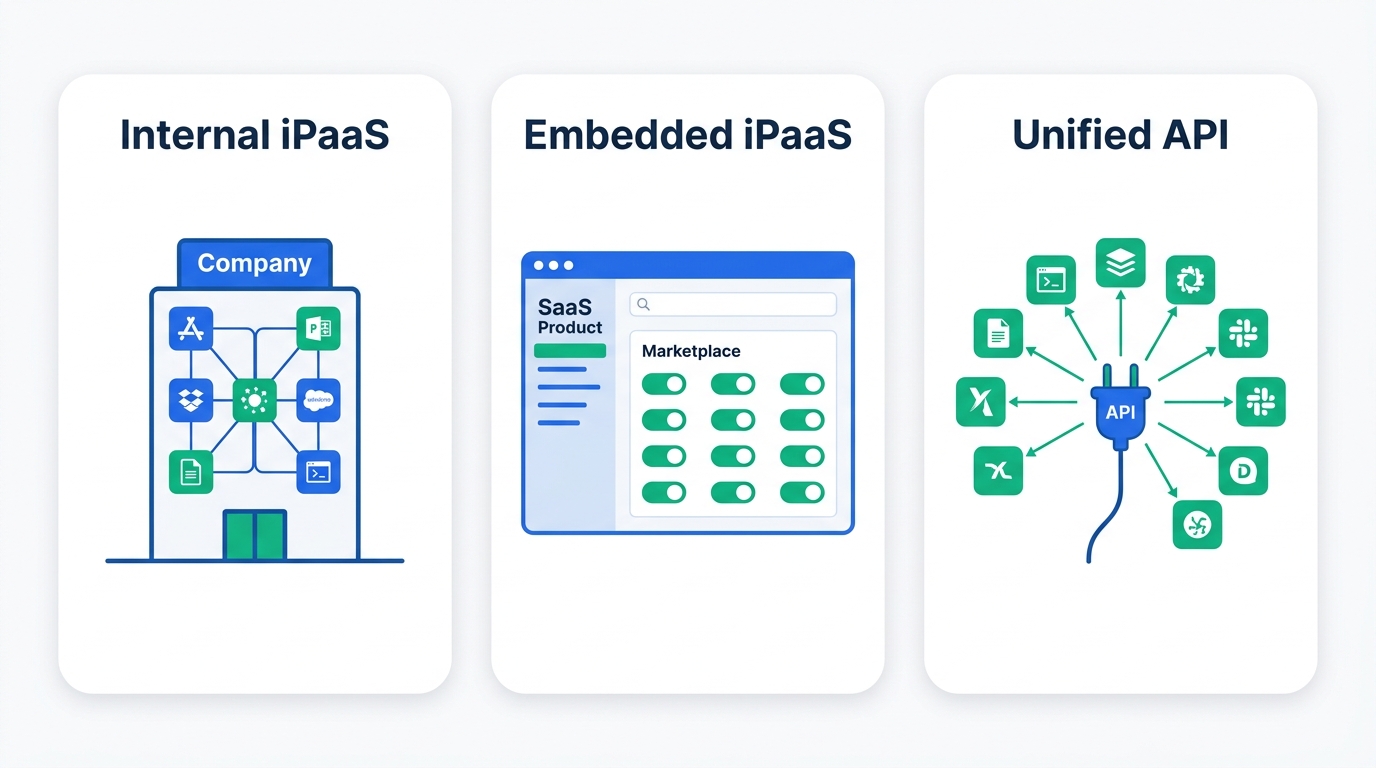
The quickest test is whose credentials the integration runs on. If it uses your company's Salesforce and your company's NetSuite, you need an internal iPaaS. If it uses your customer's Salesforce, authorized through a "Connect" button inside your app, you need an embedded iPaaS or a unified API. If you're still weighing whether to buy a platform or build point-to-point connections yourself, start with our native integration vs iPaaS vs custom API decision guide. For background on what an iPaaS does under the hood, see What Is iPaaS? Integration Platform as a Service, Explained.
Many SaaS companies eventually buy one tool from each lane. A common mid-stage stack is an internal iPaaS for operations plus one customer-facing platform for the product. Evaluating them in one bake-off leads to one of two mistakes: an operations tool gets forced into a customer-facing role it wasn't priced for, or an engineering tool gets pushed onto RevOps users who can't maintain it.
Comparison Table: All 13 Platforms
We sorted the table by lane, and the column to read first is the billing meter. Two tools with similar features can have very different costs because one charges per task and the other charges per customer or per connector. Prices were checked on each vendor's official pricing page in September 2026. "Quote" means the vendor publishes no list price.
| Platform | Best for | Billing meter | Entry price (Sep 2026) | Self-host |
|---|---|---|---|---|
| Internal iPaaS | ||||
| Workato | Enterprise automation + governance | Workspace + task pools | Quote | No |
| Boomi | Hybrid cloud/on-prem, API mgmt | Edition tiers; PAYG usage | PAYG $99/mo + usage | Runtime (Atom) |
| MuleSoft | API-led, Salesforce-centric enterprises | Mule flows + messages | Quote (advertised "from $2,000/mo") | Yes (hybrid) |
| Celigo | ERP / e-commerce (NetSuite, Shopify) | Endpoints + flows (flat) | Quote; 30-day trial | No |
| Tray.ai | Ops teams building AI agents + automation | Tasks; workspaces by plan | Quote | No |
| n8n | Engineering-led teams | Workflow executions | €20/mo (annual); Community free | Yes |
| Zapier | Business-user automation, widest app catalog | Tasks (per step) | Free; Pro from $19.99/mo (annual) | No |
| Make | Visual, cost-efficient multi-step flows | Credits (per module action) | Free; Core $9/mo | No |
| Embedded iPaaS | ||||
| Prismatic | Per-customer configurable integrations | Deployed instances | Quote; free trial | Private / GovCloud (Enterprise) |
| Paragon | Integrations + managed sync + AI agent actions | Connected users (tenants) | Quote; free trial | Enterprise only |
| Unified API | ||||
| Merge | Broad category coverage, fast launch | Linked accounts | Free (3); $650/mo for 10 | No |
| Apideck | Accounting, CRM, HRIS for EU/SMB-focused SaaS | Active consumers | €599/mo (25 consumers) | No |
| Truto | Flat-cost scale on many connectors | Connectors per year | $999/connector/yr (10 min.) | On-prem (Enterprise) |
| Nango | Code-first teams wanting control | Connections + compute | Free (10); $50/mo PAYG base | BYOC (Enterprise) |
Zapier and Make are listed for completeness. They're covered in depth in our Make vs Zapier vs n8n comparison, so we don't give them full reviews here. That makes 13 platforms in total, and 11 get full reviews below.
Internal iPaaS: Connecting Your Own Company's Stack
This is the traditional iPaaS market, where Gartner's Magic Quadrant and most analyst coverage focus. For a B2B SaaS team, the usual workloads are quote-to-cash (CRM → billing → ERP), lead routing, employee lifecycle (HRIS → identity → IT), and product-usage signals flowing into sales tools. The main differences between platforms are governance depth, how well they handle ERP-grade data, and whether a business user can maintain the workflows without engineering help.

1. Workato
InternalWorkato is often the default shortlist pick for SaaS companies past roughly 200 employees. It combines a low-code "recipe" builder with enterprise controls such as environments, role-based access, and audit logs, so business technologists can build while IT still governs. Workato reports that it was named a Leader in the 2026 Gartner Magic Quadrant for iPaaS for the eighth time.
For SaaS vendors, the key detail is that Workato also sells an Embedded edition. Its Embedded Partner APIs let you create and manage customer workspaces, recipes, and connections programmatically across its 1,200+ connectors. If you expect to need customer-facing integrations later, one vendor for both lanes has real appeal. The downside is that Embedded is licensed and priced separately, and it is a heavier tool than products designed only for embedding.
Pricing is not public. Based on our research, third-party procurement benchmarks such as Vendr's marketplace data generally put annual contracts in the tens of thousands of dollars for mid-market deployments and well into six figures for enterprise task volumes. Treat those figures as ranges, not quotes. Contracts use annual task pools, so find out the overage rate before you sign.
- Strong governance for citizen developers
- Very broad connector library
- One vendor for internal and embedded use
- No public pricing; annual commitment
- Task-based overages can surprise at volume
- More platform than a small team needs
Choose it if you have an operations or IT team that will own automation as a function, and you want room to grow into embedded integrations.
2. Boomi
InternalBoomi has the broadest scope of the internal platforms here. Its pricing page lists separate editions for Integration, API Management, Data Hub (master data), and Data Integration, and each has tiers from Standard through Enterprise Plus. Its lightweight runtime, the "Atom," can run in Boomi's cloud or on your own servers. That matters if you still have on-prem systems or data-residency rules.
Boomi is also one of the few enterprise iPaaS vendors with a self-serve entry point. As of September 2026, the Pay-As-You-Go plan is listed at "$99 per month plus usage, billed monthly" with no contract, and there's a 30-day trial of the full platform. That lets a SaaS ops team test a real workflow before starting a procurement process.
- Cloud and on-prem runtimes
- API management and MDM in the same vendor
- No-contract PAYG entry plan
- Edition sprawl makes quotes hard to compare
- UI feels dated next to newer tools
- More than a cloud-only SaaS company usually needs
Choose it if your integration estate includes on-prem or legacy systems, or you want API management and integration from one contract.
3. MuleSoft Anypoint Platform
InternalMuleSoft, owned by Salesforce, is built around "API-led connectivity": you design reusable system, process, and experience APIs and compose integrations from them. That approach works well when a central integration team serves dozens of internal consumers. It's overkill for a 150-person SaaS company that mainly needs HubSpot to talk to Stripe.
Packaging changed in 2024. New customers buy Integration Starter or Integration Advanced packages, metered on Mule flows and Mule messages instead of the old vCore sizing, and MuleSoft's documentation confirms usage is tracked against flow, message, and throughput entitlements. Third-party breakdowns report Starter at 50 flows and 5 million messages per year. MuleSoft's own pricing page advertises plans "from $2,000 a month," but actual contracts are quote-based and annual. Plan for implementation partners on top of the license, because most MuleSoft programs use them.
- Deepest API design and lifecycle tooling
- Native fit for Salesforce-heavy orgs
- Hybrid deployment
- Needs developers who know the platform
- Highest total cost here
- Slow time-to-first-integration
Choose it if you are building a governed API layer for a large enterprise, not just moving records between SaaS apps.
4. Celigo
InternalCeligo's integrator.io is known for NetSuite, Shopify, and Salesforce "integration apps": prebuilt, configurable flows for order-to-cash and similar processes. A SaaS company whose finance team runs on NetSuite gets real value from those templates, because the hard part of ERP integration is the business logic (revenue schedules, subsidiaries, tax), not the API calls.
The pricing model is Celigo's clearest advantage. According to its pricing page, cost is based on the number of endpoints and flows across Standard, Professional, and Enterprise editions, with "no overage fees." There's no per-task charge, so a surge in invoice volume at quarter-end doesn't change your bill. Exact prices require a sales conversation.
- Strong prebuilt ERP / e-commerce flows
- Flat pricing, no overage fees
- Usable by technical finance/ops staff
- Weaker outside its ERP/commerce core
- No public list prices
- Not designed for customer-facing embedding
Choose it if NetSuite or another ERP sits at the center of your internal integrations and you want predictable spend.
5. Tray.ai
InternalTray.ai, formerly Tray.io, now presents itself as a platform for integration, automation, and AI agents. Per its pricing page, plans are Pro (3 workspaces), Team (20 workspaces), and Enterprise (unlimited), with usage metered in tasks. Add-ons such as agent development, HIPAA compliance, SSO, and regional hosting are sold separately.
It suits a RevOps or GTM-systems team that wants something more capable than Zapier, with branching logic, a proper API connector builder, and the ability to call LLMs inside workflows, without moving to MuleSoft-level complexity. Because many enterprise features are add-ons, compare quotes line by line and not just on the base plan.
- Flexible builder with strong API tooling
- AI agent features built in
- Workspaces map well to departments
- Key enterprise features are paid add-ons
- No public pricing
- Smaller ecosystem than Workato
Choose it if your GTM systems team wants low-code speed with developer-level control and plans to build agentic workflows.
6. n8n
Internaln8n is the default pick for technical teams that want to self-host. The Community Edition is free on GitHub under a source-available "fair-code" license, not an OSI open-source license, which matters if you plan to resell it. Cloud plans, per its pricing page, are billed on workflow executions, not steps: Starter at €20/month for 2,500 executions, Pro at €50/month for 10,000, and Business at €667/month for 40,000 with SSO and a self-hosted option (all billed annually). All plans include unlimited users and workflows.
Billing per execution makes long multi-step workflows cheap compared with per-task tools. A 15-step enrichment workflow costs one execution on n8n and 15 tasks on Zapier. In return, your team owns more operational work: upgrades, queue mode, and credential storage if you self-host. If you're coming from Zapier, our Zapier-to-n8n migration playbook covers the cutover.
- Self-hosting for data residency
- Per-execution billing favors complex flows
- Code nodes when low-code isn't enough
- Needs engineers to run well
- Governance thinner than Workato/Boomi
- Fair-code license limits some resale uses
Choose it if engineers will own your internal automations and you care more about control and cost than about a polished business-user experience.
For smaller teams, Zapier (Pro from $19.99/month billed annually, Team from $69/month billed annually per its pricing page) and Make (Core from $9/month for 10,000 credits) remain the practical starting points. The main thing to understand is how each one bills. Our Zapier alternatives guide prices the same workflow across seven tools, and our no-code automation decision framework helps you decide when to move up to a heavier platform.
Embedded iPaaS: Shipping Integrations Inside Your Product
Integrations are a real factor in B2B deals. When a prospect asks whether you integrate with their CRM, "not yet" can cost you the deal. An embedded iPaaS gives your product team a builder, managed authentication, a white-labeled integration marketplace your customers see, and per-customer deployment and monitoring. The alternative is building and maintaining each connector in-house.
The two platforms below are built only for SaaS vendors. Workato Embedded (above) and Tray's partner offering also compete here, but they're general-purpose platforms adapted for embedding.
7. Prismatic
Prismatic is designed around the fact that each customer's integration is slightly different, with different field mappings, different triggers, and sometimes a custom step. You build an integration once, then deploy an instance of it per customer, and your support team can configure those instances without engineering. Integrations can be built in the low-code designer or as code, and there's an embedded workflow builder so customers can create their own automations.
The pricing model is what sets it apart. According to Prismatic's pricing page, plans (Scale, Enterprise, Custom) use volume per-instance pricing and are "never billed on API calls or executions," with unlimited team members, customers, integrations, and connectors on every plan. A customer who syncs a million records a day costs the same as one who syncs a hundred. Enterprise adds private and GovCloud hosting plus on-prem connectivity, which matters for healthcare, government, and industrial SaaS.
- No execution or API-call metering
- Built for per-customer configuration
- GovCloud / on-prem connectivity options
- No public list prices
- You still design each integration's logic
- Instance count grows with integrations × customers
Choose it if your customers need deep, configurable integrations, especially in a vertical with on-prem or regulated systems.
8. Paragon
Paragon now sells three products under one plan: Workflows (low-code plus TypeScript integration logic), Managed Sync (data ingestion with sync frequencies of up to every minute), and ActionKit (an API and MCP server that lets your product's AI agents take actions in customers' third-party apps). That combination suits SaaS teams building AI features that need customer data from Google Drive, Salesforce, or Slack, plus permission to write back.
Per its pricing page, there are two plans, Pro and Enterprise, with unlimited integrations. Usage "scales based on the number of tenants (customer orgs) you have using integrations." Enterprise adds self-hosting or forward deployment, dynamic field mapping, SSO, and SLAs. Prices are quote-only, so the per-tenant meter is the number to negotiate.
- Sync + workflows + agent actions in one
- Headless or white-labeled connect UI
- Self-hosting on Enterprise
- Quote-only; per-tenant cost grows with adoption
- Self-hosting limited to top tier
- Less suited to heavy per-customer customization than Prismatic
Choose it if your roadmap depends on AI features that read and act on customer data across many SaaS apps.
Unified APIs: One Integration, a Whole Category of Apps
A unified API solves a narrower problem than an embedded iPaaS, and when it fits, it solves it faster. You integrate once with a normalized schema such as "Employee" or "Invoice," and the vendor maps that schema to dozens of underlying apps. If your product needs employee rosters from whatever HRIS a customer uses, you can launch 40 HRIS integrations with roughly the work of one.
9. Merge
Unified APIMerge covers the widest set of categories among the tools we reviewed (HRIS, ATS, CRM, accounting, ticketing, file storage), and all plans include read/write access and the embeddable Merge Link authorization flow. As of September 2026, its pricing page lists the Launch plan as free for 3 production linked accounts, then $650/month for up to 10 and $65 per additional linked account, with volume discounts. Professional (custom fields, field-level scopes, configurable sync frequency) and Enterprise (audit trail, SLAs) are contract-priced.
The trade-off is the usual one for unified APIs. The normalized model covers the common fields well, but data outside the model means using custom-field features on higher plans or passthrough requests. Before committing, check the specific fields your product depends on against Merge's model.
- Broadest category coverage
- Transparent entry pricing
- Mature auth UI and sandboxes
- Per-linked-account cost climbs fast at scale
- Custom fields gated to Professional+
- Normalized model can hide app-specific data
Choose it if you need several categories live this quarter and you have fewer than about 50 connected customers, or budget for volume pricing.
10. Apideck
Unified APIApideck's unified APIs are especially strong in accounting, which matters for fintech, spend management, and invoicing products. Its meter is more forgiving than per-account billing. Per its pricing page, you pay for active consumers, meaning customers whose connection made at least one API call or webhook event that month. Connections within a plan are unlimited.
As of September 2026: Launch is €599/month (25 active consumers, 1 unified API category), Scale is €1,299/month (from 100 consumers, 3 categories, custom field mapping), and Enterprise is custom. Per-consumer cost falls with volume, from €23.96 at 25 consumers to €8.50 at 500 on Scale. There's a 30-day free trial and a 10% discount for annual billing.
- Only active customers are billed
- Strong accounting coverage
- MCP server and proxy API included
- Launch limited to one API category
- Custom field mapping requires Scale
- EUR pricing adds FX variance for US buyers
Choose it if accounting or CRM data is central to your product and many connected customers are only intermittently active.
11. Truto
Unified APITruto prices by connector, not by customer. Per its pricing page, Expansion is $999 per connector per year with unlimited connections and API calls and a minimum of 10 standard connectors at launch. Enterprise is $1,999 per connector per year, includes enterprise connectors (minimum 60), 90-day log retention, on-prem deployment, and SSO. A 30-day sandbox is available with no credit card.
This is the opposite of Merge's model, and which one is cheaper depends on your numbers. If you need 10 connectors and have 1,000 connected customers, Truto's cost stays about $10K a year. If you have 15 customers, a per-account model is probably cheaper. See the cost model below.
- Flat cost regardless of customer count
- Unlimited API calls
- On-prem option on Enterprise
- ~$10K/yr floor before the first customer
- Paying for connectors few customers use
- Younger vendor than Merge
Choose it if you're scaling to hundreds of connected customers on a known, stable list of apps.
12. Nango
Code-firstNango sits between a unified API and building everything in-house. It handles authentication, credential refresh, and infrastructure for more than 1,000 APIs, and you write the integration logic as TypeScript functions that you can review, test, and version-control, according to its documentation. There's no forced common schema, so you model exactly the data your product needs.
Its pricing is the most granular in this guide. As of September 2026, the Free plan includes 10 connections and 10 compute hours per month. Pay-as-you-go is a $50/month base, which includes $50 of credits, then $0.29 per connection, $0.72 per compute hour, and $0.50 per GB transferred. Enterprise adds self-hosting (BYOC on AWS, GCP, or Azure) and volume discounts.
- Lowest per-connection list price here
- Full control of data model and logic
- Integration code lives in your repo
- Engineers write and maintain every integration
- Compute-heavy syncs add variable cost
- No non-technical builder
Choose it if integrations are core to your product and your engineers prefer owning the code to working within a vendor's schema.
Embedded iPaaS vs Unified API: How to Tell Which You Need
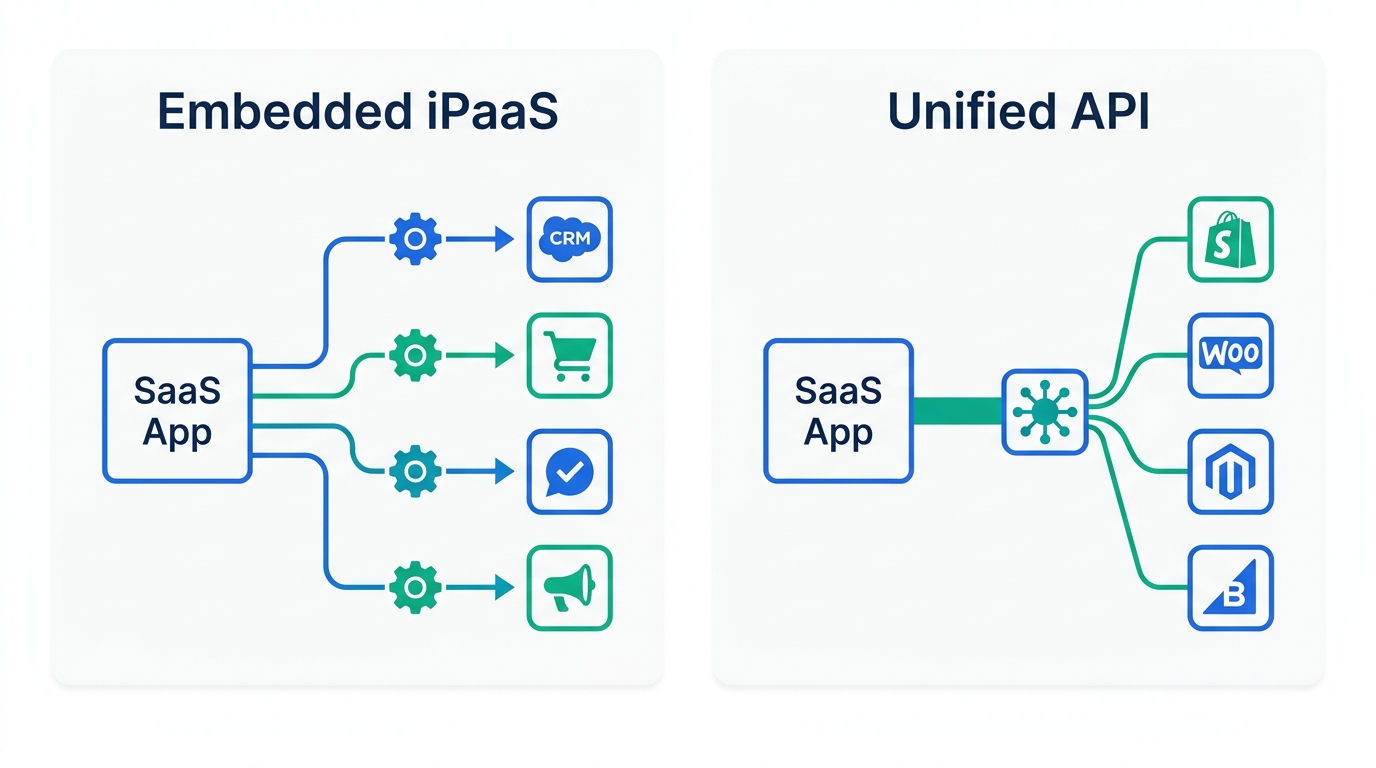
This is the decision most product teams get stuck on, partly because vendors on each side argue that the other approach doesn't scale. In practice they fit different integration patterns.
| Question | Points to embedded iPaaS | Points to unified API |
|---|---|---|
| What does the integration do? | Multi-step workflows: "when a deal closes, create a project, notify Slack, update the invoice" | Read/write standard records: "pull every employee from the customer's HRIS" |
| How many apps per category? | A few deep integrations (Salesforce, HubSpot, NetSuite) | Long tail: 20–50 HRIS or accounting apps |
| Does each customer need it configured differently? | Yes: custom field maps, triggers, conditional steps | Mostly no: the normalized schema is the product |
| Who maintains it? | Product plus support/solutions staff via low-code | Engineering, through one API contract |
| Main risk | You design and maintain each integration's logic | Needed fields fall outside the common model |
Some teams use both: a unified API for broad, shallow category coverage (for example, 40 HRIS integrations for roster sync) and an embedded iPaaS or Nango for the three or four strategic integrations where customers expect depth. If you're comparing how internal tools differ instead, our workflow automation vs RPA vs AI agents explainer covers that terminology.
Cost Model: What 200 Connected Customers Actually Costs
List prices mean little until you apply them to your own numbers. Below is a simple scenario for a customer-facing integration: 200 customers each connect one app, spread across 10 supported apps in one category. We used public list prices only, as of September 2026, before discounts. This is arithmetic from published rates, not a quote.
Bars are relative to Merge. The Apideck bar shows the upper bound of its range.
- Merge: $650 covers the first 10 linked accounts, then 190 × $65 = $12,350, for about $13,000/month at list price. At this scale you'd negotiate volume pricing, but it shows how steep the per-account meter is.
- Apideck Scale: €1,299/month covers 100 active consumers. The page doesn't give an exact figure for 200, but per-consumer rates fall with volume (€12.99 per consumer at 100, €8.50 at 500), so 200 × €12.99 ≈ €2,600 is a reasonable ceiling. Depending on how many customers are active in a month, expect roughly €1,300–€2,600/month. Treat this as indicative.
- Truto Expansion: 10 connectors × $999/year = $9,990/year, or about $833/month, regardless of customer count.
- Nango: 200 connections × $0.29 = $58, covered by the $50 base plus a small overage, plus compute and transfer. The license is cheap, but your engineers write and maintain the integrations, and that labor is the real cost.
The ranking changes with the inputs. With 15 customers, Merge's model can be the cheapest (the first 3 are free), and Truto's $10K floor is the expensive one. With 2,000 customers, flat or per-connector pricing wins clearly. Model three points: today, 12 months from now, and your 3-year plan. For embedded iPaaS, ask Prismatic about instance counts and Paragon about per-tenant usage at the same three points. For internal iPaaS, model tasks at your busiest month-end, not an average month.
Who Should Choose Which
- Seed to Series A, ops run by a generalist: Start with Zapier or Make for internal automation. Don't buy an enterprise iPaaS until you can name about 10 business-critical flows. For the product, launch the first integrations with Nango's free tier or Merge's free linked accounts.
- Engineering-led startup with data-residency requirements: Self-host n8n internally, and use Nango for product integrations so the integration code stays in your repo and your cloud.
- Series B+ with a RevOps / BizOps team: Workato or Tray.ai internally. If NetSuite is central to finance, add Celigo for ERP flows or choose it outright.
- Vertical SaaS selling to regulated or on-prem customers: Prismatic for customer-facing integrations (GovCloud and on-prem connectivity on Enterprise). Boomi internally if you also run hybrid systems.
- HR tech, fintech, or spend management product: A unified API is the natural fit. Choose Merge for breadth, Apideck for accounting depth with active-consumer billing, or Truto if you're heading toward hundreds of customers on a fixed app list.
- AI-native product needing agent actions in customer apps: Paragon (ActionKit) or Nango, depending on whether you want managed tooling or code ownership.
- Large enterprise with a central integration team: MuleSoft or Boomi. These are the only two here designed around full API lifecycle management.
How We Chose
Based on our research, we reviewed the platforms that appear repeatedly across the top-ranking "best iPaaS" and "best integration platform for SaaS" guides, then removed tools that don't fit a B2B SaaS buyer (for example, platforms focused on EDI or on-prem ERP only) and products that have been discontinued. We then sorted each remaining tool into the job it's built for and evaluated it on four criteria: (1) billing meter and published pricing, verified on each vendor's official pricing page in September 2026; (2) fit for the job (governance for internal iPaaS, per-customer deployment for embedded, schema coverage for unified APIs); (3) deployment options, including self-hosting and regulated-cloud hosting; and (4) who can realistically maintain it, meaning business users versus engineers. We have no affiliate or commercial relationship with any vendor listed. Where pricing isn't public, we say so instead of estimating, and we label third-party benchmarks as such.
FAQ
What is the best iPaaS for a B2B SaaS company?
What's the difference between embedded iPaaS and a unified API?
How much does an iPaaS cost in 2026?
Can we use Zapier for customer-facing integrations?
Should we build integrations in-house instead?
References and Sources
Pricing and plan details were checked on these official pages in September 2026:
- Merge: Pricing. https://www.merge.dev/pricing
- Apideck: Pricing. https://www.apideck.com/pricing
- Truto: Pricing. https://truto.one/pricing
- Nango: Pricing and documentation. https://nango.dev/pricing
- Prismatic: Embedded iPaaS Pricing. https://prismatic.io/pricing/
- Paragon: Pricing. https://www.useparagon.com/pricing
- Boomi: Pricing. https://boomi.com/pricing/
- Celigo: Pricing. https://www.celigo.com/pricing/
- Tray.ai: Pricing. https://tray.ai/pricing
- n8n: Plans and Pricing. https://n8n.io/pricing/
- Zapier: Pricing. https://zapier.com/pricing
- MuleSoft: Anypoint Platform Pricing (documentation). https://docs.mulesoft.com/general/pricing
- Workato: Gartner Magic Quadrant for iPaaS 2026 announcement. https://www.workato.com/the-connector/gartner-magic-quadrant-2026/
- Workato Docs: Embedded Partner APIs. https://docs.workato.com/oem/oem-api.html
- Vendr: Workato pricing benchmarks (third-party). https://www.vendr.com/marketplace/workato

Technology consultant with 10+ years in the Japanese tech industry. Specializing in SaaS evaluation, workflow automation, and B2B tool integration.