Best AI Agent Automation Platforms for B2B Teams (2026): 10 Picks Compared by Billing Meter and Home System
Most "best AI agent" lists rank Copilot Studio next to a sales-prospecting bot. Instead, we sort 10 platforms by where your data already lives and by what each one actually charges for. That's what decides total cost and rollout risk.
Pick the platform that sits on your system of record, then check its billing meter against your real volume. If your company runs on Microsoft 365, start with Microsoft Copilot Studio. Its per-action credits are the cheapest in our worked example, and employee use by Microsoft 365 Copilot license holders is included in that license. If revenue and service work lives in Salesforce, use Agentforce. If an agent has to work across 5+ systems that no single vendor owns, go with n8n. It bills per workflow run, however many steps the agent takes. Teams with a large RPA bot estate should add agents through UiPath or Automation Anywhere rather than rip the bots out.
Two numbers set the tone for 2026 buying decisions. In August 2025, Gartner predicted that 40% of enterprise apps would include task-specific AI agents by the end of 2026, up from less than 5% in 2025. Two months earlier, it predicted that over 40% of agentic AI projects will be canceled by the end of 2027, citing "escalating costs, unclear business value or inadequate risk controls." Both can be true at once. Agents are showing up inside the tools you already pay for, and many standalone pilots stall when the invoice arrives or security review starts.
This guide is for the second problem. It's written for IT, operations, and RevOps leads choosing a platform to run agents in production, not for individual users looking for a personal assistant. If you're still pinning down how agents differ from workflow automation and RPA, read our explainer on workflow automation vs. RPA vs. AI agents first. This page assumes that distinction and gets to the purchase decision.
Quick Answer: Top Picks by Situation
Microsoft Copilot Studio: best for Microsoft 365 organizations
It publishes clear per-feature credit rates ($0.01 per credit pay-as-you-go), and internal agents used by Microsoft 365 Copilot license holders don't use up credits. Our pick for most mid-market and enterprise B2B teams on Microsoft 365.
n8n: best for work that crosses many systems
It bills per workflow execution "regardless of complexity," so a 12-step agent run costs the same as a 2-step one. It's the only pick here with a production self-hosting option on a published price list.
Salesforce Agentforce: best for CRM-centric revenue and service teams
Agents act directly on Salesforce records with the platform's existing permissions. The trade-off is a higher cost per action than Copilot Studio at list price, so model the volume before you commit.
We also cover Google Gemini Enterprise, ServiceNow, UiPath, Automation Anywhere, Workato, Zapier Agents, and Lindy below. Each one is the right answer for a specific kind of team.
The First Decision: Which of the Three Lanes You're In
Competitor roundups rank these platforms in one flat list. In practice, the first question isn't "which agent is smartest?" It's "where does the data the agent needs to read and write already live?" An agent is only as useful as the systems it can act on. The cheapest way to give it safe access is usually to run it inside the platform that already holds your identity, permissions, and audit trail.
Lane 1: Suite-native
Agents live inside the suite that already runs your business: Microsoft 365, Salesforce, Google, or ServiceNow.
Copilot Studio · Agentforce · Gemini Enterprise · ServiceNow
Lane 2: RPA-heritage
Agents sit on top of an existing bot estate and can use legacy, screen-only systems as tools.
UiPath · Automation Anywhere
Lane 3: Cross-system orchestrators
Neutral platforms that connect many vendors' apps and put agent reasoning inside workflows.
n8n · Workato · Zapier Agents · Lindy
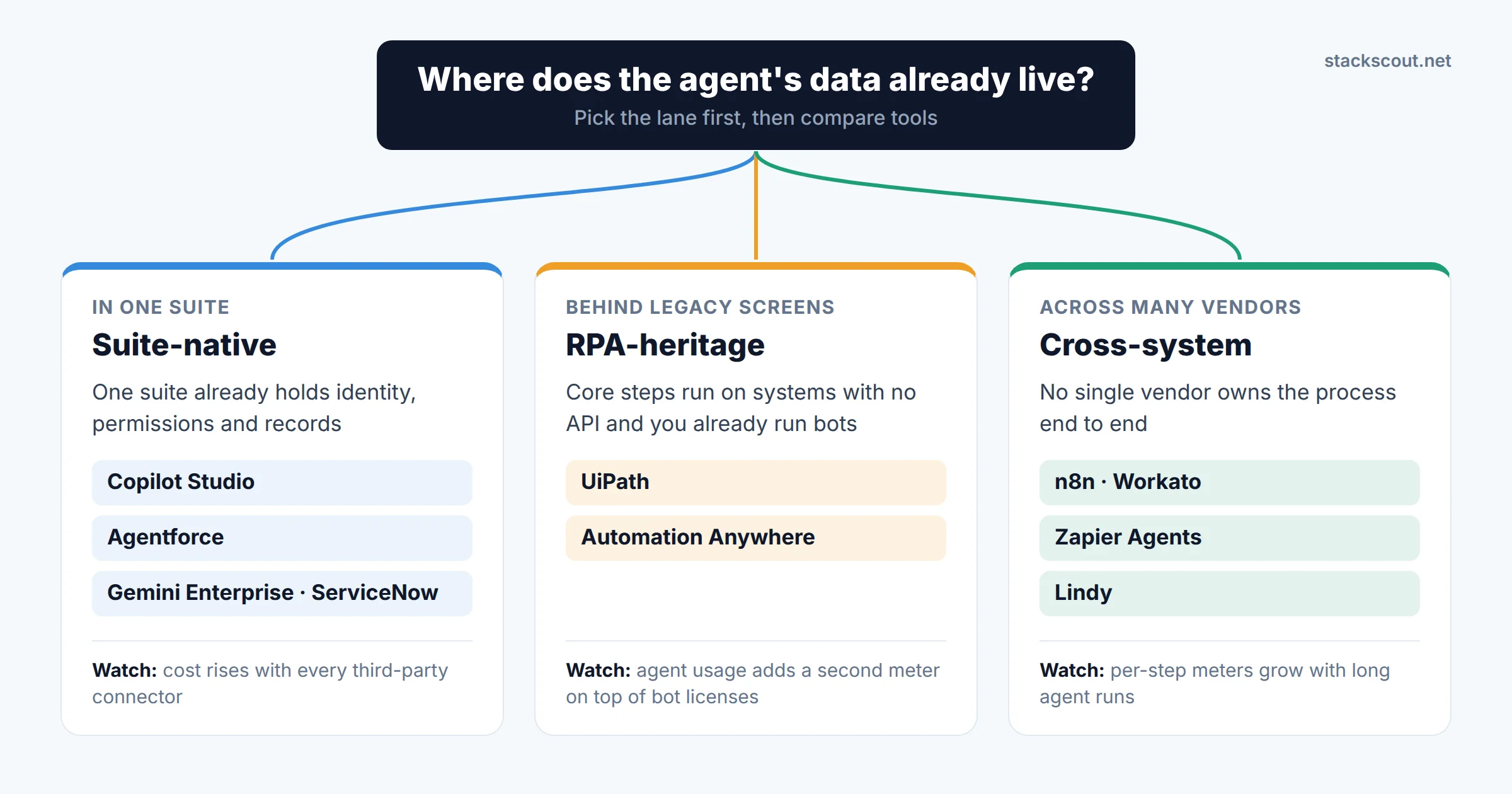
Lanes aren't exclusive. A common 2026 pattern is a suite-native agent for employee-facing questions (Copilot Studio in Teams) plus a cross-system orchestrator for back-office processes that touch 6 vendors (n8n or Workato). The mistake to avoid is forcing one lane to do the other's job. A suite-native agent that needs 5 third-party connectors starts running into the integration costs described in our guide to native integration vs. iPaaS vs. custom API.
Comparison Table: All 10 Platforms
| Platform | Lane | Best for | Billing unit for agents | Published entry price (Sep 2026) | Self-host |
|---|---|---|---|---|---|
| Microsoft Copilot Studio | Suite | Microsoft 365 / Teams organizations | Copilot Credits (1–10 per event) | $200/mo per 25,000 credits, or $0.01/credit pay-as-you-go | No |
| Salesforce Agentforce | Suite | Sales and service on Salesforce | Flex Credits (20 per standard action), per conversation, or per user | $500 per 100k Flex Credits; $2 per conversation; add-ons $125/user/mo | No |
| Google Gemini Enterprise | Suite | Google Workspace organizations, knowledge-heavy work | Per seat (quota-based) or pay-as-you-go | Business from $21/seat/mo; Standard/Plus from $30/seat/mo | No |
| ServiceNow AI Agents | Suite | IT, HR, and customer service workflows on ServiceNow | Tier (Foundation/Advanced/Prime) plus Assist consumption | Quote only | No |
| UiPath | RPA | Enterprises with an existing UiPath bot estate | Platform Units / agent calls | Basic from $25/mo (EU region, limited agent calls); Standard/Enterprise quote | Enterprise (on-prem option) |
| Automation Anywhere | RPA | Enterprises on Automation Anywhere RPA | Bot licenses plus AI consumption | Quote only; free Community Edition | Quote |
| Workato | Cross | Enterprise iPaaS buyers who want governed agents | Genie actions (1 per prompt) plus Tasks | Quote only | No |
| n8n | Cross | Technical ops teams, multi-system agents, data residency | Workflow executions | Starter €20/mo (2,500 executions, billed annually) | Yes (Business €667/mo, or free Community Edition) |
| Zapier Agents | Cross | SMB and mid-market teams already using Zapier | Activities (separate from Zap tasks) | Free: 400 activities/mo; Pro: $33.33/mo (1,500 activities, billed annually) | No |
| Lindy | Cross | Business teams that want agents in email, meetings, and CRM without building workflows | Per-seat credits, pooled across the team | Plus $29.99/user/mo (3k credits) | No |
Prices are list prices from each vendor's official pricing page or documentation, checked September 26–27, 2026. They exclude model/API costs where you bring your own key and any base licenses (for example, the Salesforce or ServiceNow platform itself). Scroll sideways on mobile.
The Billing Meter: One Workflow, Five Bills
The single most useful thing you can do before a demo is work out what counts as one billable unit on each platform. The platforms meter completely different things: a Copilot Studio "agent action," an Agentforce "Flex Credit," a Zapier "activity," an n8n "execution," a Workato "Genie action." As a result, the same agent can cost many times more on one platform than another. Most competitor lists quote the headline price and stop there.
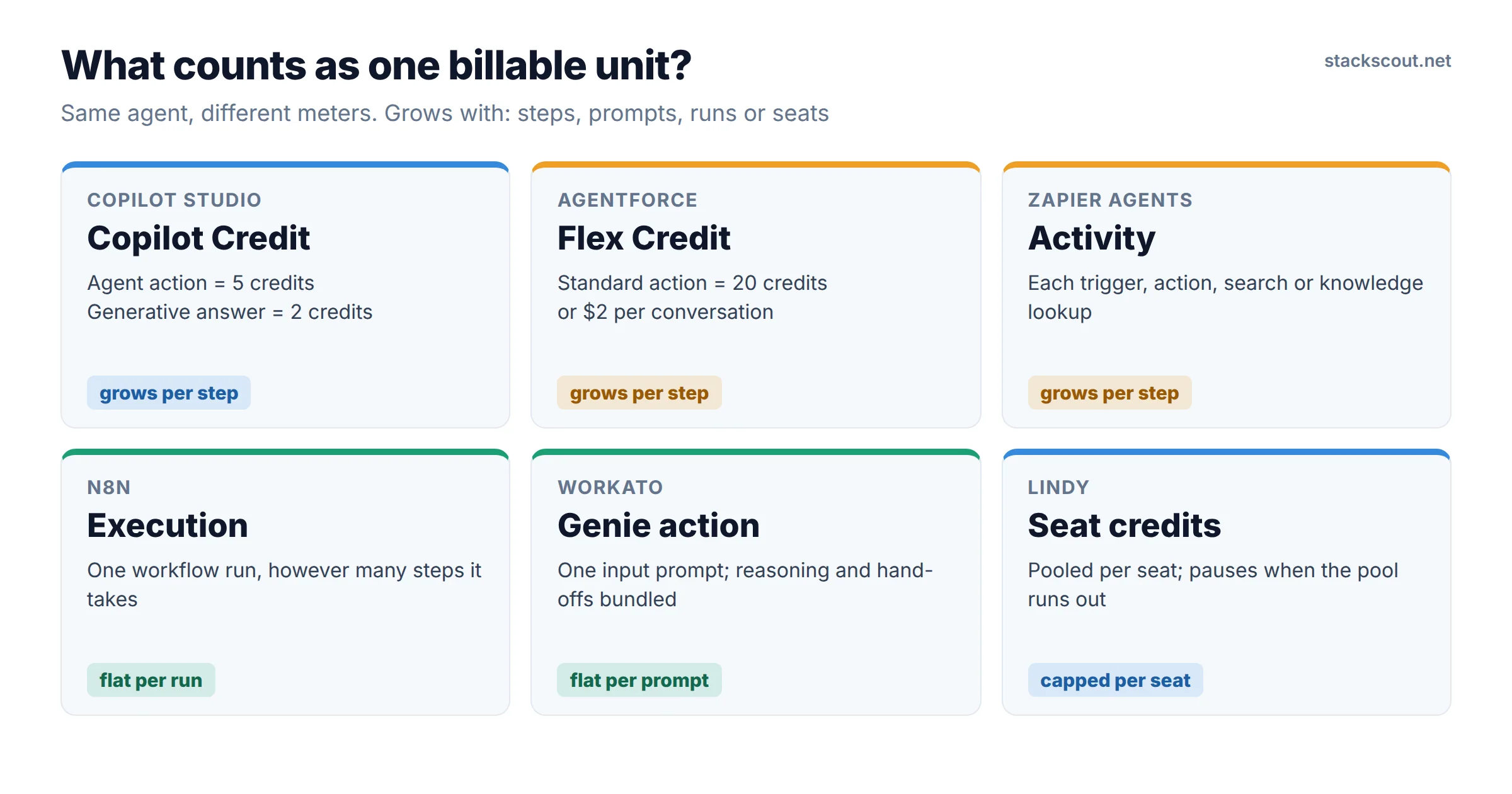
To make this concrete, we used the scenario from Microsoft's own billing documentation: an autonomous order-processing agent that fires when a new order arrives and makes 4 tool calls (check stock, look up shipping time, approve the order, email the customer). We assumed 1,000 orders per month and applied each vendor's published rates:
*n8n bills per execution, but the agent's language-model calls normally run on your own model provider's API key and are billed by that provider. Copilot Studio and Agentforce include model usage in their credit rates. Bar lengths show USD/EUR amounts on a rough common scale and aren't exchange-rate adjusted.
Three things stand out:
- On a per-action basis, Agentforce costs twice as much as Copilot Studio at list price ($0.10 vs. $0.05 per action). That doesn't make it the wrong choice. The Salesforce data layer, permissions, and audit are already paid for, and Salesforce also sells unmetered per-user add-ons ($125/user/month for Sales, Service, and Field Service). For a small team of heavy users, the per-user option can come out cheaper than metering. Run both.
- Per-execution pricing favors long, multi-step agents. n8n's pricing page says executions are counted "regardless of complexity." An agent that takes 15 reasoning and tool steps costs the same as one that takes 2, which is the opposite of per-action meters.
- Enforcement behavior matters as much as price. Copilot Studio disables custom agents once a tenant reaches 125% of its prepaid capacity, unless pay-as-you-go is attached. Lindy pauses credit-using work until the next cycle. Find out what happens at the limit before an agent sits in a revenue-critical path.
Copilot Studio's biggest pricing detail: employee-facing agent usage by a user with a Microsoft 365 Copilot license ($30/user/month, paid yearly) is billed at "no charge" for classic answers, generative answers, agent actions, and tenant graph grounding, subject to fair-use limits. Autonomous triggers like our order example, agent flows that aren't started by a licensed user, and computer-using agents are still metered. An internal HR or IT help agent can therefore cost almost nothing extra in a fully licensed tenant.
Individual Reviews
Reviews are grouped by lane. Within each lane, they're ordered by how broadly they fit a typical B2B team.
1. Microsoft Copilot Studio
Lane 1 · Suite-nativeCopilot Studio is Microsoft's low-code builder for agents that run in Teams, Microsoft 365 Copilot, websites, and autonomous background triggers. It has the most transparent metering of any suite vendor. Microsoft Learn publishes a rate card: 1 credit per classic (scripted) answer, 2 per generative answer, 5 per agent action, 10 for tenant graph grounding, and 13 per 100 agent flow actions. Reasoning models add 10 credits per 1,000 tokens. Credits come in tenant-wide packs of 25,000 for $200/month or pay-as-you-go at $0.01 each. Microsoft says there are no feature differences between the two.
For B2B teams, the strength is identity and governance. Agents use Entra ID, inherit Microsoft 365 permissions, and are managed in the Power Platform admin center, where admins can set monthly credit caps per agent. The Microsoft 365 Copilot license covering employee usage (see above) makes internal agents very cheap if you already bought Copilot seats. The weak spot is reach outside Microsoft. Hundreds of connectors exist, but multi-vendor back-office processes quickly become Power Platform projects that need a skilled maker.
Pros
- Public, per-feature rate card
- Employee use by M365 Copilot license holders is no charge (fair-use limits)
- Entra ID identity, admin-center caps per agent
Cons
- Agents are disabled at 125% of prepaid capacity without pay-as-you-go
- Reasoning models and graph grounding add up fast
- Complex non-Microsoft processes need Power Platform skills
2. Salesforce Agentforce
Lane 1 · Suite-nativeAgentforce puts agents directly on Salesforce records: qualifying leads, resolving cases, updating opportunities, and handing off to humans inside Service Cloud. Salesforce publishes three ways to pay. Flex Credits cost $500 per 100,000; a standard action uses 20 credits ($0.10) and a voice action 30. Per-conversation pricing is $2, which suits customer-facing chat. Per-user add-ons are $125/user/month for Sales, Service, and Field Service and $150 for Industries Clouds, with unmetered employee usage. Agentforce 1 Editions start at $550/user/month and include 2.5 million Flex Credits per org per year. The builder tools (Agentforce Builder, Prompt Builder, Agent Script) come with the $0 Salesforce Foundations tier, so you can prototype before you buy capacity.
If Salesforce is your system of record, no other option gives an agent the same native access to your data model, sharing rules, and field history. Outside Salesforce, it's weaker: acting on other vendors' systems usually means MuleSoft or custom integration work. Revenue teams comparing Agentforce against dedicated AI SDR tools should also read our Clay vs. Apollo vs. Outreach AI SDR comparison. Those tools are more specialized but sit outside your CRM's permission model.
Pros
- Native access to Salesforce data, sharing rules, and audit
- Three pricing models to fit different usage patterns
- Free builder tools in Salesforce Foundations
Cons
- Twice Copilot Studio's per-action list price
- Non-Salesforce systems usually need MuleSoft or custom work
- Per-user add-ons get expensive for large, light-use teams
3. Google Gemini Enterprise
Lane 1 · Suite-nativeGemini Enterprise is Google's agent workspace: search and chat grounded in company data, prebuilt Google agents, a no-code agent builder, and a place to publish full-code agents built outside the product. Google's product page lists Business from $21 per seat per month for small teams, with a 30-day trial. Standard and Plus, which add enterprise IT controls and higher quotas, start at $30. A pay-as-you-go option for organizations with 20+ seats has a $0 seat fee. According to Google's edition comparison, building custom no-code agents is available on Business, Standard, Plus, and pay-as-you-go but is labeled preview. Every edition except Frontline gets the full data connector ecosystem, including Microsoft 365 sources.
This suits knowledge-heavy work (research, drafting, finding answers across Drive, Jira, and SharePoint) more than transactional back-office automation. Seat pricing is predictable, but Google says consumption beyond each edition's quota is billed separately. Check the quotas page against your expected usage. Because the no-code builder is still in preview, we'd pilot Gemini Enterprise for employee-facing agents and keep a workflow tool for write-heavy processes.
Pros
- Predictable per-seat entry pricing
- Connectors reach beyond Google, including Microsoft 365
- Can host full-code agents built elsewhere
Cons
- No-code agent builder still in preview
- Overage beyond edition quotas billed separately
- Better for knowledge work than transactional automation
4. ServiceNow AI Agents
Lane 1 · Suite-nativeOn April 9, 2026, ServiceNow replaced its five legacy packages with three AI-native tiers: Foundation, Advanced, and Prime. Its announcement says AI capabilities now come in every package rather than as a sidecar add-on. The agent toolset includes AI Agent Studio for building, an orchestrator that routes work between agents, and AI Control Tower for governance. AI usage is metered through pools of "Assists" on top of the tier.
For organizations whose IT and HR service desks already run on ServiceNow, this is the natural home for agents that triage incidents, fulfill requests, or answer policy questions. The workflow, CMDB, and approval chains are already there. ServiceNow doesn't publish list prices, so you can't benchmark cost without a quote. Ask the account team for the Assist cost of a typical agent run in your workflow, since that's the number that grows with adoption. Teams that are new to ServiceNow shouldn't adopt it for agents alone.
Pros
- Agents run on existing service workflows, CMDB, and approvals
- AI now included in every package tier
- Governance through AI Control Tower
Cons
- No public pricing; needs a quote to benchmark
- Assist consumption grows with adoption
- Makes little sense unless ServiceNow is already your service platform
5. UiPath
Lane 2 · RPA-heritageUiPath pitches "agentic automation": AI agents, robots, and people coordinated through one orchestration layer (Maestro). Agents can call your existing bots as tools. That matters because many core processes still run on systems with no API, and a bot that already works reliably is a better tool than an agent trying to use the same screen from scratch. UiPath's pricing page lists a free Community tier, Basic from $25/month (Europe region only, limited users, robots, and agent calls), and quote-based Standard and Enterprise tiers that include agents, document extraction, and process orchestration. Enterprise adds self-healing UI automation, bring-your-own AI model, and on-premises or multi-region deployment.
If you already have dozens or hundreds of UiPath automations, adding agents here is the lowest-risk path. You keep your bot governance, credentials vault, and Center of Excellence processes. If you have no RPA today, don't start here to get agents. The platform's value is tied to bot infrastructure you won't use.
Pros
- Agents can use existing bots as tools for legacy screens
- Mature governance and credential management
- On-premises and bring-your-own-model options (Enterprise)
Cons
- Standard and Enterprise pricing are quote-only
- Basic tier is EU-only with limited agent calls
- Overkill for teams with no RPA today
6. Automation Anywhere
Lane 2 · RPA-heritageAutomation Anywhere markets itself as an "agentic process automation" platform. It includes AI Agent Studio for building agents, a Process Reasoning Engine, Document Automation, and its RPA workspace. The pitch matches UiPath's: agents reason and decide, and bots carry out actions on systems that can't be reached any other way. Pricing is quote-based. The only published option is a free Cloud Community Edition for learning and development.
The decision here usually comes down to the same thing: which RPA vendor you already run. Migrating a bot estate between UiPath and Automation Anywhere just to get agent features rarely pays off. Instead, ask your current vendor how agent runs are metered on top of existing bot licenses, and get it in writing before rollout. That second meter is where budgets surprise people.
Pros
- Agents plus bots plus document processing on one platform
- Free Community Edition for evaluation
- Natural upgrade path for existing customers
Cons
- No published production pricing
- Two meters (bots and AI) make costs harder to forecast
- Little reason to choose it without an existing estate
7. Workato (Agent Studio and Genies)
Lane 3 · Cross-systemWorkato is an enterprise integration platform that has added an agent layer called Agent Studio. Its agents are called "Genies," and they use Workato recipes and connectors as skills. Workato's documentation explains the metering: each input prompt sent to a Genie, from a user, an app event, or another Genie, counts as one Genie action. Internal reasoning, knowledge retrieval, and hand-offs between Genies are bundled into that count rather than billed separately. Recipe steps that feed a Genie are billed as regular Tasks. Workato's docs give a worked example: a quote workflow that calls a recipe function costs 4 Genie actions plus 2 Tasks.
Per-prompt metering is easier to forecast than per-step metering, because an agent that reasons longer doesn't cost more. Workato also already has the governance, audit, and connector depth that enterprise IT expects. The downside is list prices you can't see before talking to sales. For how Workato compares with other integration platforms, see our best iPaaS platforms for B2B SaaS teams roundup.
Pros
- Per-prompt metering; reasoning and hand-offs bundled
- Enterprise connector library and governance
- Agents reuse existing integration recipes
Cons
- No published list prices
- Two meters (Genie actions and Tasks) to track
- More platform than a small team needs
8. n8n
Lane 3 · Cross-systemn8n is a workflow automation platform with AI agent nodes built into the canvas. Agents run as steps in a workflow, with regular nodes before and after them for validation, branching, and human approvals. Its pricing page lists Cloud Starter at €20/month (2,500 executions) and Pro at €50/month (10,000 executions), both billed annually. The self-hosted Business plan is €667/month for 40,000 executions, and Enterprise is custom. All plans include unlimited users and workflows. The key line is that pricing is "based on monthly workflow executions, regardless of complexity." The AI credits in each cloud plan are for n8n's built-in AI Assistant, which helps you build workflows. Your agent's own model calls normally run on your provider's API key.
This combination (flat per-run pricing, self-hosting, and bring-your-own model) makes n8n our pick for teams that want cost control and data residency and are comfortable reading JSON. It's not the easiest option for non-technical staff. For head-to-head billing math against Zapier and Make, see Make vs. Zapier vs. n8n. If you're moving existing Zaps across, our Zapier-to-n8n migration guide covers the steps.
Pros
- Flat per-execution pricing, even for long agent runs
- Self-hosting option on a published price list
- Bring your own model and API keys
Cons
- Assumes comfort with JSON and debugging
- Model costs are a separate bill from your provider
- Self-hosted Business plan is a big jump from Pro
9. Zapier Agents
Lane 3 · Cross-systemZapier Agents lets business users describe agent behaviors in plain English and connect them to the same app catalog that Zaps use. Billing is separate from Zap tasks. Zapier defines an activity as "any billable action an agent takes: using a trigger, answering from a knowledge source, running an action, web browsing or scraping, a web search, or a message sent via the Chrome extension." The Free plan includes 400 activities a month. Pro is $33.33/month billed annually for 1,500 activities. Enterprise, with custom volumes, org-wide agent sharing, and audit logs, goes through sales. On Team accounts, activities are shared as a pool.
It's the fastest way for a non-technical team to get a working agent. But per-activity metering adds up quickly on multi-step agents. In our 1,000-order example, roughly 5 activities per run would use up the Pro allowance in about 300 runs. Zapier Agents fits low-volume, high-value work (research, triage, meeting prep) better than high-volume transactional processing.
Pros
- Plain-English setup for non-technical users
- Large app catalog shared with Zaps
- Generous free tier for trying it out
Cons
- Every step counts as an activity, so long runs get expensive
- Audit logs and org-wide sharing require Enterprise
- Separate meter from your existing Zap task allowance
10. Lindy
Lane 3 · Cross-systemLindy is an agent product for business users that works in email, calendars, meetings, and CRM, with approvals built in. Its pricing page lists Plus at $29.99/user/month (3,000 credits), Pro at $99.99 (15,000 credits), and Max at $199.99 (35,000 credits). Every seat's credits go into one team pool. Lindy estimates "everyday asks" at 2–250 credits and "deep work" such as competitor research or triaging a day's support queue at 250–1,000 credits. Credits don't roll over. When the pool runs out, Lindy pauses credit-using work instead of charging overage. Enterprise adds a HIPAA BAA, audit logs, and dedicated support.
Lindy doesn't compete with n8n or Workato for back-office processes. It's a per-seat assistant platform for revenue, success, and executive teams, and the pooled credits make it easy to budget. The trade-off is less control over each step of a workflow than a workflow tool gives you.
Pros
- Predictable per-seat budget with no surprise overage
- Team-wide credit pool
- HIPAA BAA available on Enterprise
Cons
- Work pauses when credits run out mid-cycle
- Less deterministic control than workflow tools
- Credit use per task varies widely (2–1,000)
Left out on purpose: OpenAI Agent Builder. OpenAI sent a deprecation notice on June 3, 2026, and Agent Builder shuts down on November 30, 2026. OpenAI recommends Workspace Agents in ChatGPT for prompt-driven use cases and the code-first Agents SDK for everything else. Don't start a new production build on it this quarter.
Moving From RPA to Agents Without Breaking Production
The trend behind many of these evaluations is teams trying to replace brittle RPA with AI agents. The vendors' own messaging suggests a better approach, and it's how UiPath and Automation Anywhere design their products: wrap first, retire later.
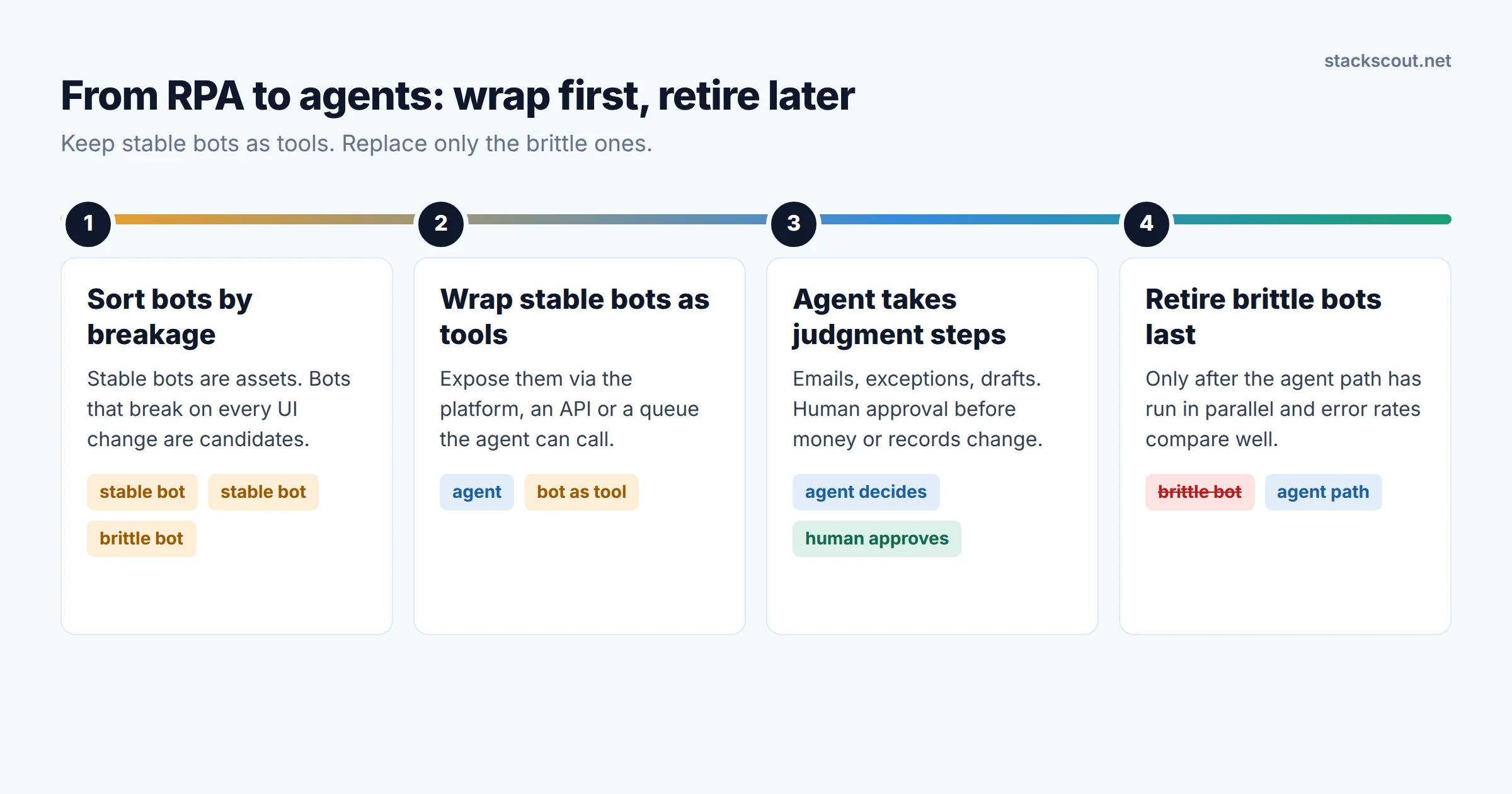
- Sort your bots by how often they break. Bots that run on stable screens and rarely fail are assets. Bots that break every time a vendor updates its UI are the real candidates for agents.
- Turn stable bots into tools the agent can call. On UiPath or Automation Anywhere, this is built in. Elsewhere, expose the bot through an API or queue that the agent platform can trigger.
- Give the agent the judgment steps only. Reading unstructured emails, classifying exceptions, drafting responses. Put a human approval gate before anything that moves money or changes customer records.
- Retire the brittle bots last, once the agent path has run in parallel long enough to compare error rates.
This order lowers risk and keeps costs forecastable: bot runs stay on their existing licenses, and only the judgment steps use agent metering. For the governance side (approval policies, logging, model-risk review), our AI governance platforms guide covers the tools, and the EU AI Act checklist for B2B SaaS buyers covers the regulatory questions.
Who Should Choose Which
If you're still torn between a workflow tool and an agent platform, our decision framework for choosing a no-code automation tool walks through the questions to ask. For a deeper head-to-head of the two biggest suite options, we're preparing a Copilot Studio vs. Agentforce cost comparison.
How We Chose
We started with the pages that currently rank for this search. Most were either sales-agent lists (AI SDR and prospecting tools) or flat enterprise lists that mixed builders, suites, and single-purpose bots. We limited this guide to platforms where a B2B team can build and run its own agents against its own systems, and excluded single-function products. We then scored each candidate on five criteria: (1) access to the systems of record B2B teams actually use; (2) identity, permission, and audit controls; (3) whether pricing is published and forecastable, weighted heavily because of Gartner's warning about escalating costs; (4) ways to keep humans in the loop and constrain agent actions; and (5) whether you can leave, meaning self-hosting, bring-your-own-model, or reuse of existing assets. Every price above comes from the vendor's own pricing page or documentation, checked September 26–27, 2026. Where a vendor publishes no price, we say so rather than repeat third-party estimates. We didn't run paid production workloads on these platforms. The worked cost example applies published rates to a scenario taken from Microsoft's documentation.
FAQ
What's the difference between an AI agent platform and a workflow automation tool?
Which AI agent platform is cheapest for a small B2B team?
Do I need Microsoft 365 Copilot licenses to use Copilot Studio?
Will AI agents replace our RPA bots?
Is it safe to build on OpenAI's Agent Builder in 2026?
Sources
- Gartner: Over 40% of Agentic AI Projects Will Be Canceled by End of 2027 (June 25, 2025)
- Gartner: 40% of Enterprise Apps Will Feature Task-Specific AI Agents by 2026 (August 26, 2025)
- Microsoft Learn: Copilot Studio billing rates and management
- Microsoft: Copilot Studio plans and pricing
- Azure: Copilot Studio pay-as-you-go pricing
- Salesforce: Agentforce pricing
- Google Cloud: Gemini Enterprise editions and pricing
- Google Cloud Docs: Compare editions of Gemini Enterprise
- ServiceNow Newsroom: AI-native experience across all products and packages
- UiPath: Plans and pricing
- Automation Anywhere: Pricing
- Workato Docs: Agent Studio usage metrics
- n8n: Plans and pricing
- Zapier: Pricing (including Zapier Agents)
- Lindy: Pricing
- OpenAI Developer Community: Deprecation notice, Agent Builder

Technology consultant with 10+ years in the Japanese tech industry. Specializing in SaaS evaluation, workflow automation, and B2B tool integration.