TL;DR — Verdict
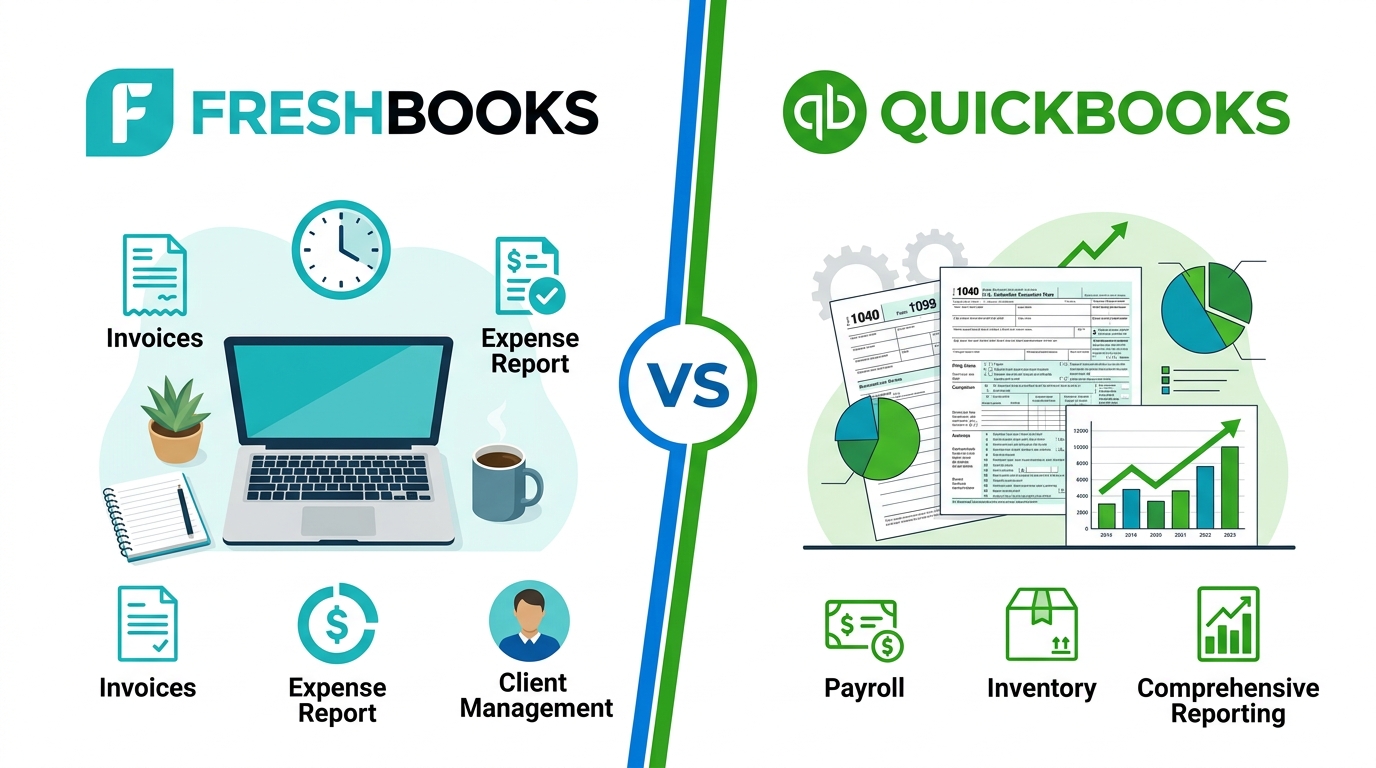
FreshBooks wins for service-based freelancers who bill clients by the hour or project. Its native time tracking, polished invoices, and client portal are genuinely better than QuickBooks at this specific job. QuickBooks Solopreneur wins if US tax filing is your top concern — automatic Schedule C categorization and direct TurboTax export make quarterly estimated taxes painless. At $20/month, it's also the cheapest full-featured option.
Invoicing-first design, built-in time tracking, client portal, polished proposal workflow.
Automatic Schedule C, TurboTax integration, mileage tracking — $20/month with no client cap.
Quick Comparison Table
Side-by-side on the dimensions that matter most for independent contractors and freelancers:
| Feature | FreshBooks Plus | QuickBooks Solopreneur |
|---|---|---|
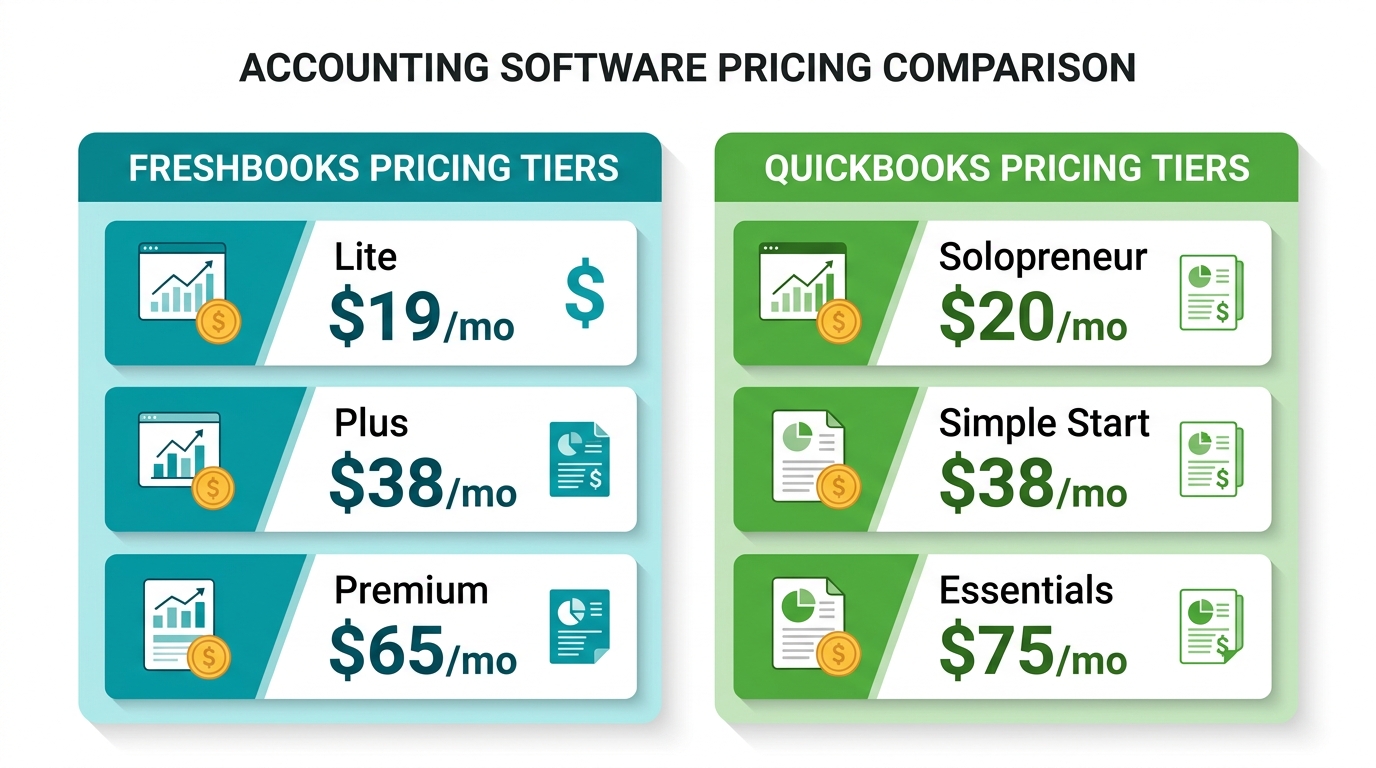
| Starting price | $19/mo (Lite) — $38/mo (Plus) | $20/mo |
| Client limit | 5 (Lite) / 50 (Plus) / Unlimited (Premium) | Unlimited Win |
| Time tracking | Built-in, all plans Win | Requires add-on |
| Invoicing | Best-in-class, proposals→invoices Win | Basic invoicing |
| Client portal | Yes — clients view history & approve estimates Win | No |
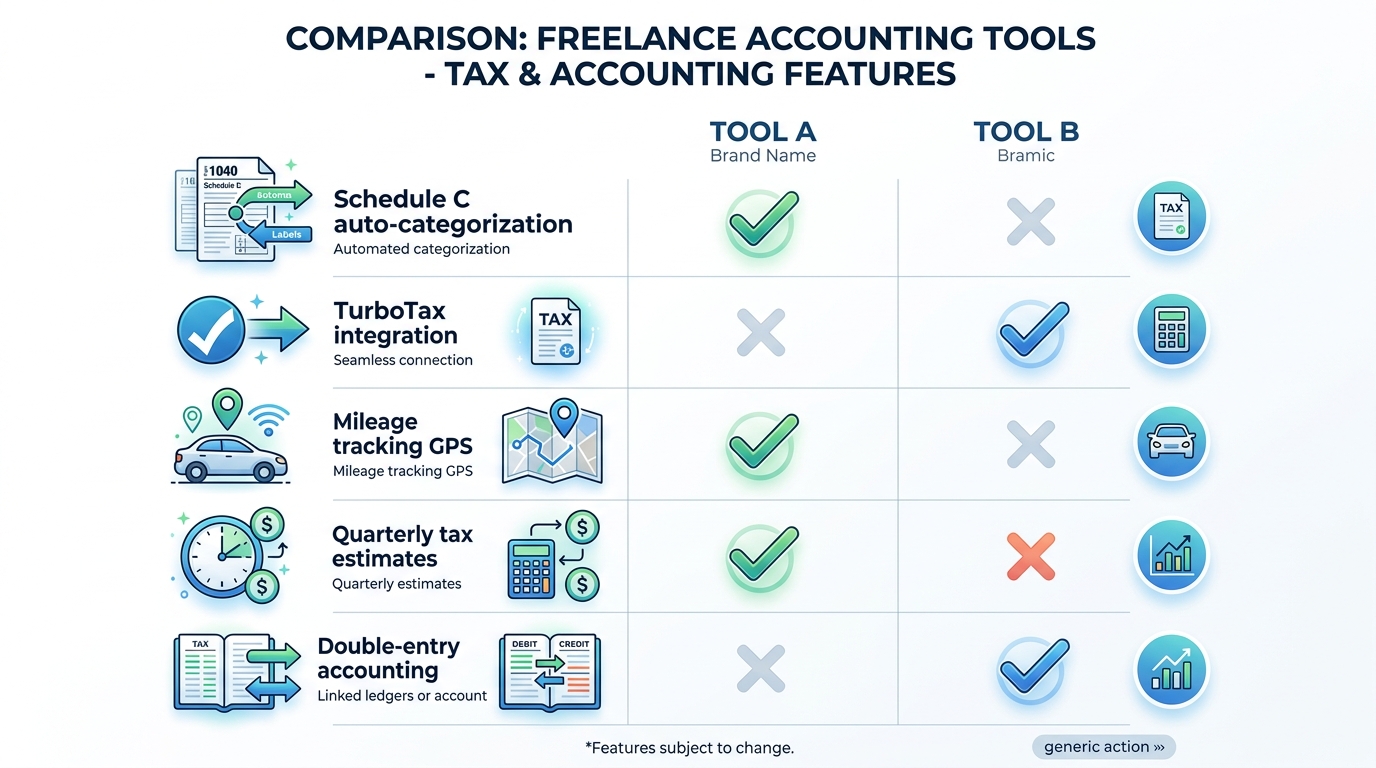
| Schedule C / US taxes | Manual categorization | Automatic, exports to TurboTax Win |
| Mileage tracking | Mobile app (iOS/Android) | Built-in GPS Win |
| Bank feeds | Yes, all plans | Yes, all plans Tie |
| Accountant access | Guest access available | 80% of US CPAs use QBO daily Win |
| Double-entry accounting | Yes (Plus and above) | No (Solopreneur is cash-basis only) |
| Free trial | 30 days | 30 days Tie |
Pricing: What You Actually Pay in 2026
Both tools have increased prices over the past year. Here's what freelancers are looking at as of June 2026:
The Client Limit Problem With FreshBooks Lite
FreshBooks Lite at $19/month looks cheap until you hit the 5-client ceiling. If you invoice more than five clients in a month — common even for new freelancers — you're forced to upgrade to Plus at $38/month. Most active freelancers realistically land on Plus, not Lite.
QuickBooks Solopreneur has no client cap at $20/month. For a freelancer with 10–30 active clients, that's $18/month cheaper than FreshBooks Plus for comparable core functionality.
The Hidden Costs to Watch
Both tools charge extra for features that feel like they should be included. With FreshBooks: additional team members cost $11/month each, and advanced payment features (recurring billing, in-person card payments) add $20/month. With QuickBooks, time tracking (QuickBooks Time) is a separate add-on on plans above Solopreneur, and payroll starts at $40/month base.
For a solo freelancer, neither of these extras typically applies — but check before assuming the advertised price is your total cost.
Start the right free trial
Both FreshBooks and QuickBooks offer 30-day free trials. Test the invoicing workflow and see which one clicks for how you actually work.
Invoicing & Time Tracking: FreshBooks Has the Edge
How FreshBooks Handles Hourly Work
FreshBooks was built from the ground up for service businesses that bill by the hour or by project. The time tracker is woven into the same interface as your invoices. You track hours against a project, then click "Generate Invoice" — billable time populates the line items automatically, formatted and ready to send.
Every FreshBooks plan (including Lite) includes unlimited time tracking. There's no add-on to buy, no third-party integration to configure. For a web developer billing 40 hours a month across six clients, this alone is worth the price.
How QuickBooks Handles Hourly Work
QuickBooks Solopreneur doesn't include native time tracking. You'd need to log hours separately — in a spreadsheet, a timer app, or QuickBooks Time (an add-on paid separately) — and then manually create an invoice referencing those hours. That's extra steps for a core freelance workflow.
QuickBooks Simple Start adds basic invoicing but still doesn't match FreshBooks' end-to-end project billing flow until you get to higher-tier plans with QuickBooks Time included.
Client Portal: A Genuine Differentiator
FreshBooks gives clients a login portal where they can view their invoice history, approve estimates, and communicate directly. This is meaningfully better than the standard "you get a payment link via email" experience that QuickBooks provides. For freelancers who want to look professional and reduce back-and-forth email with clients, this matters.
Tax Preparation: QuickBooks Pulls Ahead
QuickBooks Solopreneur + TurboTax Integration
Intuit owns both QuickBooks and TurboTax. This is the product integration that matters most for US-based freelancers. Every expense you categorize in QuickBooks Solopreneur maps to an IRS Schedule C line item automatically. When tax season arrives, your data exports directly into TurboTax — no manual re-entry, no exporting spreadsheets.
QuickBooks Solopreneur also calculates quarterly estimated tax payments automatically. It monitors your income throughout the year and tells you what to send to the IRS each quarter. For freelancers who've been burned by a surprise tax bill in April, this feature alone may justify the monthly cost.
FreshBooks Tax Workflow
FreshBooks handles expenses, generates P&L reports, and can produce a tax summary report. But it doesn't auto-categorize expenses to Schedule C line items or integrate directly with TurboTax. You'll need to export your data and work through it with your accountant or manually in tax software.
For freelancers who use a CPA anyway, this is a non-issue — your accountant can work with FreshBooks reports. But if you self-file, QuickBooks' TurboTax pipeline is meaningfully simpler.
Mileage Tracking
QuickBooks Solopreneur includes GPS mileage tracking in the mobile app. Every drive is logged automatically; you swipe to classify as business or personal. FreshBooks added mileage tracking to its mobile apps, but it's generally considered more accurate and automatic in QuickBooks. For freelancers who drive to client sites regularly, mileage deductions add up to real money — the 2026 IRS standard mileage rate is $0.70 per mile.
CPA Compatibility
An estimated 80% of US accountants work primarily in QuickBooks. If you have or plan to hire a bookkeeper or CPA, they will almost certainly prefer QuickBooks. Handing your accountant FreshBooks access is possible but introduces a tool they may not use day-to-day, which means additional time (and cost) for them to work with your data.
Ease of Use & Mobile App
FreshBooks has a well-earned reputation for its clean, approachable interface. First-time users consistently rate setup as fast and intuitive — you can send your first invoice within minutes of signing up. The iOS and Android apps are highly rated and cover all core workflows: invoicing, expense capture, and time tracking on the go.
QuickBooks Online (Simple Start and above) is more powerful but noticeably more complex. The dashboard presents more data, more menus, and more options — valuable if you need them, overwhelming if you don't. QuickBooks Solopreneur is a simpler, stripped-down version designed specifically for solo users, and it's considerably easier to navigate than full QuickBooks Online.
If you're new to accounting software and want something you'll actually use rather than dread opening, FreshBooks is the smoother onboarding experience.
Integrations
Both tools connect to the major platforms freelancers use, but with different depths:
| Integration Category | FreshBooks | QuickBooks |
|---|---|---|
| Payment processors | Stripe, PayPal, Square, GoCardless | Stripe, PayPal, Square, Venmo, Apple Pay |
| Project management | Asana, Trello, Basecamp, ClickUp | Limited native; via Zapier |
| CRM | HubSpot, Capsule | HubSpot, Salesforce, Zoho |
| Tax software | Export only | TurboTax direct sync Win |
| Payroll | Gusto add-on | QuickBooks Payroll (native) |
| eCommerce | Shopify, WooCommerce | Shopify, Amazon, eBay, Etsy Win |
| Bank connections | 5,000+ banks via Plaid | 10,000+ banks Win |
QuickBooks wins on sheer integration breadth, particularly for e-commerce sellers and those already embedded in Intuit's ecosystem (TurboTax, Mint, Credit Karma). FreshBooks' integrations are narrower but better tuned for the service freelancer workflow.
Pros & Cons
- Best-in-class invoicing with estimates-to-invoices flow
- Built-in time tracking on every plan, no add-on needed
- Client portal lets clients view history and approve estimates
- Cleaner, more approachable interface for non-accountants
- Project profitability tracking included
- Retainer billing for recurring client relationships
- Excellent mobile apps (iOS + Android)
- Lite plan caps at 5 billable clients — most need Plus at $38/mo
- No direct TurboTax integration for US self-filers
- Less familiar to CPAs than QuickBooks
- No inventory management (not built for product businesses)
- Fewer bank connections than QuickBooks
- Team members cost extra ($11/user/month)
- Automatic Schedule C categorization for US taxes
- Direct TurboTax integration — no manual re-entry at tax time
- Quarterly estimated tax calculator built in
- GPS mileage tracking in mobile app
- No client cap at $20/month
- Trusted by 80% of US accountants and CPAs
- Upgrade path to full QuickBooks Online if business grows
- No native time tracking — requires third-party add-on
- Basic invoicing; no client portal or proposal workflow
- Solopreneur is cash-basis only — no double-entry accounting
- Upgrading to Simple Start jumps to $38/month
- More complex UI than FreshBooks for new users
- QuickBooks Time (add-on) costs extra on higher plans
Who Should Choose Which?
Choose FreshBooks if you…
- Bill clients by the hour and need time tracking built into your invoicing
- Send proposals that convert to invoices — designers, consultants, agencies
- Want clients to approve estimates and view their invoice history online
- Work with a CPA who handles your taxes (so TurboTax integration isn't critical)
- Value a clean, simple interface over accounting depth
- Manage projects with multiple deliverables and want to track profitability per project
- Have fewer than 50 active clients (Plus handles this well)
Choose QuickBooks Solopreneur if you…
- Self-file US taxes with TurboTax and want the simplest possible workflow
- Drive frequently to client sites and want automatic mileage deduction tracking
- Have more than 5 active clients and don't want to pay FreshBooks Plus pricing
- Expect to hire employees or grow the business — QuickBooks scales cleanly
- Already have a CPA who uses QuickBooks (most do)
- Need automatic quarterly estimated tax calculations
- Invoice occasionally but your bigger concern is expense tracking and taxes
What About QuickBooks Simple Start vs FreshBooks Plus?
At $38/month each, these are the most direct head-to-head comparison. QuickBooks Simple Start gives you more robust double-entry accounting, 50+ report types, and the QuickBooks ecosystem — but still no native time tracking. FreshBooks Plus gives you better invoicing, time tracking, and client communication. If you're choosing between these two: service freelancers should lean FreshBooks, freelancers building a business entity with more complex accounting needs should lean QuickBooks Simple Start. If that business entity is a funded startup rather than a solo practice, the calculus changes again — see our comparison of QuickBooks alternatives for startups, sorted by funding stage.
Also worth considering: if you're primarily concerned about accounting automation rather than invoicing elegance, look at FreshBooks vs Xero for freelancers — Xero offers a more CPA-friendly double-entry setup at a similar price point.
Need to connect your accounting software to other tools?
Both FreshBooks and QuickBooks integrate with automation platforms like Zapier and Make. See our Zapier vs Make comparison to find the best automation layer for your workflow.
FAQ
Yes, meaningfully so for most freelancers. FreshBooks is designed for non-accountants — you can set up an account and send a professional invoice in under 10 minutes. QuickBooks is more powerful but comes with more menus, more options, and a steeper learning curve. QuickBooks Solopreneur (the simplified version) closes this gap somewhat, but FreshBooks still wins on first-use experience.
FreshBooks is the best choice for service-based freelancers who bill by the hour or project. QuickBooks Solopreneur is the best choice for US freelancers who prioritize painless tax filing. For freelancers who need robust double-entry accounting at a lower price point, Wave Accounting (free) or Xero (~$15/month) are worth evaluating as well.
QuickBooks Solopreneur at $20/month is genuinely worth it for US freelancers who self-file taxes with TurboTax — the automatic Schedule C and quarterly estimated tax calculator alone can save hours per year. For international freelancers or those whose primary need is professional invoicing rather than tax prep, FreshBooks delivers more relevant value at a similar price.
This framing is a bit misleading — most CPAs actually prefer QuickBooks because it's what they know. The friction is usually with specific QuickBooks Online pricing changes (Intuit has raised prices significantly in 2024–2026) and with clients who have messy data entry, not with the software itself. That said, some CPAs prefer desktop versions of QuickBooks over the cloud version for performance and feature reasons. The occasional CPA preference for Xero is usually due to Xero's cleaner multi-currency support and audit trail.

Technology consultant with 10+ years in the Japanese tech industry. Specializing in SaaS evaluation, workflow automation, and B2B tool integration.