Workato vs Zapier for Enterprise Teams (2026): SSO, Audit Logs, Environments, and the Two Task Meters
If one central team owns and ships integrations between systems of record (ERP, HRIS, CRM, databases behind a firewall), Workato is the better fit. Its entry enterprise edition (Standard) includes dev, test, and production environments, SAML SSO, and role-based access. Higher editions add on-prem agents, a choice of data center region, HIPAA with a BAA, and batch actions that count as one task however many records they move. If you want many business teams building their own automations under central guardrails, Zapier is the better fit: SAML SSO and an audit log start on the self-serve Team plan, and Enterprise adds SCIM, an allowlist for apps, and log streaming to your SIEM. Zapier's prices are public and its catalog lists 9,000+ apps. It has no dev/test/prod promotion, no on-prem agent, and no BAA.
Most "Workato vs Zapier" pages say Workato is for IT and Zapier is for everyone else. That's broadly true, and it won't get you through a security review or a budget meeting. A CTO or IT director needs to know which tier unlocks SAML enforcement, how long audit events are kept, whether a change can be tested before it hits production, and what a nightly 500-record sync will actually cost. This guide answers those questions from each vendor's own pricing pages, documentation, and help center, as published in late October 2026.
One note on perspective: the page ranking first for this query is Zapier's own comparison, and several others come from vendors selling a third option. We have no commercial relationship with either company, and we flag below where a claim comes from one vendor about the other.
OverviewQuick comparison table
| Criterion (Oct 2026) | Workato | Zapier |
|---|---|---|
| Built for | Centrally governed integration and orchestration program, usually owned by IT or an integration team | Distributed automation by business teams, with admin guardrails on top |
| How you buy | Self-service Free/Pro (max 3 users per workspace); enterprise editions (Standard, Business MCP, Enterprise MCP, Workato ONE) are quote-only | Self-serve Free, Professional, and Team; Enterprise via sales |
| Published entry price | Pro from $75/mo (2,500 credits); enterprise editions not published | Professional from $19.99/mo (750 tasks, annual); Team from $69/mo (2,000 tasks, annual) |
| Billing unit | Workato credits; workflows are metered in Tasks (1 per action step, triggers and control flow free, batch action = 1) | Tasks (1 per successful action; triggers, Filters, Paths, Formatter, Looping, etc. free) |
| Connectors | 1,200+ pre-built, plus HTTP, OpenAPI, and a Ruby connector SDK | 9,000+ apps, plus webhooks, API requests, and Code steps |
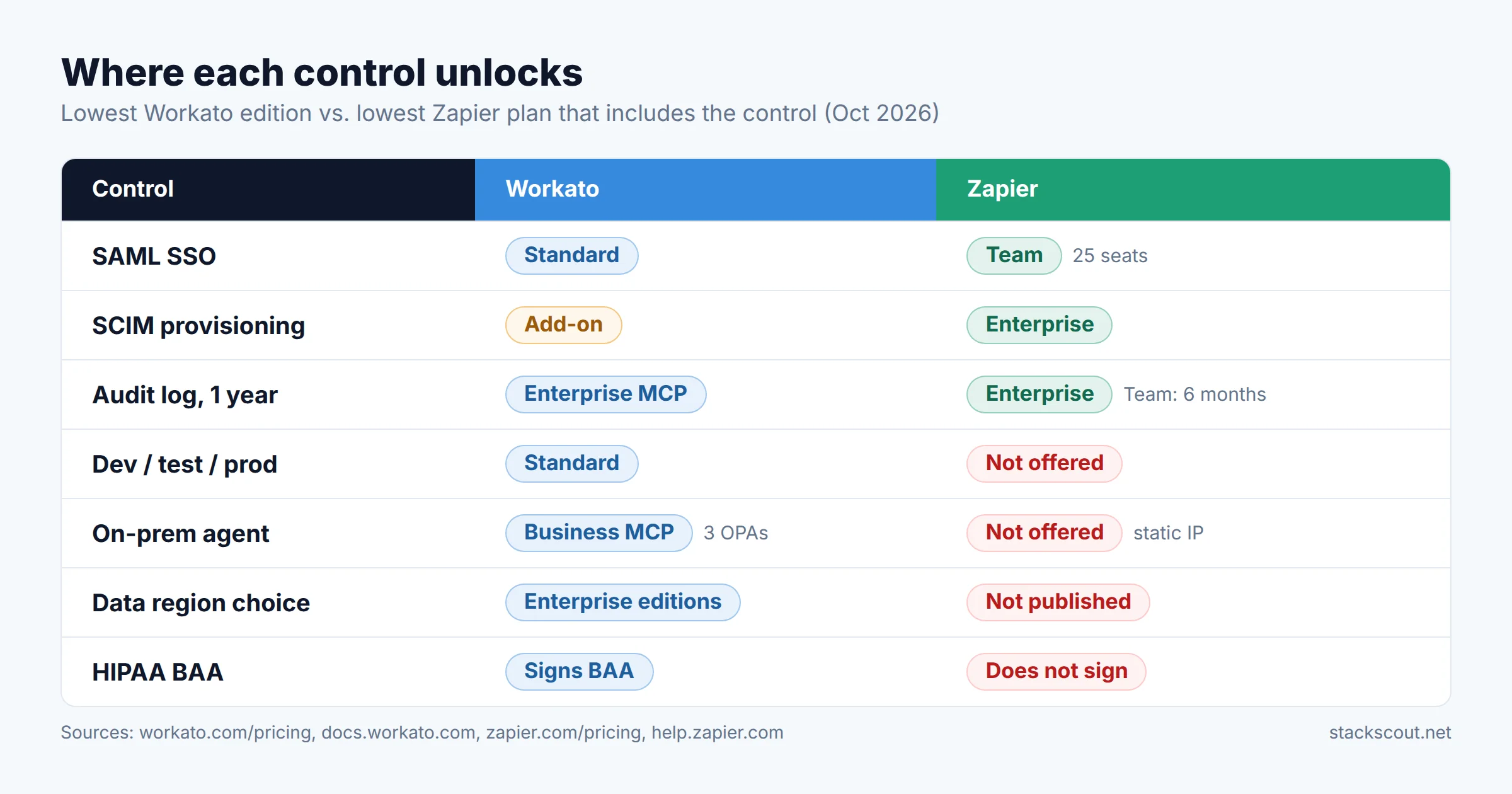
| SAML SSO | Standard+ (not in Free/Pro) | Team+ |
| SCIM provisioning | Add-on (Advanced Security & Compliance) | Enterprise |
| Dev / test / prod environments | Standard+ built in, with deployment history and rollback | None: drafts and versions per Zap; Enterprise workspaces separate teams, not stages |
| Audit log | Activity audit log kept 1 year (Enterprise MCP edition); streaming to S3, Azure Monitor, etc. | Team: 6 months · Enterprise: 1 year; log streams to any HTTPS endpoint |
| On-prem connectivity | On-prem agents (OPA): 3 in Business MCP, 10 in Enterprise MCP, 30 in Workato ONE; outbound-only mTLS tunnel | No on-prem agent; static IP on paid plans for allowlisting |
| Data residency | US, EU, UK, JP, SG, AU, IL, KR, CN data centers (enterprise); self-service is US only | No region choice published (see network section) |
| HIPAA / BAA | Signs BAAs; SOC 1 & 2 Type II, ISO 27001/27701, PCI-DSS 4.0 L1 | Doesn't sign BAAs; SOC 2 Type II, SOC 3, GDPR, CCPA |
| Time to first workflow | Minutes on self-service; enterprise rollouts are sales-led | Minutes; Team is card-purchasable |
Sources: workato.com/pricing, workato.com/free, docs.workato.com, zapier.com/pricing, help.zapier.com (checked October 26–27, 2026). Tier labels show the lowest plan that includes the control.
What changed in 2026Workato now sells self-service, but not to enterprises
Most comparisons still say you can't buy Workato without talking to sales. That's out of date. Workato now offers two self-service plans you can sign up for online, paying by card. Both meter usage in the same Workato credits as the enterprise contracts:
| Workato self-service | Price | Credits |
|---|---|---|
| Workato Free | $0 | 50,000 credits, one-time grant |
| Workato Pro | $75/mo | 2,500 credits/mo |
| Workato Pro | $100/mo | 3,500 credits/mo |
| Workato Pro | $275/mo | 10,000 credits/mo |
| Workato Pro | $780/mo | 30,000 credits/mo |
| Workato Pro | $1,275/mo | 50,000 credits/mo |
Source: Workato Docs, "Self-service (Workato Free and Workato Pro) billing." Unused Pro credits expire at the end of each billing month.
For an enterprise buyer, the limits matter more than the prices. According to Workato's own plan page, Pro allows up to 3 users per workspace. SSO, unlimited users, platform APIs, and "advanced lifecycle & environment management" are listed under Enterprise. Pro customer data is hosted in the United States, and only enterprise customers can choose a data center region. Workato also doesn't publish how many credits one task consumes, so a Pro tier can't be turned into a cost per task in advance.
Use Workato Free (the 50,000-credit grant) as a sandbox for proving a recipe against your real apps. Don't treat Pro as a cheaper alternative to Zapier Team for a department: three users and no SSO won't pass most IT policies. For enterprise teams, the real comparison is Zapier Team or Enterprise vs. Workato Standard and above, and that's the comparison the rest of this guide makes.
Control 01 · IdentitySSO, SCIM, roles, and offboarding
Identity is usually the first item on the security checklist and the first place the two products diverge. Zapier puts SSO lower in its price ladder. Workato's authorization model goes deeper once you're on an enterprise edition.
- SAML SSO, MFA, custom OAuth profiles, and role-based access control are included from the Standard edition.
- SSO can be enforced for all members, with one exception: the workspace account owner can't sign in through SAML and must use a username and password. Protect that account with MFA and a vault.
- SCIM 2.0 (Okta, OneLogin, Entra ID) is part of the Advanced Security & Compliance add-on and requires SAML SSO first.
- Roles are scoped to environments and projects (Project admin, Builder, Operator, and so on). That lets you give a team build rights in DEV without deploy rights in PROD.
- SAML SSO is on Team ($69/mo and up, annual), which is capped at 25 seats. Enterprise removes the seat cap.
- SCIM, domain capture, Super Admin, advanced admin permissions, app access controls, and action restrictions are Enterprise only.
- Under SCIM, deactivating a user in your identity provider transfers their shared Zaps, connections, and folders to the account owner and pauses their unshared Zaps.
- New Enterprise accounts start with an empty allowed-apps list, so every app is blocked until an admin approves it.
The practical difference shows up at offboarding. In Zapier, the main risk is a personal Zap that quietly keeps sending data under a departed employee's connection. SCIM plus the allowlist is how Zapier closes that gap, so budget for Enterprise if you expect more than a few dozen builders. In Workato, the main risk is elevated privilege: who can promote a recipe to production. Environment-scoped roles handle that without extra licensing.
Control 02 · EvidenceAudit logs, retention, and SIEM streaming
Auditors want to know who changed what and when, and whether you can still show it a year later. Both vendors now keep a year of audit events at their top tier, and both stream events to your own systems. The tiers and the plumbing differ.
Zapier
- Audit log retention: 6 months on Team, 1 year on Enterprise (per the pricing table). Zapier's governance checklist also says it keeps audit activity for 12 months.
- Log streams send each audit event as JSON to an HTTPS endpoint you choose, at the moment it happens, with an optional signing secret. They also carry Zap execution events (success, error, halted), which the audit log itself doesn't record.
- Log streams only capture events from the moment you create them, so turn them on before the first team starts building.
- Enterprise also adds an Observability API, analytics, alerts, and side-by-side version comparison.
Workato
- The activity audit log keeps events for one year by default. On the public edition list it appears under "Enhanced security" in Enterprise MCP.
- Job data (job history, trigger events, reports) is a separate retention policy: 30 days on Standard and Business, and 90 days on Enterprise, where you can also shorten it (down to 1 hour) or turn storage off per recipe. That's useful when payloads contain personal data.
- Audit log streaming can send job status, full job details, user activity, API platform logs, log-service events, and Genie conversations to destinations such as Amazon S3 or Azure Monitor. Automation HQ can stream from all managed workspaces to one destination.
Job-run data and audit events aren't the same thing. Zapier's audit log doesn't record whether a Zap run succeeded; that only reaches you through log streams. Workato deletes job payloads after 30 or 90 days even though audit events last a year. If your control framework requires keeping evidence of execution, stream it to your SIEM from day one. Our guide to debugging Zaps that fail silently shows what's lost when you don't.
Control 03 · Change managementEnvironments vs. drafts and versions
This is the most decisive difference between the two products, and most comparisons skip it.
Workato lists "Dev, test, and production environments" and "Recipe lifecycle management" in its entry Standard edition. With Environments enabled, each workspace gets DEV, TEST, and PROD. Projects are deployed from one to the next, every deployment is recorded, and you can roll back to an earlier deployment. Each environment gets its own encryption main key. For teams with an existing CI/CD pipeline, deployments can be scripted through the platform APIs. Recipe lifecycle management (RLCM) can export a package containing recipes, connections, SDK connectors, lookup tables, environment properties, test cases, and more. RecipeOps triggers can alert you when a deployment is submitted, approved, rejected, or fails. One caveat: Workato's self-service page lists platform APIs and "advanced lifecycle & environment management" as Enterprise features, so check exactly which deployment tools your quote includes.
Zapier works one Zap at a time. Every paid plan includes drafts and versions: you edit a draft while the published version keeps running, then publish. Enterprise adds Compare Versions, Approval requests (beta), and Workspaces. Each workspace can have its own task limit, and workspaces can't be deleted once created. Zapier's newer Next Gen Zaps (early access) let you keep several drafts, run a draft live before publishing, and see a check run before publish. Zapier's own docs mention enabling them in a workspace "such as a sandbox". None of this promotes a tested change from a test environment to production with its connections remapped. A sandbox workspace is a separate copy that you rebuild by hand.
If your change policy (SOX ITGC, SOC 2 CC8.1, or internal policy) requires changes to be tested away from production and approved before release, Workato meets that design out of the box. Zapier can meet a lighter standard: versioning, approvals, and an audit trail. It can't give you a separate test stage.
Control 04 · Network & dataOn-prem, residency, encryption, and HIPAA
Systems behind the firewall
Workato's on-prem agent (OPA) runs inside your network and makes outbound-only connections to Workato on TCP 443, so you don't open inbound ports. The connection uses mutual TLS that trusts only Workato's private certificate authority. Agents can be grouped for high availability, and they can read credentials from AWS Secrets Manager, Azure Key Vault, Google Secret Manager, or HashiCorp Vault. One operational catch: TLS-inspecting proxies such as Zscaler break the mTLS chain, so you need a do-not-inspect rule for Workato's gateway domains. The editions include 3, 10, or 30 OPAs (Business MCP, Enterprise MCP, Workato ONE), and more are sold as add-ons.
Zapier has nothing comparable. Paid plans get a static IP you can allowlist, which works for a database or API exposed to the internet behind an IP filter. It doesn't help with a SQL Server instance or a file share that never leaves the private network.
Data residency
Workato enterprise customers choose a region when the account is created: US, EU, UK, Japan, Singapore, Australia, Israel, South Korea, or China. The data stays in that region and can't be moved to another one. Zapier's pricing and help pages, as checked for this guide, don't offer a region choice. If EU-only processing is a contractual requirement, settle it with Zapier sales before the pilot.
Encryption and compliance attestations
- Workato: per-workspace key hierarchy with hourly keys, and bring-your-own-key through Enterprise Key Management. Hourly key rotation is listed in Enterprise MCP. Workato's security page lists SOC 1 Type II (semi-annual) and SOC 2 Type II, ISO/IEC 27001:2022 and 27701:2019, PCI-DSS 4.0 Level 1 Service Provider, GDPR, and HIPAA: it signs a Business Associate Agreement and gets an annual HIPAA attestation.
- Zapier: AES-256 encryption at rest and TLS in transit; SOC 2 Type II, SOC 3, GDPR, and CCPA. Zapier states it doesn't support HIPAA compliance or sign BAAs and advises against sending PHI through it.
For a healthcare company, or any company whose workflows touch PHI, the BAA question settles the choice on its own.
Control 05 · CostPricing and the two task meters
Both vendors call their unit a "task," and on paper the definitions are close: a task is one action step that succeeds, triggers are free, and failed steps aren't billed. The difference is in the details.
| Counting rule | Workato (workflow recipes) | Zapier (Zaps) |
|---|---|---|
| Trigger | Free | Free, including every poll |
| Action step | 1 task, including Workato's own utility connectors (lookup tables, variables) | 1 task per successful run |
| Logic steps | IF, loops, Stop job, error handlers: free | Filter, Paths, Formatter, Delay, Looping, Digest, Storage: free |
| Loop body | 1 task per iteration | 1 task per iteration |
| Bulk / batch action | 1 task, however many records it processes | No equivalent rule |
| Retries and reruns | Only the successful retry counts; full reruns count again | Replaying a whole run re-counts previously successful steps |
| Sub-workflows | The call counts as 1, plus the function's own steps | Call + return + steps inside the sub-Zap all count |
| AI steps | AI by Workato steps count as more than 1 task (per contract); Genie = 1 Genie action per prompt | AI by Zapier counts by model tier; Zapier MCP = 2 tasks per tool call |
Worked example: a nightly 500-record sync
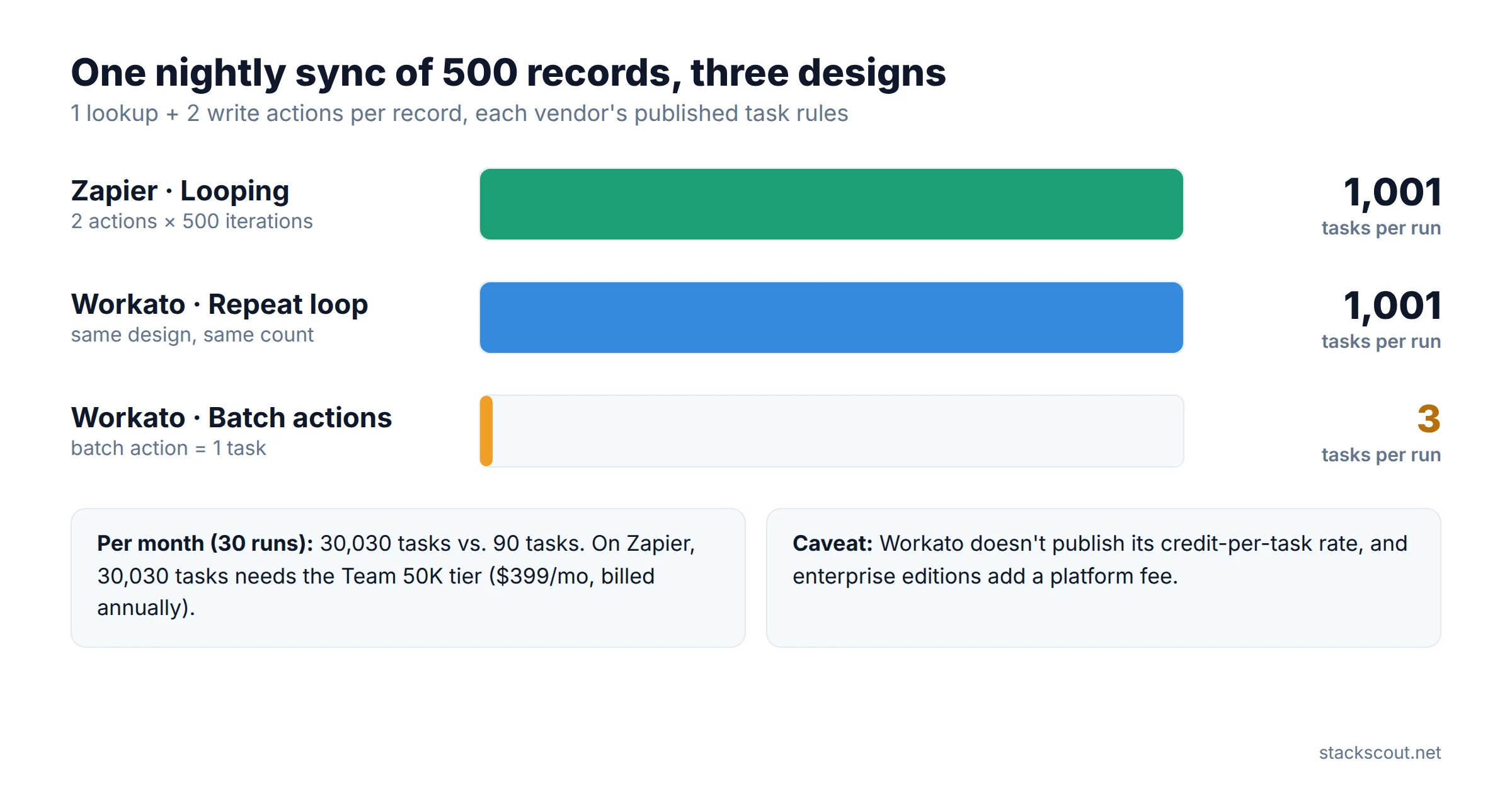
Say a recipe runs once a night. It looks up 500 updated customer records in your ERP and writes each one to Salesforce and to a data table, so two write actions per record.
per run = 1 + (2 × 500) = 1,001 tasks
per month = 1,001 × 30 = 30,030 tasks → Team 50K tier, $399/mo billed annually
# Workato, same design with a Repeat-for-each loop
per run = 1 + (2 × 500) = 1,001 tasks
# Workato, rebuilt with batch actions (e.g. Salesforce batch create/update, up to 2,000 records per call)
per run = 1 lookup + 1 batch upsert + 1 batch insert = 3 tasks
per month = 3 × 30 = 90 tasks
The takeaway isn't that Workato is cheaper. Its credit-to-task rate isn't published, so you can't put a dollar figure on those 90 tasks, and enterprise contracts have a platform fee on top of usage. The point is that Workato's meter rewards engineering effort: a recipe designed around batch actions costs a fraction of a naive loop. Zapier's meter rewards simplicity: its free logic steps (Filter, Paths, Formatter) and published prices make cost predictable, but volume grows linearly with records. If your workloads are high-volume record syncs, ask Workato to price them as batch designs during the quote, not as loops.
What you'll actually pay
Zapier publishes every Team tier. Billed annually as of October 2026: 2K tasks $69/mo, 5K $119, 10K $169, 20K $249, 50K $399, 100K $599, 200K $999, 500K $1,799, 1M $2,499, 2M $3,999. Monthly billing costs 1.5× those amounts. Pay-per-task overage is charged at 1.25× your tier's per-task rate. Enterprise pricing isn't published. Our Zapier pricing breakdown walks through overage caps and how AI steps are multiplied.
Workato enterprise editions are priced as a platform edition plus credit usage plus add-ons (extra OPAs, concurrency, Private Link, Virtual Private Workato). No list prices are published. Vendr, which analyzes software purchase data, reports typical Workato annual contracts between $25,000 and $500,000+, with small and mid-market deployments often between $30,000 and $80,000, and implementation services between $10,000 and $50,000+. These figures are third-party estimates, not Workato's prices.
Two smaller items for the budget model: Workato counts usage across all environments, so test runs in TEST consume credits too. Workato editions also include a fixed concurrency allowance (1, 1, 15, and 30 from Standard to Workato ONE), and a single recipe defaults to processing one job at a time (configurable up to 30).
Control 06 · BuildersDeveloper experience
- Connector SDK in a Ruby DSL, built in the browser or locally with the SDK Ruby gem and CLI; a connector can be generated from an OpenAPI spec.
- Custom connectors ship inside RLCM packages, so they move through DEV → TEST → PROD with the recipes that use them.
- Test Automation for recipes (mocked actions count as tasks).
- API platform, MCP servers and MCP Gateway (Business MCP+), Agent Studio (Workato ONE).
- Code by Zapier steps in JavaScript or Python, with 30 seconds of runtime included on Pro and Team and 2 minutes on Enterprise.
- Platform CLI (Node.js) for building private or public integrations.
- Zapier MCP on all plans, and Next Gen Zaps (early access) that build and deploy whole workflows from an MCP client such as Claude or Cursor.
- Copilot generates Zaps from a prompt; unlimited on paid plans.
Engineers tend to like Workato's lifecycle tooling and dislike its Ruby DSL. Zapier's Node and Python story feels more familiar, but there's no test stage to deploy into. If engineering will own the platform and cares mostly about control and cost, also look at self-hosted options. See our n8n cloud vs. self-hosted cost breakdown and the wider iPaaS platform roundup.
SummaryPros and cons
Workato
Pros
- Dev/test/prod environments with deployment history and rollback, from the entry enterprise edition
- On-prem agents with outbound-only mTLS
- Nine data center regions; HIPAA BAA; PCI-DSS 4.0 L1; ISO 27001/27701
- Batch actions count as one task, so high-volume syncs can be very cheap to meter
- Free tier with 50,000 credits for proof-of-concept work
Cons
- Enterprise prices aren't published, and credit-to-task conversion isn't either
- SCIM is an add-on; the workspace owner can't use SAML
- Self-service Pro is capped at 3 users and has no SSO
- Ruby DSL for custom connectors
- 1,200+ pre-built connectors, versus 9,000+ apps on Zapier
Zapier
Pros
- SAML SSO and an audit log on the card-purchasable Team plan
- Published prices at every Team tier, and free logic steps
- 9,000+ apps, including the niche SaaS tools business teams pick on their own
- Enterprise app allowlist on by default, SCIM offboarding that pauses orphaned Zaps, and log streams with run outcomes
- Fastest way to get non-engineers building under guardrails
Cons
- No dev/test/prod promotion
- No on-prem agent; no published region choice
- Doesn't sign BAAs
- Team is capped at 25 seats; SCIM and app controls require Enterprise
- Task volume grows linearly with records looped over
DecisionWho should choose which, and when to run both
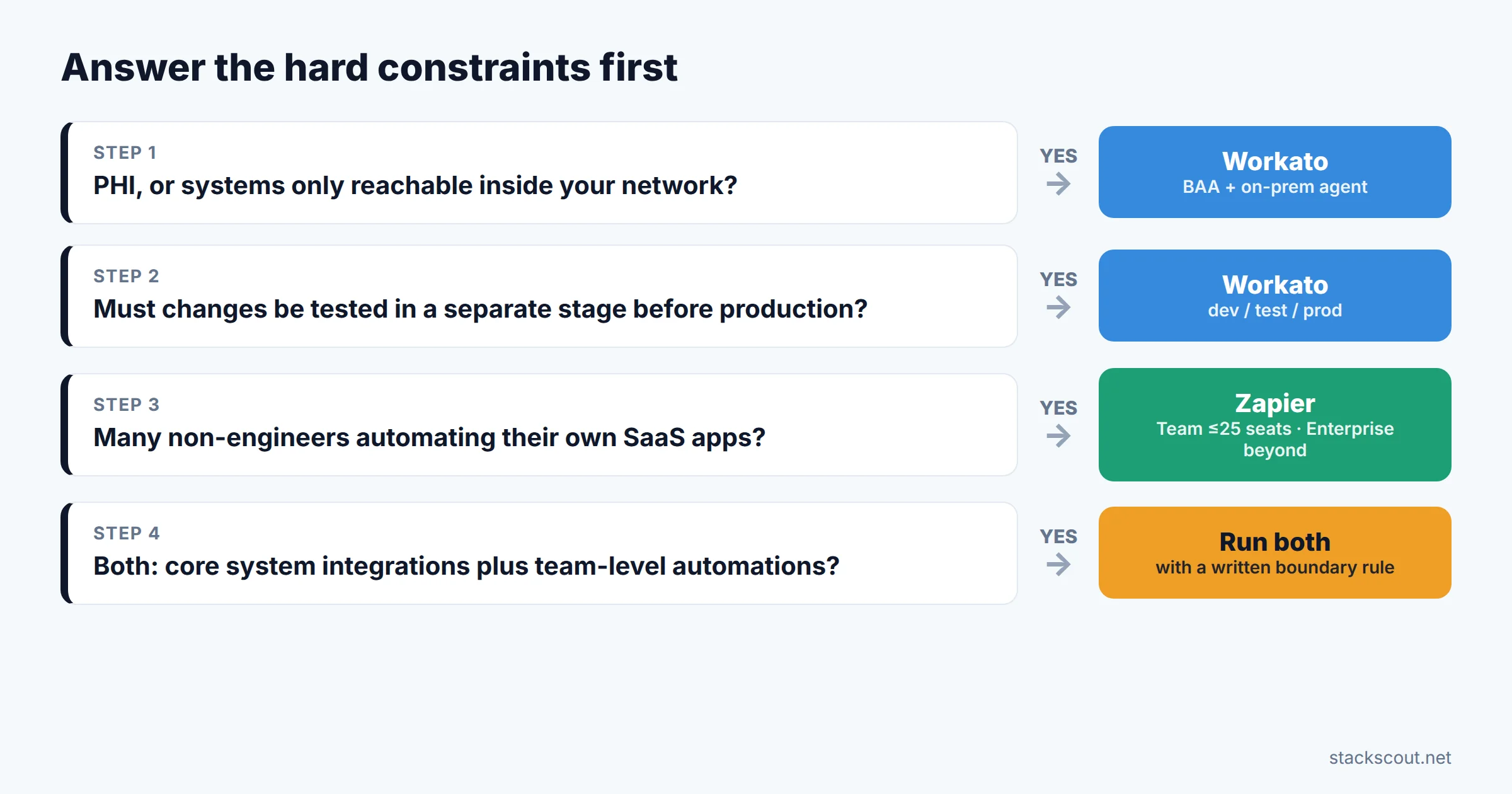
Central IT or integration team
- Workflows touch PHI, card data, or systems behind the firewall
- Auditors require tested, approved promotion to production
- Data must stay in the EU, UK, or APAC
- High-volume record syncs between ERP, HRIS, and CRM
Many business-team builders
- Ops, marketing, and sales want to automate their own SaaS apps
- IT's job is guardrails (SSO, allowlist, audit log), not building
- Under 25 builders: Team covers SSO; above that, budget for Enterprise
- Microsoft-centric? Compare Power Automate vs. Zapier first
The common enterprise pattern
- Workato carries system-of-record integrations (order-to-cash, hire-to-retire) under IT change control.
- Zapier Enterprise, with its allowlist, handles team-level automations at the edges.
- Write down a boundary rule, for example "anything that writes to the ERP or HRIS goes through Workato," and enforce it with Zapier's action restrictions.
Signals that it's time to move workflows from Zapier to Workato
- An auditor asks how a change to a revenue-affecting Zap was tested before release, and there's no answer.
- A new workflow needs a system that's only reachable inside the network.
- Your task bill is dominated by loops over records that a batch action could handle.
- A healthcare customer or partner requires a BAA for the data flowing through.
None of these means moving everything. Migrate the workflows that triggered the signal, and leave team-level automations where they work. We're preparing a step-by-step guide to migrating Zaps to Workato recipes. If cost is pushing you toward a self-hosted option instead, our Zapier-to-n8n cutover playbook covers that route.
FAQFrequently asked questions
Which is better, Zapier or Workato?
Does Zapier work with teams?
Is Workato more expensive than Zapier?
Is there anything better than Zapier for enterprise teams?
Who are Workato's main competitors?
How we evaluatedMethodology
We compared the two platforms on six criteria an enterprise IT owner signs off on: identity, audit evidence, change management, network and data controls, cost metering, and builder tooling. Every price and plan entitlement comes from the vendors' own pages, checked October 26–27, 2026: workato.com/pricing and /free, Workato's documentation on tasks, retention, environments, SCIM, on-prem agents, data centers, and encryption, Zapier's pricing page and its plan data, and Zapier's help center articles on task usage, log streams, workspaces, and enterprise governance. Where we cite one vendor's claims about the other, or third-party contract data (Vendr), we say so. The task-count example applies each vendor's published counting rules to a hypothetical workflow. We didn't run production workloads on either platform, and this is not a benchmark of speed or reliability.
Sources
- Workato, Pricing (editions and add-ons): https://www.workato.com/pricing
- Workato, Free / Pro plans and FAQ: https://www.workato.com/free
- Workato Docs, Self-service (Workato Free and Workato Pro) billing: https://docs.workato.com/en/pricing/self-service/self-service.html
- Workato Docs, Tasks usage: https://docs.workato.com/en/recipes/tasks.html
- Workato Docs, Billing and usage FAQs: https://docs.workato.com/en/pricing/pricing-faqs.html
- Workato Docs, Environments: https://docs.workato.com/en/features/environments.html
- Workato Docs, Data retention policies: https://docs.workato.com/en/security/data-protection/data-retention.html
- Workato Docs, Activity audit log: https://docs.workato.com/en/features/activity-audit-log.html
- Workato Docs, Single sign-on and SCIM 2.0: https://docs.workato.com/en/user-accounts-and-teams/single-sign-on.html, https://docs.workato.com/en/scim.html
- Workato Docs, On-prem agent: https://docs.workato.com/en/on-prem.html
- Workato Docs, Supported cloud regions: https://docs.workato.com/en/datacenter/datacenter-overview.html
- Workato, Security overview (SOC, ISO, HIPAA, PCI-DSS): https://www.workato.com/legal/security
- Zapier, Pricing and plan comparison: https://zapier.com/pricing
- Zapier Help, How is task usage measured in Zapier?: https://help.zapier.com/hc/en-us/articles/8496196837261
- Zapier Help, Enterprise governance checklist: https://help.zapier.com/hc/en-us/articles/49783646603405
- Zapier Help, Understanding the audit log and log streams: https://help.zapier.com/hc/en-us/articles/49374721349901
- Zapier Help, Create workspaces in your organization: https://help.zapier.com/hc/en-us/articles/36606521426829
- Zapier Blog, Is Zapier HIPAA compliant?: https://zapier.com/blog/is-zapier-hipaa-compliant/
- Vendr, Workato pricing benchmarks (third-party): https://www.vendr.com/marketplace/workato

Technology consultant with 10+ years in the Japanese tech industry. Specializing in SaaS evaluation, workflow automation, and B2B tool integration.