When to Move from QuickBooks Online to NetSuite or Sage Intacct (2026): 8 Triggers, the Middle Step, and the Best Month to Switch
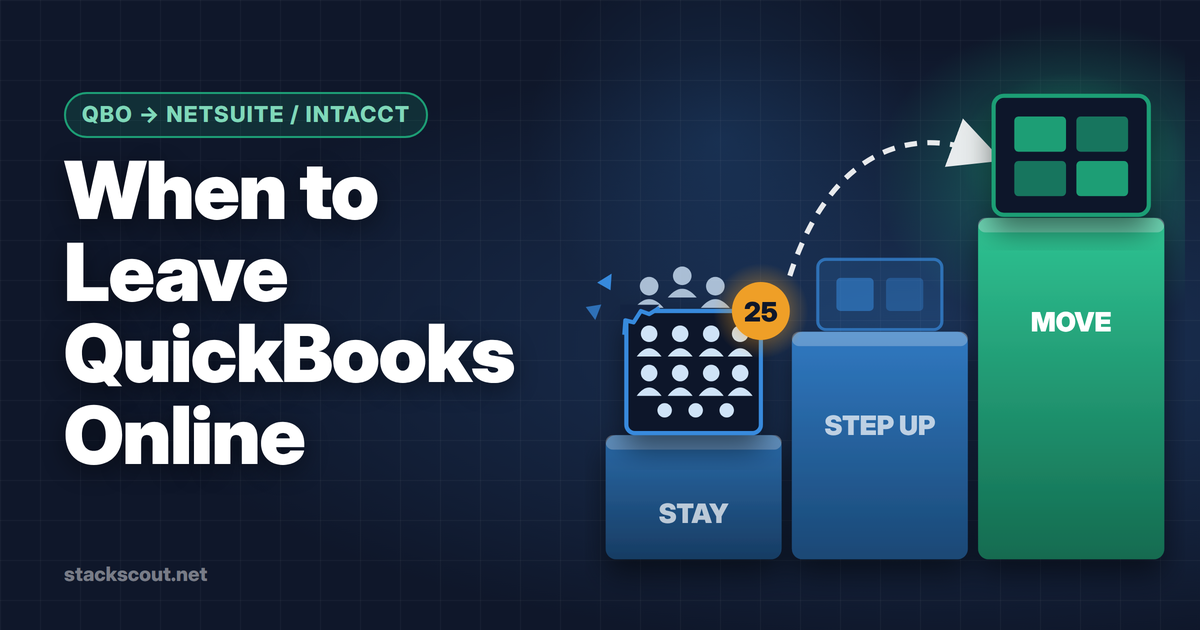
Move when QuickBooks Online hits a hard limit, not when you hit an ARR number. There are three hard limits: more than 25 billable users, a second legal entity you have to consolidate, and revenue contracts that templates can't recognize correctly (bundles, mid-term changes, usage). Before any of those, QuickBooks Online Advanced ($340/month list as of October 2026) plus a revenue subledger is usually the cheaper setup.
Once you do move: pick Sage Intacct if the problem is finance (consolidation, dimensions, ASC 606, audit). Pick NetSuite if the problem is the whole business (inventory, procurement, order-to-cash across many countries). If the only problem is multiple entities, look at Intuit Enterprise Suite too. All three are quote-only. Plan go-live for the first day of a fiscal year or quarter, and work back 4–9 months from that date.
Most "when to leave QuickBooks" articles are written by NetSuite partners, and they end the same way: a checklist of pain points, a revenue rule of thumb, and a contact form. The checklists aren't wrong. The problem is that "reporting feels slow" and "you raised a Series B" don't tell a CFO when to sign. They also don't say what the move costs compared with staying put.
This guide is for finance leaders at growing B2B and SaaS companies who are already on QuickBooks Online (QBO), usually on Plus or Advanced. It separates the limits QBO actually enforces from the signals that are only uncomfortable. It also puts numbers on staying versus moving and shows how to pick a go-live date. Pricing for QBO is from Intuit's pricing page, checked October 18, 2026. NetSuite, Sage Intacct, and Intuit Enterprise Suite don't publish prices, so those figures are third-party estimates, and we label them as such every time.
The 8 triggers, ranked by how hard they force a move
We split the triggers into two groups. Hard limits are product constraints you can't configure around inside QBO. When you hit one, every extra month on QBO costs you workarounds. Soft signals are operational. They mean you should start evaluating, but you could fix each of them some other way.
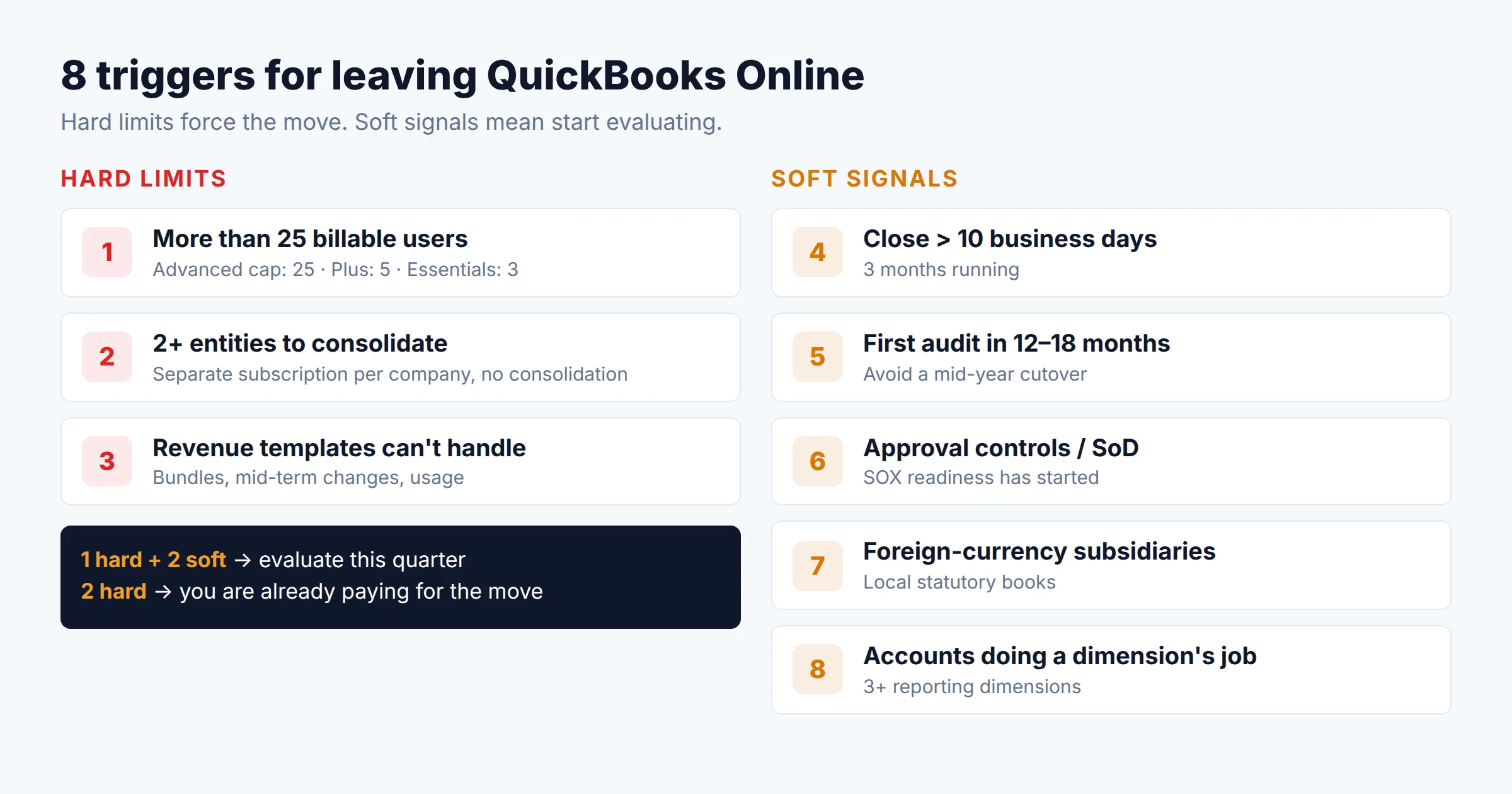
You need more than 25 billable users Hard limit
QBO Advanced allows 25 billable users. Plus allows 5 and Essentials 3. Intuit's own usage-limits page says that when you reach a limit, you can upgrade or reduce usage. On Advanced there is nothing left to upgrade to inside QBO. Accountant seats and reports-only/time-tracking users don't count toward the cap, so check who actually needs a full seat before treating this as the trigger.
A second legal entity you have to consolidate Hard limit
Every QBO company is a separate subscription with separate data. You can switch between companies with one login, but QBO has no consolidation ledger, no automatic intercompany eliminations, and no way to merge companies. Teams get by with exported spreadsheets or a reporting add-on. That works for 2 entities that rarely trade with each other. It breaks once intercompany charges are monthly and currencies differ.
Revenue contracts that templates can't recognize Hard limit
QBO's revenue recognition exists only on Advanced (and Intuit Enterprise Suite). You assign a template to a product or service, and QBO spreads the amount on each invoice line over a schedule. That handles annual prepaid subscriptions. It doesn't allocate a bundle's price by standalone selling price, re-spread a contract after a mid-term change, or follow usage.
Month-end close takes more than 10 business days Soft signal
A slow close usually traces back to one of the hard limits: consolidation in Excel, deferred revenue reconciled by hand, or approvals chased by email. Find which one before you blame the ledger. If the slowness comes from bank feeds and coding, an ERP won't fix it.
Your first financial statement audit is scheduled Soft signal
Priced rounds, debt facilities, and enterprise customers' vendor reviews lead to a first audit. QBO can be audited. The real issue is timing: if you switch systems in the middle of the audited year, the auditors have to test two systems and the cutover. Timing section covers how to avoid that.
You need real approval controls and segregation of duties Soft signal
Advanced adds custom roles and workflow automation, which covers a lot. What you won't get is multi-level purchase approvals by department and amount, or audit-grade separation between whoever creates a bill and whoever pays it. You can also add those controls with an AP tool (see our accounts payable automation comparison), so this signal is soft.
Subsidiaries that keep their books in another currency Soft signal
QBO supports multicurrency transactions from Essentials up. But each foreign subsidiary is still its own company file with its own home currency, and translating and consolidating them happens outside QBO. This becomes a hard limit when it combines with trigger 2.
Your chart of accounts is doing a dimension's job Soft signal
Simple Start, Essentials, and Plus cap you at 250 accounts, and Plus gives you 40 classes and locations combined. Advanced removes both caps. You still get only class, location, tags, and 12 custom fields per transaction. Teams that need P&L by product line, department, and region often end up with accounts like "Revenue – EMEA – Platform." That works, but it is a sign the next system should have a dimensional ledger.
How to read the list: one hard limit plus two soft signals means start evaluating this quarter. Two hard limits means you are already paying for the move in staff hours. Soft signals alone almost never justify an ERP. Fix them with targeted tools first.
Why "$10M ARR" is the wrong trigger
The most common advice online is to move at Series B or around $10M ARR. Eagle Rock CFO's guide uses exactly that line ("Series B or later," "$10M+ ARR," "50+ employees"). It's a reasonable average. It's a poor rule for any single company, because revenue isn't what breaks QBO. Complexity is, and complexity doesn't scale with revenue.
Two companies make the point:
- Company A: $3M ARR, three entities. A US parent, a UK subsidiary opened to sell into Europe, and an Indian subsidiary for engineering. Intercompany service charges every month, three currencies. It hits trigger 2 and trigger 7 at $3M ARR. QBO is costing it days of close work right now.
- Company B: $15M ARR, one entity. Self-serve monthly plans billed through Stripe, 14 people touching finance, no bundles. It hits nothing on the hard list. QBO Advanced plus a Stripe revenue subledger fits, and an ERP would mostly add cost.
Company A should be in an ERP evaluation. Company B can wait. The ARR rule gets both wrong.
The cheapest way to avoid trigger 2
Many SaaS companies open a foreign subsidiary just to employ a few people abroad. An employer of record (EOR) can employ them for you without a local entity, which keeps you single-entity on QBO for longer. EOR fees can exceed the cost of running a subsidiary once a country has more than a handful of hires, but for the first few people it often delays the ERP decision by a year or more. See how an employer of record works before you open an entity for your first two hires.
Three paths: stay, step up, or move
"QuickBooks or NetSuite" is a false choice. There are three paths, and the cheapest one that fixes your binding constraint is usually the right one.
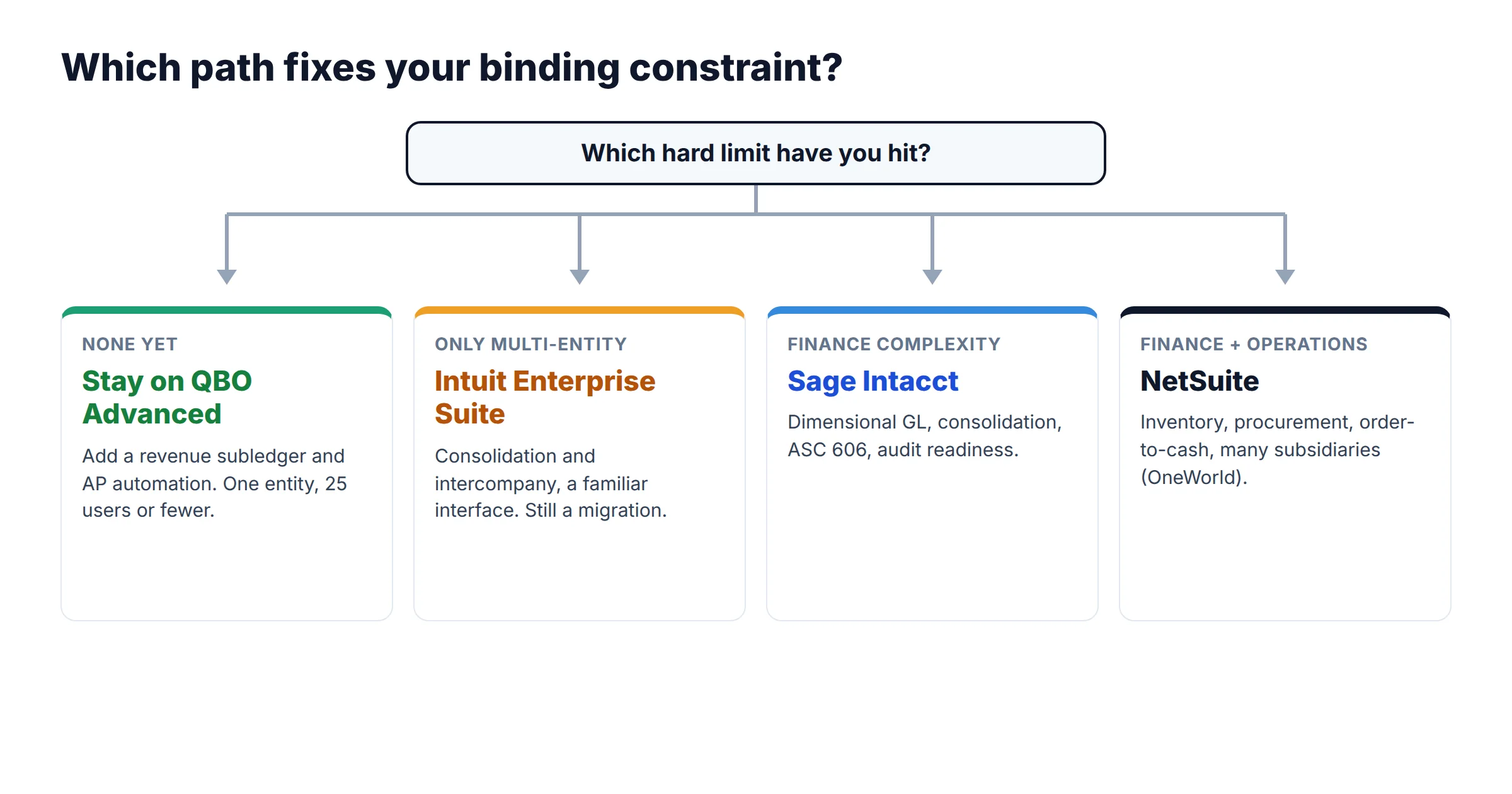
Path A: Stay on QBO Advanced and add subledgers
Fits: one entity, under 25 users, revenue complexity handled by a dedicated tool.
QBO Advanced lists at $340/month (25 users) as of October 2026, after Intuit's August 1, 2026 increase. Our QuickBooks Online pricing breakdown has every plan and add-on. The usual add-ons are a revenue recognition subledger that posts summary journals to QBO and an AP automation tool for approvals. If you bill through Stripe, the setup in our Stripe-to-QuickBooks connection guide keeps fees and deferred revenue from being double-counted. For the full list of options at this stage, see our comparison of accounting software for SaaS companies.
Ceiling: this path does nothing for triggers 1 and 2.
Path B: Step up to Intuit Enterprise Suite
Fits: multiple entities is the main problem, the team knows QuickBooks, and you don't need operational ERP modules.
Intuit Enterprise Suite (IES) launched in September 2024 and adds multi-entity consolidation, intercompany automation, and dimensional reporting. Intuit is explicit that IES is "a new category of software distinct from our QuickBooks Online and Desktop products." It isn't a higher QBO plan, so plan it as a migration. Pricing is quote-only. Intuit says customers working with a ProAdvisor can get "up to 60% off the list price," excluding per-user charges and add-ons added later.
Ceiling: a younger product with a smaller partner and auditor ecosystem than Intacct or NetSuite. ERP Research describes inventory support as basic.
Path C: Move to Sage Intacct or NetSuite
Fits: two or more hard limits, an audit or institutional round coming, or operational needs (inventory, procurement, projects) beyond accounting.
Both are quote-only, sold with implementation partners, and take months to implement. How to choose between them is in section 5.
What staying vs. moving really costs
None of the three ERP-class options publishes a price list. The table below uses independent estimates from ERP Research and Eagle Rock CFO. Treat them as ranges for budgeting, not quotes.
| Option | Annual software | One-time implementation | Typical timeline | Source type |
|---|---|---|---|---|
| QBO Advanced | $4,080 per entity ($340 × 12, list) |
Minimal | — | Official list price |
| Intuit Enterprise Suite | ~$7,800–$8,000 (1 entity) ~$12,000–$15,000 (2–5 entities) |
Quoted separately | 1–3 months | Third-party estimate |
| Sage Intacct | From ~$10,000–$15,000; most $25,000–$75,000 |
~$30,000–$75,000 average ($10K basic to $200K+ complex) |
2–4 months average | Third-party estimate |
| NetSuite | Base ~$999/mo + ~$99–$199 per full user/mo; OneWorld ~+$500–$1,000/mo per subsidiary | ~$43,000–$125,000 for a smaller rollout (partner, migration, integrations, training) |
4–6 months (Eagle Rock); 4–9 months (ERP Research) | Third-party estimate |
Sticker price is only half of it. The real question is how many hours of manual work per month the move has to remove before it pays for itself. Here is that math for a realistic case. All inputs are assumptions you should replace with your own.
Scenario: a SaaS company with three entities (US parent, UK and Canadian subsidiaries) and about 10 people who need full finance-system access. Today it runs three QBO Advanced subscriptions. We spread implementation evenly over three years and value finance-team time at $90 per hour, fully loaded.
To use this: add up the hours your team spends each month on intercompany entries, consolidation spreadsheets, deferred revenue rollforwards, and chasing approvals. For a three-entity company with intercompany activity every month, 40+ hours is common, and the low end of either range is easy to clear. A single-entity company that spends 8 hours a month on a revenue spreadsheet is nowhere near break-even. A revenue subledger costing a few hundred dollars a month solves its problem.
The Intuit Enterprise Suite anomaly
Using ERP Research's estimate of $12,000–$15,000 a year for 2–5 entities, IES software costs about the same as the three QBO Advanced subscriptions in this scenario ($12,240). If that holds in your quote, multi-entity consolidation is nearly free on the software line, and implementation becomes the main cost. Get an IES quote even if you expect to choose Intacct, because it's a useful benchmark in negotiation.
NetSuite vs Sage Intacct (and where Intuit Enterprise Suite fits)
Eagle Rock CFO's guide puts it this way: Intacct "often provides 80% of NetSuite's value at 50% of the cost" when the needs are purely financial. Our research agrees with the direction. The more useful question is which 20% you would be missing, and whether you need it.
| Criterion | Sage Intacct | NetSuite | Intuit Enterprise Suite |
|---|---|---|---|
| What it is | Cloud financial management (finance-first) | Full ERP suite: finance, CRM, inventory, order management, HR, ecommerce | Finance-first platform built on QuickBooks technology |
| Multi-entity consolidation | Multi-entity and global consolidations module; automated intercompany eliminations | OneWorld add-on for multi-subsidiary, multi-currency, multi-book | Included; consolidated P&L with drill-down to entity, automated intercompany |
| Reporting structure | Dimensional GL (department, location, project, customer, and more) | Segments plus custom segments; Multi-Book accounting | Up to 20 custom dimensions (per ERP Research) |
| ASC 606 depth | Contract revenue management module (quoted separately) | Advanced Revenue Management (add-on) | Revenue recognition schedules that adjust as contracts change |
| Price list | None ("pricing plans based on the modules") | None (base + users + modules) | None (custom bundle; ProAdvisor up to 60% off) |
| Implementation | 2–4 months average | 4–9 months | 1–3 months |
| Choose when | The pain is close, consolidation, revenue, audit | The pain also covers inventory, procurement, fulfillment, or many countries | The pain is mostly multiple entities and you want to stay in the Intuit ecosystem |
Sage Intacct: choose it when finance is the problem
Intacct is built for the finance team, not the whole company. Its dimensional ledger lets you report P&L by entity, department, product, and customer without encoding them in account names, which solves trigger 8 directly. Its multi-entity module handles consolidation and intercompany eliminations (triggers 2 and 7). Sage prices it module by module ("pricing plans are based on the modules that are included"). That's useful if you only need financials, because you don't pay for an operations suite you won't use. Sage also points to SaaS-specific features (subscription billing models and SaaS metrics dashboards), so it fits subscription businesses better than its "general ledger" reputation suggests.
- Dimensional GL removes chart-of-accounts sprawl
- Mature multi-entity consolidation
- Lower year-one cost than NetSuite in most estimates
- Large pool of CPA-firm partners and experienced controllers
- Not a full ERP; inventory and CRM need other systems
- Module-by-module pricing adds up
- Implementation goes through a partner
- No public pricing to anchor negotiation
NetSuite: choose it when the business, not just finance, has outgrown its tools
NetSuite's pitch to QuickBooks users is a single platform: "CRM, ecommerce, HR management software (HRMS), professional services automation and more" alongside the ledger. For a pure-software company, much of that duplicates tools you already own (a CRM, a billing system, an HRIS). NetSuite is the right answer when you sell hardware or physical goods, run complex procurement, or operate many subsidiaries across countries and want one system and one vendor for all of it. OneWorld is what handles the multi-subsidiary part, and each additional subsidiary raises the license fee.
- One system from order to cash to consolidated close
- OneWorld scales to many subsidiaries and currencies
- Advanced Revenue Management handles complex ASC 606
- Largest mid-market ERP partner ecosystem
- Highest total cost of the three in published estimates
- Longest implementation (4–9 months)
- Per-user and per-module licensing grows with headcount
- Overlaps with CRM, billing, and HRIS a SaaS company already pays for
Multi-entity consolidation specifically
If consolidation is your main trigger, all three handle the basics: one place for every entity, automated intercompany eliminations, and consolidated statements. The differences are in the edges. Ask each vendor to demo your structure: a partially owned subsidiary if you have one, a subsidiary with a different fiscal year, local statutory books alongside US GAAP (NetSuite's Multi-Book addresses this directly), and the translation method for a foreign subsidiary's balance sheet versus its P&L. A demo with a one-currency, wholly owned sample company proves nothing.
The best time to switch: working back from go-live
Once you have decided to move, the go-live date matters more than the vendor. The best go-live is the first day of a fiscal year, and the second best is the first day of a quarter. A clean start means the whole year's activity lives in one system. Comparatives, budgets versus actuals, and the audit trail don't straddle two ledgers, and you load opening balances once instead of mid-year roll-forwards.
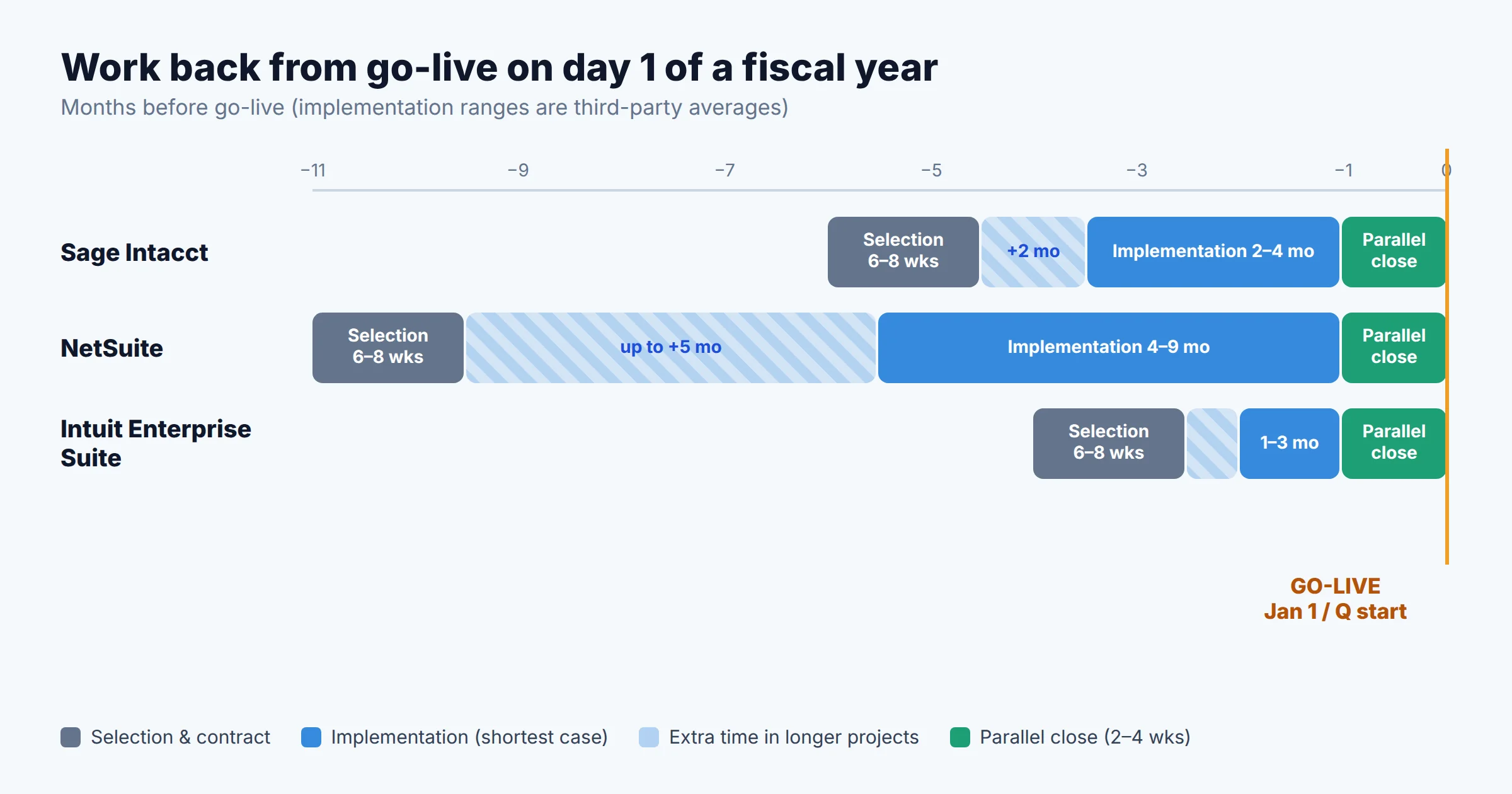
Allow roughly 6–8 weeks for selection (demos, references, contract) on top of implementation. For a company on a calendar fiscal year, reading this in October 2026:
| Target go-live | Sage Intacct | NetSuite | Intuit Enterprise Suite |
|---|---|---|---|
| January 1, 2027 | Tight Contract signed by early November; only works for a simple scope | Unrealistic | Feasible if scope is consolidation only |
| April 1, 2027 (Q2 start) | Comfortable | Tight Needs a signed contract by late fall | Comfortable |
| January 1, 2028 | Comfortable; start selection mid-2027 | Comfortable; start selection spring 2027 | Comfortable |
Four rules for picking the date:
- Don't go live during your first audit year unless it's on day one. If your first audit covers FY2027, go live January 1, 2027 or wait until after the FY2027 report is issued. A mid-year cutover means the auditors test the conversion as well as both systems.
- Keep go-live and implementation work away from year-end close. The people who know your QBO data best are busy in January. A January 1 go-live only works if the build is finished by early December.
- Run at least one parallel close. Close the last month before go-live in both systems and reconcile the trial balances. Budget two to four weeks for this.
- Don't let a vendor's quarter-end set your timeline. End-of-quarter discounts are real, but signing early to get one and then starting implementation in your busiest month is a bad trade. Sign when your timeline needs a signature.
What to bring over, and what to leave in QuickBooks
The most common migration mistake is trying to move every historical transaction. Most implementations move far less, and that's usually the right call:
- Always move: opening trial balance as of go-live, open AR and AP at the invoice level, the fixed asset register, vendor and customer masters, and, for SaaS companies, the remaining deferred revenue balance for every contract, with its schedule.
- Usually move: monthly trial balances for the prior one to two years by account and dimension. That gives you comparative reports in the new system without the cost of moving every transaction.
- Usually leave behind: transaction-level history. Keep it in QBO for lookups and audit requests.
Don't cancel QBO the day you go live
Intuit's cancellation policy: if you cancel a single QBO subscription, you get read-only access for one year, and after that you have to resubscribe to see your data. If you have multiple QBO subscriptions under the same login and keep at least one active, read-only access continues indefinitely. Export full reports (general ledger detail, transaction lists, attachments) before the first anniversary, or keep one low-tier subscription active for as long as you might get audit or diligence requests.
Revenue is where SaaS migrations most often go wrong. If your deferred revenue currently lives in QBO templates or in a spreadsheet, rebuild the remaining schedules in the new system and reconcile the total to the QBO deferred revenue balance at cutover. If you use a billing system with its own revenue module (see our subscription billing software comparison), decide during implementation which system is the source of truth for recognition. Don't let both post revenue journals.
Frequently asked questions
Is $10M ARR the right time to leave QuickBooks Online?
Can QuickBooks Online handle multiple entities?
Is Intuit Enterprise Suite just a bigger QuickBooks Online plan?
Does QuickBooks Online Advanced support ASC 606?
How long does a move from QuickBooks to NetSuite or Sage Intacct take?
Methodology
Based on our research, we split migration triggers into hard limits and soft signals using Intuit's published QBO usage limits (page updated August 5, 2026), Intuit's revenue recognition and cancellation help articles, and Intuit Enterprise Suite product and pricing pages. We checked QBO list prices on Intuit's pricing page on October 18, 2026. NetSuite, Sage Intacct, and Intuit Enterprise Suite don't publish prices, so cost ranges come from ERP Research's pricing pages and Eagle Rock CFO's migration guide. We label them as estimates throughout. The break-even model uses those ranges plus stated assumptions (three entities, 10 full users, $90/hour loaded finance cost, three-year amortization) that readers should replace with their own figures. The suggested thresholds for soft signals are our judgment, not vendor guidance. StackScout has no commercial relationship with Intuit, Sage, or Oracle.
Sources
- Intuit, "Learn about usage limits in QuickBooks Online" (updated 8/5/2026): quickbooks.intuit.com
- Intuit, QuickBooks Online plans and pricing (checked 10/18/2026): quickbooks.intuit.com/pricing
- Intuit, "Set up a product or service's revenue recognition schedule" (updated 8/27/2026): quickbooks.intuit.com
- Intuit, "Cancel your QuickBooks Online subscription" (updated 9/25/2026): quickbooks.intuit.com
- Intuit QuickBooks Community, "Create or add another company": quickbooks.intuit.com
- Intuit Enterprise Suite product page and FAQ: intuit.com/enterprise
- Intuit Enterprise Suite pricing and ProAdvisor discount terms: intuit.com/enterprise/pricing
- Sage, "Sage Intacct pricing plans": sage.com
- Oracle NetSuite, "Upgrade from QuickBooks to NetSuite": netsuite.com
- ERP Research, NetSuite pricing: erpresearch.com; Sage Intacct pricing: erpresearch.com; Intuit Enterprise Suite pricing: erpresearch.com
- Eagle Rock CFO, "When to Upgrade from QuickBooks to NetSuite": eaglerockcfo.com

Technology consultant with 10+ years in the Japanese tech industry. Specializing in SaaS evaluation, workflow automation, and B2B tool integration.