Power Automate vs Zapier (2026): Which One a Microsoft 365 Organization Should Run, and When to Run Both
If your company already pays for Microsoft 365 and most of your automations start and end in SharePoint, Outlook, Teams, Excel, or Planner, Power Automate is the default. Those connectors are standard, so the flows cost nothing beyond the M365 licenses you already have, and IT can govern them with DLP policies in the Power Platform admin center.
Zapier wins when the work starts in non-Microsoft SaaS, such as HubSpot, Notion, Shopify, or the long tail of 9,000+ apps. In Power Automate those apps are premium or only exist as community-built "Independent Publisher" connectors. Zapier also wins when the people building automations aren't going to learn environments and solutions.
Zapier inside an M365 tenant has three costs that most comparisons skip. SharePoint is a premium app on Zapier, so the Free plan can't use it. Microsoft triggers on Zapier are polling, so they're delayed by up to 2 minutes on Pro and up to 1 minute on Team. And your Entra ID admin will likely have to grant consent before anyone can connect. Most M365 organizations end up running both tools. The real decision is which tool owns which flows.
Choose Power Automate if…
- Flows stay inside Microsoft 365
- IT must enforce connector rules tenant-wide
- You need desktop RPA on Windows apps
Choose Zapier if…
- Triggers come from SaaS outside Microsoft
- Builders are ops/marketing, not IT
- You want one bill per task, not per person
Quick comparison table
All figures were checked against Microsoft's October 2026 Power Platform Licensing Guide, Microsoft Learn, Zapier's pricing page, and the Zapier Help Center between October 4 and October 12, 2026.
| Criterion | Power Automate | Zapier |
|---|---|---|
| Billing unit | Per user (Premium), per flow (Process), or per run (pay-as-you-go) | Per task (each successful action step) in a shared pool |
| Cost for M365-only flows | $0 standard connectors come with M365 business plans | Free plan: 100 tasks, two-step Zaps, no premium apps (SharePoint is premium) |
| Entry paid price | Premium $15/user/mo; Process $150/flow/mo; PAYG $0.60 per premium run | Pro $19.99/mo for 750 tasks; Team $69/mo for 2,000 tasks (both annual) |
| Connector catalog | 182 standard + ~1,400 premium certified/Independent Publisher connectors on Microsoft Learn | 9,000+ apps |
| Microsoft 365 triggers | Native connectors; minimum recurrence 60 seconds | Polling: 15 min (Free), 2 min (Pro), 1 min (Team/Enterprise) |
| Tenant access | Runs inside your tenant; no third-party consent | Third-party OAuth app; admin consent often required |
| Governance | DLP policies at tenant/environment level; Managed Environments with standalone licenses | SAML SSO + 6-month audit log on Team; SCIM, app access controls, custom retention on Enterprise |
| Data location | Power Platform environment region | AWS servers in the United States |
| Run history | 30 days | Current + previous month (29–69 days) |
| Desktop RPA | Yes (attended in Premium; unattended $150/bot) | No |
Prices are US list prices as of October 2026. Zapier's monthly billing is 1.5× the annual price. Connector counts come from Microsoft Learn's standard and premium connector reference lists on October 12, 2026.
Who gets billed: users vs tasks
This is the difference that drives most of the cost gap, and it's easy to get backwards.
Power Automate bills by who owns or runs a flow. Microsoft 365 business and enterprise plans include the right to build flows with standard connectors, so a flow that moves a SharePoint list item into a Teams message costs nothing extra. Adding one premium connector (Salesforce, SQL Server, HTTP, Dataverse, Jira, or any Independent Publisher connector) puts the flow on a paid license:
- Automated and scheduled flows run on the owner's license. One Premium seat at $15/month covers all of that owner's premium flows.
- Instant (button) flows run on each runner's license. If 30 salespeople click a button that touches Salesforce, 30 people need Premium. Alternatively, the flow gets a Process license at $150/month.
- Pay-as-you-go charges $0.60 per premium cloud run to an Azure subscription, so it fits flows that run rarely.
Zapier bills by what the workflow does. Every successful action step uses one task from a pool shared across the account. Triggers, filters, paths, and Formatter steps don't count. A three-step Zap (trigger plus two actions) that runs 500 times a month uses 1,000 tasks, no matter how many colleagues benefit from it.
The two models favor opposite shapes of work. Power Automate is cheap for many low-volume flows owned by a few people, and free when the flows stay in Microsoft. Zapier is cheap when many people need a few high-value cross-app automations but nobody wants to license users. We cover the full price list and break-even math in our Power Automate pricing guide for Microsoft 365 teams and our Zapier pricing breakdown. This comparison uses only the numbers needed to decide.
How each tool handles Microsoft 365 apps
Competitor pages usually say "Zapier integrates with Microsoft 365 too." That's true, but each Microsoft app has its own requirements on Zapier, and they matter in a locked-down tenant.
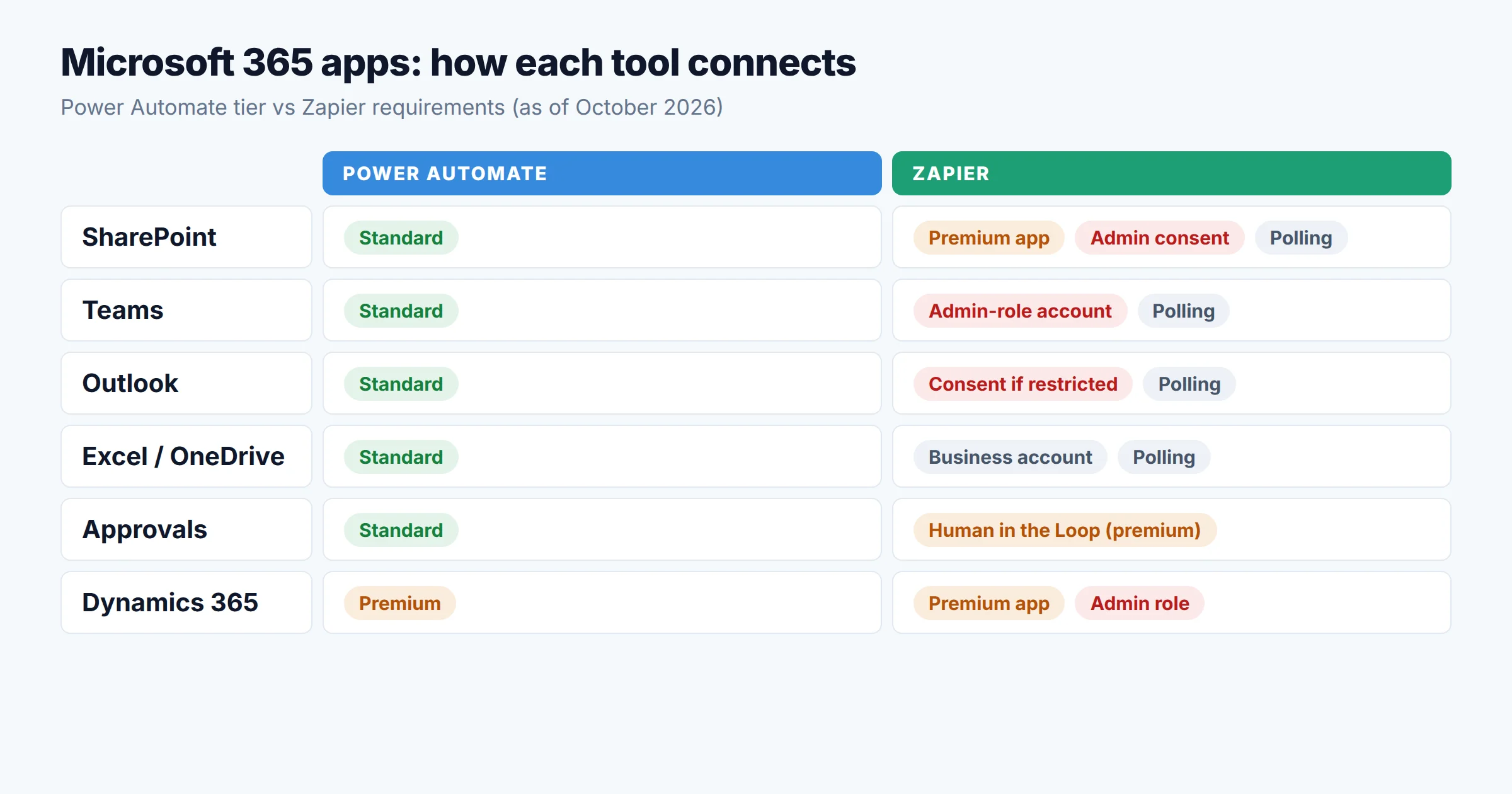
| Microsoft app | In Power Automate | On Zapier |
|---|---|---|
| SharePoint | Standard | Premium app Admin consent Needs admin consent for delegated permissions. The app's move to the Microsoft Graph API (v5) changed IDs and may need fresh admin consent. |
| Outlook | Standard | Business/Enterprise mailbox; admin approval if user consent is restricted; triggers are mostly polling |
| Teams | Standard | Admin role The connecting account must be a Global Administrator, Security Administrator, Security Reader, or Privileged Role Administrator, and the Zapier app must be installed in each team |
| Excel | Standard (Excel Online Business) | Business/Enterprise account; polling triggers on new/updated rows |
| OneDrive | Standard (OneDrive for Business) | OneDrive for Business; polling triggers |
| Forms, Planner, Approvals | Standard | No first-party Forms app found; approvals via Human in the Loop, which is Premium |
| Dynamics 365 / Dataverse | Premium | Premium app; needs System Administrator or equivalent role in Dynamics |
Requirements as listed in each app's Zapier Help Center guide on October 12, 2026. Zapier's Microsoft apps don't support personal or free Microsoft accounts.
Three things in this table change the decision for an M365 shop:
- Zapier's Free plan can't touch SharePoint. Premium apps need a paid Zapier plan or a trial, and SharePoint is one of them. So the common "SharePoint list to Teams" flow costs $0 in Power Automate and at least the Pro plan on Zapier.
- The Teams requirement is a security conversation. To connect Teams, Zapier's help docs require the connecting account to hold one of four admin roles. Security teams usually won't hand an admin identity to a marketing ops builder.
- Microsoft tokens expire. Zapier warns that Microsoft expires the refresh token if the user changes their password, if the connection goes unused for 14 days, or after 90 days. When that happens someone has to reconnect, and Zaps can stop until they do. We've seen this cause many "it just stopped working" tickets. Our guide to debugging Zaps that fail silently covers how to catch it.
Connectors for apps outside Microsoft
Outside Microsoft the advantage reverses. Zapier lists 9,000+ apps. Power Automate's reference lists show 182 standard connectors and about 1,400 premium ones. The count isn't the main issue, though. Who builds each connector, and which tier it lands in, matters more:
- Gmail, Google Sheets, Slack, Asana, Trello, and Docusign are standard in Power Automate, so they work on M365 seeded rights. Many reviews miss this.
- Salesforce, Jira, Zendesk, ServiceNow, SQL Server, and Stripe are premium. Any flow that uses one needs a Premium seat, a Process license, or pay-as-you-go.
- HubSpot, Notion, Shopify, and Zoom appear on Microsoft's list only as Independent Publisher connectors. These are community-built, premium-tier, and not maintained by the vendor. If HubSpot is your CRM, this is the most important line in the comparison.
Zapier's long tail matters most for revenue and marketing teams, whose stacks change every quarter. A connector built by the vendor and maintained on Zapier will usually be better than an Independent Publisher connector. For the cases where neither tool fits, see our framework for native integration vs iPaaS vs custom API.
Triggers, latency, and run limits
When builders say "Zapier is slow with Outlook," they're usually seeing polling. Zapier's Help Center labels nearly every Microsoft trigger "(Polling)." That includes New Email, New Row, New List Item, New Channel Message, and New File. Zapier checks for new data on a schedule set by your plan:
| Zapier plan | Polling interval | Practical meaning |
|---|---|---|
| Free | 15 minutes | Fine for digests, not for routing |
| Pro | 2 minutes | Acceptable for most notifications |
| Team / Enterprise | 1 minute | Closest to real time for Microsoft triggers |
Power Automate's limits work differently. They depend on the flow owner's performance profile. Microsoft Learn puts Free, Microsoft 365 plans, and all trials in the Low profile. Premium is Medium, and Process and per-flow licenses are High. The differences matter at scale:
- Apply to each and pagination: 5,000 items on Low, 100,000 on every other profile. An M365-licensed flow that loops over a 12,000-row SharePoint list will stop at 5,000.
- Daily Power Platform requests (during the current transition period): about 10,000 on Low, 200,000 on Medium, and 500,000 on High per 24 hours.
- Run duration: 30 days for every license, which covers long approval chains. Minimum recurrence is 60 seconds.
- Inactivity: a flow that isn't triggered for 90 days may be turned off. Flows owned by Premium or Process license holders are exempt. A flow that fails or is throttled continuously for 14 days gets turned off.
- Owner leaves: if the owner leaves the organization, the flow drops to the Low profile. Assign co-owners or a Process license to business-critical flows.
Zapier has none of these per-owner profiles. A Team plan Zap behaves the same whoever built it, and when a builder leaves, a shared connection keeps the Zap running. That helps ops teams whose builders change often. The trade-off is that Zapier's limits show up in your task bill instead.
Governance: DLP vs app access controls
Most M365 organizations end up deciding on governance. The two tools approach it from opposite sides.
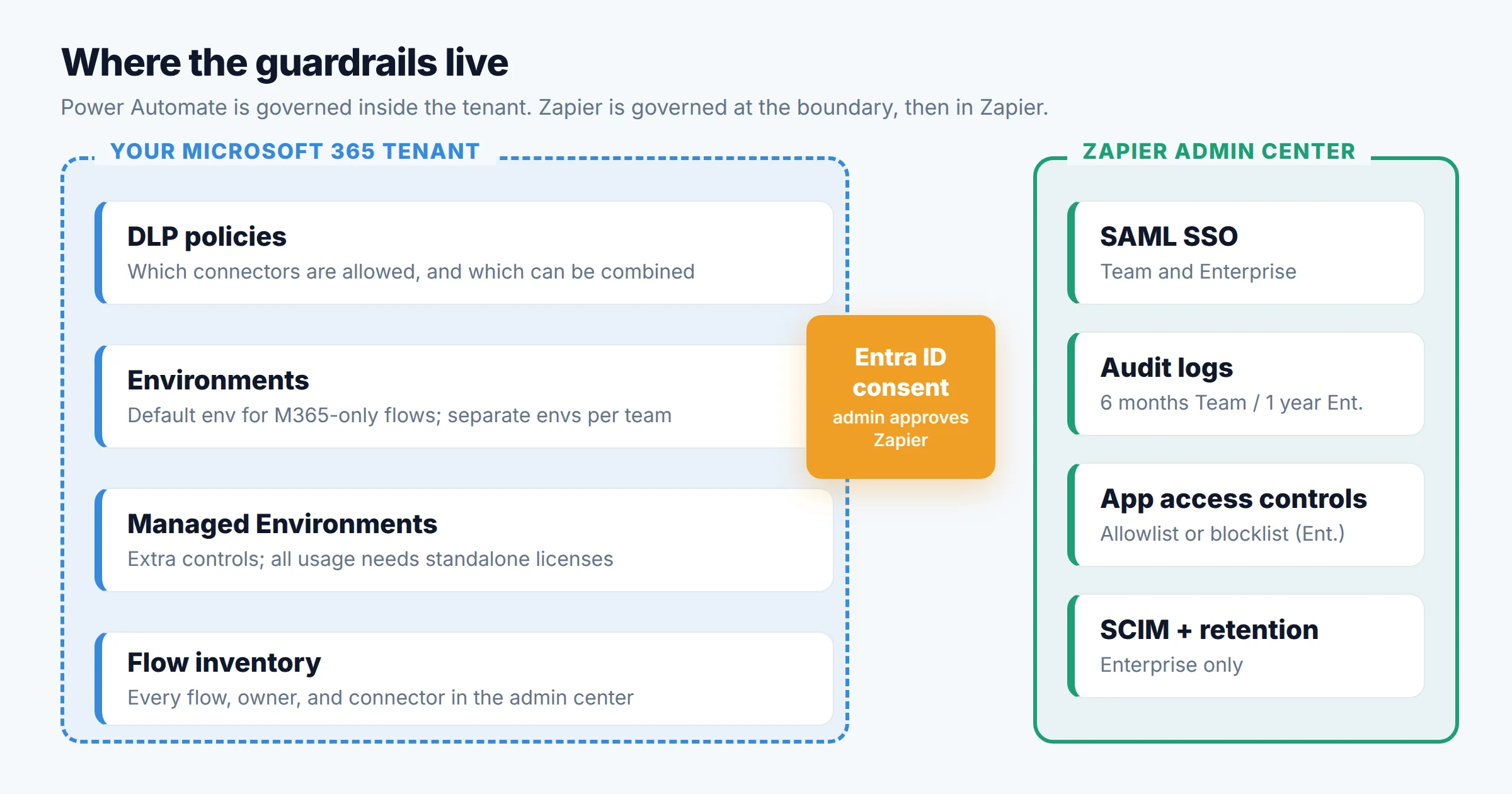
Power Automate: rules inside the tenant
Power Platform DLP policies decide which connectors are enabled in each environment and which can be used together. For example, you can block any flow that combines SharePoint with Gmail, or block HTTP outright. The licensing guide applies them "at the tenant or environment level." Admins also get a full inventory of flows, owners, and connectors in the Power Platform admin center.
Managed Environments add more controls, such as sharing limits, usage insights, and solution checker enforcement. The licensing guide has a catch here: once Managed Environments is enabled, "all active usage in the environment will require" standalone licenses. The limited Power Automate rights in Microsoft 365 don't count. If you turn on Managed Environments in your default environment, every M365-only flow builder there would need Premium. The usual pattern is to keep the default environment for M365-only flows and use managed environments for premium, business-critical ones.
Zapier: consent at the boundary, controls in Zapier
Zapier is a third-party OAuth app in your tenant. Your first control is Entra ID user consent. If users can't consent to third-party apps, nobody can connect SharePoint, Outlook, or Teams to Zapier until an admin approves it. Inside Zapier, controls depend on the plan:
- Team: SAML SSO, shared app connections, 6-month audit log retention, and up to 25 users.
- Enterprise: SCIM provisioning, 1-year audit logs, custom data retention, and app access controls. These work either as a blocklist or an allowlist. Enterprise accounts created on or after October 5, 2026 get the allowlist by default. Zapier also offers managed connections, managed apps, and allowed OAuth domains, which stop members from connecting personal accounts in place of company ones.
Data location is often the deciding factor. Zapier's data privacy page says it "hosts data in AWS servers located in the United States," and keeps Zap history for the current and previous month. Power Automate data stays in the region of the Power Platform environment, inside your Microsoft tenant boundary. Teams with EU data residency requirements should start with that difference.
Three workflows, priced on both
These are list-price estimates as of October 2026 for a typical M365 Business Standard company. Read the decision flow below first, then check the scenarios.
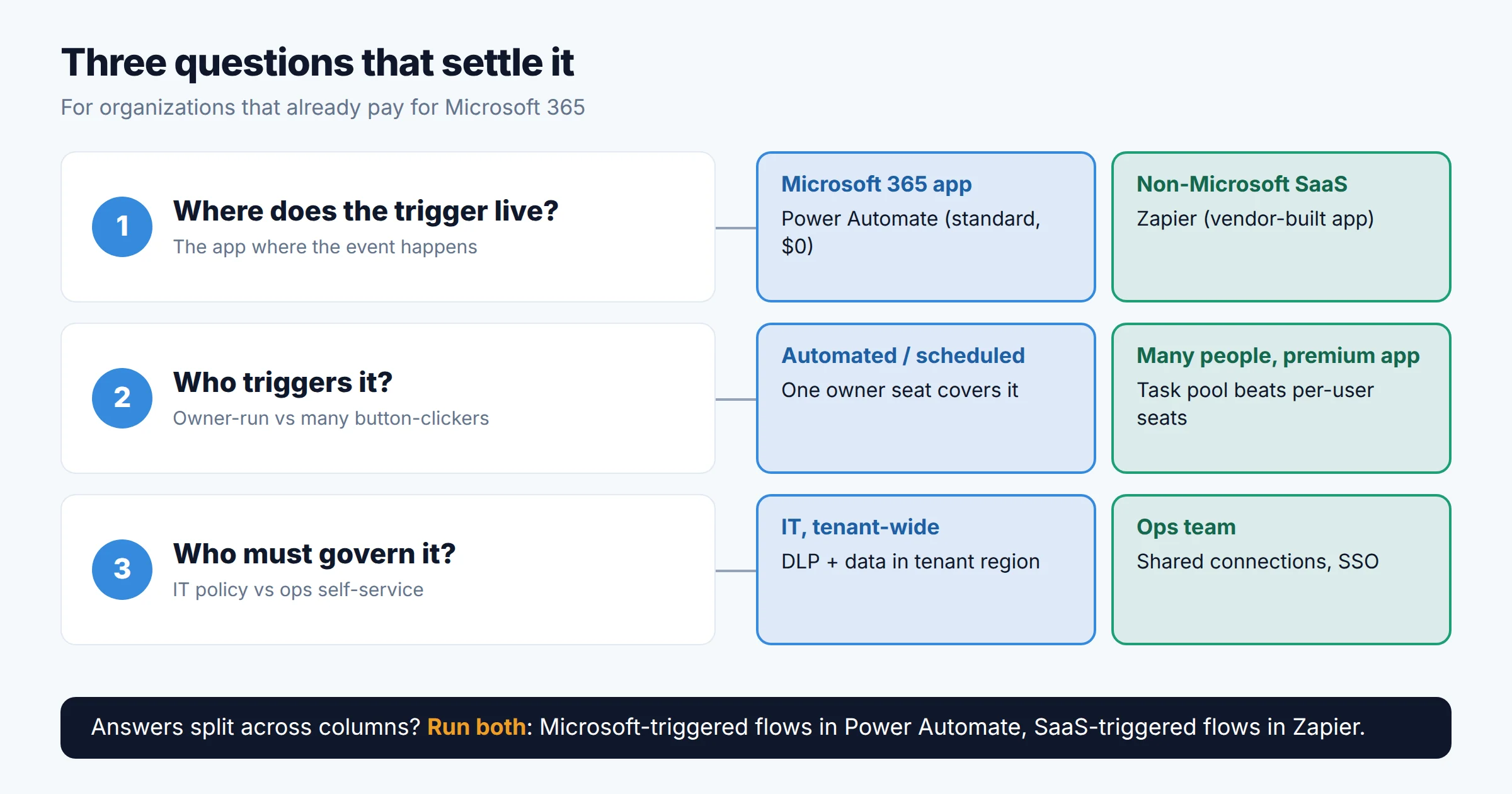
A. Purchase request: SharePoint list → Teams approval → Outlook confirmation
About 300 requests a month, all inside Microsoft 365.
Verdict: Power Automate, easily.
B. HubSpot new deal → Teams channel post + Excel tracker row
About 500 deals a month. One ops manager owns the automation.
Verdict: Power Automate is cheaper on paper. Zapier is safer to rely on. If the CRM sync matters to revenue, the $24 difference is worth paying.
C. Nightly export from a legacy Windows ERP into SharePoint
No API, and nobody is at the desk.
Verdict: Power Automate. For how RPA differs from workflow automation and agents, see our explainer on workflow automation vs RPA vs AI agents.
Scenario B is the one to remember. Power Automate can be cheaper for a single owner even with a premium connector. The real costs are elsewhere: Independent Publisher connectors aren't maintained by the vendor, and the license follows the owner. Zapier usually costs more once volume grows, because every action step is a task. For a side-by-side of task, operation, and execution billing across Zapier, Make, and n8n, see our Make vs Zapier vs n8n comparison.
Pros and cons
Power Automate
Pros
- $0 for flows using standard connectors on M365 business plans
- SharePoint, Teams, Outlook, Approvals, and Forms are native and need no consent
- DLP policies and a tenant-wide flow inventory
- Desktop RPA for legacy Windows apps
- 30-day run duration for long approvals
Cons
- One premium connector moves a flow onto paid licensing
- HubSpot, Notion, and Shopify only via community connectors
- Low profile caps loops at 5,000 items on M365 licenses
- Flows depend on their owner; departures and 90-day inactivity cause outages
- Environments and solutions take training beyond templates
Zapier
Pros
- 9,000+ apps, maintained by Zapier or the app vendor
- Task billing doesn't scale with headcount
- Shared connections keep Zaps alive when builders leave
- Fast for non-IT builders
- Enterprise app allowlists, SCIM, and audit logs
Cons
- SharePoint and Dynamics 365 are premium apps; the Free plan can't use them
- Microsoft triggers poll (1–15 minutes depending on plan)
- Admin consent and admin-role accounts for some Microsoft apps
- Microsoft tokens expire after 90 days or 14 idle days, so connections need reconnecting
- Data hosted in the US; no desktop RPA
Who should choose which
If neither fits well, there are other options. Make costs less per operation than Zapier, and n8n can be self-hosted for data residency. Our decision framework for choosing a no-code automation tool covers the questions to ask. For agent-style automation, see our comparison of AI agent automation platforms.
FAQ
How does Zapier compare to Power Automate?
Is Power Automate good?
Are Power Apps different from Power Automate?
Can Zapier connect to Microsoft Teams without an admin?
Is Power Automate cheaper than Zapier?
Methodology
Based on our research, not hands-on testing of a single tenant. We used Microsoft's Power Platform Licensing Guide (October 2026 edition) for license rules, multiplexing, DLP, and Managed Environments. We used the Microsoft Learn "Limits of automated, scheduled, and instant flows" page (updated July 2026) for performance profiles and limits. We sorted connectors into standard, premium, and Independent Publisher using Microsoft Learn's connector reference lists on October 12, 2026. On the Zapier side, we read the plan comparison on zapier.com/pricing and each Microsoft app guide in the Zapier Help Center (most updated October 1, 2026). Zapier's data privacy page gave us hosting and retention facts. Scenario costs use US annual list prices and exclude taxes, Microsoft 365 seat costs, and Windows machine costs. Microsoft and Zapier both changed pricing and app versions during 2026, so confirm the details before you buy.
Sources
- Microsoft, Power Platform Licensing Guide, October 2026
- Microsoft Learn, Limits of automated, scheduled, and instant flows
- Microsoft Learn, Standard connectors list and premium connectors list
- Microsoft Learn, Zapier MCP (Preview) connector
- Zapier, Plans and pricing
- Zapier Help Center, How to get started with Microsoft SharePoint on Zapier
- Zapier Help Center, How to get started with Microsoft Teams on Zapier
- Zapier Help Center, How to get started with Microsoft Outlook on Zapier
- Zapier Help Center, Configure app access settings for your Enterprise account
- Zapier Help Center, What is a premium app?
- Zapier, Data Privacy Overview

Technology consultant with 10+ years in the Japanese tech industry. Specializing in SaaS evaluation, workflow automation, and B2B tool integration.