Native Integration vs iPaaS vs Custom API: How to Choose in 2026
Build cost is the visible 20% of what an integration costs you. The other 80% is maintenance — and that is what should decide this, not the feature list.
These three options are not three grades of the same product. They are three different answers to one question: who absorbs the maintenance when this breaks? Native integrations push that to your SaaS vendor and accept a capability ceiling in exchange. An iPaaS pushes it to a platform you rent, and you pay a metered fee forever. A custom build keeps it in-house, which is cheap to start and expensive to own.
Because run-and-change cost typically runs several times the build cost, the deciding variables are not technical. They are how many flows you operate, how often those flows change, and how much engineering capacity you can permanently commit. Score those three and the answer is usually unambiguous.
- NativeA vendor-supported connector already covers the flow, you need standard objects only, and latency of roughly 10–15 minutes is acceptable.
- iPaaSYou run more than a handful of flows, the business logic changes monthly, and no one owns integrations full-time.
- CustomThe integration is a differentiating part of your product, no connector exists, volume is extreme — or the target API is stable enough that maintenance rounds to zero.
Most teams past their first growth stage run all three. That is the correct end state, not a failure of planning.
01The three options, defined precisely
Half the confusion in this decision comes from loose vocabulary. "Integration platform" gets applied to at least five different product categories with different billing models and different owners. Here is the distinction that matters operationally.
| Approach | What it actually is | Who fixes it at 2 a.m. | Time to first flow |
|---|---|---|---|
| Native integration | A connector one SaaS vendor built to another, shipped inside the product you already pay for | The vendor | Hours to days |
| iPaaS | A rented workflow engine with a connector library, used for your internal system-to-system flows | You, on the vendor's platform | Weeks |
| Custom API build | Code your team writes, deploys, monitors, and versions against each target API | You, on your own infrastructure | Months |
| Unified API | One normalized API across many vendors in a single category (HRIS, CRM, accounting) | The vendor, up to the normalized surface | Days to weeks |
| Embedded iPaaS | An integration layer you resell to your customers, inside your own product UI | You, on the vendor's platform | Weeks |
The last two rows exist because a large share of the search traffic for this question comes from SaaS companies who do not actually have an internal integration problem — they have a product problem. If the integrations are something your customers configure, you are shopping in the embedded iPaaS and unified API aisle, and the internal-versus-custom debate barely applies. We cover those categories in a dedicated comparison of unified API platforms; the rest of this article assumes internal flows.
02Why the usual comparison misleads
Nearly every framing of this decision compares an implementation quote to an annual subscription. That compares the smallest term in the equation to one of the larger ones.
Integration consultancies that model full lifecycles put it starkly: the cost to run and change an integration over its lifetime commonly lands at three to five times the cost to build it, with maintenance, monitoring, incident response, and estate changes making up roughly 80% of total cost while the build is the visible 20% on the proposal. Other practitioners put initial development at 30–40% of total ownership cost. The exact split varies with estate complexity, but every serious estimate points the same direction, and it is consistent with the broader software benchmark that maintenance consumes 50–80% of total ownership cost.
Read that as a decision rule rather than trivia. If maintenance is most of the cost, then the option that minimizes build effort is not automatically the cheapest option — and the option that minimizes your team's maintenance obligation usually is.
This is why "we can build that in three weeks" is a misleading argument in an architecture review. Three weeks of build implies somewhere between nine and fifteen weeks of equivalent effort spread across the following three years, and that effort arrives unscheduled.
03The three variables that actually decide it
Everything that matters compresses into three numbers you can measure in an afternoon. Score each one honestly and the recommendation follows mechanically.
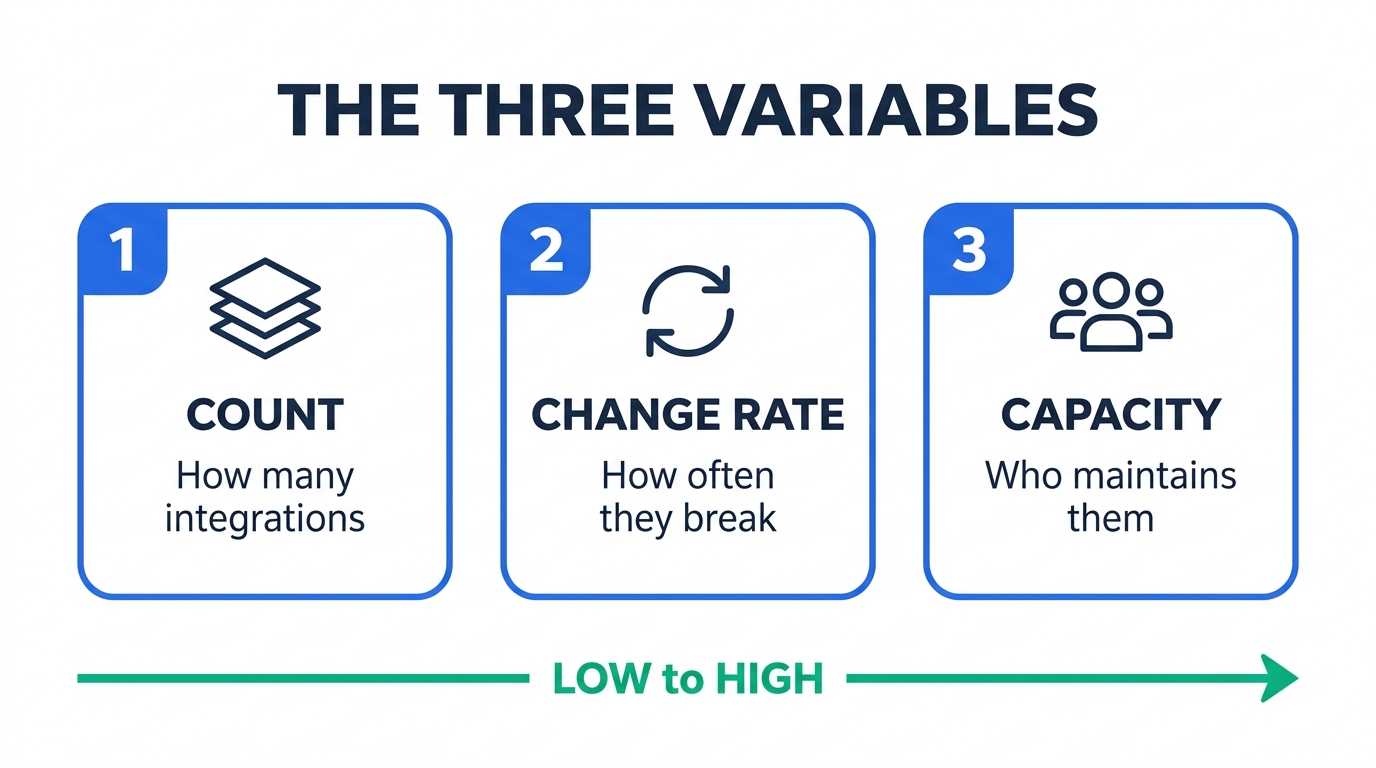
Count flows, not systems. A bidirectional sync between two systems is two flows, because each direction has its own field mapping, its own failure mode, and its own conflict-resolution rules. Count only flows that are in production and have a named business owner; proof-of-concept automations someone built in a trial account do not belong in the denominator.
Count matters because the three options scale differently. Custom maintenance scales close to linearly with flow count — every connector is its own deprecation calendar. An iPaaS platform fee is largely fixed with metered usage layered on top, so its marginal cost per additional flow is low until you hit a volume tier. Native has no marginal cost at all, only a capability ceiling.
Change arrives from two directions, and teams consistently underweight the second.
External change is the vendor altering the API under you. A large-scale study of 317 real-world Java libraries found that 14.78% of API changes broke backward compatibility, with breaking-change frequency increasing over time. Vendor deprecation windows for major SaaS APIs commonly run something like a six-month notice, twelve months of migration support, and 18–24 months before removal — generous, but it is still work you did not schedule.
Internal change is your own business logic moving. Marketing renames a lifecycle stage. Finance adds a cost center. Sales introduces a new deal type that needs different routing. In a custom build, each of those is a ticket, a pull request, a review, and a deploy. In an iPaaS, most are a dropdown change by someone who is not an engineer. In practice this is the dominant driver, and it is the variable that most cleanly separates the two options.
The question is never "can we build this." Competent teams can build almost any integration. The question is whether you can still own it in year three, after the person who wrote it has changed teams.
Price it honestly. Mid-to-senior US software engineers ran roughly $85–$110 per hour fully loaded in 2026, and fully loaded cost for senior engineers commonly sits 30–70% above base salary. A custom integration that consumes a modest four hours a month of maintenance is therefore on the order of $4,000–$5,300 per year — per integration, indefinitely, and drawn from the same headcount that was hired to ship product.
There is also a risk term that does not appear on any spreadsheet: key-person concentration. A custom integration with exactly one person who understands it is an outage waiting for a resignation letter.
04The decision matrix
Combine the three scores. This table is the practical output of the framework — find your row and start there, then adjust for the exceptions noted below it.
| Flows | Change rate | Platform capacity | Default choice |
|---|---|---|---|
| 1–4 | Low | Any | Native |
| 1–4 | Low | Dedicated | Custom — only if differentiating |
| 1–4 | High | None or part-time | iPaaS |
| 5–15 | Low | Part-time | Native + iPaaS |
| 5–15 | High | Any | iPaaS |
| 15+ | Any | Dedicated team | iPaaS core + custom edges |
| Any | Any | It is your product surface | Embedded iPaaS or unified API |
Three exceptions override the table. First, if no connector exists for the target system — a mainframe, a regional ERP, an internal service — custom is the only option regardless of your scores. Second, if the flow moves enough records that per-operation metering would dominate the bill, custom becomes cheaper even at high change rates. Third, if the integration is itself a reason customers buy your product, build it: you do not outsource your differentiator to a connector library.
05What each option costs in 2026
Published pricing in this category is patchy — the enterprise tier is quote-only almost everywhere. The figures below are what vendors publish or what third-party contract data reports, with the source noted. Verify against a current quote before you commit; these move.
| Option | Entry price | Notes |
|---|---|---|
| Native connector | $0 incremental | Bundled with existing seats; some vendors gate sync behind a higher plan tier |
| Boomi | from ~$550/mo | ≈$6,600/yr floor, quote-based above that; cost climbs with data volume |
| Celigo | from ~$600/mo | Typical small deployments $600–$1,500/mo; larger multi-flow estates past $5,000/mo |
| Workato | quote only | Third-party contract data (Feb 2026) reports a ~$64,500 median annual contract; entry deals $10k–$15k, enterprise $150k+ |
| Merge (unified API) | $650/mo | 10 production linked accounts included, $65 per account after; 3 accounts free to start |
| Nango (unified API) | from $50/mo | Metered on API requests rather than per linked account — a materially different cost shape |
| Tray Embedded | ~$20k/yr + ~$7k | Reported annual platform fee plus per-integration charge |
| Custom build | $0 license | All cost is engineering time; see the worked example below |
Comparisons circulating in this category cite three-year TCO of $800,000–$2,000,000 for custom development against $30,000–$65,000 for managed iPaaS. Those figures describe large ERP integration estates with dozens of flows, and they are usually published by iPaaS vendors. They are not a fair model for a startup weighing four flows, and quoting them at that scale will discredit an otherwise sound recommendation. Model your own numbers.
Worked example: eight flows, moderate change rate
Assume eight production flows, roughly 60 engineering hours to build each, and a fully loaded rate of $95 per hour. Applying the lifetime multiplier of 3–5× build cost, spread across a three-year life:
Three-year total cost, eight flows
Modeled from published rates and the reported lifetime-to-build cost ratio. Illustrative, not measured.
Custom: 480 hours × $95 = $45,600 build, plus $136,800–$228,400 lifetime run-and-change.
iPaaS: $18,000/yr platform ($1,500/mo tier) + $20,000 one-time implementation + ~6 hours/month internal operations at $95/hr.
At eight flows with ordinary business-logic churn, the rented platform wins by roughly two to three times. That is the result most articles stop at, and it is the reason "just buy an iPaaS" has become the default advice.
Now invert it: when custom actually wins
Run the same model at one flow against a stable, well-versioned API with no business-logic churn — a payment processor webhook, a document-signing callback, an internal service:
Three-year total cost, one stable flow
Same rates, same method, low change rate.
Custom: 60 hours × $95 = $5,700 build, plus ~8 hours/year maintenance ($760/yr) at a low change rate.
iPaaS: the entry-tier floor of $550–$600/mo, which you pay whether you run one flow or forty.
This is the finding worth taking away: the crossover point is driven far more by change rate than by flow count. At a low change rate, custom code stays cheaper than a rented platform much longer than the prevailing "always buy" advice admits — because the maintenance multiplier that makes custom expensive is a function of how often things change, not of how much code exists.
The corollary is the useful one. Before you write a line of integration code, ask how stable the target API has been for the last two years. A vendor with a versioned API, a published deprecation policy, and a quiet changelog is a reasonable custom-build target. A vendor that ships breaking changes with a blog post is not, at any flow count.
06Where each option breaks
Every option has a failure mode that shows up months after the decision, when reversing it is expensive. These are the ones worth pricing in advance.
Native integrations
Strengths
- No incremental license cost
- Vendor maintains it through their own API changes
- Fastest possible time to production
- Supportable by non-engineers
Limits
- Sync latency, not real time — mature native syncs commonly batch every 10–11 minutes
- Custom objects frequently unsupported
- Field mapping cannot reshape data: no splitting, combining, unit or currency conversion, or derived fields
- Failed records pass silently without your own monitoring
- High-volume syncs consume your API quota
You discover the ceiling in month eight, after the process has become business-critical and three teams depend on it. The limit is almost never throughput — it is a transformation the mapping UI cannot express, or a custom object the connector does not carry. Test both on day one with your real data model, not the demo one. Our walkthrough of connecting Slack with Salesforce shows where a native path stops and a platform has to take over.
iPaaS
Strengths
- Large connector libraries, weeks not months
- Non-engineers can safely change mappings
- Retries, logging, and alerting built in
- Marginal cost of flow number nine is low
Limits
- The billing unit governs your bill more than the feature list does
- Enterprise pricing is quote-only and hard to forecast
- Logic lives in the vendor's canvas, not your repository
- Deep custom transformations still land back on engineering
A flow that cost $200 a month at launch costs several thousand at scale, because the vendor meters per task or per operation and your volume shape does not match that unit. Model your highest-volume flow against the metering model before signing — this is the single most common budget surprise in the category, and we broke the arithmetic down in our comparison of Make, Zapier, and n8n. The escape route is real but not free; our Zapier-to-n8n migration playbook covers what a cutover actually costs.
Custom API builds
Strengths
- Exact fit to your data model, no compromises
- No per-task metering — volume is nearly free
- Logic lives in version control alongside your product
- Can be a genuine competitive differentiator
Limits
- Lifetime cost typically several times the build cost
- Key-person risk concentrates fast
- You inherit every vendor's deprecation calendar
- Observability is your problem, and usually gets skipped
The engineer who wrote it leaves, and the runbook is a Slack thread. The integration keeps working until an upstream API version sunsets, at which point nobody remembers why the retry logic has that specific backoff. The mitigating discipline is unglamorous: a written runbook, a named backup owner, and a calendar entry for every deprecation notice you receive.
07The stack most teams actually land on
Framed as a three-way choice, this decision has no good answer at scale, because the three options are strongest at different layers of the same estate. Teams that have run integrations for a few years converge on a layered arrangement rather than a winner.
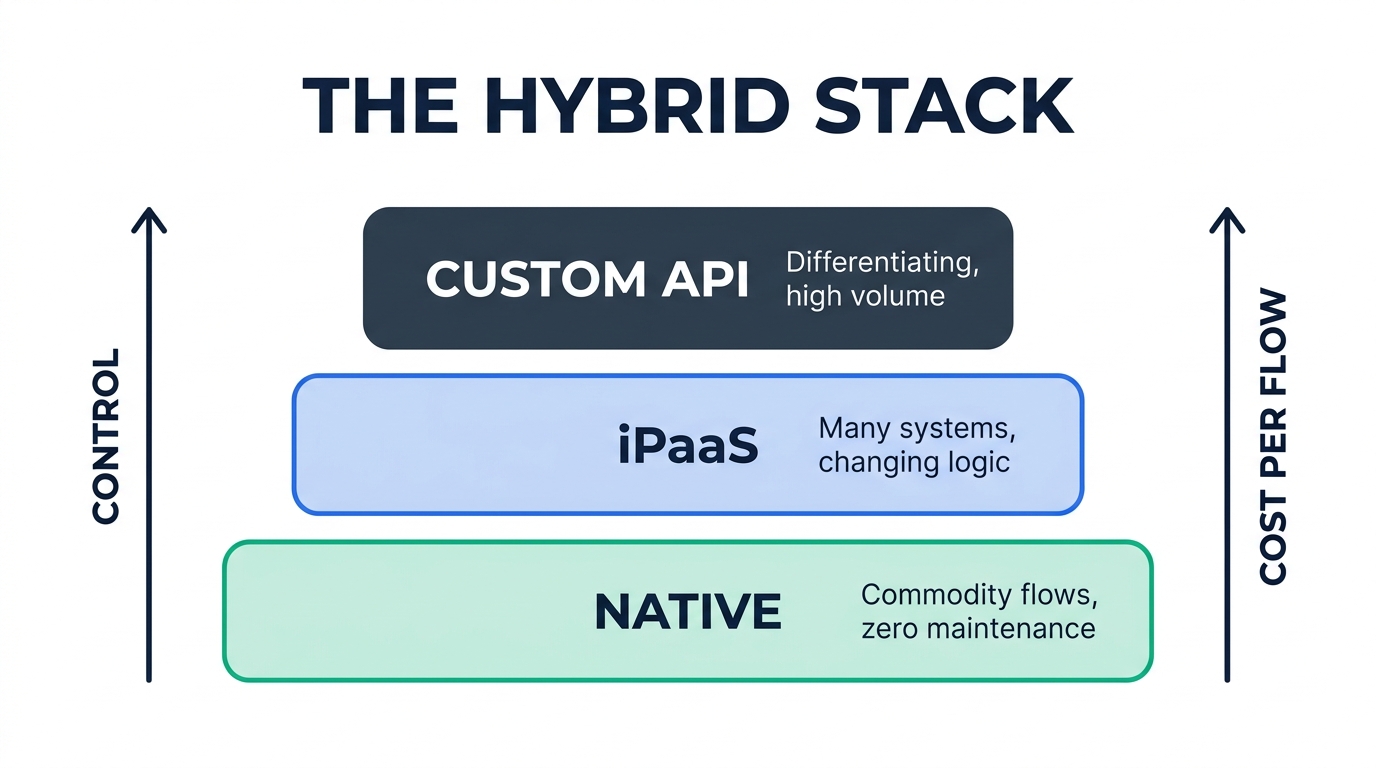
The base layer is native. Anything a vendor connector already handles correctly should stay there permanently. This layer should be as wide as possible — every flow you move up a layer starts costing money and attention.
The middle layer is the iPaaS. This is where flows go when they cross more than two systems, need transformation the native mapping cannot express, or change often enough that a non-engineer should be able to edit them. For most companies this ends up being the largest layer by flow count.
The top layer is custom, and it should stay narrow. Reserve it for integrations that are differentiating, extremely high volume, or targeting systems with no connector. If your custom layer is growing faster than your product, the layering has inverted and something below it is not doing its job.
This is the same shape we described in our breakdown of workflow automation tooling for HR onboarding, where the practical answer was also a stack rather than a single product. The pattern generalizes because it follows the cost structure, not the use case. If you are shipping integrations as a customer-facing feature, the layering shifts again toward embedded integration platforms — a different decision with a different cost model.
08Running the decision in one week
This does not warrant a quarter-long evaluation. Five focused days is enough to reach a defensible answer.
Inventory the flowsList every production integration with source, target, direction, monthly record volume, and business owner. Delete anything nobody would miss. This produces your Count.
Score the change ratePull six months of tickets. Count changes to existing integrations, per flow. This produces your Change Rate, and it is usually higher than the team's estimate.
Test the native ceilingFor each flow, check three things against your real data model: does it need custom objects, does it need sub-10-minute latency, and does it need data reshaping? Any yes disqualifies native for that flow.
Price the survivors at your volumeTake the two options still standing and price them against your actual highest-volume flow, using each vendor's own metering unit. Do not price against the marketing tier.
Assign ownersName a primary and a backup for every flow. Any flow without two names cannot be custom code. This constraint alone resolves most remaining ambiguity.
A related decision worth sequencing correctly: if the flows in question touch financial systems, settle the system-of-record question first, because it changes the direction of half your flows. Our comparison of connecting HubSpot with QuickBooks covers why the contact-versus-customer mapping decision has to precede the tooling decision.
09Frequently asked questions
What's the best API integration platform?
There is no category winner, because the platforms differentiate on billing unit rather than capability, and the billing unit that suits you depends on your volume shape. Platforms metered per task or operation favor low-volume, many-step flows. Platforms metered per connection or per linked account favor high-volume, few-connection flows. Price your single highest-volume flow against each vendor's meter before comparing feature lists — that calculation separates the options far more decisively than any feature matrix.
What are the best iPaaS platforms?
The category splits roughly into three tiers. Lightweight platforms such as Zapier, Make, and n8n suit small teams and simple flows, with published self-serve pricing. Mid-market platforms such as Celigo and Boomi start around $550–$600 per month and target ERP and finance-heavy estates. Enterprise platforms such as Workato and MuleSoft are quote-only; third-party contract data put Workato's median annual contract near $64,500 in early 2026. Choose the tier by governance requirements and volume, not by connector count — every platform in this list has more connectors than you will use.
Can you give me an example of an iPaaS?
Zapier is the most widely recognized example. A concrete flow: when a deal closes in your CRM, an iPaaS recipe creates the customer record in your accounting system, provisions the account in your product, posts to a Slack channel, and adds the customer to an onboarding sequence. All four steps run on the vendor's infrastructure, with retries and logging handled for you, and an operations manager can change the field mappings without touching code. Other examples across the tiers include Make, n8n, Celigo, Boomi, Workato, and Tray.
What is iPaaS, or integration platform as a service?
iPaaS is a cloud-hosted platform for building and running integrations between applications without managing the underlying infrastructure. It provides three things you would otherwise build yourself: pre-built connectors that handle each vendor's authentication and API quirks, a workflow engine that executes multi-step logic with retries and error handling, and monitoring that tells you when a flow fails. You rent all three, typically on a platform fee plus metered usage, and the vendor maintains the connectors as the underlying APIs change.
Is a unified API the same thing as an iPaaS?
No, and conflating them causes real procurement mistakes. An iPaaS orchestrates workflows across many different categories of system — you build the logic. A unified API normalizes many vendors within a single category behind one schema, so you write one integration against, say, an HRIS abstraction and get twenty HRIS vendors. Unified APIs are typically bought by SaaS companies that need to offer many integrations to their customers; iPaaS is typically bought by operations teams connecting their own internal stack. If you find yourself evaluating both, you probably have two separate problems.
10Methodology
Pricing figures were taken from vendor pricing pages and published third-party contract data in August 2026, and are labeled in the table above by source type. Where a vendor publishes no pricing, that is stated rather than estimated. Cost models in Section 5 are explicitly modeled, not measured: they combine published fully loaded engineering rates with the lifetime-to-build cost ratios reported by integration consultancies, and the assumptions behind each figure are shown inline so you can substitute your own.
Based on our research across vendor documentation, independent pricing analyses, and integration-consultancy TCO models. We hold no commercial relationship with any platform named in this article, and no vendor reviewed it before publication. Pricing in this category changes frequently — verify against a current quote before making a commitment.
11References
- Merge — Pricing Published per-linked-account pricing for the Launch tier, checked August 2026
- OneIO — True Cost of Enterprise Integrations: SI vs iPaaS vs Managed (2026) Source for the lifetime run-and-change cost being three to five times build cost
- Automation Atlas — Workato Pricing 2026 Aggregated third-party contract data, including the reported median annual contract value
- Historical and impact analysis of API breaking changes: A large-scale study Empirical study of 317 libraries; source for the 14.78% breaking-change rate
- Stacksync — HubSpot and Salesforce Sync: The Complete Guide (2026) Source for native sync batch latency and custom object limitations
- ConnectorHub — Custom Integrations vs iPaaS vs Embedded iPaaS (2026) Source for initial development representing 30–40% of total ownership cost

Technology consultant with 10+ years in the Japanese tech industry. Specializing in SaaS evaluation, workflow automation, and B2B tool integration.