Zapier Pricing 2026: Every Task Tier, the Overage Math, and What AI Steps Really Cost
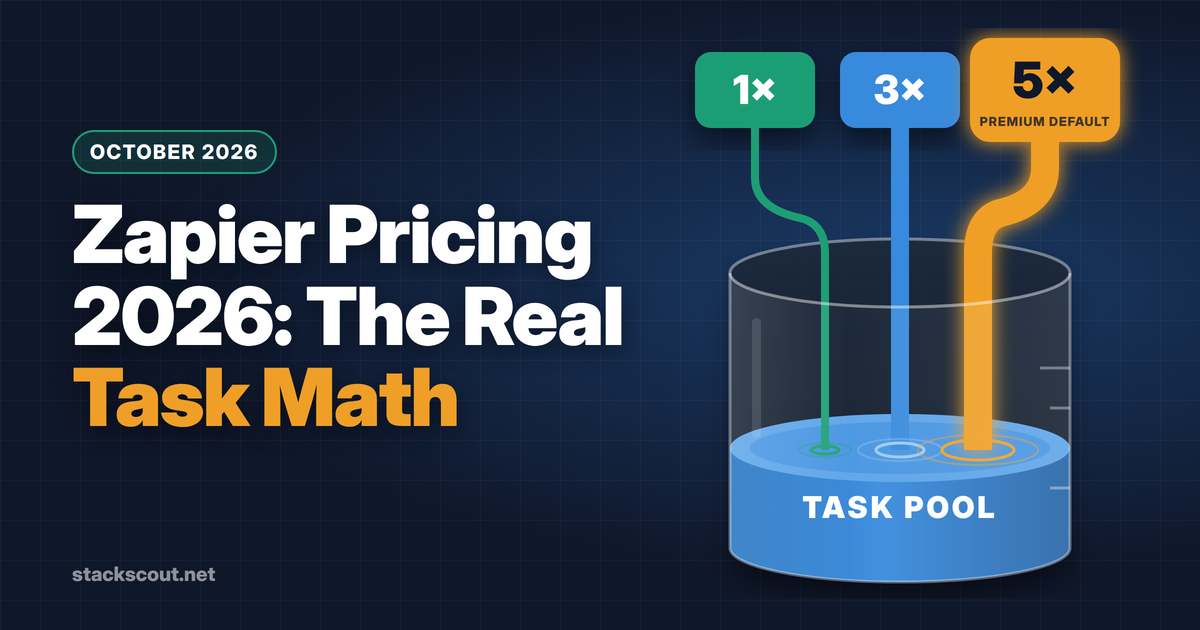
Zapier's sticker price is easy to find. Professional starts at $19.99 a month and Team at $69. Neither number tells you what your team will actually pay. That depends on how many tasks your workflows burn, and in 2026 that count changed. Since June 2026, AI steps, Code steps, and Zapier MCP all draw from one shared task pool, each at its own rate. A single AI step now uses 1, 3, or 5 tasks depending on the model, and new AI steps default to the most expensive tier.
This guide is for the ops or RevOps lead who has to put a Zapier line item in a budget. It lists every published task tier, shows how tasks are counted, works out when paying overage beats upgrading, and turns four realistic workloads into monthly dollar amounts. All prices are in USD, taken from Zapier's pricing page and help center on October 7, 2026.
TL;DR
- Plans: Free (100 tasks, two-step Zaps), Professional from $19.99/mo billed annually ($29.99 monthly), Team from $69/mo billed annually ($103.50 monthly), Enterprise by quote. Paying monthly costs exactly 1.5× the annual rate.
- What you pay for: successful action steps. Triggers, Filters, Paths, Formatter, Delay, Looping, Tables, and Forms cost 0 tasks.
- What changed in 2026: AI steps cost 1×, 3×, or 5× per run, plus the same multiple per tool call. New AI steps on paid plans default to Premium (5×). MCP tool calls cost 2 tasks each. Code steps cost 1 task, plus 1 for every 30 seconds past your runtime allowance.
- Overage: charged at 1.25× your tier's per-task price, capped at 3× your plan's task limit. For occasional spikes, overage is often cheaper than moving up a tier.
- Watch out: downgrades only take effect at the end of the billing cycle, which on an annual plan means at renewal. Size the annual tier to your baseline and let overage absorb the peaks.
01Zapier plans at a glance (October 2026)
Zapier has four plans. Within Professional and Team you also choose a task tier: a monthly task allowance that sets the price. Features don't change between tiers of the same plan, with one exception: live chat support starts at the Professional 2,000-task tier.
| Free | Professional | Team | Enterprise | |
|---|---|---|---|---|
| Entry price | $0 | $19.99/mo annual $29.99 monthly | $69/mo annual $103.50 monthly | Custom quote |
| Entry task tier | 100/mo | 750/mo | 2,000/mo | Custom, with annual task limits |
| Seats | 1 | 1 | 25 (per the plan comparison table) | Unlimited |
| Zap length | Two-step | Multi-step | Multi-step | Multi-step |
| Polling interval | 15 min | 2 min | 1 min | 1 min |
| Code step runtime included | 1 second | 30 seconds | 30 seconds | 2 minutes |
| Tables records | 2,500 | 100,000 | 500,000 | Contact sales |
| Collaboration / security | — | Premium apps, webhooks | Shared Zaps, folders and app connections, SAML SSO, priority support | SCIM, advanced admin permissions, app controls, observability, TAM |
Source: zapier.com/pricing, checked October 7, 2026. One inconsistency: the pricing FAQ says "unlimited users are available on Team and Enterprise plans," while the comparison table and plan card list 25 users for Team. If you need more than 25 builders, get the limit in writing from sales.
New accounts get a 14-day Professional trial with no credit card required. Nonprofits get 15% off any paid plan. The discount doesn't apply to pay-per-task charges.
02Every published task tier and its price
The pricing page lets you pick from 18 tiers, from 750 up to 2 million tasks a month. The table below covers the range most B2B teams actually buy. The last two columns show what each task costs you, which matters more than the headline price.
| Tasks / month | Pro, annual | Pro, monthly | Team, annual | Team, monthly | Pro cost per task (annual) |
|---|---|---|---|---|---|
| 750 | $19.99 | $29.99 | — | — | 2.67¢ |
| 1,500 | $39 | $58.50 | — | — | 2.60¢ |
| 2,000 | $49 | $73.50 | $69 | $103.50 | 2.45¢ |
| 5,000 | $89 | $133.50 | $119 | $178.50 | 1.78¢ |
| 10,000 | $129 | $193.50 | $169 | $253.50 | 1.29¢ |
| 20,000 | $189 | $283.50 | $249 | $373.50 | 0.95¢ |
| 50,000 | $289 | $433.50 | $399 | $598.50 | 0.58¢ |
| 100,000 | $489 | $733.50 | $599 | $898.50 | 0.49¢ |
| 2,000,000 | $3,389 | $5,099 | $3,999 | $5,999 | 0.17¢ |
Annual prices are the per-month equivalent of the yearly charge (e.g., $239.88/yr for Pro 750). Taken from the plan data on zapier.com/pricing, USD, October 7, 2026. Intermediate tiers (200K–1.75M) are also offered.
Three patterns stand out from the grid:
- Monthly billing is always 1.5× annual. Zapier advertises this as "save 33%" on annual. Pro 750 costs $239.88 a year on annual or $29.99 a month, so annual wins if you'll keep the plan for 8 months or more.
- Team costs $20–$110 a month more than Professional at the same tier (annual billing). That's the price of shared app connections, shared folders, SAML SSO, and seats for other builders. If one person owns every Zap, Professional covers the same tasks for less.
- The per-task price drops steeply. A task costs 2.67¢ at 750/mo and 0.49¢ at 100K/mo, so per-task price alone doesn't tell you whether Zapier is "expensive." What matters is which tier your volume lands in.
03How Zapier counts tasks in 2026
A task is one successful unit of work. Once you know which steps are free, you can work out your bill from your Zap designs. Here are the rules from Zapier's help center as of October 2026:
| Step type | Tasks | Notes |
|---|---|---|
| Trigger (incl. polling for new data) | 0 | "Zap triggers never use tasks." |
| Standard app action (create, update, send) | 1 | Per successful step |
| Filter, Paths, Formatter, Delay, Looping, Digest, Storage, Zapier Manager, Tables, Forms | 0 | Built-in tools are free |
| Failed or halted action, or a step skipped by a Filter or Path | 0 | Only successful actions count |
| Sub-Zaps | 1 each | "Call a Sub-Zap" and "Return from a Sub-Zap" are 1 task each, plus the actions inside |
| Code by Zapier step | 1 | +1 task per 30 seconds beyond the plan's included runtime (partial blocks round up) |
| AI by Zapier step | 1 / 3 / 5 | Standard / Advanced / Premium, plus the same multiple per tool call |
| Zapier MCP tool call | 2 | Per successful call from Claude, Cursor, or another AI client |
| Lead Router | 5 | Per step |
| Zapier SDK actions | 0 | Free while in beta; Zapier says it will give notice before charging |
Sources: zapier.com/pricing/rates; Zapier Help Center articles on task usage and Code by Zapier usage, checked October 7, 2026.
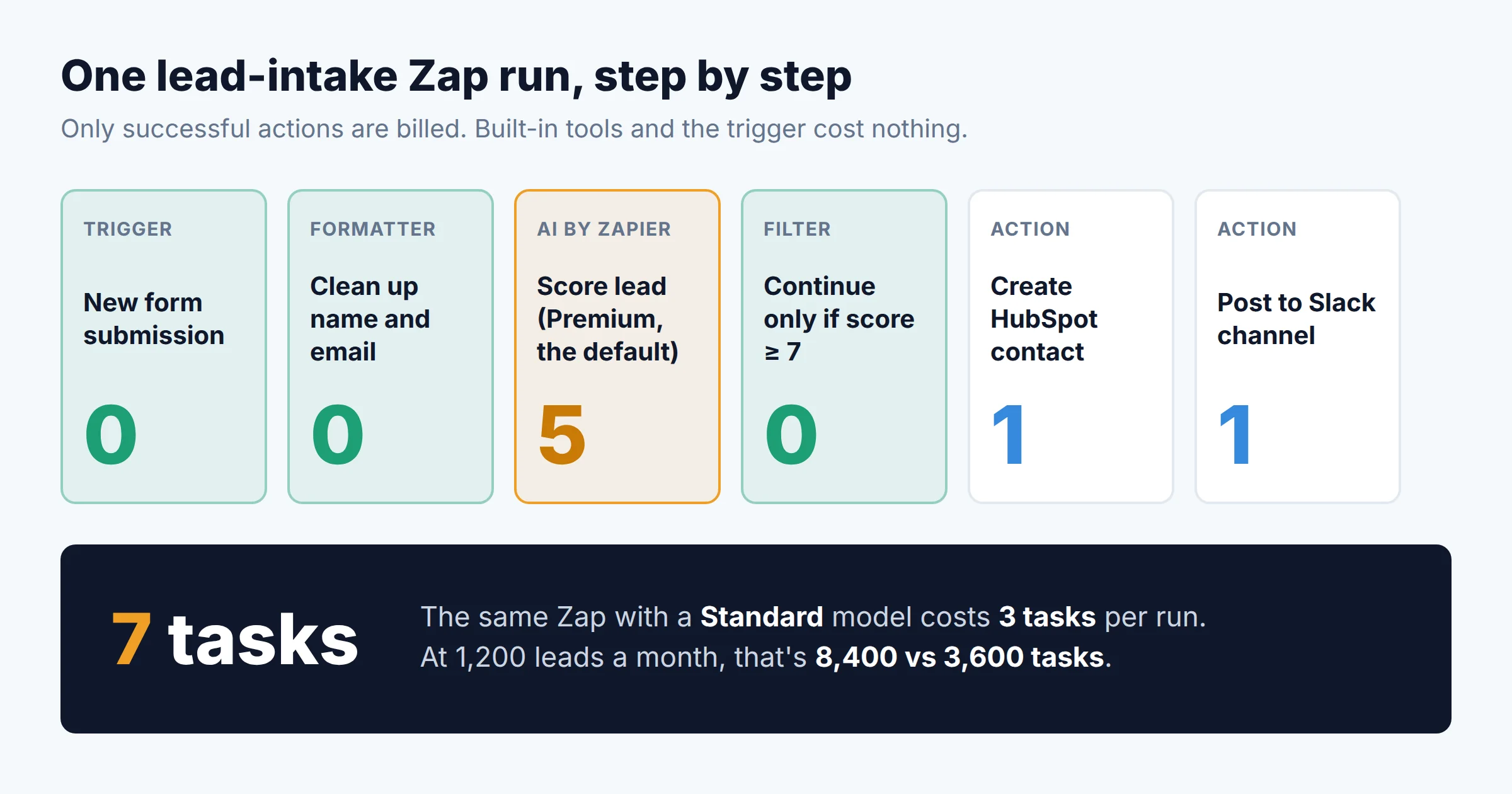
To estimate a Zap's monthly tasks: (billable tasks per run) × (runs per month). Count only the steps that actually run. If a Filter stops 40% of runs, the steps after it are billed on the other 60%. Zapier's usage insights page breaks down usage by Zap once workflows are live. That's the number to base a renewal on, not the estimate.
Because Filter, Paths, and Formatter are free, putting a Filter before paid actions or AI steps is the cheapest optimization Zapier offers. A Filter that drops spam leads before a Premium AI step saves 5 tasks per dropped run.
04AI by Zapier: the 1×, 3×, 5× multipliers
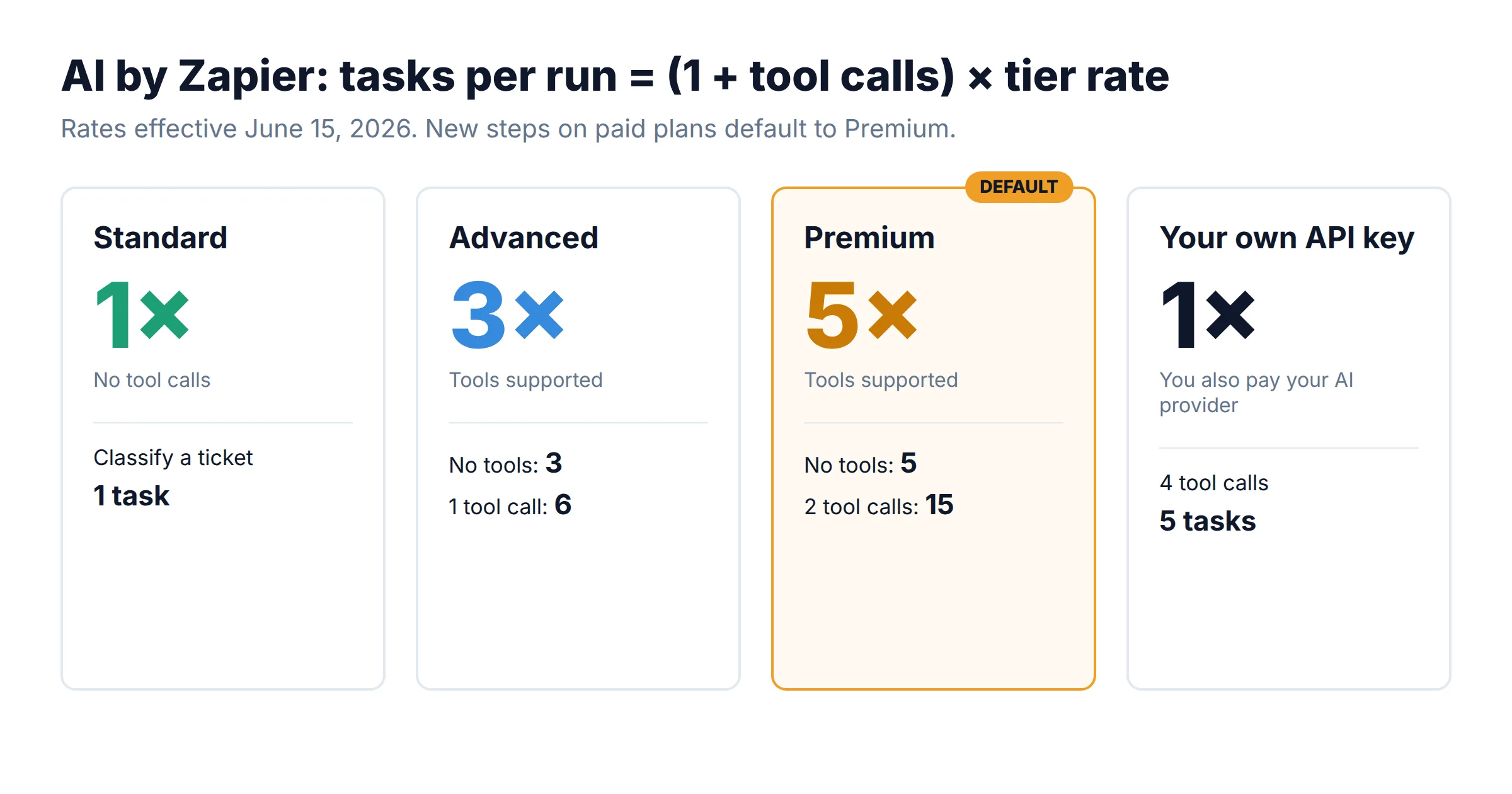
As of June 15, 2026, AI by Zapier steps are priced by model tier. Here's the formula Zapier publishes:
Tasks per run = (1 × tier rate) + (tool calls × tier rate)
| Tier | Rate | Tool calls | Example models listed by Zapier |
|---|---|---|---|
| Standard | 1× | Not supported | GPT-5 mini, GPT-4.1 mini, Gemini 2.5 Flash |
| Advanced | 3× | Yes | GPT-4.1, o3-mini, Claude 4.5 Haiku, Gemini 2.5 Pro |
| Premium (default) | 5× | Yes | GPT-5, GPT-5.4, Claude 4.6 Sonnet, Claude Opus models |
| Your own AI account (bring your own key) | 1× | With Advanced/Premium models | You also pay your AI provider directly |
Source: Zapier Help Center, "AI by Zapier model tier pricing" (updated October 1, 2026).
Zapier's current help article says new AI by Zapier steps on paid plans default to Premium. At launch in June 2026 the default was Advanced, and many 2026 pricing guides still say so. If your builders accept the default for simple classification or extraction, each run costs 5 tasks instead of 1. Before you size a tier, audit every AI step and set Standard wherever the job doesn't need tools or deep reasoning.
Two more guardrails matter for budgeting:
- Per-run task limit. An AI step that hits 75 tasks in one run (adjustable up to 500) pauses and waits for approval. This guards against runaway tool loops. It doesn't cap total monthly spend.
- Legacy AI steps. AI steps created before June 15, 2026 still bill 1 task with no tools. Since June 30, 2026, legacy steps that use knowledge sources with a Standard model have been paused. Rebuilding a legacy step on the new step type can raise its cost.
05Code steps and MCP: the other variable meters
Code by Zapier
Every Code step run costs 1 task. If it runs longer than your plan's included runtime (30 seconds on Professional and Team, 2 minutes on Enterprise), Zapier adds 1 task per extra 30 seconds, rounded up. A 45-second step on Professional therefore costs 2 tasks, and a 90-second step costs 3. Extended-runtime billing was rolled out in phases starting June 15, 2026. Free-plan Code steps fail after 1 second. Code steps that error before completing don't use tasks.
Zapier MCP
Zapier MCP lets AI clients such as Claude or Cursor run Zapier actions directly. Each successful tool call costs 2 tasks and comes out of the same task pool as your Zaps. This is the meter most likely to surprise an ops team. Usage grows with how many people use AI assistants, not with how many Zaps you've built, and nobody builds a Zap that would show up in a review. If you allow MCP, check usage by source after the first month.
06Overage: when paying 1.25× beats upgrading
When you hit your tier's limit, Zapier switches you to pay-per-task billing for the rest of the cycle. It's on by default for accounts created after January 2024, and only the account owner can turn it off on Professional and Team. Here's how it works:
- Price: 1.25× your tier's per-task cost on both monthly and annual billing. On Pro 750 annual, that's about 3.3¢ per extra task (5¢ on monthly billing). On Pro 10K annual, it's about 1.6¢.
- Cap: 3× your plan's task limit in total. A Pro 750 plan can run up to 2,250 tasks (750 included + 1,500 overage). Past the cap, Zaps are held until the cycle resets.
- If you turn it off: Zaps are held as soon as you reach the plan limit.
Because the tier ladder has big steps, a modest overage often costs less than the next tier up. The chart below shows how many extra tasks a month you can pay for at the overage rate before upgrading becomes the cheaper option:
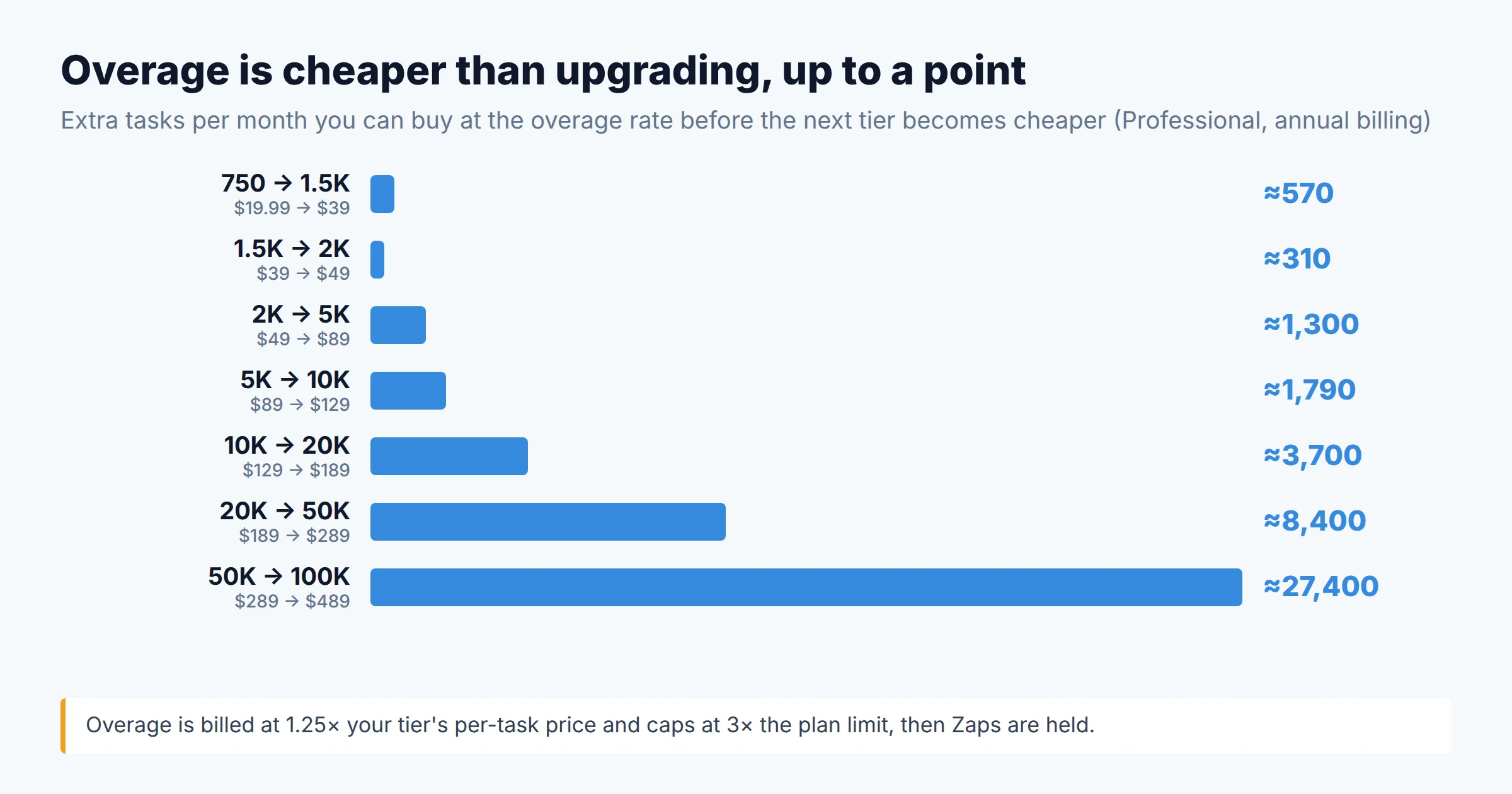
Example: you're on Pro 2K annual ($49) and some months use 3,000 tasks. The 1,000 extra tasks cost about $30.70, for $79.70 in total. Pro 5K would cost $89. Overage stays cheaper until you regularly go about 1,300 tasks over.
Zapier applies upgrades immediately, charging a prorated amount. Downgrades take effect at the end of the billing cycle, which on an annual plan means at renewal. If you pick an annual tier for your busiest month, you pay for it all year. The cheaper approach is usually to size the annual tier to your typical month and let overage cover the spikes. Upgrade mid-year only if the spikes turn into your new normal.
07Four workloads, priced out
The scenarios below use the counting rules and prices above. Volumes are illustrative, so swap in your own run counts. Each shows the cheapest Professional option on annual billing, with monthly billing for comparison.
08Add-ons billed outside the task pool
Two AI products still have their own pricing on the Zapier pricing page:
- Zapier Agents: Free gives 400 activities a month. Pro is $33.33 a month billed annually ($400/yr) for 1,500 activities. Zapier is migrating Agents into AI by Zapier steps, which use the task pool instead. As of October 2026 it hasn't set a shutdown date and says it will email users first. Before you sign a new annual Agents plan, check whether AI by Zapier steps would cover the same work.
- Zapier Chatbots: Free covers 2 chatbots. Pro is $13.33 a month billed annually ($160/yr) for 5 chatbots and website embedding. Advanced is $66.67 a month billed annually ($800/yr) for 20 chatbots and removes the Zapier logo.
Enterprise prices aren't published. Enterprise adds annual task limits, so usage can be pooled across the year rather than reset each month. It also adds observability, log streams, bring-your-own-model controls, and a technical account manager at a set threshold.
09Pros and cons of Zapier's pricing model
Pros
- Triggers, polling, and logic steps are free, so well-designed Zaps stay cheap
- Failed actions aren't billed
- Overage keeps Zaps running, and at 1.25× it's often cheaper than upgrading for spikes
- Standard-tier AI steps cost the same as a normal action
- One shared pool covers Zaps, AI, Code, and MCP, so there's a single budget line
Cons
- Premium is the default AI tier, which makes AI-heavy Zaps cost up to 5× more
- MCP usage grows with headcount and has no build-time footprint
- On annual plans, downgrades wait until renewal
- Monthly billing costs 50% more than annual
- Team seat limit is stated inconsistently (25 vs. "unlimited")
10Which plan should your team buy?
- One ops owner, under ~2,000 tasks a month: Professional, annual, at the 750–2K tier. Turn overage on as a buffer.
- Several builders, or IT requires SSO: Team. The premium over Professional at the same tier is $20–$110 a month on annual billing.
- AI-heavy workflows: before picking a tier, set every AI step to the lowest model that does the job, then measure for a month on monthly billing. Switch to annual once your volume has settled.
- Spiky or seasonal volume, or the whole company on MCP: ask sales about Enterprise annual task limits, which pool usage across the year instead of resetting monthly.
- High-volume, low-value runs (above roughly 50K tasks a month of simple syncs): compare per-execution pricing. Our Make vs Zapier vs n8n comparison explains why the billing unit decides the winner, and the Zapier-to-n8n migration playbook covers the execution-count trap on the other side.
If you're still choosing a platform category rather than a Zapier tier, start with our decision framework for choosing a no-code automation tool. If your company is already on Microsoft 365, compare against Power Automate's 2026 per-user and per-process pricing. And if a Zap fails without an error, you aren't billed for it, but you also lose the work. Our guide to debugging Zaps that fail silently covers the alerting setup.
FAQ
How much is Zapier per month in 2026?
Does Zapier charge for triggers or failed steps?
What happens when I go over my Zapier task limit?
How many tasks does an AI step use in Zapier?
Is Zapier MCP free?
Methodology
All prices come from the plan data published on zapier.com/pricing (USD, checked October 7, 2026), including the per-tier overage rates. Task-counting rules come from zapier.com/pricing/rates and the Zapier Help Center articles listed below, which were last updated between August and October 2026. Break-even points and scenario costs are our own calculations from those published figures. Scenario volumes are illustrative, not customer data. Based on our research; we did not run these workloads on a paid account.
Sources

Technology consultant with 10+ years in the Japanese tech industry. Specializing in SaaS evaluation, workflow automation, and B2B tool integration.