Workato vs Tray.ai (2026): Governance, AI Agents, and How Each One Counts a Task
Both are enterprise iPaaS platforms that now ship AI agent builders and governed MCP. The decision usually comes down to two things most comparisons skip: which edition unlocks the feature you need, and how each platform counts a task.
Choose Workato if you want built-in Dev/Test/Prod environments, the bigger connector catalog (1,200+), and more data-center regions (nine), and if the edition that includes agents (Workato ONE) fits your budget. Choose Tray.ai if you want agents and MCP as an add-on without moving to a top edition, no per-user or per-connection fees, on-prem connectivity via AWS PrivateLink or VPN, and a TypeScript connector kit. Neither publishes enterprise list prices, so run the same three workflows in both trials and compare measured task counts against the quotes.
Workato and Tray.ai (formerly Tray.io) usually end up on the same shortlist once a company outgrows team-level tools like Zapier and Make. Both serve the same buyer: an IT or business-systems owner who needs integrations, automations, and now AI agents to run under one governance model. In the 2026 Gartner Magic Quadrant for iPaaS, Workato was named a Leader for the eighth consecutive time. Tray.ai says it was named a Visionary for the third year in a row.
Most of the first-page results for this query are either vendor pages (Tray publishes its own "honest comparison") or review aggregators with conflicting price estimates. This guide uses each vendor's own pricing page and documentation, read on November 1, 2026. Where a claim comes only from one vendor's marketing, we say so. If you are still choosing between categories, not between two vendors, start with our ranking of iPaaS platforms by the integration job you need done.
01Quick comparison table
| Criterion | Workato | Tray.ai |
|---|---|---|
| Packaging | 4 enterprise editions (Standard, Business MCP, Enterprise MCP, Workato ONE), plus self-service Free and Pro | 3 iPaaS plans (Pro, Team, Enterprise) plus add-ons; separate Tray Helix runtime for AI-built apps |
| Published price | Self-service Pro: $75/mo for 2,500 credits up to $1,275/mo for 50,000. Enterprise editions are quoted. | iPaaS plans are quoted ("sized to your needs"). Helix Builder Edition starts at $50/mo. |
| Usage meter | Workato credits. Workflow recipes are measured in tasks (successful action steps). | Tasks (trigger, each step, each loop/boolean pass) and Helix Compute Units |
| Per-user / per-connection fees | Enterprise editions advertise unlimited workspaces and users. Self-service Pro is capped at 3 users. | None, according to the pricing FAQ |
| Free trial | Workato Free: one-time grant of 50,000 credits | 30 days, 1 million tasks, all capabilities, no card required |
| SSO | SAML SSO, MFA, and RBAC from Standard | Add-on on Team, included in Enterprise |
| Dev/Test/Prod | Built-in Environments feature (listed in Standard) | Workspaces used as environments, plus project versioning and export/import |
| Log retention | 30 days (Standard, Business), 90 days (Enterprise) | 7 days on Pro and Team (30-day add-on), 30 days by package |
| AI agents | Agent Studio (genies): Workato ONE edition | Merlin Agent Builder: part of the Agent Development add-on |
| Governed MCP | MCP Gateway from Business MCP | Agent Gateway for MCP (Agent Development add-on) |
| Connectors | 1,200+ | 700+ |
| Hosting regions | 9 data centers (US, EU, UK, JP, SG, AU, IL, KR, CN) | 3 regions (US, EU, APAC). Add-on per region on Team, all included in Enterprise. |
| Concurrency | Included per edition: 1 / 1 / 15 / 30. More can be bought as an add-on. | No published per-workflow quota (Tray claims unlimited parallel executions) |
| On-prem connectivity | On-prem agents (3 / 10 / 30 OPAs from Business MCP up), Private Link add-on | On-prem agent, AWS PrivateLink, Transit Gateway, VPC peering, site-to-site VPN |
| Custom connector SDK | Ruby DSL (Connector SDK) | TypeScript CDK (Node 18+) |
Sources: workato.com/pricing, docs.workato.com, tray.ai/pricing, and tray.ai/documentation, all read on November 1, 2026. Workato notes that "pricing and plan structures may vary based on your contract terms and when you joined."
02Pricing: Workato's edition ladder vs Tray's plan-plus-add-on model
On both platforms, the bill has two parts: a platform fee that decides which features you get, and usage that scales with what you run. They differ in where features are gated.
Workato: the feature you need often decides the edition
Workato's pricing overview describes three components: a platform edition, usage measured in Workato credits, and optional add-ons such as more concurrency or on-prem agents. Each edition includes everything in the one below it. According to the pricing page:
- Standard: application integration, recipe lifecycle management, Dev/Test/Prod environments, SAML SSO, MFA, RBAC, 30-day log retention, and 1 concurrency.
- Business MCP: adds pre-built MCP servers, the AI/MCP Gateway, the Enterprise Skill builder, data integration (ETL/ELT/reverse ETL), the API platform, the log service, and 3 on-prem agents (OPAs). Concurrency stays at 1.
- Enterprise MCP: adds data pipelines, event streams, IDP, AI by Workato, Insights, data masking, activity audit, hourly key rotation, 90-day retention, 10 OPAs, and 15 concurrency.
- Workato ONE: adds Agent Studio, Workato Knowledge Base, Workato GO, 30 OPAs, and 30 concurrency.
The practical consequence: a team that wants Workato's own agent builder (genies) is buying the top edition. A team that wants to expose recipes as MCP tools behind a gateway can stop at Business MCP. Workato's agentic FAQ confirms that "customers on Business MCP and Enterprise MCP plans can create and use skills without an Agent Studio license."
Workato also has a self-service tier. Workato Pro costs $75/month for 2,500 credits, $100 for 3,500, $275 for 10,000, $780 for 30,000, or $1,275 for 50,000. It is billed monthly by card, and unused credits expire at the end of each month. It is useful for a proof of concept, but the Workato free-plan page says Pro is limited to three users per workspace with data hosted in the US. SSO, unlimited users, and platform APIs are reserved for the Enterprise editions. Enterprise evaluators should treat Pro as a sandbox, not as a price reference. Our Workato vs Zapier comparison for enterprise teams covers what Pro lacks in more detail.
Tray.ai: three plans, and the features come as add-ons
Tray's pricing page lists three iPaaS plans, all "sized to your needs" with no published dollar amount:
- Pro: 3 workspaces, 7-day insights, 7-day log retention, 700+ connectors.
- Team: 20 workspaces, 30-day insights, 7-day log retention that can be extended, log retention management, Guardian log masking, and access to all add-ons.
- Enterprise: unlimited workspaces, 180-day insights, advanced on-premise, SSO, HIPAA, regional hosting, log streaming, and data engineering.
Every plan includes process automation, data integration, API management, connector development, AI-assisted building, the AI Palette and VectorTables, observability, audit trails, and Data Tables. The paid add-ons are Agent Development (Agent Gateway for MCP plus Merlin Agent Builder), HIPAA, SSO, regional hosting, 30-day log retention, 180-day insights, Tray IDP, data engineering, log streaming, and on-premise connectivity. Tray says the add-ons "are available to add to Team." The pricing FAQ says there are "no per-user, per-connection, or per-runtime fees" and that an annual commitment gets a fixed annual price, with overages "settled at a true-up."
The only dollar figure Tray publishes, "starts at $50 a month," is for Tray Helix Builder Edition, the runtime for apps built with AI coding assistants. It is not the price of an iPaaS plan.
03How each one counts a task (and why you can't compare per-task prices)
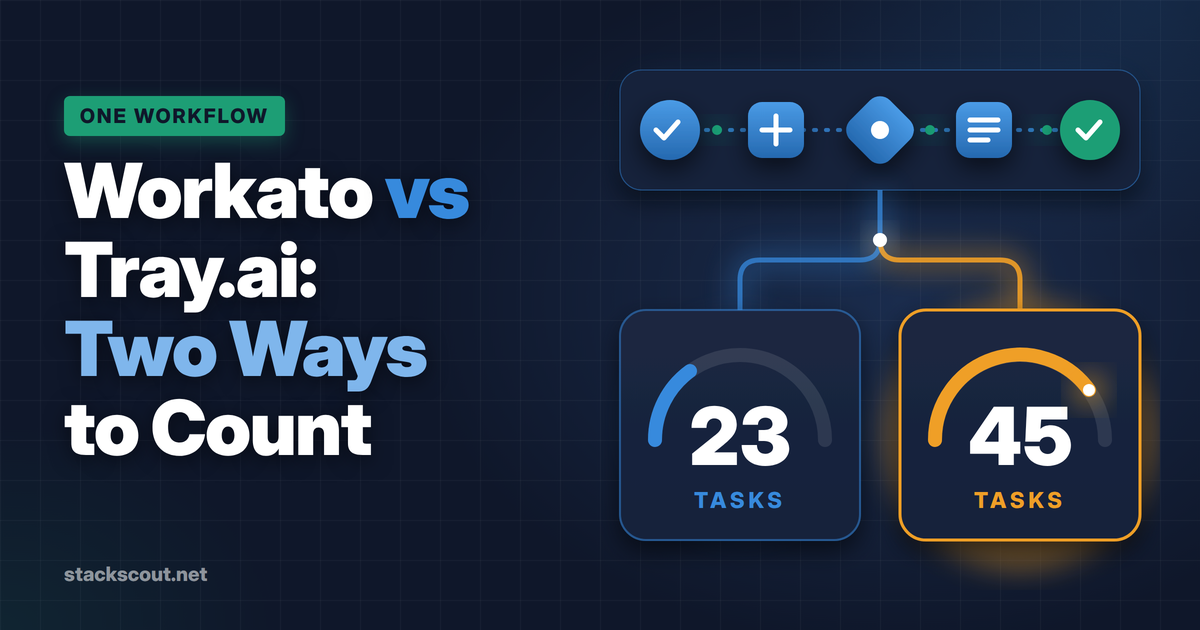
Both vendors use the word "task," but the two meters count different things. That is why vendor-supplied task ratios mean little until you have counted your own workflows in both trials.
| Step type | Workato task | Tray.ai task |
|---|---|---|
| Trigger firing | Not counted | 1 task |
| Connector action | 1 task per successful action | 1 task per step, even if the step makes several API calls |
| IF / boolean | Not counted (only steps in the branch that runs count) | 1 task per pass |
| Loop | Loop block not counted. Each action inside it counts once per iteration. | Each pass through the loop counts, as do the steps inside it |
| Bulk / batch action | 1 task, however many records | 1 task per connector step |
| Failures and retries | Failed operations are not billed. Only the successful retry counts. Reruns count. | Retries are not charged. Test-step runs ("steps in isolation") are billed. |
| AI steps | AI by Workato actions count as more than one task (per contract). A genie is billed per prompt, with reasoning and skills included. | AI connector tokens are converted into tasks at a ratio you get from support. IDP is billed per page. |
Sources: Workato "Tasks" and "Understand usage"; Tray pricing FAQ and "Usage & Billing".
Worked example: one deal-to-order workflow, counted both ways
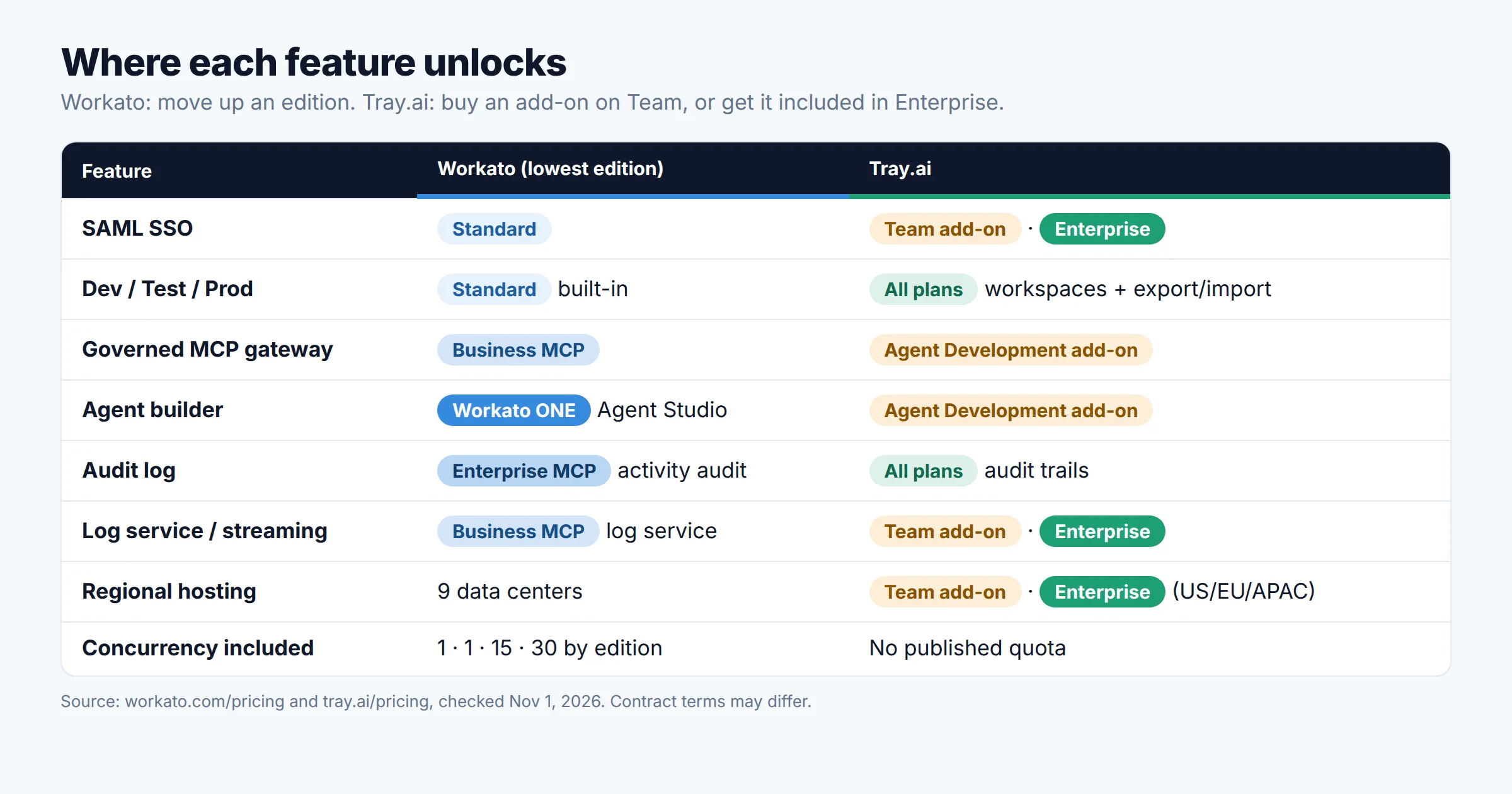
Take a common RevOps flow. A Salesforce opportunity closes, the workflow looks up the account, creates the customer in NetSuite if the customer is new, adds 20 order lines one at a time, and posts a Slack message. This is one run in which the "new customer" branch executes:
Workato (per its docs)
Tray.ai (per its pricing FAQ)
At 2,000 closed deals a month, that is about 46,000 Workato tasks against about 90,000 Tray tasks. That does not mean Tray costs twice as much. The units are priced differently. Workato converts tasks into credits at a rate it doesn't publish, and Tray quotes a price per task volume. The comparison only becomes meaningful when you multiply each count by the unit price on each vendor's quote.
If you redesign the flow to use one bulk insert instead of the 20-line loop, both meters drop sharply: to 4 tasks per run on Workato and 6 on Tray. On either platform, how you build the workflow moves the bill more than the vendor you pick. Tray's own optimization guide gives the example of a workflow that triggers 500 times a day and burns 1,500 tasks on filter steps. With trigger-level filtering, the same workflow ran 3 times a day for 20 to 30 tasks.
04Governance and security
Identity and access
Workato includes SAML SSO, MFA, custom OAuth profiles, and role-based access control from the Standard edition. SCIM provisioning is documented through Workato Identity, but the docs don't say which edition includes it. Workato sells an Advanced Security & Governance add-on, so confirm whether SCIM is covered by your edition or needs that add-on. On Tray, SSO is an add-on on Team and included in Enterprise. Tray's RBAC model has four fixed roles: Owner, Admin, Contributor, and Viewer. Workspace roles can be raised above a user's org-level role, and Contributors can only work inside workspaces they belong to. Tray's environment documentation notes one limitation: authentications can't be restricted per project inside an environment workspace.
Audit evidence and logs
Activity audit and data masking sit in Workato's Enterprise MCP edition, as do 90-day job-data retention and hourly key rotation. Standard and Business keep job data for 30 days, according to Workato's limits page. Tray includes audit trails on every plan. Tray retains logs for 7 or 30 days depending on package, and executions can be re-run for 7 days. Tray's log streaming sends execution, step, and audit events to tools such as Datadog, Sentry, Redshift, New Relic, or Kibana. It is included in Enterprise, sold as an add-on on Team, and switched on through a support ticket.
If an auditor will ask you for a year of change history, check retention against your evidence window before you sign. On Tray's Pro and Team plans, the 7-day default is short for SOC 2 Type 2 evidence unless you stream logs out.
Compliance attestations
Tray's security statement lists SOC 1 Type 2 and SOC 2 Type 2 (annual, 12-month reporting periods), HIPAA compliance as a Business Associate, GDPR and CCPA controls, and annual third-party penetration tests. HIPAA is included in Enterprise and an add-on on Team. Workato signs a HIPAA BAA and holds PCI DSS 4.0 Level 1, ISO 27001, and ISO 27701 attestations, per its Trust Center. If you are mapping these to your own audit, our SOC 2 Type 1 vs Type 2 guide explains what a vendor's report actually covers.
05Environments and change management
This is the clearest structural difference between the two platforms.
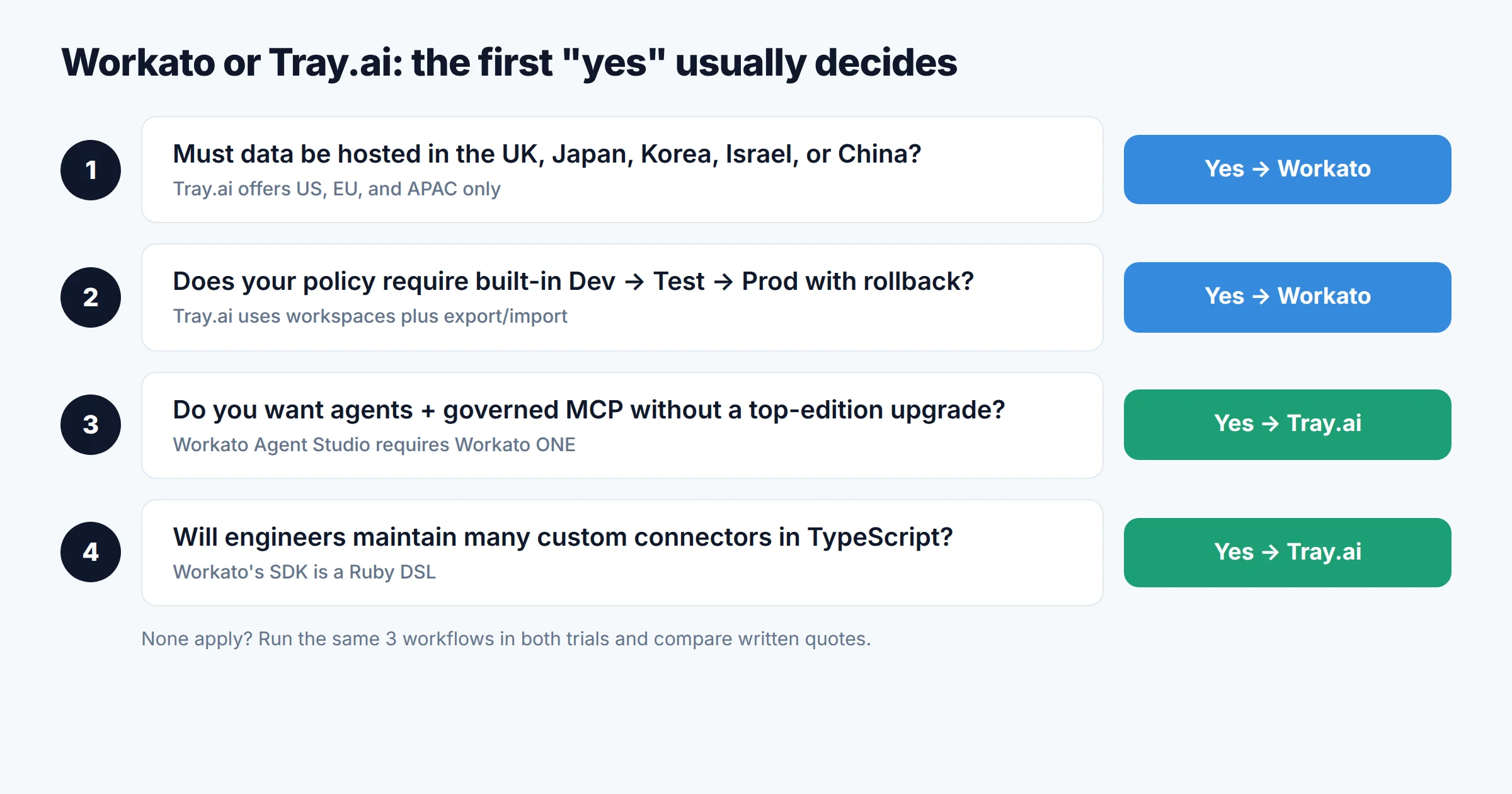
Workato's Environments feature automatically provisions Development, Test, and Production environments inside one workspace. Projects are deployed from one environment to the next, with a full deployment history and rollback to any earlier deployment. Collaborator roles control who can build, test, and deploy. The pricing page lists Dev/Test/Prod in the Standard edition. The docs say the feature is "available to customers on specific pricing plans," so confirm it is in your order form.
Tray gets to the same outcome with different building blocks. Its environment guide recommends shared workspaces as environments, for example a dev and a prod workspace per department. You promote changes by exporting a project from dev and importing it into prod, mapping authentications, custom services, and connectors along the way. Project versioning takes snapshots that work like commits: each version records who changed what, can be restored, and can be exported as JSON. You can also set a monthly task limit per workspace, which keeps a dev workspace from inflating the bill. Embedded customers, though, can't create Solutions in shared workspaces and need separate Tray orgs for dev, staging, and prod.
The workspace count also limits this design. Pro's three workspaces fill up quickly once each department needs both dev and prod, which is one reason teams move up to Team (20 workspaces).
06AI agents and MCP
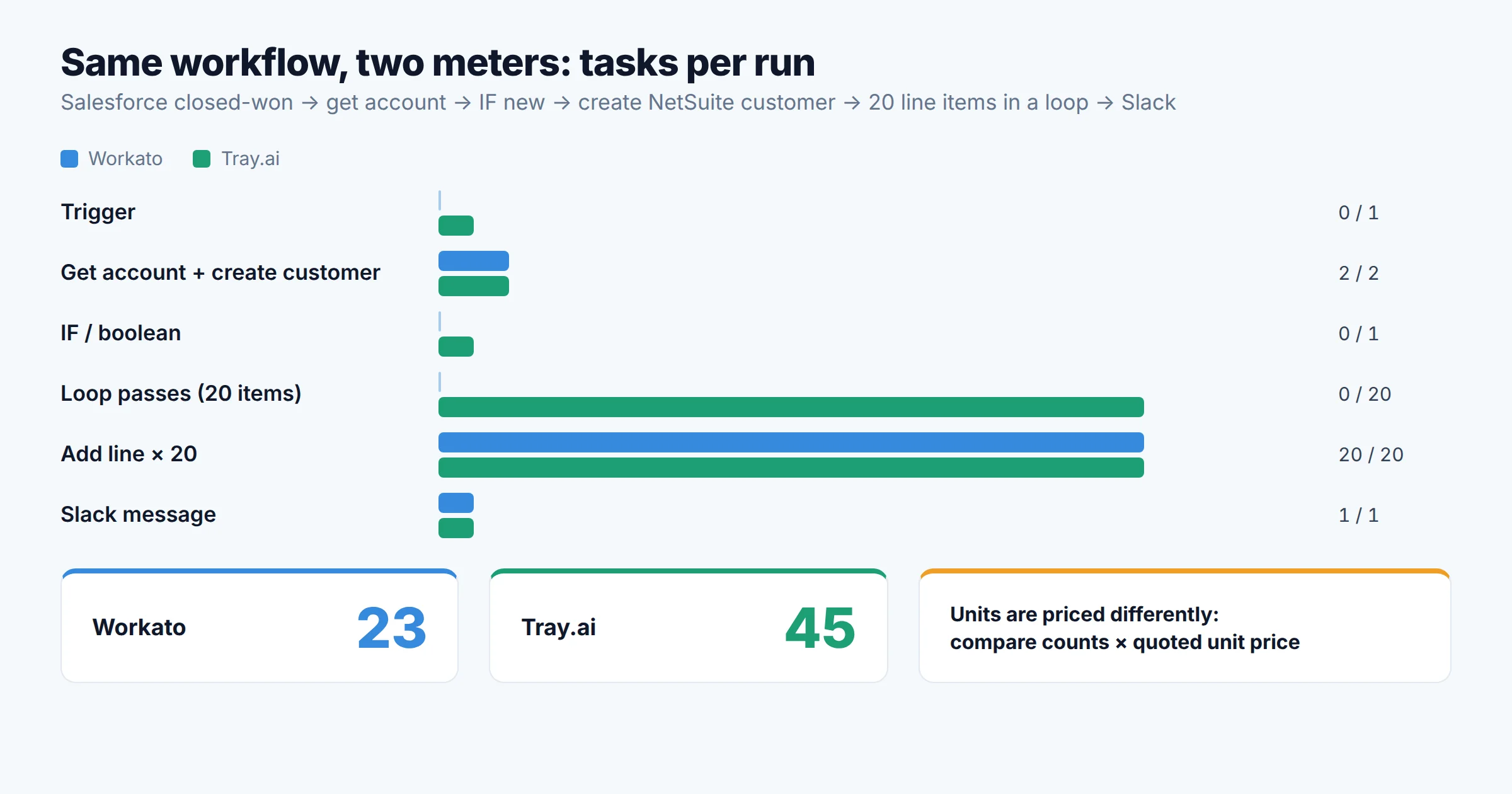
Both vendors now have the full set of pieces: an agent builder, a governed MCP layer, document processing, and an AI assistant for building workflows. As the edition map shows, they differ mostly in packaging and metering, not in whether a capability exists. Our explainer on workflow automation vs RPA vs AI agents covers the terminology if your stakeholders use it loosely.
Workato: genies, skills, and the MCP Gateway
- Agent Studio builds agents that Workato calls genies. Genies use Anthropic Claude by default, and you can switch to OpenAI GPT or your own LLM connection. They are available in the US, EU, AU, SG, and JP data centers. Agent Studio is in the Workato ONE edition, and Workato also sells pre-packaged genies as an add-on.
- Billing: one Genie action per prompt. Reasoning, knowledge retrieval, hand-offs to other genies, and skills the genie calls directly are all included. A recipe function called from a skill is still billed as tasks.
- MCP Gateway (from Business MCP) controls access in three layers: which MCP servers a user can reach (end-user groups), which tools they can use within a server (subgroups), and what they can do in the backend system (per-user OAuth through Verified User Access). It also enforces traffic limits and records audit data for each tool call, according to the MCP Gateway docs. MCP usage is billed as whatever asset the call invokes. A skill invoked over MCP is billed as tasks.
Tray.ai: Merlin Agent Builder and Agent Gateway for MCP
- Merlin Agent Builder treats each agent as a Tray project. You define a scope, connect data sources as a knowledge base, attach workflows as tools, and choose the model. Tray's docs ask you to contact your CSM or AE to enable it.
- Agent Gateway for MCP publishes Tray's connectors and workflows as governed MCP tools, with access control and observability.
- Packaging: both come together in the Agent Development add-on, so you don't have to move to a higher plan.
- Billing: AI connectors such as Merlin Text Generation are metered in tokens (input plus output), converted to tasks at a ratio your account team provides. One example log in Tray's docs shows 2,167 tokens recorded as 108.35 tasks. Merlin Guardian (PII masking), RAG, and Functions are billed as standard tasks. Usage alerts fire at 80% and 100% of the entitlement, and those percentages include token-generated tasks.
07Runtime limits, regions, and on-prem connectivity
Concurrency and timeouts
Workato's pricing page lists total included concurrency per edition: 1 for Standard and Business MCP, 15 for Enterprise MCP, and 30 for Workato ONE. More concurrency is sold as an add-on. The limits page lists the standard job timeout as 90 minutes. Workspace admins can change it, and REST, Salesforce, ServiceNow, and SFTP actions have their own limits. Long pause and long action steps can wait up to 732 days.
Tray doesn't publish a per-workflow concurrency quota. Its comparison page claims "unlimited parallel executions" and workflows that run "up to 14 days," but that is the vendor's own claim, and we couldn't find either in the technical documentation. What the technical limits page does document: a 45-second timeout per connector call (120 seconds for CDK connectors), a 6 MB payload limit between steps, a 1 MB limit for webhook triggers, and possible HTTP 429 responses from validated webhooks above "several hundred per second." If you have one high-volume webhook, load-test it during the trial.
Data residency
Workato runs nine data centers: US, EU, UK, Japan, Singapore, Australia, Israel, Korea, and China. Tray offers three regions: US, EU, and APAC. Regional hosting is an add-on per region on Team, and all regions are included in Enterprise. Each region is a separate org with its own API base URL. If UK-only or Japan-only hosting is a hard requirement, only Workato offers that region today.
Reaching systems behind the firewall
Workato connects to on-prem systems through on-prem agents (OPAs). Business MCP includes 3, Enterprise MCP 10, and Workato ONE 30. Private Link is a separate add-on. Tray's on-prem options are an on-prem agent (the default), AWS Transit Gateway, PrivateLink, VPC peering, a site-to-site IPSec VPN, and IP allow-listing with Tray's public IPs. On Team, on-premise connectivity is an add-on.
Building custom connectors
Workato's Connector SDK is a Ruby DSL. Tray's Connector Development Kit uses TypeScript on Node 18 or later. For most enterprise teams, finding TypeScript developers is easier, which counts in Tray's favor if you expect to maintain many custom connectors. Both vendors now let you build workflows from AI coding tools: Workato through its AIRO MCP server, and Tray through Claude Code and Codex plugins ("Tray Headless").
08Pros and cons
Workato
Pros
- Built-in Dev/Test/Prod environments with deployment history and rollback
- 1,200+ connectors and nine hosting regions
- Triggers, IFs, and loop blocks are free, and failed operations aren't billed
- Bulk and batch actions count as one task
- Genie pricing per prompt is easy to forecast
- Published self-service Pro prices for proofs of concept
Cons
- Agent Studio requires the top edition (Workato ONE)
- Only 1 concurrency included in Standard and Business MCP
- The credit-per-task conversion isn't published
- Activity audit and data masking only from Enterprise MCP
- Custom connector SDK is a Ruby DSL
Tray.ai
Pros
- No per-user, per-connection, or per-runtime fees
- 30-day trial with 1 million tasks to measure real usage
- Agents and MCP come as one add-on, with no forced edition upgrade
- Broad private connectivity: PrivateLink, Transit Gateway, VPC peering, VPN
- TypeScript CDK; retries aren't billed
- Monthly task caps per workspace keep dev spend contained
Cons
- No list price for any iPaaS plan
- Triggers, booleans, and each loop pass count as tasks
- Only three hosting regions, and regions are a Team add-on
- SSO, HIPAA, and log streaming cost extra below Enterprise
- Environments are assembled from workspaces plus export/import
- Token-to-task ratio is only available from your account team
09Who should choose which
- You need hosting in the UK, Japan, Korea, Israel, or China
- Your change-management policy requires a formal Dev → Test → Prod pipeline with rollback
- Most of your workflows are loop-heavy or use bulk actions, so a meter that skips control flow works in your favor
- You are already budgeting for an Enterprise-class edition and want the most connectors
- You want to pilot AI agents and governed MCP without moving up to a top edition
- Many builders across departments would make per-seat or edition gating expensive
- Your systems sit in AWS VPCs that you'd rather reach over PrivateLink or Transit Gateway
- Your engineers will maintain custom connectors and prefer TypeScript over Ruby
Two situations where neither one is the right fit. If your real need is customer-facing integrations inside your own SaaS product, compare dedicated embedded platforms and unified APIs first. Our embedded iPaaS vs unified API breakdown covers that decision. If you're a Microsoft 365 shop automating mostly inside Microsoft apps, Power Automate may already be paid for.
Questions to settle before signing either contract
- Which edition or add-on does each must-have feature (SSO, SCIM, audit log, log streaming, regional hosting, agents) require on your order form?
- What are the measured task counts for three representative workflows, taken from each trial?
- How are AI steps converted (tokens to tasks, or tasks per AI action), and is that conversion written into the contract?
- How are overages handled: true-up, hard cap, or automatic upgrade? What renewal price protection applies in years 2 and 3?
- Are dev and test usage billed at the same rate as production, and can you cap it?
- Does log retention cover your audit evidence window, or will you need to stream logs out?
If you'd rather start with a breakdown of Workato's credits on its own, see our Workato pricing guide.
10FAQ
What is Tray.ai?
Is Workato doing well?
Is Workato similar to Zapier?
What are the key differences between MuleSoft and Workato?
Which is cheaper, Workato or Tray.ai?
11Methodology
We compared Workato and Tray.ai on six criteria that an enterprise IT owner signs off on: commercial packaging (which tier unlocks which feature), usage metering, identity and audit controls, change management, AI agent and MCP governance, and runtime, residency, and connectivity limits. Every fact comes from the vendors' own pricing pages and documentation, read on November 1, 2026. Workato's docs were fetched as Markdown through its llms.txt index, and Tray's through its documentation's .md endpoints. Claims that appear only in a vendor's marketing comparison (Tray's "unlimited parallel executions" and "14 days") are labeled as such. We did not use either platform ourselves, on free or paid plans. The task counts in the worked example apply each vendor's published counting rules to a hypothetical workflow, and you should confirm them in a trial. StackScout has no affiliate relationship with either vendor.
Sources
- Workato: Pricing (platform editions). https://www.workato.com/pricing
- Workato Docs: Self-service (Workato Free and Workato Pro) billing. https://docs.workato.com/en/pricing/self-service/self-service.md
- Workato Docs: Pricing overview. https://docs.workato.com/en/pricing/overview.md
- Workato Docs: Understand usage. https://docs.workato.com/en/pricing/usage-metrics.md
- Workato Docs: Tasks. https://docs.workato.com/en/recipes/tasks.md
- Workato Docs: Genie usage. https://docs.workato.com/en/pricing/usage-metrics/agent-studio.md
- Workato Docs: MCP Gateway. https://docs.workato.com/en/mcp/mcp-gateway.md
- Workato Docs: Environments. https://docs.workato.com/en/features/environments.md
- Workato Docs: Limits. https://docs.workato.com/en/limits.md
- Workato Docs: Agentic FAQs. https://docs.workato.com/en/agentic/faqs.md
- Business Wire: Workato Named a Leader in the 2026 Gartner Magic Quadrant for iPaaS for the 8th Consecutive Time (March 18, 2026). businesswire.com
- Tray.ai: Pricing. https://tray.ai/pricing
- Tray.ai Docs: Usage & Billing. https://tray.ai/documentation/platform/enterprise-core/usage-billing.md
- Tray.ai Docs: Regional Hosting. https://tray.ai/documentation/platform/enterprise-core/organisation-management/regional-hosting.md
- Tray.ai Docs: Setting up your environment. https://tray.ai/documentation/platform/enterprise-core/lifecycle-management/setting-up-your-environment.md
- Tray.ai Docs: Project Versioning. https://tray.ai/documentation/platform/enterprise-core/lifecycle-management/project-versioning.md
- Tray.ai Docs: User management and RBAC. https://tray.ai/documentation/platform/enterprise-core/organisation-management/users/roles.md
- Tray.ai Docs: Log Streaming. https://tray.ai/documentation/platform/enterprise-core/logs-debugging/log-streaming.md
- Tray.ai Docs: Technical limits, timeouts and retries. https://tray.ai/documentation/platform/enterprise-core/logs-debugging/technical-limits.md
- Tray.ai Docs: Security statement. https://tray.ai/documentation/platform/enterprise-core/security-compliance/security-statement.md
- Tray.ai Docs: On Prem Options. https://tray.ai/documentation/platform/connectivity/on-premise-systems/on-prem-options.md
- Tray.ai Docs: Merlin Agent Builder. https://tray.ai/documentation/platform/artificial-intelligence/agent-builder/overview.md
- Tray.ai: Tray.ai vs. Workato (vendor comparison). https://tray.ai/compare/tray-vs-workato/

Technology consultant with 10+ years in the Japanese tech industry. Specializing in SaaS evaluation, workflow automation, and B2B tool integration.