Notion API vs Airtable API for Developers: Which One Should You Build On in 2026?
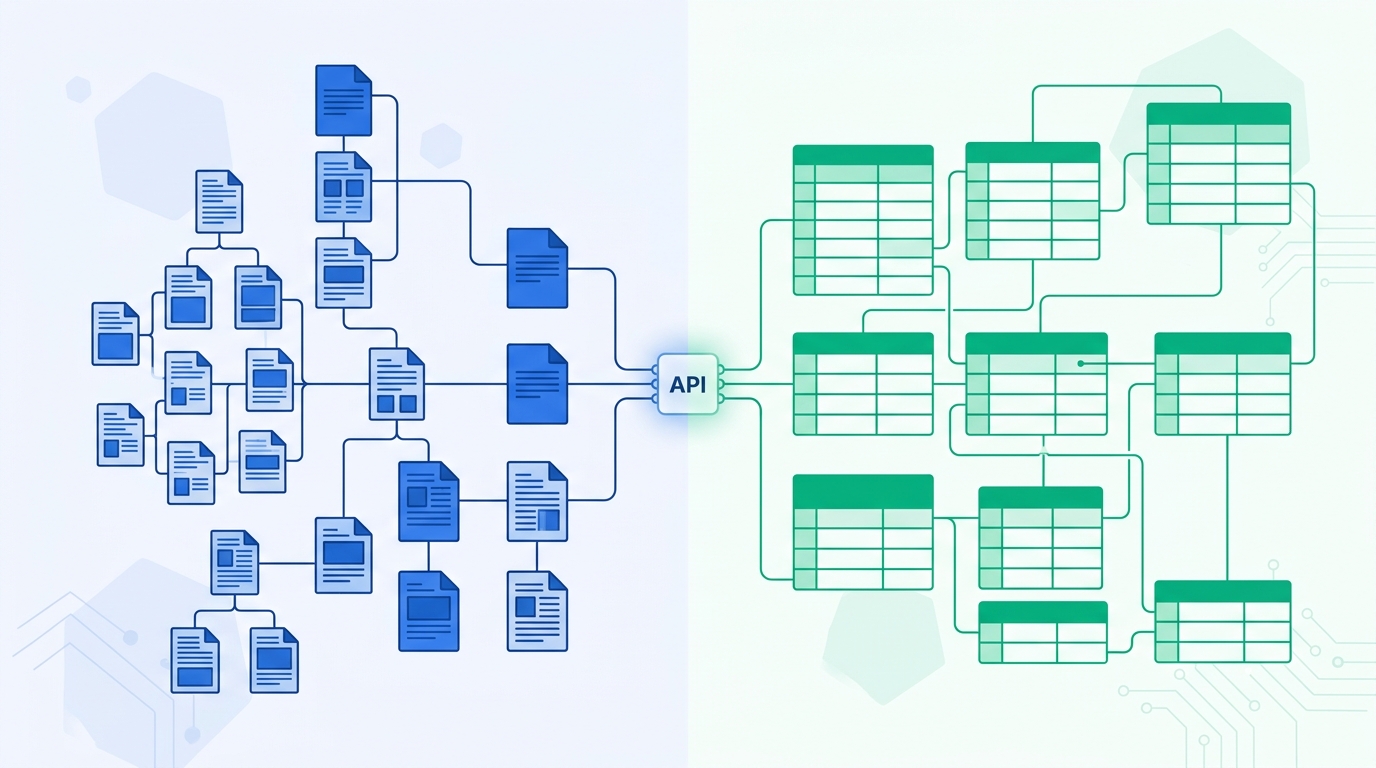
Airtable's API is the better foundation if you're building anything that behaves like structured, relational data: CRMs, inventory, ops dashboards, anything you'd otherwise model as SQL tables. It has a higher, flatter rate limit (5 req/s per base, the same on every plan) vs. Notion's per-connection limit, which as of September 2026 is no longer flat either — ~3 req/s (180 req/min) on Free and Plus, ~10 req/s (600 req/min) on Business and Enterprise. Airtable also has native batch writes and a mature formula-based filter language. Notion's API is the right call when the data really is content: docs, wikis, and knowledge bases where the block/page hierarchy and rich text are the point, not an obstacle. Neither is a substitute for a real database if you're building a SaaS product's actual data layer — see the section on that below.
01Quick Comparison Table
Both APIs get compared constantly on features, but developers usually only care about a handful of things once they've decided the tool itself fits: how hard will the rate limit bite, what does a write actually cost, and will this still work when the base or workspace outgrows a spreadsheet. Here's the side-by-side, verified against each vendor's own documentation in August 2026 and re-checked in September 2026 after Notion changed its rate-limit structure.
| Criterion | Notion API | Airtable API |
|---|---|---|
| Core data model | Pages & blocks (hierarchical); the underlying table is now called a data source, contained inside a database | Bases → Tables → Records → Fields (relational, spreadsheet-shaped) |
| Rate limit | Per connection, since Sep 9, 2026: 180 req/min (~3/sec) on Free & Plus, 600 req/min (~10/sec) on Business & Enterprise; plus a separate workspace-wide limit scaled by plan | 5 requests/sec per base; 50 requests/sec per token across bases — same on every plan |
| Monthly call cap | None published — no monthly limit on any plan (the per-connection ceiling above is now plan-tiered instead) | Free: 1,000/mo · Team: 100,000/mo · Business/Enterprise: unlimited |
| Batch writes | One page or block operation per call — no native batch endpoint | Up to 10 records per create/update/delete call |
| Filtering | Nested JSON filter objects; compound logic gets verbose fast | filterByFormula — an Excel-style formula string |
| Webhooks | REST API webhooks shipped Jan–Mar 2026, versioned separately from the main API | Ping-based Webhooks API; you fetch the payload after the ping |
| Official SDK | notion-sdk-js (JS/TS); Python via community packages | airtable.js (JS); Python via community pyairtable |
| MCP server | Official, Notion-hosted remote MCP server (OAuth) | Official Airtable MCP server, plus community options |
| Best fit | Docs-as-database, wikis, content with structure | Relational records, ops tooling, frequent programmatic sync |
Sources: Notion's API request limits docs, developer changelog, and webhooks reference; Airtable's rate limits docs and API call limits by plan.
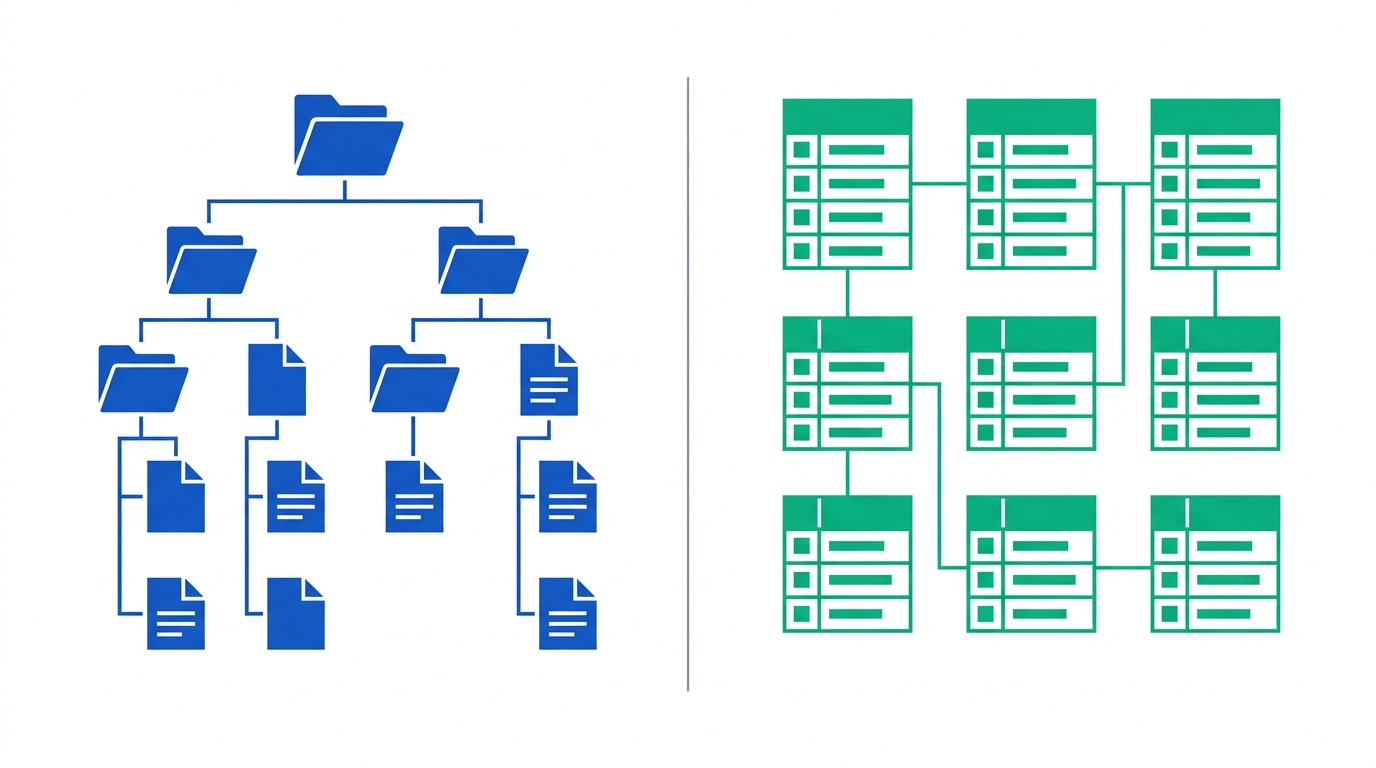
02The Real Difference: A Relational Grid vs. a Block Tree
Every other difference on this page is downstream of one decision each company made early on. Airtable built a spreadsheet and gave it an API. Notion built a document editor and gave it an API. That's not a knock on either — it's just the thing to internalize before you pick one to build against.
An Airtable base is a set of tables, each with typed fields (text, number, single select, linked record, formula, rollup) and rows that are records. Linked-record fields are true relations: you can look up, roll up, and count across tables the way you would with a foreign key, and the API exposes that directly. If your mental model is "this is basically a lightweight relational database," Airtable's API matches it field for field.
Notion's structure starts from the page. A database in Notion is a page that contains other pages, and each of those pages has properties (the closest thing to a "field") plus a body made of blocks — paragraphs, headings, to-do items, embeds, nested sub-pages. As of the 2025-09-03 API upgrade, Notion split this further: a database is now a container object, and the actual table of rows and properties you query against is a data source living inside it. It's a genuinely useful change for teams that outgrew a single Notion database view, but it also means any Notion API integration written before September 2025 needs a real migration, not a version bump — every call that referenced a database ID for querying rows now needs a data source ID instead.
Practically: if what you're storing is "records with values," Airtable's model requires zero translation. If what you're storing is "documents that happen to have some structured metadata," Notion's model requires zero translation. Trying to force relational data into Notion means fighting the block tree; trying to force rich, nested content into Airtable means stuffing markdown into a long-text field and losing the block structure entirely. Our deeper walkthrough of the data source migration covers the exact ID changes if you're maintaining an existing Notion integration through this transition.
03Rate Limits: Where Notion Actually Falls Behind
This is the section developers searching for a Notion API rate limits guide usually land on, so the specific numbers matter more than the vibes.
Until recently, Notion enforced a flat ~3 requests per second on average per integration (roughly 2,700 calls per 15-minute window per token) on every plan. That changed on September 9, 2026, when Notion moved to a plan-tiered per-connection limit measured over a 60-second window: 180 requests per minute (~3/sec) on Free and Plus, and 600 requests per minute (~10/sec) on Business and Enterprise. Notion also introduced a separate workspace-wide limit back on June 16, 2026, shared across every connection in that workspace and scaled to the workspace's plan — so a busy workspace can get throttled even when each individual connection is within its own per-connection budget. Exceed either limit and you get an HTTP 429 with a rate_limited error code; the September 2026 update also shortened the maximum Retry-After wait from up to 15 minutes down to a 60-second cap, so backoff loops recover faster than they used to.
Airtable's limit is both higher and structured differently: 5 requests per second per base, and separately, 50 requests per second per personal access token or service account across all the bases that token touches. Go over the per-base limit and you get a 429 with a flat 30-second cooldown before requests to that base succeed again — no gradual backoff curve, just a hard 30-second wall. Unlike Notion's per-second limit, Airtable's 5 req/s per-base ceiling doesn't change by plan; instead Airtable layers a second constraint on top of it: a monthly API call cap tied to plan. The Free plan caps out at 1,000 calls per month per workspace, the Team plan at 100,000, and Business and Enterprise plans remove the monthly cap entirely, leaving only the 5 req/s per-base ceiling.
What this means in practice: a Notion integration on a Free or Plus workspace syncing a database of a few thousand pages on a schedule will still feel the ~3 req/s ceiling almost immediately if it's doing per-page reads, because there's no batch read endpoint to spread that cost across fewer calls. On a Business or Enterprise workspace, the new 10 req/s ceiling gives roughly 3x the headroom for the same job — worth knowing before you reach for a queue purely because of the old flat limit. An Airtable integration doing the same job can lean on pageSize pagination (up to 100 records per read call) and the batch write endpoint to get more done per request, but a Free-plan integration will hit the 1,000-call monthly wall long before it hits the per-second one if it's polling frequently.
Notion is now the one with headroom that scales with plan — Free/Plus stays capped around 3 req/s per connection, Business/Enterprise reaches roughly 10 req/s. Airtable, by contrast, is a hard cap regardless of plan: the per-base 5 req/s figure doesn't change with tier, only the monthly call allowance does. Either way, if your integration needs sustained throughput above roughly 4–5 requests per second against a single resource on Free/Plus Notion, or against a single Airtable base, you're going to need a queue and a caching layer in front of the API — upgrading Notion's plan can now buy you more per-connection throughput, but upgrading Airtable's plan only buys you more monthly calls, not a faster per-second ceiling.
04Querying, Filtering, and Batch Writes
Reading data back out is where the two APIs feel most different day to day. Airtable's filterByFormula parameter takes a string that looks like an Airtable formula field: AND({Status}='Active', {Score}>80). It's expressive, it's the same syntax you'd use in a formula field inside the UI, and most developers who've used a spreadsheet formula bar can write one without documentation open. Notion's filter object is a nested JSON structure — each condition is its own object keyed by property name and type, and compound and/or logic means nesting those objects inside arrays. It's not hard, but it's noticeably more verbose for the same query, and one recurring complaint from teams running larger Notion databases (several thousand rows) is that filtered queries and view-switching visibly slow down, since a meaningful amount of Notion's own filtering and rendering logic happens client-side rather than being a thin wrapper over an indexed database query.
Writes follow the same pattern. Airtable's batch endpoints accept up to 10 records per create, update, or delete call, so updating 100 records is 10 requests, not 100. Notion's API doesn't have an equivalent batch endpoint for pages: each page create or property update is its own call. That single difference is often the deciding factor for any integration that needs to write more than a few dozen records in one run — on Notion, that's a job for a queue with rate-limit-aware retries, not a simple loop.
05Webhooks and Keeping Things in Sync
Both platforms added real webhook support relatively recently, and both work on a similar principle: a change happens, your endpoint gets notified, you decide what to do next. The details of "notified" differ. Notion's webhook events, covered in its webhooks reference, deliver structured event payloads (page updated, data source schema changed, and so on) and are versioned independently from the main REST API — useful, because it means Notion can change webhook event shapes without forcing every integration onto a new API version at the same time. Airtable's Webhooks API is ping-based: your endpoint gets a lightweight notification that something changed in a base, and your integration then calls back into the API to fetch the actual list of changes. It's an extra round trip compared to Notion's payload-in-the-webhook approach, but it keeps the webhook delivery itself small and fast.
Neither webhook system is a substitute for understanding the rate limits above — a burst of changes in either tool can still generate more webhook-triggered API calls than your integration's per-second budget allows, so any production sync needs a debounce or batching layer regardless of which platform is sending the notifications.
Don't want to build and maintain the sync layer yourself?
Rate limits, retry logic, and webhook debouncing are exactly the kind of plumbing an iPaaS platform already handles. Before you write a custom sync worker, it's worth comparing what a no-code automation platform can do out of the box.
06Authentication, Access Control, and Pricing Gates
Both APIs support two authentication flows: a simple token for internal, single-workspace integrations, and OAuth for public integrations that need to connect to workspaces or bases you don't own. Notion calls its simple token an "internal integration secret"; Airtable calls its equivalent a "personal access token" with scoped permissions. Functionally, they solve the same problem.
Where they diverge is what plan gates what — and this got more interesting in September 2026. Until then, Notion didn't meter API calls or lock higher throughput behind a paid workspace plan at all; every tier got the same ~3 req/s ceiling. As of the September 9, 2026 change, that's no longer true: Business and Enterprise workspaces now get roughly 3x the per-connection throughput (600 req/min vs. 180 req/min) of Free and Plus. There's still no Notion feature gate on API access itself — every plan can create an integration and call the API — but throughput is now a paid-plan perk. Airtable ties API access more tightly to plan in a different way: the Free plan's 1,000-call monthly cap will bite an actively-polling integration within days, and two automation features developers often want to pair with the API — the "Run a script" automation action and Extensions (Airtable's in-base add-ons) — are unavailable on the Free plan entirely, requiring at least a Team subscription. If you're prototyping against Airtable, budget for a paid base before you budget for scale; the Free tier is workable for a demo, not for a staging environment that polls on a schedule. If you're prototyping against Notion, the same logic increasingly applies if per-second throughput is the bottleneck.
07MCP Servers and AI-Agent Access
Both vendors shipped official Model Context Protocol servers in the past year, which matters if any part of your roadmap involves letting an AI agent read or write these bases directly instead of going through your own API layer. Notion's is a Notion-hosted remote MCP server: you authorize it with OAuth, and an MCP-compatible client (Claude, an internal agent, whatever you've built) gets tools scoped to what that connection can access, tracking the same API versioning as the REST API itself. Airtable ships an official MCP server plus several actively maintained community implementations, letting an agent inspect a base's schema and then read or write records through the same permission model as a personal access token.
Neither MCP server changes the underlying rate limits — an agent hammering either API through MCP is still bound by the numbers in the comparison table above, which is worth knowing before you wire an autonomous agent loop up to either one. If MCP access is a bigger part of your evaluation than this article covers, our roundup of the best MCP servers for B2B workflows goes deeper on the OAuth and governance side of running MCP in a company setting.
08Notion API: Pros and Cons
Pros
- API access itself is free on every plan — no feature-gated Notion tier just to call the API
- Rich, structured content (headings, embeds, nested pages) is native, not bolted on
- Official, Notion-hosted MCP server with OAuth makes AI-agent access straightforward
- Webhooks versioned independently from the core API, so event-shape changes don't force a full API migration
Cons
- ~3 req/s ceiling on Free/Plus (up to ~10 req/s on Business/Enterprise since Sep 2026) with no native batch write endpoint makes bulk syncs slow without a queue
- Higher per-connection throughput is now a Business/Enterprise perk, not a given — Free/Plus workspaces stay at the old ~3 req/s ceiling
- The 2025-09-03 database-to-data-source split is a breaking change for any pre-existing integration
- Filtering and querying get noticeably slower on databases in the low thousands of rows
- No official Python SDK — community packages fill the gap
09Airtable API: Pros and Cons
Pros
- Higher, simpler rate limit (5 req/s per base, 50 req/s per token) with predictable 30-second cooldowns
- Native batch endpoints (up to 10 records/call) for create, update, and delete
filterByFormulais expressive and familiar to anyone who's used spreadsheet formulas- True relational fields (linked records, rollups, lookups) map directly to how the API exposes data
Cons
- Free plan's 1,000-call monthly cap is easy to blow through with any scheduled polling
- "Run a script" automations and Extensions are locked out of the Free plan
- No native way to store deeply structured, nested rich content the way Notion's blocks do
- Webhooks are ping-only — you still need a follow-up API call to get the actual change
10Who Should Choose Which
Strip away the feature list and the decision usually comes down to what the data actually looks like once you sketch it out.
Notion API
- Internal wikis or knowledge bases with structured metadata on top of long-form content
- Docs-as-database products: changelogs, roadmaps, content calendars built on Notion pages
- Teams already living in Notion who want automation without leaving the tool
- Low write volume, high read variety — you're pulling structured content more than hammering records
Airtable API
- Anything you'd otherwise sketch as SQL tables: CRMs, inventory, applicant trackers, ops dashboards
- Integrations that need to write dozens or hundreds of records per run
- Multi-table relational data with lookups and rollups across tables
- Frequent, scheduled sync jobs where a flatter, higher rate limit matters more than content richness
There's a real middle case too: teams that use both, syncing structured records in Airtable with narrative documentation in Notion, connected through an automation layer rather than either API talking to the other directly. If that's your situation, the integration platform choice (not the API choice) becomes the harder decision — our comparison of no-code automation platforms is a reasonable next stop.
11Developer Decision Checklist
If you're still choosing between the two, work through these questions in order — each one either eliminates an option or points you toward a queue/cache layer you'll need regardless of which API you pick.
- What shape is the data? Rows with typed fields and relations (foreign-key-style lookups) → Airtable. Long-form content with some structured metadata on top → Notion.
- How many records do you write per run? Dozens or hundreds in one batch job → Airtable's 10-records-per-call batch endpoint will get there faster than Notion's one-call-per-page writes.
- What plan will this actually run under? If you're counting on Notion's higher throughput, confirm the workspace is Business or Enterprise — Free and Plus are still capped at ~3 req/s per connection as of September 2026, not the ~10 req/s figure that only applies above that tier.
- Do you need complex filter logic? If your queries are more than one or two conditions, Airtable's
filterByFormulastring stays more readable than nesting Notion's JSON filter objects. - Will an AI agent need direct access? Both ship official MCP servers with OAuth — check your governance and audit requirements rather than the API choice itself, since MCP doesn't change either vendor's rate limits.
- Is this the primary datastore behind a customer-facing product? If yes, stop — neither API is built for that. Use a managed Postgres platform (see the section below) and treat Notion or Airtable as an internal tool at most.
- Are you maintaining an existing Notion integration built before September 2025? Budget time for the database-to-data-source ID migration before you touch anything else — it's a breaking change, not an optional upgrade.
12Neither Is Your Production Database
If the search that brought you here was closer to "what's the best database API for SaaS," it's worth saying plainly: Notion and Airtable are both excellent for internal tools, ops workflows, and content management, but neither is designed to be the primary data layer behind a customer-facing SaaS product. The rate limits in this article — 3 req/s and 5 req/s respectively — are workable for internal automation and modest sync jobs. They are not workable as the backend for an application serving concurrent users, and neither product's terms of service are written with that use case in mind.
For an actual production database with an auto-generated API, the current default answer for SaaS teams is a managed Postgres platform — Supabase or Neon are the two most commonly recommended, both offering instant branching, row-level security for multi-tenancy, and none of the per-second request ceilings baked into Notion or Airtable's consumer-facing APIs. If your project needs to scale past what a spreadsheet-shaped tool can offer, that's a different evaluation than this one, and it's a comparison we're planning to publish in more depth rather than trying to squeeze into a Notion-vs-Airtable article.
13Frequently Asked Questions
Is Notion API better than Airtable API?
What are Notion's API rate limits in 2026?
Does Airtable's API integrate with Notion, or vice versa?
What API does Notion use, and has it changed recently?
Can I use either API as the backend database for a SaaS product?
14Methodology
Every rate limit, pricing figure, and plan restriction cited above was checked directly against Notion's and Airtable's own developer documentation, changelog, and support pages — first in August 2026, then re-checked in September 2026, which is when we caught and incorporated Notion's September 9, 2026 move to plan-tiered rate limits. Nothing here comes from third-party aggregators, and each specific number is linked to its source inline. Developer sentiment on filtering performance and API ergonomics (the "gets slower at scale" and "feels like a form in triplicate" observations) reflects patterns reported across multiple independent developer write-ups and community threads rather than our own load-testing, and is flagged as such rather than presented as a benchmarked result.
References & Sources
- Notion — API Request Limits: developers.notion.com/reference/request-limits
- Notion — Developer Changelog (Sep 9, 2026 plan-tiered rate-limit update): developers.notion.com/page/changelog
- Notion — Webhooks Reference: developers.notion.com/reference/webhooks
- Notion — Upgrading to API version 2025-09-03 (data sources): developers.notion.com/docs/upgrade-faqs-2025-09-03
- Airtable — Web API Rate Limits: airtable.com/developers/web/api/rate-limits
- Airtable Support — Managing API Call Limits in Airtable: support.airtable.com/docs/managing-api-call-limits-in-airtable
- Airtable Support — Webhooks API Overview: support.airtable.com/docs/airtable-webhooks-api-overview
- Airtable — Pricing: airtable.com/pricing
- Notion — Official MCP Server (GitHub): github.com/makenotion/notion-mcp-server

Technology consultant with 10+ years in the Japanese tech industry. Specializing in SaaS evaluation, workflow automation, and B2B tool integration.