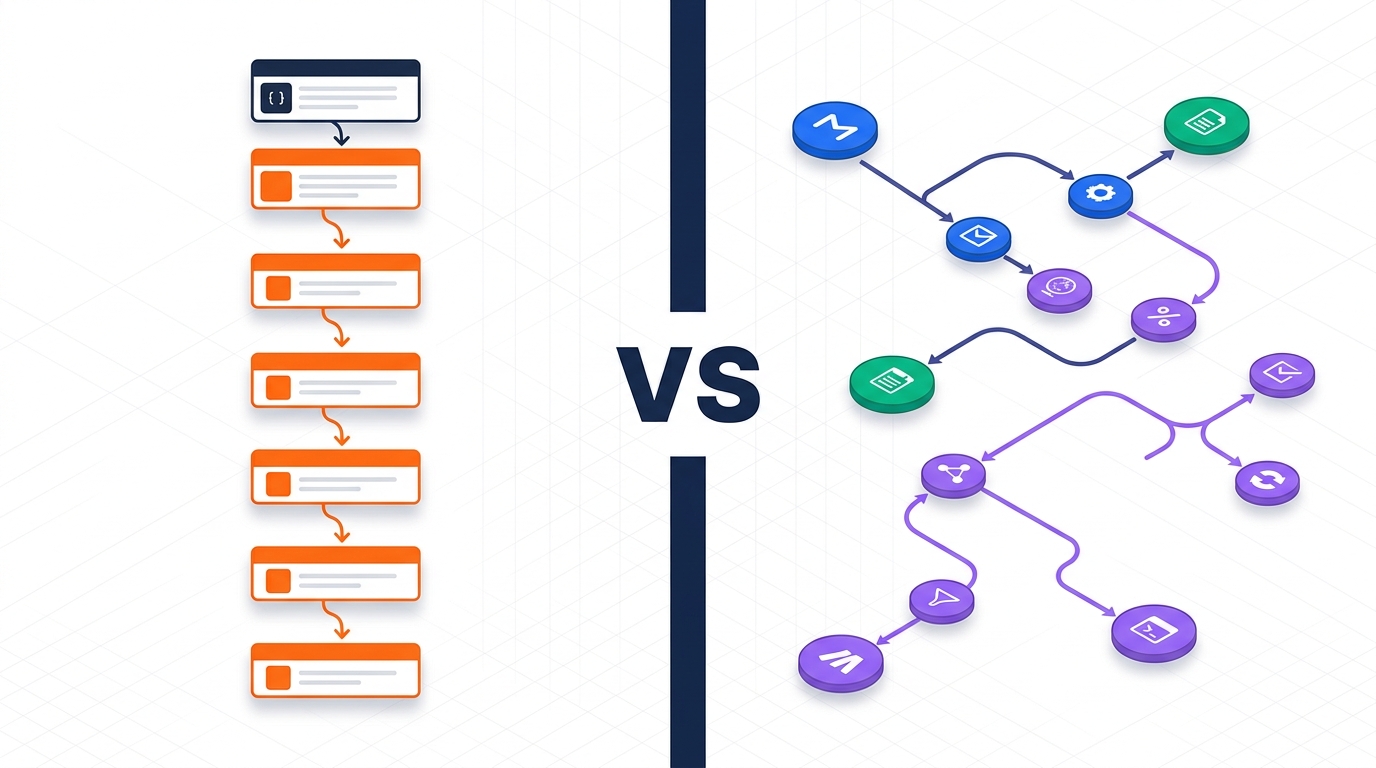
n8n vs Activepieces Self-Hosted (2026): The Honest Comparison for B2B Teams
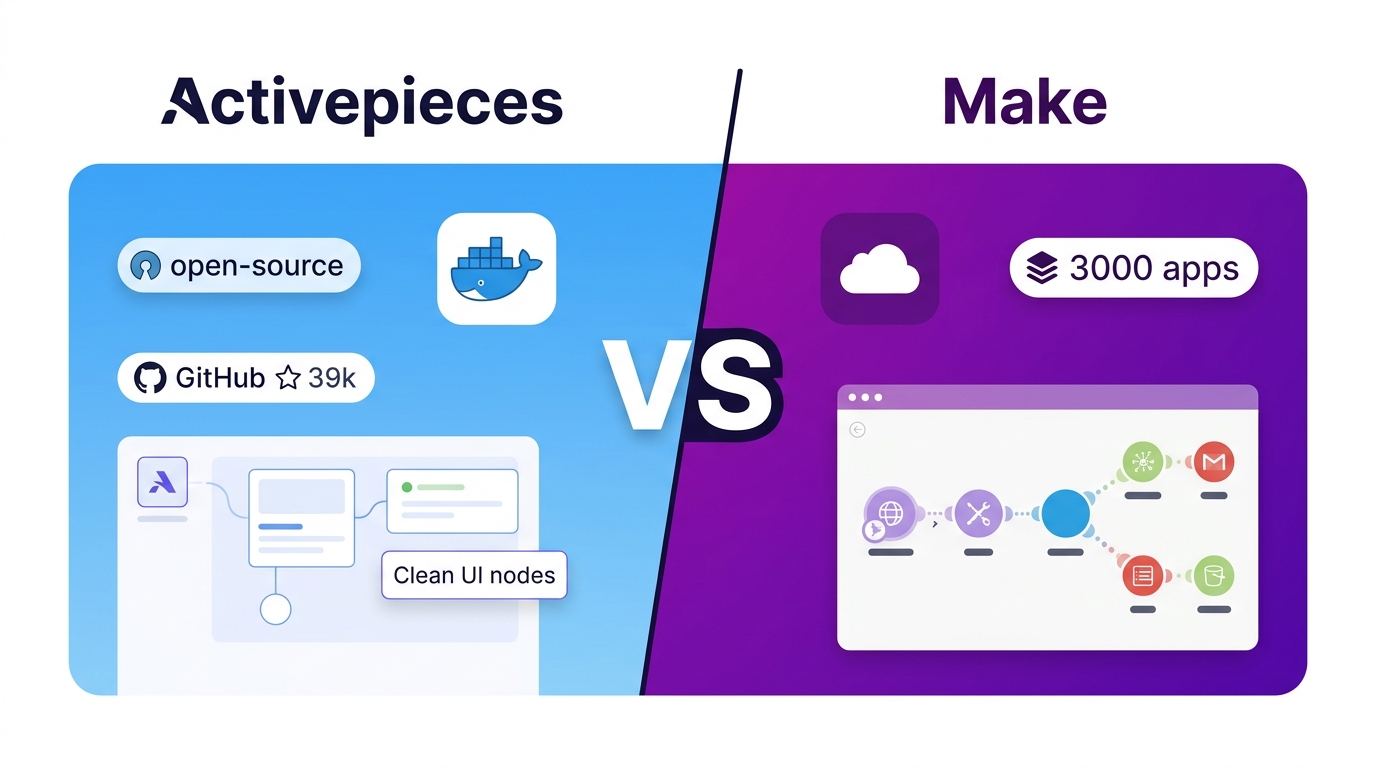
Pick n8n if your team needs the deepest integration catalog, mature LangChain-powered AI agents, and a battle-tested platform with 180K+ GitHub stars behind it — and you're not planning to white-label or resell automations. Pick Activepieces if you need a truly permissive MIT license (the only safe option of the two if you intend to embed or resell), native Model Context Protocol (MCP) support out of the box, and a lighter operational footprint. For internal B2B automation, both are free to self-host with no execution limits, and both scale horizontally by adding workers at no license cost. The deciding factors are license, AI strategy, and catalog depth. Once you need active-active high availability (multi-main in n8n), SSO, external secret stores, or audit logs, both put those behind a paid edition.
This guide covers the whole self-hosting lifecycle in one place: choosing between the two tools, the first Docker deployment, scaling past a single box, and day-2 operations (upgrades, backups, and the first-deploy failures that fill community forums). If you only need one part, the contents menu will take you straight there.
Quick comparison: n8n vs Activepieces at a glance
Here's the high-level scorecard before we get into what self-hosting each platform really involves. Community and catalog figures were checked against each project's documentation, GitHub repository, and independent reviews in June 2026. Deployment and scaling rows were rechecked against the official docs in September 2026.
| Dimension | n8n | Activepieces |
|---|---|---|
| License | Sustainable Use License (fair-code) | MIT core engine (truly permissive) |
| Self-host cost (software) | Free, unlimited executions | Free, unlimited executions |
| Integrations (core) | 500+ official, 1,000+ with community nodes | 440+ pieces (≈60% community-built) |
| AI / MCP support | Deep LangChain nodes, 50+ AI providers | Native MCP server & client, ~400 MCP servers |
| GitHub stars (Jun 2026) | ~186,000 | ~22,000 |
| Founded | 2019 | 2023 |
| Embed / white-label | Requires paid Embed License | Engine permitted under MIT; packaged embedding/branding is a paid plan feature |
| Zero-config start | SQLite by default (not for production) | One docker run with embedded PGlite + in-memory queue (personal use only) |
| Production database | PostgreSQL (SQLite not recommended with queue mode) | PostgreSQL (required for paid editions) |
| Horizontal scaling | Queue mode: Redis + worker processes (free) | Separate worker containers from the app (free) |
| Active-active HA | Multi-main: self-hosted Enterprise only | Stateless containers, DIY design, no license gate |
| SSO, audit logs, secret managers | Enterprise | Paid plans |
| Min. self-host RAM | 2 GB (4 GB+ recommended) | 2 GB |
| Learning curve | Steeper, more powerful | Gentler, cleaner UI |
| Workflow templates | 2,000+ community templates | Smaller library, growing fast |
What the table hides is that the gap between these tools is shrinking on almost every dimension except licensing. Licensing should be your first filter, not your last. The second thing it hides is a pattern that only shows up at scale: raw throughput is free on both platforms. You pay for resilience (managed active-active HA) and governance (SSO, secrets, RBAC, audit). Budget for those, not for workers.
The license question (read this first)
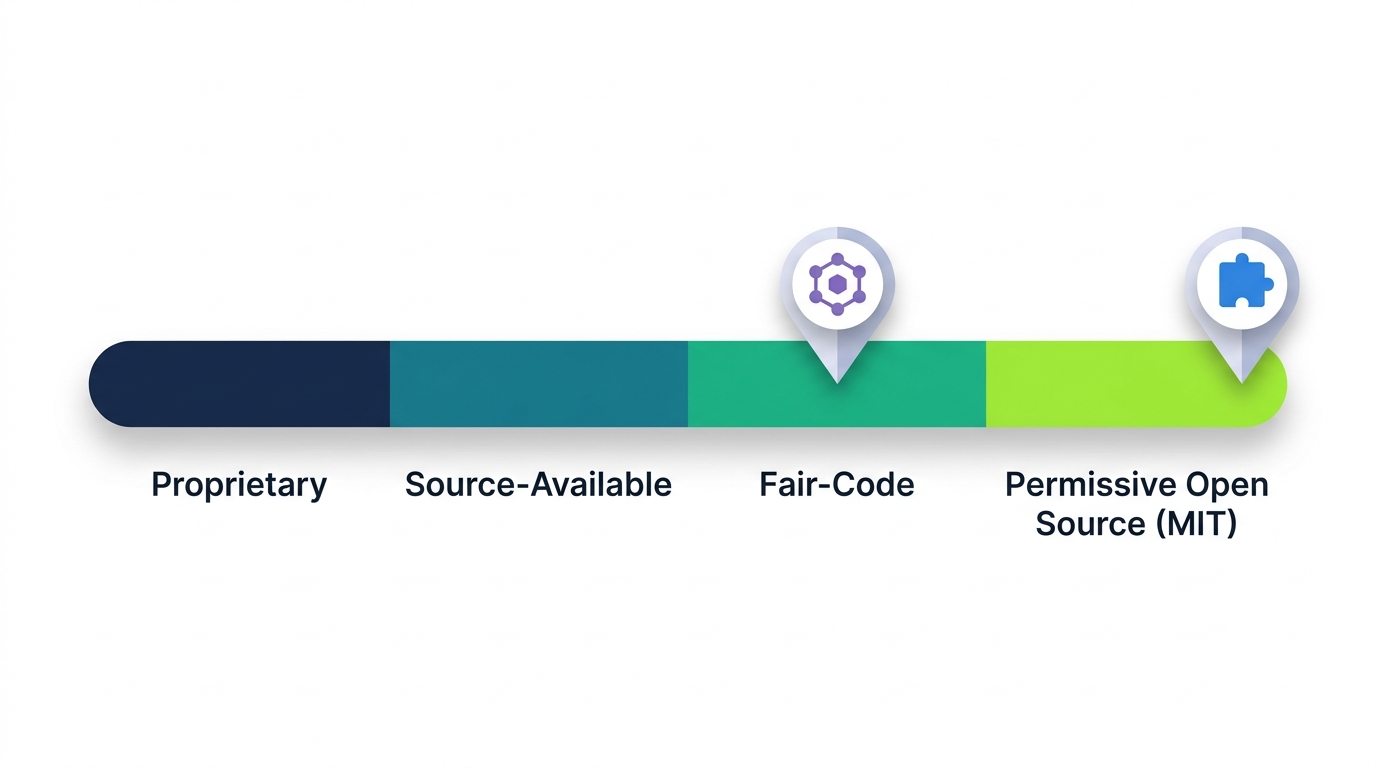
This is the most important difference between n8n and Activepieces, and most comparison articles bury it halfway down the page. If you self-host n8n only for internal automations in your own company, n8n is free and this section barely applies to you. Think connecting Slack to Salesforce, syncing leads to HubSpot, or triggering Stripe refunds. But once your use case starts to look like a product, the calculation changes. The license also changes your architecture, so read this before you pick a container to start.
n8n's Sustainable Use License
n8n created its Sustainable Use License in 2022 under its broader "fair-code" model. It lets you use, modify, create derivative works from, and redistribute n8n for free, but only for your own internal business purposes or non-commercial use. Making money is fine: you can automate a revenue-critical process as much as you like. What the license prohibits is turning n8n itself into the product. You can't offer n8n as a service or get substantial commercial value from the platform itself without a paid agreement. Building workflows for clients as a consultant is allowed.
Concretely, you cannot:
- Re-skin the n8n UI with your own logo and sell access to it as your workflow platform
- Spin up customer-isolated n8n instances and charge a monthly fee to access them
- Embed n8n in a commercial product where workflow automation is a primary value
- Let external users trigger workflows as a paid offering
For any of these, you need an n8n Embed License or a commercial agreement. n8n doesn't publish pricing for these. It's negotiated directly with n8n through its sales team.
Activepieces' MIT license
Activepieces ships its automation engine under the MIT license, the most permissive license in wide open-source use. You can fork it, modify it, build on it, and ship it inside a commercial product without owing Activepieces anything for the engine. Like most open-core projects, some features sit in paid plans. According to Activepieces' self-hosting docs, a paid license key unlocks these:
- Teams and access: projects and multi-tenancy, SSO, standard and custom roles, SCIM provisioning
- Governance: audit logs, secret managers, piece management
- Operations: releases and Git Sync, worker groups, global connections
- Branding and embedding: the embeddable builder and JavaScript SDK, custom branding and domains
So the engine is free to commercialize, but the packaged governance and white-label features are not. For B2B teams building automation into a product (agencies productizing client automations, SaaS vendors embedding workflow builders, integration platforms), Activepieces is the only one of the two whose engine allows this with no field-of-use restriction.
Self-hosting in the real world: what setup actually looks like
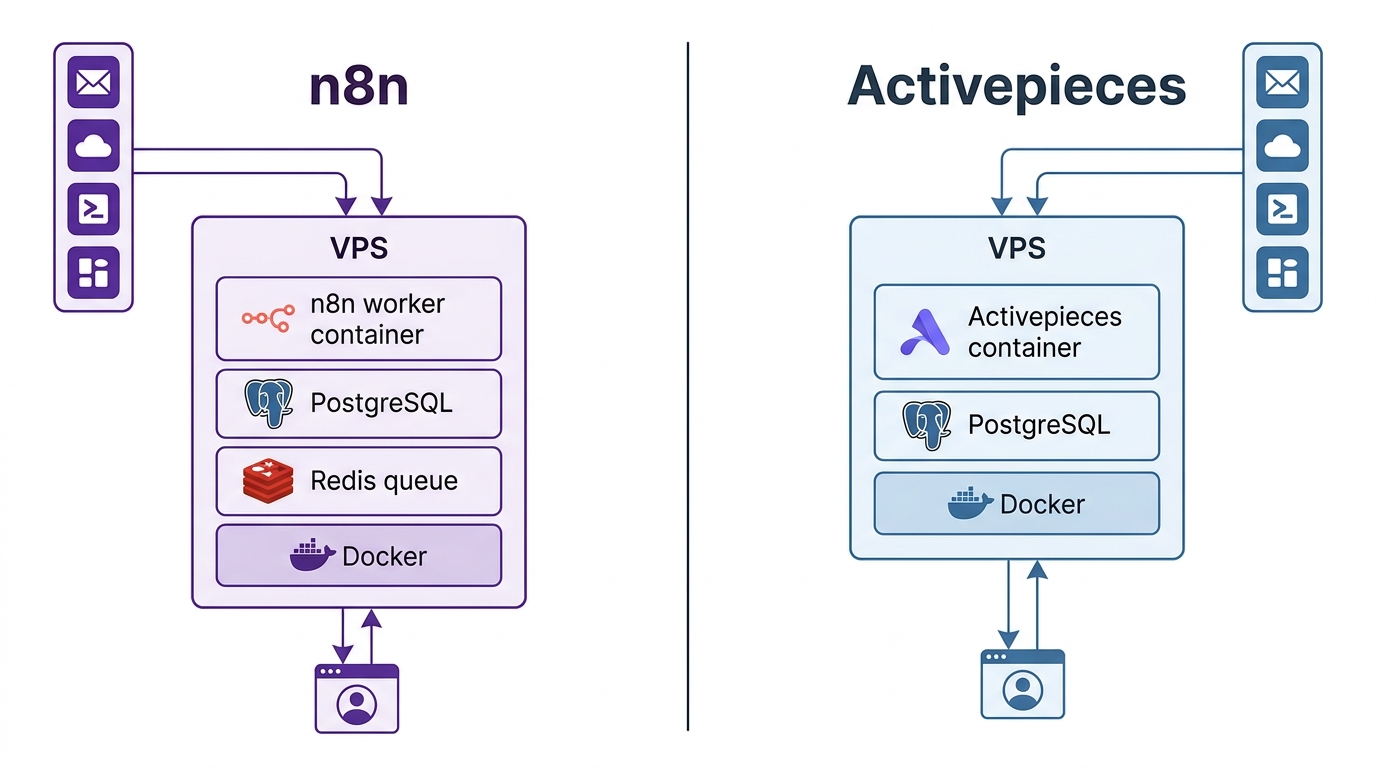
Both platforms publish a quick Docker path, but the production architecture diverges quickly. Here's what each one looks like once real workflows depend on it.
n8n: more moving parts, more knobs
n8n's Docker quickstart works fine for a development instance. A production setup soon adds more pieces: PostgreSQL (the default SQLite isn't meant for production), Redis for queue mode once you have concurrent webhooks, separate worker containers, and careful management of environment variables for the encryption key, webhook URL, and timezone. The official docs list 2 GB RAM as the minimum. Most production deployments run 4 GB or more, and 8 GB is a comfortable size if Postgres, Redis, and queue-mode workers share one box.
This complexity is deliberate. Queue mode is what lets n8n absorb bursts of concurrent webhook triggers without blocking. Separating workers from the main process is how it scales horizontally. If your team has DevOps capacity, you'll appreciate the control. If you're an engineering team without anyone who owns infrastructure, the amount of configuration can feel heavy.
Activepieces: simpler defaults, faster to a stable instance
Activepieces ships a single image. By default (AP_CONTAINER_TYPE=WORKER_AND_APP), one container runs the API, the UI, and an embedded worker. The official Docker Compose setup adds PostgreSQL and Redis next to it and exposes the UI on port 8080. The quickest start is a single docker run with no external database at all. The default Compose file has far fewer environment variables to configure than a production n8n stack.
For internal automations at small and mid-sized teams, that means a faster path to a working instance, easier upgrades, and lower running costs. When you outgrow a single container, you can split workers from the app (covered below) without a license. What you don't get is a vendor-managed high-availability design. You build that yourself.
Our take: if you've already invested in Kubernetes, Helm charts, and a platform team, n8n's architectural depth will pay back in operational maturity. If you're a B2B team running automation as a supporting function on a single VPS or small cluster, Activepieces is easier to live with.
What you need before you start (either tool)
The baseline is the same for both:
- A Linux host: a VPS or a server you control. Sizing differs (see the cost section), but Ubuntu 22.04 or 24.04 LTS is a safe default for either tool.
- Docker and Docker Compose: the modern
docker composeplugin, not the legacydocker-composebinary. - A domain and a reverse proxy: both tools send and receive webhooks, so they need a publicly reachable HTTPS URL. Caddy, Traefik, or Nginx all work, and the configs below assume one sits in front.
- Persistent volumes: encryption keys and workflow data live on disk. If you lose the volume, you lose your credentials.
Deploying on Docker: the configs that matter
Below are the minimal production shapes for each tool. Environment variable names match each project's official documentation as of September 2026. Generate every secret once, store it in your secrets manager, and never rotate it casually.
Activepieces: the 60-second start (personal use only)
# Single container, embedded PGlite database, in-memory queue
docker run -d --name activepieces -p 8080:80 \
  -v ~/.activepieces:/root/.activepieces \
  -e AP_DB_TYPE=PGLITE \
  -e AP_REDIS_TYPE=MEMORY \
  -e AP_FRONTEND_URL="http://localhost:8080" \
  activepieces/activepieces:latest
Open http://localhost:8080 and you have a working automation platform. This quick start is the main reason Activepieces has a reputation for being easier to run, and the reputation is deserved.
Activepieces: the production setup (Postgres + Redis)
Anything a team depends on needs a real database and a real queue. A reasonable compose.yaml looks like this:
services:
  activepieces:
    image: activepieces/activepieces:latest
    restart: unless-stopped
    ports: ["8080:80"]
    environment:
      AP_FRONTEND_URL: "https://automate.yourco.com"
      AP_DB_TYPE: POSTGRES
      AP_POSTGRES_HOST: postgres
      AP_POSTGRES_DATABASE: activepieces
      AP_POSTGRES_USERNAME: activepieces
      AP_POSTGRES_PASSWORD: ${AP_PG_PASSWORD}
      AP_REDIS_TYPE: STANDALONE
      AP_REDIS_HOST: redis
      AP_ENCRYPTION_KEY: ${AP_ENCRYPTION_KEY}   # openssl rand -hex 16
      AP_JWT_SECRET: ${AP_JWT_SECRET}           # openssl rand -hex 32
    depends_on: [postgres, redis]

  postgres:
    image: postgres:16
    restart: unless-stopped
    environment:
      POSTGRES_DB: activepieces
      POSTGRES_USER: activepieces
      POSTGRES_PASSWORD: ${AP_PG_PASSWORD}
    volumes: ["ap_pg:/var/lib/postgresql/data"]

  redis:
    image: redis:7
    restart: unless-stopped

volumes:
  ap_pg:
Two variables need special care: AP_ENCRYPTION_KEY encrypts stored connections, and AP_JWT_SECRET signs tokens, including the worker tokens you'll need later. The docs are explicit that without the encryption key, stored connections can't be decrypted, even from a full database backup. The other thing teams forget: AP_FRONTEND_URL must be the public HTTPS URL. If it isn't, inbound webhooks from third-party apps will never reach you. Note that AP_REDIS_TYPE accepts MEMORY, STANDALONE, or SENTINEL. Some older guides show other values that no longer work.
n8n: single instance with Postgres
n8n takes the opposite approach and pushes you toward a full stack from the start. SQLite is the default, but n8n's own docs, and every serious guide, tell you to put Postgres behind it before you trust it with anything.
services:
  n8n:
    image: n8nio/n8n:latest
    restart: unless-stopped
    ports: ["5678:5678"]
    environment:
      DB_TYPE: postgresdb
      DB_POSTGRESDB_HOST: postgres
      DB_POSTGRESDB_DATABASE: n8n
      DB_POSTGRESDB_USER: n8n
      DB_POSTGRESDB_PASSWORD: ${N8N_PG_PASSWORD}
      N8N_ENCRYPTION_KEY: ${N8N_ENCRYPTION_KEY}
      N8N_HOST: automate.yourco.com
      N8N_PROTOCOL: https
      WEBHOOK_URL: "https://automate.yourco.com/"
    volumes: ["n8n_data:/home/node/.n8n"]
    depends_on: [postgres]

  postgres:
    image: postgres:16
    restart: unless-stopped
    environment:
      POSTGRES_DB: n8n
      POSTGRES_USER: n8n
      POSTGRES_PASSWORD: ${N8N_PG_PASSWORD}
    volumes: ["n8n_pg:/var/lib/postgresql/data"]

volumes:
  n8n_data:
  n8n_pg:
N8N_ENCRYPTION_KEY does the same job as Activepieces' encryption key: it protects the credentials stored in the database. Back it up separately from the database. WEBHOOK_URL is n8n's version of the public-URL gotcha. If it's wrong, webhook nodes generate URLs that nobody can reach.
Scaling beyond one box: queue mode vs separate workers
This section is for the stage after the first deploy. Your single container is pinned at high CPU, a long-running workflow is blocking webhooks, and someone in security is asking who can see production credentials. Once you scale, both platforms settle on the same proven shape: a thin front tier that receives triggers, a Redis-backed queue that holds pending jobs, a pool of workers that execute them, and a PostgreSQL database that stores everything. The details differ in ways that matter.
Scaling n8n: queue mode, workers, and the concurrency dial
In the default "regular" mode, a single n8n process runs everything, so one heavy workflow can starve your webhooks. The fix is queue mode, and it's available in the free self-hosted edition. The main instance handles timers, webhooks, and the editor UI. It hands executions to Redis, and dedicated worker processes pick them up.
- Set
EXECUTIONS_MODE=queueand point n8n at Redis on the main instance and on every worker. - Run one or more worker processes (
command: worker). Each worker can run several executions in parallel. n8n's docs recommend a concurrency of 5 or higher for worker instances, so throughput scales with workers × concurrency. - Use PostgreSQL. n8n's docs say running queue mode on SQLite isn't recommended.
- Optionally, add webhook processors, an extra scaling layer that n8n documents as optional, so inbound webhooks don't compete with execution.
# add to the n8n service, plus a new worker service
environment:
  EXECUTIONS_MODE: queue
  QUEUE_BULL_REDIS_HOST: redis

n8n-worker:
  image: n8nio/n8n:latest
  command: worker            # run as a worker, not the UI
  environment:
    EXECUTIONS_MODE: queue
    QUEUE_BULL_REDIS_HOST: redis
    # ...same DB settings and N8N_ENCRYPTION_KEY as main...
  deploy: { replicas: 3 }    # scale workers independently
Need three more workers to absorb a traffic spike? Raise replicas. This clean separation of UI, queue, and execution is the main operational reason teams expecting growth lean toward n8n. There's one architectural detail worth knowing: n8n's docs require every worker to have access to Redis and the n8n database, so each worker holds those credentials.
Scaling Activepieces: stateless workers you just add
Activepieces' scaling story is deliberately boring, which is a compliment at scale. The same image runs in one of two roles, selected by AP_CONTAINER_TYPE. According to the official "Separate Workers" guide, the steps are:
- Generate a worker token with the CLI (
npx @activepieces/cli workers token). When prompted, enter the sameAP_JWT_SECRETyour app server uses. - On each worker, set three variables:
AP_CONTAINER_TYPE=WORKER,AP_FRONTEND_URL(your public instance URL), andAP_WORKER_TOKEN. - On the app machine, set
AP_CONTAINER_TYPE=APP. Otherwise it keeps the defaultWORKER_AND_APPand continues running an embedded worker. - Confirm the workers appear in the Platform Admin Console under Infra → Workers.
Activepieces' docs list two benefits. First, the app stays light while workers scale independently. Second, workers have no direct access to Redis or the database: they reach the app only through AP_FRONTEND_URL. That limits the damage if a worker is compromised, which is a real architectural difference from n8n. Worker separation is not on Activepieces' list of paid features. Worker groups, which reserve dedicated capacity for specific tenants, are.
Activepieces' production-setup guide is also unusually specific about sizing. It recommends one flow per worker (AP_WORKER_CONCURRENCY=1) at about 0.5 vCPU / 1 GB per worker, one 1 vCPU / 1 GB app container per ten workers, managed Postgres and Redis, and S3 storage in the same region. The shipped default is AP_WORKER_CONCURRENCY=5. The docs call this a transitional mode and warn that it widens an out-of-memory failure to every job in that container. They also warn that Postgres CPU rises with throughput, so scale the database along with the worker fleet.
High availability: the honest gap
This is where the two diverge most, and where teams get surprised after go-live. Adding workers gives you throughput, not availability.
n8n offers a supported, documented HA design called multi-main: several main instances with leader election, so the control plane survives a node failure. According to n8n's docs, multi-main is available only on self-hosted Enterprise, and not on n8n Cloud. In single-main queue mode, the one main instance is still a single point of failure. You get a vetted answer, and you pay for it.
Activepieces gives you the building blocks for HA under MIT: stateless app and worker containers you can run behind a load balancer. There's no vendor-managed control-plane redundancy feature. According to its docs, a worker that crashes mid-run has its job requeued and picked up by another worker. Beyond that, you own the design and its edge cases.
Neither approach is better in the abstract. If you have a platform team that can run redundant stateless stacks behind a load balancer, Activepieces' approach costs less and has no license restrictions. If you'd rather buy a supported HA path and keep your engineers on product work, n8n Enterprise is the faster route to an approved architecture.
Security & governance at scale
Once more than a handful of people share an instance, auditors care about four things. On both platforms, the enterprise-grade versions are paid, so budget for them whichever tool you pick:
| Control | n8n | Activepieces |
|---|---|---|
| External secret stores | Enterprise | Paid plans ("secret managers") |
| SSO | Enterprise | Paid plans |
| Custom roles / RBAC | Enterprise | Paid plans (standard and custom roles) |
| Audit logs | Enterprise | Paid plans |
| Worker credential exposure | Workers connect to Redis and the database | Separated workers hold no Redis/DB credentials |
On the free tiers, credentials are stored encrypted in each platform's own database, and access control is coarse. That's workable for an automation backbone run by an engineering team. It's not what a SOC 2 reviewer hopes to see for a company-wide deployment. Once compliance, finance, or customer-facing data is involved, you'll be buying an enterprise tier of either tool. Compare those quotes, not just the open-source feature lists.
Integrations: depth vs MCP-native breadth
This is where the gap is narrowing fastest. The practical difference in catalog size is much smaller than it was a year ago, but the difference in philosophy has grown.
n8n: deeper, more mature, broader long tail
n8n maintains 500+ official integrations in its core catalog, plus hundreds more community-built nodes in its community node registry. For mainstream B2B tools, n8n's nodes are deep, well maintained, and proven in large numbers of production deployments. That includes Salesforce, HubSpot, Slack, Notion, Jira, Stripe, GitHub, PostgreSQL, MongoDB, AWS services, and Google Workspace. The long tail is real too. If you need a regional CRM, an obscure transactional email service, or a specific telephony provider, n8n's community catalog is more likely to have it.
n8n's AI support is also more mature. Its LangChain integration is first-class: you can build agents, chains, vector stores, memory buffers, and tool use directly in the visual editor. n8n ships native nodes for major model providers, including Anthropic Claude, Google Gemini, and OpenAI, plus vector stores such as Pinecone, Qdrant, Weaviate, and Supabase pgvector. If you're orchestrating complex multi-step agents across many tools, n8n's LangChain depth is hard to match.
Activepieces: MCP-native, AI-first design
Activepieces made a different bet. It supports the Model Context Protocol (MCP) natively, in both directions. As an MCP server, it lets any MCP-aware client, such as Claude Desktop, call your Activepieces flows as tools. As an MCP client, its pieces let flows call out to MCP servers. The platform exposes roughly 400 MCP servers built on its piece catalog, which makes it one of the broadest MCP-ready automation platforms in open source.
For teams building modern AI workflows, this matters more than raw integration count. MCP is becoming the standard way for AI agents to talk to tools. Because Activepieces adopted it natively, a flow you build once works both as a traditional automation and as a tool for AI agents, without any rewriting.
The 440+ pieces in the Activepieces catalog cover most mainstream B2B SaaS. If your stack includes obscure or legacy vendors, though, you're more likely to hit a gap than with n8n. Building a custom piece is relatively easy (it's a TypeScript package you can publish to npm), but it's still work you wouldn't need to do with n8n.
For wider context on open-source automation, our Activepieces vs Make comparison shows how Activepieces compares with a closed-source competitor. Our Zapier vs Make hands-on review covers the proprietary side of the market. If your stack depends on Notion or Slack, our Notion API integrations guide and Slack–HubSpot integration walkthrough cover connector patterns worth automating on either platform.
User experience: who actually uses each tool
n8n's editor
n8n's visual editor is built for engineers. Nodes are packed with options. Expressions use JavaScript-style templating ({{ $json.field }}). You can drop into raw code in a Code node and build complex branching, error handling, and sub-workflows. The result is very powerful, and unforgiving for non-technical users. Marketers and ops teams may struggle to troubleshoot flows they didn't build when something breaks late at night.
Activepieces' editor
Activepieces' editor is cleaner, with more sensible defaults, fewer toggles per step, and a more linear, left-to-right way of building flows. Its expression builder works like Zapier's "click to insert a value from a previous step" rather than raw JavaScript. You get less power, but far more accessibility.
For teams where engineers and non-engineers share automation work (revenue ops, customer success, marketing), Activepieces makes it much easier to get started without capping what power users can do. For teams where automation lives entirely in engineering, n8n's expressive power is the reason to choose it.
Not ready to self-host n8n?
n8n Cloud offers a managed instance with the same workflow engine, starting at usage-based pricing — useful for teams that want to validate the platform before committing to infrastructure ownership.
n8n: pros & cons
Pros
- Largest open-source automation community (180K+ GitHub stars)
- Deepest integration catalog, especially the long tail of B2B SaaS
- First-class LangChain support; serious AI agent depth
- Free, well-documented queue mode for horizontal scaling
- Supported, vendor-designed HA path (multi-main) if you buy Enterprise
- Mature enterprise security: external secret stores, SSO, RBAC, audit logs
- 2,000+ community workflow templates and plenty of Compose examples for every reverse proxy
Cons
- Sustainable Use License restricts white-label, embed, and resale use cases
- Heavier baseline: wants Postgres, Redis, and more RAM as you grow
- Multi-main HA, SSO, secrets, RBAC, and audit logs are all Enterprise; costs add up
- Workers hold direct database and Redis credentials (larger blast radius)
- Embed and Enterprise pricing isn't public; it takes a sales conversation
- Steeper learning curve; webhook and host environment variables are easy to misconfigure
Activepieces: pros & cons
Pros
- Truly permissive MIT engine: embed, modify, and commercialize without a field-of-use limit
- Native MCP server & client support, ideal for AI agent workflows
- Genuine one-command start; the shortest path to a first workflow
- Separated workers are free, stateless, and hold no Redis or database credentials
- Clear official sizing guidance for production worker fleets
- Cleaner editor that non-engineers can use
Cons
- Smaller community (~22K GitHub stars vs n8n's 186K+)
- Fewer long-tail integrations; you're more likely to need custom pieces
- No vendor-managed HA; you design redundancy yourself
- The easy PGlite path can't scale or move to Enterprise
- SSO, audit logs, custom roles, worker groups, and white-label embedding are paid
- Smaller template library and fewer community troubleshooting threads
Want to test-drive Activepieces?
Activepieces offers a hosted Cloud plan with a generous free tier so you can validate the workflow builder before committing to self-hosting on your own infrastructure.
Day-2 operations: the part nobody screenshots
Getting the container running is day one. The days after that are upgrades, backups, and the occasional 500 error. Here's what operating each tool looks like.
Upgrades
Both follow the standard Docker pattern: pull the new tag, recreate the container, and let migrations run on boot. Always snapshot the database before pulling. The PGlite caveat applies here too. An embedded-database Activepieces instance is awkward to move, which is the real reason to start on Postgres if you're at all serious. n8n upgrades are routine, but read the release notes, because major versions occasionally change node behavior.
Backups
Your backup needs three things, and the encryption key is the one people forget:
- The Postgres database: your workflows, connections, and execution history (
pg_dumpon a schedule). - The encryption key (
N8N_ENCRYPTION_KEY/AP_ENCRYPTION_KEY): without it, a restored database has unreadable credentials. - Your Compose and environment files: keep them under version control, with the secrets excluded.
Troubleshooting the usual first-deploy failures
- Webhooks return 404 or point at localhost. Your public URL variable is wrong. Set
WEBHOOK_URL(n8n) orAP_FRONTEND_URL(Activepieces) to the real HTTPS address behind your proxy. - Credentials "disappear" after a redeploy. The encryption key changed or wasn't persisted. It must stay identical across restarts, and on n8n it must also match on every worker.
- n8n workers sit idle in queue mode. The main instance and the workers must share the same Redis host and database, and
EXECUTIONS_MODE=queuemust be set on both. - Activepieces workers don't pick up jobs. Check that the worker token was generated with the app's
AP_JWT_SECRETand that the worker can reachAP_FRONTEND_URL. Also check that the workers appear under Infra → Workers. - Database connection refused on first boot.
depends_ononly waits for the container to start, not for Postgres to accept connections. Add a healthcheck or a short retry.
Who should choose which: a decision framework
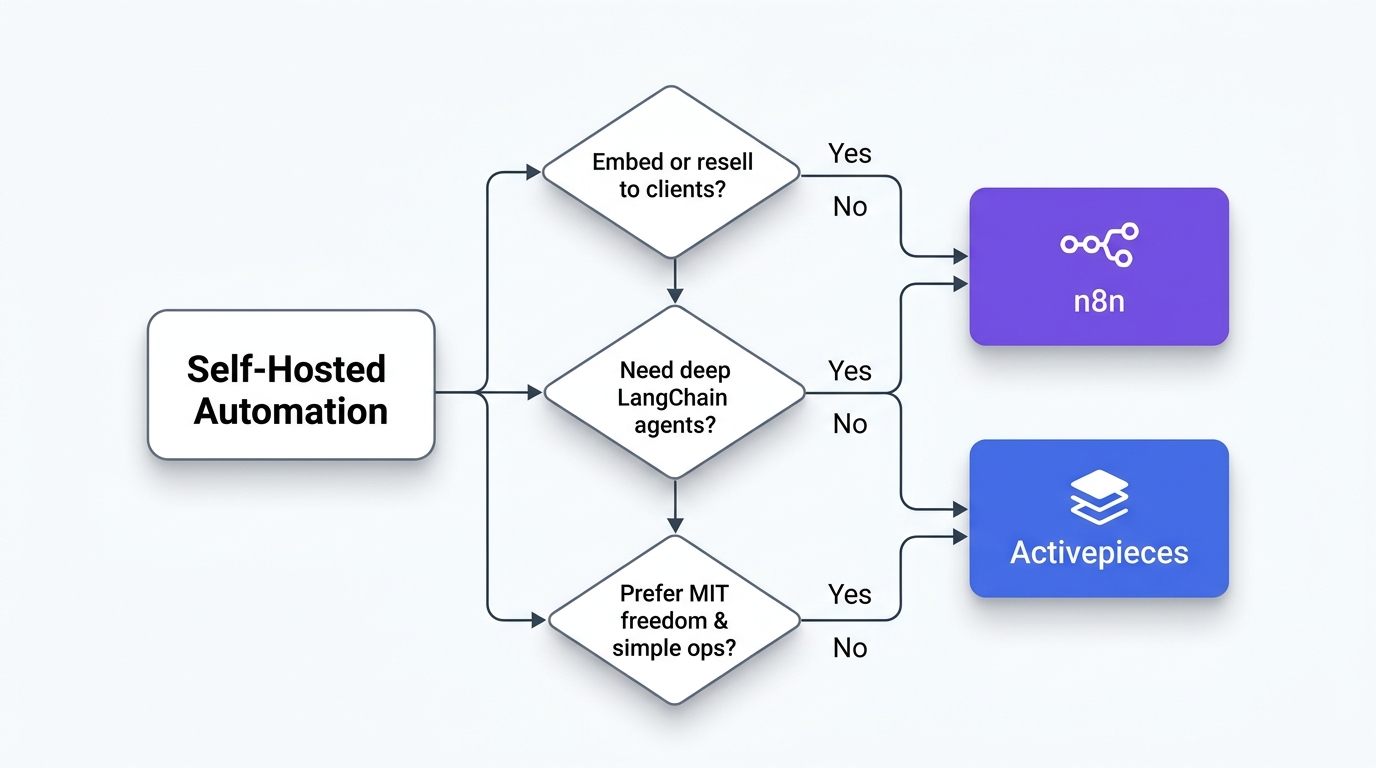
Choose n8n if…
- You're a mid-to-large engineering team running automations only for internal use (no embedding, no reselling)
- You need the broadest possible integration catalog, including legacy or regional SaaS tools
- You're building serious AI agent workflows and want LangChain-grade depth
- You expect heavy concurrent webhook traffic and want a well-documented queue-mode path
- You want a signed-off, vendor-supported HA architecture and are willing to buy Enterprise for it
- You value mature community resources: templates, tutorials, forum threads, Compose examples
- You have DevOps capacity to run a multi-container production stack
Choose Activepieces if…
- You're a B2B SaaS vendor or agency planning to embed or white-label automation in your own product
- Your AI strategy is built around MCP and modern AI agent patterns
- You want a smaller operational footprint: a simpler stack on a single VPS
- Your security team wants minimal credential exposure on execution nodes
- You have a capable platform team and want active-active scaling with no license gate on the engine
- Your team includes non-engineers who need to build or maintain automations
- You want zero legal risk around commercial use of the engine
Coming from a hosted tool? Our Zapier to n8n migration playbook covers the cutover itself, and our Make vs Zapier vs n8n comparison explains how billing units change the math.
Real-world scenarios: which would actually win?
Scenario 1: Series A B2B SaaS, 80 employees, internal RevOps automation
Winner: n8n. Use is internal only, so the license isn't a blocker. The team needs to integrate Salesforce, HubSpot, Stripe, Slack, Notion, and a regional payment processor, and n8n's catalog is the most likely to cover all of them out of the box. Engineering owns the platform and can run a queue-mode production deployment. The template library speeds up building 30+ internal flows.
Scenario 2: Boutique automation agency productizing client workflows
Winner: Activepieces. The agency wants to sell "your workflows, managed by us" as a productized service to 50 clients on isolated instances. With n8n, this requires negotiating an Embed License, which puts the whole margin at risk. The MIT engine makes the same model legally straightforward, and the simpler stack lets a small ops team manage more client instances.
Scenario 3: AI startup building an agent platform
Winner: It depends. If you're embedding workflow execution into your AI product as a feature, Activepieces' MCP-native design plus MIT license is the obvious choice. If you're building an AI ops platform internally and your agents need to orchestrate many obscure tools, n8n wins on catalog depth and LangChain integration.
Scenario 4: 250-person enterprise with strict procurement
Winner: n8n. Procurement teams at this size are more comfortable with established vendors. n8n's Enterprise edition includes SSO, LDAP, audit logs, RBAC, multi-main HA, and a support contract. Activepieces offers most of the governance features in its paid plans, but for enterprise buyers in 2026, vendor maturity and a supported HA design still count for a lot.
Scenario 5: Platform team with a strict "least credentials" rule
Winner: Activepieces. Security requires that execution nodes running third-party code never hold database secrets. Activepieces' separated workers talk only to the app over HTTPS, and the team is happy to build its own active-active setup behind a load balancer instead of buying a vendor HA feature.
Pricing reality check
For pure self-hosting with internal use, both platforms are free at the software layer, and neither self-hosted engine meters usage per execution. Doubling your run volume costs you compute, not a bigger SaaS invoice, which is exactly why high-volume teams self-host. Your real costs are infrastructure and ops time. Below are indicative monthly costs for a typical small-team production deployment:
| Cost component | n8n | Activepieces |
|---|---|---|
| Software license | $0 (internal use) | $0 (MIT engine) |
| VPS (2–4 vCPU, 4 GB RAM) | $20–40/month | $10–25/month |
| Managed Postgres (optional) | $15–30/month | $15–30/month |
| Redis | Container on the same box, or managed at $10–20/month for queue mode | Container on the same box in the official Compose stack; managed at a similar cost once you split workers |
| SSL / domain | Free–$15/year | Free–$15/year |
| Embed License (if needed) | Custom (negotiated) | $0 for the engine; packaged embedding/branding is a paid plan |
| Enterprise governance (HA, SSO, secrets, audit) | Custom-quoted Enterprise | Paid plans; custom plans via sales |
| Realistic total (internal, single box) | ~$30–90/month | ~$15–55/month |
Sizing by stage matters more than any single price. These are practical targets, not theoretical minimums:
| Stage | n8n sizing | Activepieces sizing | Typical VPS cost |
|---|---|---|---|
| Solo / testing | 2 GB / 2 vCPU (SQLite) | 1–2 GB (PGlite, personal use only) | ~$6–12/mo |
| Small-team production | 4 GB / 3 vCPU + Postgres | 2–4 GB / 2 vCPU + Postgres + Redis | ~$18–30/mo |
| Scaling / high volume | 8 GB+ / 4 vCPU, queue mode + workers | Split app + workers (~0.5 vCPU / 1 GB per concurrency-1 worker, per official guidance) | ~$40–80/mo and up |
The infrastructure difference is real but small, and most teams give it too much weight. The bigger cost is engineering time spent maintaining and upgrading the stack. That gap is wider, because n8n's extra complexity costs more hours over a year. For high-volume workloads, the comparison tilts back toward n8n, whose queue mode is mature and heavily documented. If your volume is modest and predictable, a managed cloud tier can still cost less than paying engineers to look after Redis in the middle of the night.
Frequently asked questions
Is n8n actually free to self-host in 2026?
Yes. n8n's Community Edition is free under the Sustainable Use License, with unlimited workflows, executions, and users for internal use. The paid tiers you'll meet when self-hosting are the Enterprise license, for features like SSO, LDAP, audit logs, external secrets, and multi-main HA, and the separate Embed License if you want to commercialize n8n itself.
Does n8n queue mode require an Enterprise license?
No. Queue mode, meaning one main instance plus multiple workers coordinated through Redis, is available on free self-hosted n8n. What needs an Enterprise license is multi-main: running several main instances for active-active high availability. According to n8n's docs, multi-main isn't available on n8n Cloud.
Can Activepieces scale to multiple workers for free?
Yes. Separating workers from the app server uses three environment variables on each worker plus AP_CONTAINER_TYPE=APP on the app, and it isn't on Activepieces' list of paid features. Worker groups (dedicated capacity for specific tenants), SSO, audit logs, and custom roles are the paid parts.
Is Activepieces missing anything important compared to n8n?
The honest answer in 2026: yes, but less than a year ago. Activepieces has a smaller community, a shorter long tail of integrations, fewer templates, and no vendor-managed HA feature. For the 80% case of "automate common B2B SaaS workflows," it's now competitive. For obscure tools, or if you want a vendor-supported HA design, n8n still wins.
Can I run Activepieces without Postgres and Redis?
Yes, with AP_DB_TYPE=PGLITE and AP_REDIS_TYPE=MEMORY in a single container. Activepieces' docs position this for personal projects on one machine: it can't scale, can't move to Enterprise, and moving off it means starting over. Use Postgres for anything a team depends on.
Do I need queue mode or separate workers on day one?
No. Both run fine as a single instance to start. n8n's queue mode and Activepieces' separate workers are both free, so adopt them when execution volume actually requires it, not up front.
Which is safer for production credentials?
Architecturally, Activepieces isolates more. Its separated workers have no direct access to Redis or the database, while n8n's docs require every worker to reach both. For enterprise secret management (external stores such as HashiCorp Vault or cloud secret managers), both put the integration in a paid edition.
What's the one thing people forget to back up?
The encryption key (N8N_ENCRYPTION_KEY or AP_ENCRYPTION_KEY). If you restore the database without it, every stored credential is unreadable. Back it up separately from the database.
Can I migrate workflows from one to the other?
Not natively. Both platforms export workflows as JSON, but the formats aren't compatible, so in practice migration means rebuilding flows by hand. Plan for that effort if you switch.
Which is better for AI agents in 2026?
It depends on what you're optimizing for. n8n's LangChain integration is deeper, which is better for sophisticated agents with memory, tool use, and multi-step reasoning chains. Activepieces' MCP-native design is better for exposing your existing workflows to AI agents (Claude Desktop, Cursor, custom agents) as callable tools. Many teams use both for different jobs.
What about Make, Zapier, or other alternatives?
n8n and Activepieces are both open-source, self-hostable options, which is a different category from hosted-only Make and Zapier. If your priority is zero ops overhead and hosting location doesn't matter to you, hosted platforms usually get you to value faster. If you care about data residency, cost at scale, or customization, self-hosting wins. Our Activepieces vs Make comparison and Zapier vs Make review go into those tradeoffs.
How should we evaluate these platforms before committing?
Spin up both with Docker Compose on a small VPS. Pick three real workflows from your team's backlog: one simple, one with an AI step, and one that uses a tool from your long tail. Build all three on each platform. The friction you hit tells you more than any feature matrix. If you expect to scale, also split out one worker on each platform and run a load test with your own workflows.
Methodology
Based on our research, this comparison was built by reviewing the official n8n and Activepieces documentation, licenses, Docker images, GitHub repositories, and current independent reviews. License terms, integration counts, and community sizes were checked in June 2026. Deployment details, environment variable names, queue and worker architecture, high-availability options, and the boundary between free and paid features were rechecked against the official documentation in September 2026. We did not benchmark either platform ourselves. Resource and cost figures are indicative sizing guidance based on official hosting requirements, Activepieces' published production-setup guidance, and common VPS price tiers, so validate them against your own workloads. Pricing for n8n Enterprise and Embed licenses is not public. Always confirm current license terms before a commercial deployment.
StackScout's comparisons aim to be tool-agnostic. We don't have a financial relationship that depends on either of these projects winning. If you spot an inaccuracy or have first-hand experience that contradicts what we've written, email us. We update reviews when new information arrives.

Technology consultant with 10+ years in the Japanese tech industry. Specializing in SaaS evaluation, workflow automation, and B2B tool integration.